
1. Einleitung
This manual provides essential information for the safe and efficient use of your XIAOMI Redmi 15 5G Smartphone. Please read it carefully before using the device and keep it for future reference.
2. Packungsinhalt
Überprüfen Sie, ob Ihr Paket die folgenden Artikel enthält:
- XIAOMI Redmi 15 5G Smartphone
- Schutzhülle
- USB-C-Kabel
- SIM-Auswerferwerkzeug
Notiz: A power adapter is not included in the package. Please use a compatible 33W fast charger for optimal charging performance.
3. Gerätelayout
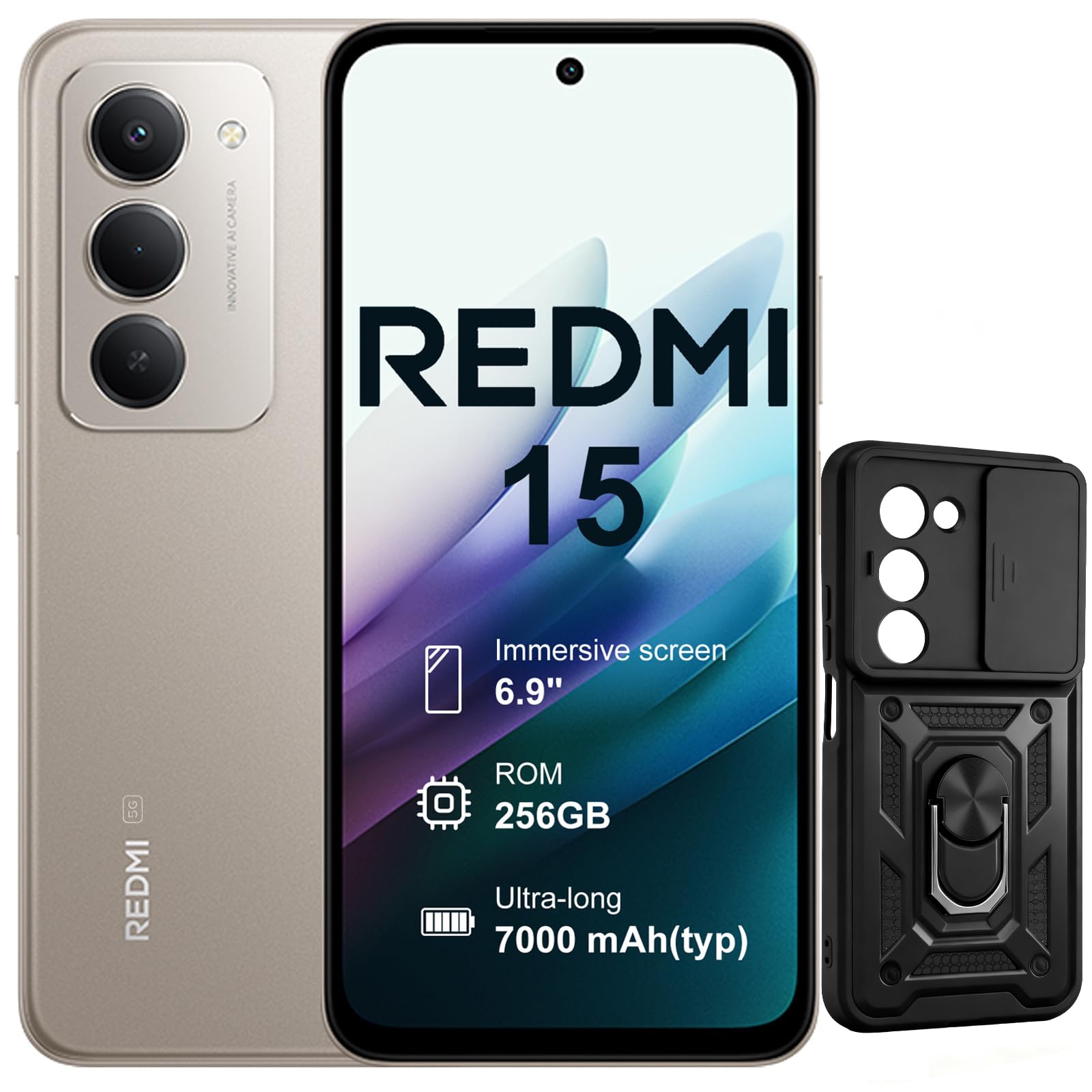
Abbildung: Vorder- und Rückseite view of the XIAOMI Redmi 15 5G Smartphone. The device features a large display on the front and a triple camera setup on the rear.
Machen Sie sich mit den physischen Komponenten Ihres Smartphones vertraut:
- Netzschalter: Located on the side, used to power on/off or wake/sleep the device. Also integrates the fingerprint sensor.
- Lautstärketasten: An der Seite gelegen, dient zum Einstellen der Medien- und Anruflautstärke.
- USB-C-Anschluss: Befindet sich unten und dient zum Laden und zur Datenübertragung.
- 3.5mm Kopfhörerbuchse: Located on the top/bottom, for connecting wired headphones.
- SIM-Kartenfach: Located on the side, for inserting Nano SIM cards.
- Frontkamera: Located on the display, for selfies and video calls.
- Rückfahrkameras: Multiple lenses on the back for high-quality photography and video recording.
4. Einrichtung
4.1. SIM-Karten einlegen
- Suchen Sie den SIM-Karten-Einschub an der Seite Ihres Geräts.
- Führen Sie das SIM-Auswurfwerkzeug in die kleine Öffnung neben dem Fach ein und drücken Sie fest, bis das Fach herausspringt.
- Place your Nano SIM card(s) into the designated slots on the tray. This device supports Dual SIM.
- Setzen Sie die Schublade vorsichtig wieder in das Telefon ein.
4.2. Erste Inbetriebnahme und Einrichtung
- Halten Sie den Ein-/Ausschalter gedrückt, bis das XIAOMI-Logo erscheint.
- Folgen Sie den Anweisungen auf dem Bildschirm, um Ihre Sprache auszuwählen, eine WLAN-Verbindung herzustellen und Ihr Google-Konto einzurichten.
- Configure security features such as fingerprint recognition (integrated into the power button) and screen lock.
5. Bedienung Ihres Smartphones
5.1. Darstellung und Interaktion
The Redmi 15 features an immersive 6.9-inch FHD+ display with a 144Hz refresh rate for smooth visuals. It also includes an all-day eye-care display for comfortable viewing.

Bild: Eine Person viewing the smartphone screen in a dimly lit room, demonstrating the all-day eye-care display feature for reduced eye strain.
The device incorporates Wet Touch Technology 2.0, ensuring accurate touch response even when your fingers are wet or covered with oil or foam.

Image: A person interacting with the smartphone while at the beach, illustrating the Wet Touch Technology 2.0 which allows for accurate touch input even with wet fingers.
5.2. Kamerafunktionen
The Redmi 15 5G is equipped with a 50MP AI dual camera system, offering features like Super Resolution mode and dynamic shots. Video recording is stabilized in 4K.
5.3. Konnektivität und Leistung
Powered by the Snapdragon 6 Gen 3 processor with integrated 5G modem, the device provides ultra-fast downloads and smooth gaming. It ensures powerful and fluid multitasking even with demanding applications.

Image: A graphic representation of the Snapdragon 6s Gen 3 processor, highlighting its 5G capabilities and support for up to 16GB RAM with memory extension.
5.4. Besondere Merkmale
Kreis zum Suchen mit Google: This feature allows you to instantly search for anything you see on your phone by circling, scribbling, or tapping to pinpoint items without needing screenshots.

Image: A smartphone screen demonstrating the "Circle to Search with Google" feature, where a user circles an item in an image to perform a search and view related results.
6. Maintenance and Battery Management
6.1. Battery Charging and Longevity
The device is equipped with a 7000mAh battery, providing up to 2 days of typical use. It supports 33W turbo charging for quick power-ups.

Image: A smartphone screen displaying a charging animation with "86.11%" and "MI TURBO CHARGE", alongside text highlighting the benefits of 33W turbo charging.
The battery is designed for durability, maintaining at least 80% of its original capacity after 1600 full charging cycles. Even at 1% battery level, the phone can remain in standby mode for up to 7.5 hours or allow up to 59 minutes of calls.

Image: A graphic illustrating "1% power endurance" with call and standby times, and "1600 charge cycles, capacity still ≥80%", emphasizing battery longevity.
The device also supports 18W reverse charging, allowing it to function as a portable power bank for other devices.

Image: Two smartphones connected via a cable, demonstrating the 18W reverse charging feature where one phone charges another, effectively acting as a power bank.
6.2. Environmental Resilience
The Redmi 15 5G is designed for reliable performance even in low temperatures, with enhanced battery performance at -20°C. It is also water-resistant.

Image: A smartphone with frost on its edges, illustrating its reliable performance and battery endurance at -20°C, with specific video playback and call times.
7. Fehlerbehebung
Sollten Sie Probleme mit Ihrem Gerät haben, versuchen Sie die folgenden grundlegenden Schritte zur Fehlerbehebung:
- Gerät reagiert nicht: Um einen Neustart zu erzwingen, halten Sie den Netzschalter etwa 10-15 Sekunden lang gedrückt.
- Netzwerkprobleme: Prüfen Sie, ob Ihre SIM-Karte richtig eingelegt ist. Versuchen Sie, den Flugmodus ein- und auszuschalten. Überprüfen Sie Ihre mobilen Dateneinstellungen.
- Ladeprobleme: Ensure the USB-C cable is securely connected to both the phone and the power adapter (not included). Try a different cable or power source.
- App-Fehlfunktionen: Schließen Sie die App und öffnen Sie sie erneut. Sollte das Problem weiterhin bestehen, leeren Sie den App-Cache oder installieren Sie die App neu.
- Fingerabdrucksensor funktioniert nicht: Stellen Sie sicher, dass Ihr Finger sauber und trocken ist. Registrieren Sie Ihre Fingerabdrücke gegebenenfalls erneut.
For more advanced troubleshooting, please refer to the official XIAOMI support resources.
8. Spezifikationen
| Besonderheit | Spezifikation |
|---|---|
| Marke | XIAOMI |
| Modellname | Redmi 15 |
| Betriebssystem | Android 15 |
| RAM | 8 GB |
| Speicherkapazität | 256 GB |
| Bildschirmgröße | 6.9 Zoll |
| Auflösung | 2460 x 1080 |
| Bildwiederholrate | 144 Hz |
| Zellulartechnologie | 5G |
| SIM-Kartensteckplätze | Dual-SIM |
| Biometrische Identifikation | Fingerabdruckerkennung |
| Wasserbeständigkeit | Wasserfest |
| Kopfhöreranschluss | 3.5 mm |
| Auflösung der Frontkamera | 8 Megapixel |
| Auflösung der Rückkamera | 50 Megapixel |
| Batteriekapazität | 7000 mAh |
| Durchschnittliche Akkulaufzeit | 2 Tage |
| Maße | 16.9 x 8 x 0.8 cm |
| Ladeanschluss | USB-C |
9. Garantieinformationen
Your XIAOMI Redmi 15 5G Smartphone comes with a 2 Jahr HerstellergarantieDiese Garantie deckt Material- und Verarbeitungsfehler bei normalem Gebrauch ab. Bitte bewahren Sie Ihren Kaufbeleg für Garantieansprüche auf.
For detailed warranty terms and conditions, please visit the official XIAOMI webWebsite oder wenden Sie sich an den Kundendienst.
10. Unterstützung
For further assistance, technical support, or service inquiries, please contact XIAOMI customer support through their official channels. You can also visit the official XIAOMI store for more information and resources:


