
Einführung
Vielen Dank für Ihren Einkauf.asing the Anker Soundcore P31i True Wireless Earbuds. This manual provides detailed instructions on how to set up, operate, and maintain your earbuds to ensure optimal performance and longevity. Please read this manual carefully before use and retain it for future reference.
Im Leistungsumfang enthalten
Your Soundcore P31i package includes the following items:
- Soundcore P31i Earbuds (Left and Right)
- Ladeetui
- Ear Tips (XS, S, M, L - M size pre-installed)
- USB-C zu USB-A Ladekabel
- Kurzanleitung
- Sicherheitshandbuch
Produkt überview
The Soundcore P31i earbuds are designed for comfort and high-quality audio. Each earbud features a touch control area and an indicator light. The charging case protects the earbuds and provides additional battery life.
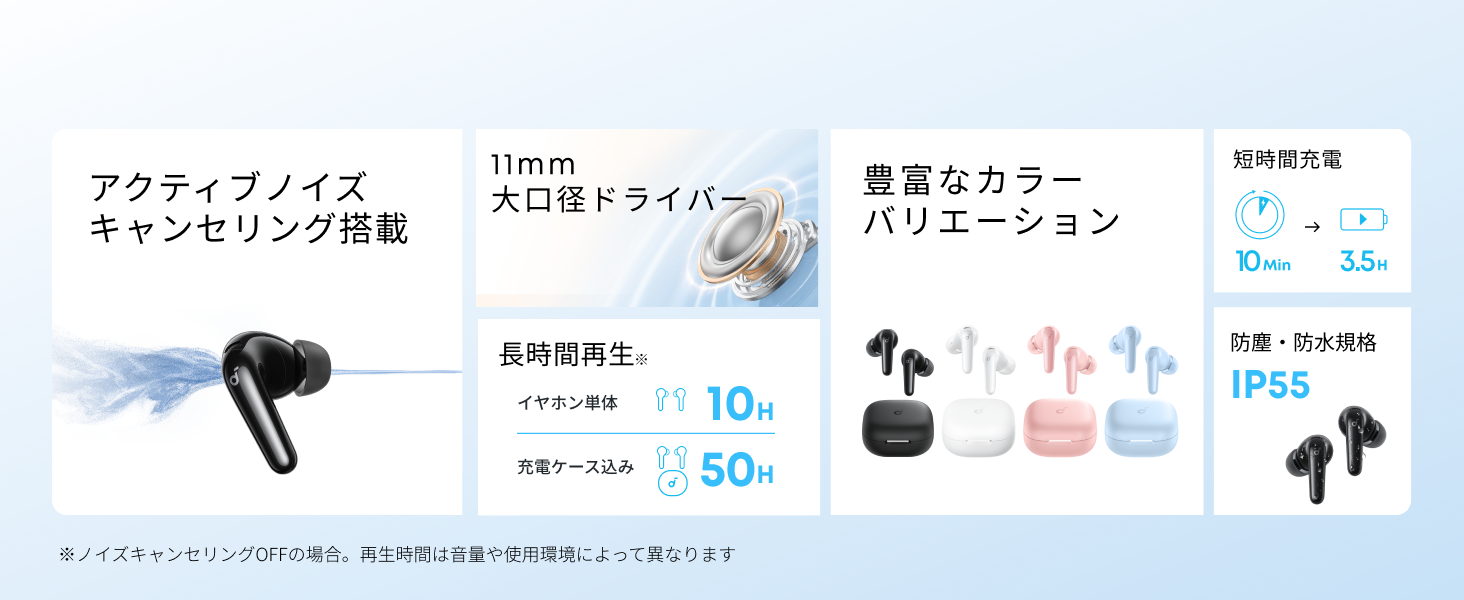
Diagram showing the Soundcore P31i earbuds and charging case with key components labeled.
Ohrhörer: Each earbud is equipped with an 11mm dynamic driver for powerful bass and clear sound. They feature active noise cancellation and AI noise reduction for calls. The ergonomic design ensures a secure and comfortable fit.
Ladekoffer: The compact charging case not only stores and protects your earbuds but also recharges them on the go. It has a USB-C charging port and a strap hole for portability.
Aufladen Ihrer Ohrhörer und Hülle
Vor dem ersten Gebrauch müssen sowohl die Ohrhörer als auch das Ladecase vollständig aufgeladen werden.
- Aufladen der Ohrhörer: Place the earbuds into the charging case. The indicator lights on the earbuds will show charging status.
- Aufladen des Gehäuses: Connect the charging case to a power source using the provided USB-C to USB-A cable. A full charge for the case and earbuds takes approximately 3 hours.
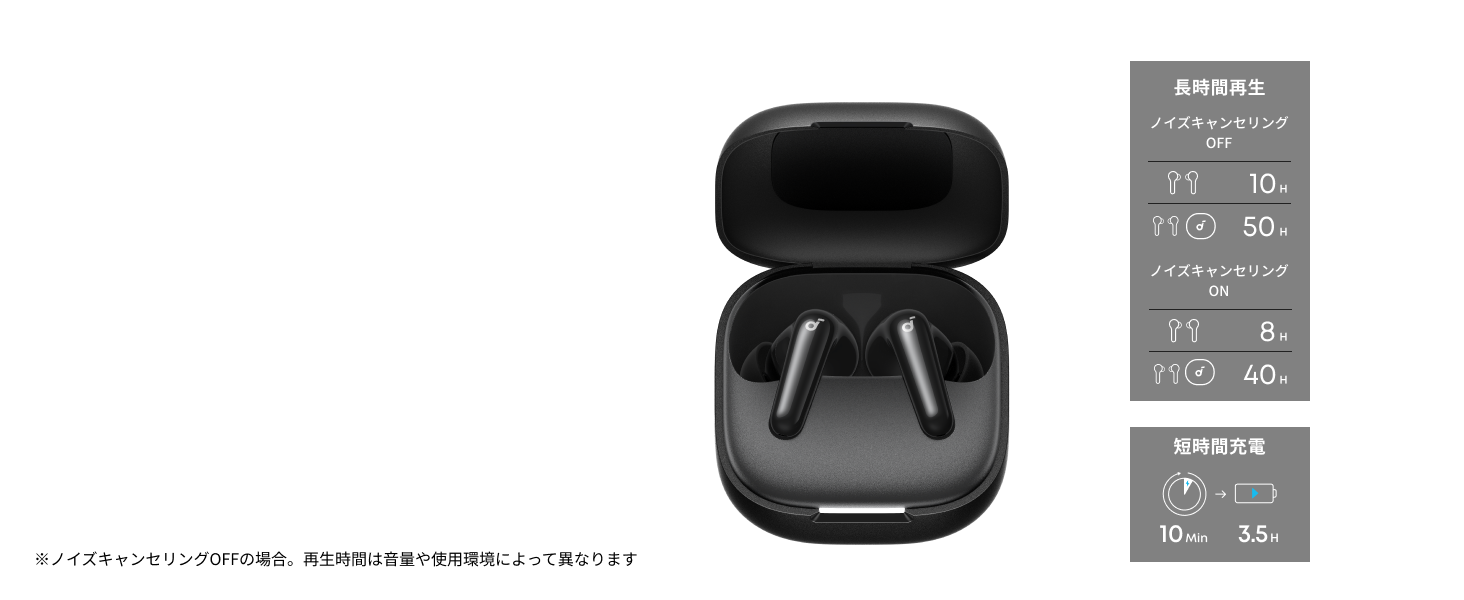
Diagram illustrating charging times and playback duration for Soundcore P31i earbuds.
Akkulaufzeit:
- Up to 10 hours of playback on a single charge (earbuds only).
- Bis zu 50 Stunden Gesamtwiedergabezeit mit dem Ladecase.
- A quick 10-minute charge provides up to 3.5 hours of listening time.
Note: Playback time varies depending on volume level and audio content.
Tragen Sie Ihre Ohrhörer
For optimal sound quality and comfort, it is important to wear your earbuds correctly.
- Wählen Sie die richtigen Ohrstöpsel: Select the ear tips that provide the best seal and comfort for your ears. Experiment with different sizes (XS, S, M, L) to find the perfect fit.
- Setzen Sie die Ohrhörer ein: Führen Sie die Ohrhörer vorsichtig in Ihre Gehörgänge ein.
- Zum Sichern drehen: Twist the earbuds slightly until they fit snugly and securely in your ears.

Image showing a person wearing the Soundcore P31i earbuds correctly.
Bluetooth-Kopplung
Follow these steps to pair your Soundcore P31i earbuds with your device:
- Erstmalige Kopplung:
- Open the charging case. The earbuds will automatically enter Bluetooth pairing mode. The indicator lights on the earbuds will flash white.
- Gehen Sie auf Ihrem Gerät (Smartphone, Tablet usw.) zu den Bluetooth-Einstellungen.
- Select "Soundcore P31i" from the list of available devices.
- Once connected, the indicator lights on the earbuds will turn solid white for 1 second and then turn off.
- Koppeln mit einem anderen Gerät:
- Legen Sie die Ohrhörer in das Ladecase und lassen Sie den Deckel offen.
- Press and hold the button on the charging case for 3 seconds until the earbud indicator lights flash white rapidly.
- Wiederholen Sie die Schritte 2 und 3 aus „Erstmaliges Koppeln“ auf Ihrem neuen Gerät.
Bedienelemente
The Soundcore P31i earbuds feature touch controls for managing playback, calls, and other functions. Specific control configurations can often be customized via the Soundcore app.
General Touch Controls (Default):
- Abspielen/Pause: Tippen Sie einmal auf einen der Ohrhörer.
- Nächster Titel: Doppeltippen Sie auf den rechten Ohrhörer.
- Vorheriges Lied: Doppeltippen Sie auf den linken Ohrhörer.
- Anruf annehmen/beenden: Tippen Sie einmal auf einen der Ohrhörer.
- Anruf ablehnen: Halten Sie einen der Ohrhörer 2 Sekunden lang gedrückt.
- Sprachassistenten aktivieren: Triple-tap either earbud (may vary).
- ANC-/Transparenzmodus umschalten: Press and hold the right earbud for 2 seconds (may vary).
For detailed and customizable controls, please refer to the Soundcore app or the included Quick Start Guide.
Aktive Geräuschunterdrückung (ANC)
The Soundcore P31i earbuds feature Active Noise Cancelling technology to minimize ambient noise, allowing for an immersive listening experience.

Illustration demonstrating the active noise cancelling feature of the Soundcore P31i earbuds.
ANC detects and reduces various types of noise, such as engine hum on trains or buses, and chatter in cafes. This allows you to enjoy your music or podcasts with greater clarity and fewer distractions.
To switch between ANC, Normal, and Transparency modes, use the touch controls on the earbuds or adjust settings within the Soundcore app.
Tonqualität
The Soundcore P31i earbuds are engineered to deliver a rich audio experience.

Diagram illustrating the 11mm dynamic driver responsible for the audio output.
- 11-mm-Dynamische Treiber: Equipped with large 11mm drivers, these earbuds produce a wide frequency range and detailed sound.
- BassUp™ Technology: Anker's proprietary BassUp™ technology enhances low frequencies, delivering powerful and impactful bass.
You can further customize the sound profile using the equalizer settings within the Soundcore app.
Anrufqualität
The Soundcore P31i earbuds ensure clear voice calls and web Konferenzen.

Illustration depicting AI noise reduction technology for clear voice calls.
KI-Rauschunterdrückung: Integrated AI noise reduction technology effectively filters out background noise, ensuring your voice is transmitted clearly to the person on the other end of the call, even in noisy environments.
Mehrpunktverbindung
The Soundcore P31i supports multi-point connection, allowing you to connect to two Bluetooth devices simultaneously.

Illustration showing the Soundcore P31i connected to multiple devices simultaneously.
This feature enables seamless switching between devices. For example, you can listen to music on your laptop and instantly switch to answer a call on your phone without manually re-pairing.
To enable multi-point connection, ensure both devices are paired with your earbuds. The earbuds will automatically connect to the last two paired devices when powered on.
Soundcore-App
Download the Soundcore app to enhance your experience with the P31i earbuds. The app offers various features and customization options.

Screenshots of the Soundcore app interface, highlighting customization features.
Zu den Funktionen der App gehören:
- Anpassbare Steuerelemente: Personalize touch controls for playback, calls, and voice assistant.
- Equalizer-Einstellungen: Passen Sie Audio Pro anfiles to your preference or choose from preset EQs.
- ANC/Transparency Mode Switching: Easily toggle between noise cancelling and transparency modes.
- Firmware-Updates: Halten Sie Ihre Ohrhörer mit den neuesten Funktionen und Verbesserungen auf dem aktuellen Stand.
- KI-Übersetzungsfunktion: (Available from Spring 2026, requires Soundcore app ver 4.0.0 or higher).
The Soundcore app is available for download on both iOS and Android devices.
Produkt überview Video
Offizielles Produktvideo präsentiertasing the key features and design of the Soundcore P31i True Wireless Earbuds, including active noise cancellation, powerful bass, long battery life, and multi-point connectivity.
Wartung und Pflege
Proper maintenance ensures the longevity and performance of your Soundcore P31i earbuds.
- Reinigung: Reinigen Sie die Ohrhörer und das Ladecase regelmäßig mit einem weichen, trockenen und fusselfreien Tuch. Verwenden Sie keine scharfen Chemikalien oder Scheuermittel.
- Ohrtipps: Remove the ear tips and clean them with water and mild soap if necessary. Ensure they are completely dry before reattaching.
- Ladekontakte: Um einen ordnungsgemäßen Ladevorgang zu gewährleisten, müssen die Ladekontakte sowohl an den Ohrhörern als auch am Ladecase sauber und trocken sein.
- Lagerung: Bewahren Sie die Ohrhörer bei Nichtgebrauch im Ladecase auf, um sie vor Staub und Beschädigungen zu schützen.
- Wasserbeständigkeit: The earbuds are rated IP55 for dust and water resistance. This means they can withstand sweat and light rain, but are not designed for submersion in water. Ensure the earbuds are dry before placing them back in the charging case.

Image showing Soundcore P31i earbuds with water droplets, highlighting their IP55 water resistance.
Fehlerbehebung
If you encounter any issues with your Soundcore P31i earbuds, refer to the following common solutions:
- Ohrhörer lassen sich nicht koppeln:
- Stellen Sie sicher, dass beide Ohrhörer vollständig aufgeladen sind.
- Legen Sie die Ohrhörer in das Ladecase, schließen Sie den Deckel und öffnen Sie ihn anschließend wieder, um den Kopplungsmodus erneut zu aktivieren.
- Forget "Soundcore P31i" from your device's Bluetooth list and try pairing again.
- Reset the earbuds (refer to the Quick Start Guide for specific reset instructions).
- Only One Earbud Playing Audio:
- Place both earbuds back into the charging case and close the lid for 5 seconds, then open it again.
- Stellen Sie sicher, dass beide Ohrhörer über ausreichend Akku verfügen.
- Setzen Sie die Ohrhörer zurück.
- Schlechte Tonqualität:
- Achten Sie darauf, dass die Ohrstöpsel gut im Gehörgang abdichten. Probieren Sie verschiedene Größen aus.
- Entfernen Sie jegliche Verunreinigungen von den Ohrhörerdüsen.
- Um Störungen zu vermeiden, gehen Sie näher an Ihr angeschlossenes Gerät heran.
- Ladeprobleme:
- Prüfen Sie das Ladekabel und den Adapter auf Beschädigungen.
- Stellen Sie sicher, dass die Ladekontakte an den Ohrhörern und am Ladecase sauber sind.
- Versuchen Sie es mit einem anderen Ladekabel oder einer anderen Stromquelle.
Technische Daten
| Besonderheit | Detail |
|---|---|
| Marke | Soundcore |
| Modellname | P31i |
| Modellnummer | T1202 - Die wunderbare Welt der Träume |
| Farbe | Black (This specific variant) |
| Formfaktor | In-Ear |
| Konnektivitätstechnologie | Kabellos (Bluetooth 6.1) |
| Lärmschutz | Aktive Geräuschunterdrückung |
| Treibergröße | 11 mm dynamische Treiber |
| Wiedergabezeit (Ohrhörer) | Bis zu 10 Stunden |
| Gesamtwiedergabezeit (mit Hülle) | Bis zu 50 Stunden |
| Schnelles Laden | 10 Minuten Ladezeit für 3.5 Stunden Wiedergabe |
| Ladezeit (vollständig) | Ungefähr 3 Stunden |
| Wasserbeständigkeit | IP55 |
| Mehrpunktverbindung | Unterstützt |
| UPC | 194644251543 |
| Ursprungsland | China |
Garantie und Kundendienst
Soundcore provides a comprehensive warranty for your P31i earbuds.

Image detailing the warranty period and extension for Soundcore P31i.
- Standardgarantie: An 18-month warranty is provided for products purchased from authorized retailer AnkerDirect.
- Erweiterte Garantie: Anker members can extend their warranty up to a maximum of 24 months.
- Wichtiger Hinweis: Purchases from unauthorized sellers may not be covered under warranty.
For product inquiries, delivery questions, or technical support, please contact Soundcore customer support. Contact details can typically be found on the official Soundcore webauf der Website oder in Ihrer Kurzanleitung.
Sicherheitshinweise
Bitte lesen und befolgen Sie diese Sicherheitshinweise, um Schäden an Ihrem Gerät oder Verletzungen zu vermeiden:
- Die Ohrhörer und das Ladecase dürfen nicht auseinandergenommen oder verändert werden.
- Das Gerät darf keinen extremen Temperaturen, direkter Sonneneinstrahlung oder offenen Flammen ausgesetzt werden.
- Avoid exposing the device to excessive moisture or liquids, beyond its IP55 rating.
- Do not use the device at high volume levels for extended periods to prevent hearing damage.
- Außerhalb der Reichweite von Kindern und Haustieren aufbewahren.
- Entsorgen Sie das Produkt verantwortungsvoll gemäß den örtlichen Vorschriften.


