
Ajazz AK35I V4
Ajazz AK35I V4 Customizable Wireless Gaming Mechanical Keyboard User Manual
Einführung
This manual provides detailed instructions for the setup, operation, and maintenance of your Ajazz AK35I V4 Customizable Wireless Gaming Mechanical Keyboard. Please read this manual thoroughly to ensure optimal performance and longevity of your device.
Hauptmerkmale
- Smart Color Screen and Multifunction Knob: Displays essential information and allows for quick adjustments.
- Tri-Mode-Konnektivität: Unterstützt Bluetooth 5.0, 2.4-GHz-Funkverbindungen und kabelgebundene USB-C-Verbindungen.
- Fortschrittliche Dichtungsstruktur: Features silicone pads and PCB groove design for enhanced typing feel and reduced noise.
- Full-Color RGB Backlighting: Offers 20 lighting effects and 16.8 million colors with side-illuminated lighting.
- Programmable Software: Customize key mappings, macros, screen animations, and RGB effects.
- Hot-Swappable Key Zone: Compatible with 3-pin/5-pin switches for personalized customization.
- 10000mAh Akku: Provides extended usage for gaming and productivity.

Überview of the Ajazz AK35I V4 keyboard highlighting its main features.
Aufstellen
Packungsinhalt
Prüfen Sie beim Auspacken, ob alle folgenden Artikel vorhanden sind:
- Ajazz AK35I V4 Mechanical Keyboard
- USB-C-auf-USB-A-Kabel
- 2.4GHz Wireless Dongle (often stored in the keyboard's base)
- Tastenkappenabzieher
- Abzieher wechseln
- Extra Switches (for replacement or customization)
- Benutzerhandbuch (dieses Dokument)
Konnektivitätsmodi
The Ajazz AK35I V4 keyboard offers three versatile connection options:
- Kabelgebundener Modus (USB-C): Verbinden Sie die Tastatur mithilfe des mitgelieferten USB-C-Kabels direkt mit Ihrem Gerät. In diesem Modus wird die Tastatur auch aufgeladen.
- 2.4-GHz-Wireless-Modus: Insert the 2.4GHz USB dongle into your computer's USB port. Switch the keyboard's mode selector to 2.4G.
- Bluetooth 5.0-Modus: Switch the keyboard's mode selector to BT. On your device, search for available Bluetooth devices and select "Ajazz AK35I V4" to pair. The keyboard supports pairing with multiple Bluetooth devices.

Illustration of the keyboard's triple-mode connectivity.
Bedienungsanleitung
Smart Color Screen and Multifunction Knob
The keyboard features a 1.14-inch color screen and a multifunction knob for intuitive control:
- Bildschirmanzeige: The screen shows date, time, battery level, system information, connection mode, and status indicators.
- Knopffunktionen:
- Rotate left/right to adjust volume.
- Drücken Sie diese Taste, um den Ton stummzuschalten/die Stummschaltung aufzuheben.
- Press and hold to access system settings, connection mode selection, RGB lighting modes, language, and screen images/GIFs.

Detaillierte view of the multifunction knob and its controls.
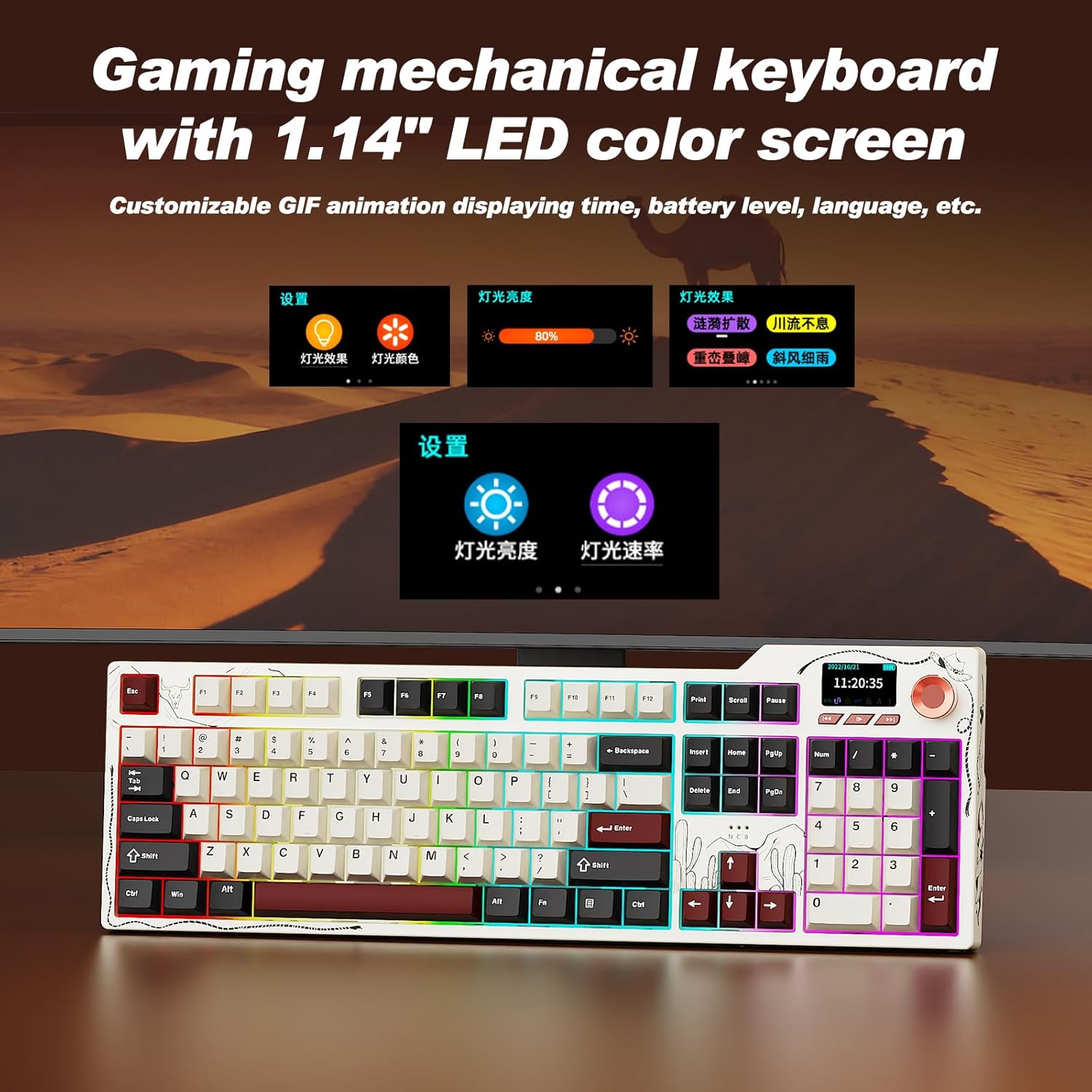
The 1.14-inch color screen displaying various customizable information.
Video demonstrating the mechanical keyboard with its integrated screen.
RGB-Hintergrundbeleuchtungssteuerung
The keyboard features 20 lighting effects and 16.8 million RGB colors. Use the following key combinations to adjust the backlighting:
- FN + ↑ (Pfeil nach oben): Die Beleuchtungsstärke erhöhen.
- FN + ↓ (Pfeil nach unten): Verringern Sie die Beleuchtungshelligkeit.
- FN + ← (Linkspfeil): Adjust lighting effect direction.
- FN + → (Rechtspfeil): Switch interface colors.
- FN + \|: Lichteffekte wechseln.

Visual guide for controlling the RGB backlighting.
Programmierbare Software
The keyboard supports full key programming through dedicated software. This allows you to:
- Customize key mappings.
- Set macro commands.
- Adjust sleep time.
- Upload on-screen GIF animations.
- Modify RGB lighting effects, including music-synced backlighting.
Hot-Swappable Key Zone
The AK35I V4 features a hot-swappable design, allowing you to easily change switches without soldering. It supports both 3-pin and 5-pin mechanical switches, offering extensive customization options for your typing experience.

Diagram illustrating the internal gasket structure of the keyboard.
Wartung
- Reinigung: Regularly clean the keyboard with a soft, dry cloth. For deeper cleaning, remove keycaps using the provided keycap puller and use compressed air to clear debris.
- Batteriepflege: To prolong battery life, avoid fully discharging the keyboard frequently. Charge it when the battery indicator on the screen shows low power.
- Lagerung: Bewahren Sie die Tastatur an einem kühlen, trockenen Ort fern von direkter Sonneneinstrahlung und extremen Temperaturen auf.
Fehlerbehebung
- Tastatur reagiert nicht: Ensure the keyboard is charged and properly connected (wired, 2.4GHz dongle, or Bluetooth paired). Try restarting your computer or device.
- Verbindungsprobleme:
- For 2.4GHz, ensure the dongle is securely plugged in and the keyboard is in 2.4G mode.
- For Bluetooth, ensure Bluetooth is enabled on your device and the keyboard is in BT mode and successfully paired. Try re-pairing if necessary.
- RGB-Lichter funktionieren nicht: Check the keyboard's RGB settings via the multifunction knob or programmable software. Ensure brightness is not set to zero.
- Bildschirmanzeige fehlerhaft: Try restarting the keyboard. If issues persist, consult the programmable software for screen settings or contact support.
- Schlüssel werden nicht registriert: If individual keys are not working, try replacing the switch using the provided switch puller and extra switches.
Technische Daten
| Besonderheit | Detail |
|---|---|
| Modellnummer | AK35I V4 |
| Konnektivitätstechnologie | 2.4-GHz-Funk, Bluetooth 5.0, USB-C-Kabel |
| Batteriekapazität | 10000 mAh |
| Tastaturbeschreibung | Mechanisch |
| Key Backlighting | RGB (20 Effekte, 16.8 Millionen Farben) |
| Besondere Merkmale | Backlit, Hot-Swappable, Hotkeys and Media Keys, TFT Display Screen, Volume Roller |
| Kompatible Geräte | Laptop, PC, Smart TV, Smartphone, Tablet (Windows, Mac, iOS, Android) |
| Technische Daten | 17 x 5 x 1.22 Zoll |
| Artikelgewicht | 4.55 Pfund |
Video zeigtasing the multifunctionality of the Ajazz AK35I V4 gaming keyboard.
Garantie und Support
The Ajazz AK35I V4 keyboard comes with a manufacturer's warranty. For specific warranty details, please refer to the warranty card included in your product packaging or visit the official Ajazz website. For technical support, troubleshooting assistance, or any product-related inquiries, please contact Ajazz customer service through their official channels.
Ask a question about this manual
Ask about setup, troubleshooting, compatibility, parts, safety, or missing instructions. Manuals+ will review the question and use this page’s manual context to help answer it.