
Laxasfit LF-01
Benutzerhandbuch für die Laxasfit LF-01 Smartwatch
Model: LF-01
1. Einleitung
Welcome to the user manual for your Laxasfit LF-01 Smart Watch. This guide provides essential information on setting up, operating, and maintaining your device to ensure optimal performance and a seamless user experience. Please read this manual thoroughly before using your smart watch.
1.1 Was ist in der Box?
- Smartwatch
- Ladekabel
- Bedienungsanleitung
2. Einrichtung
2.1 Aufladen des Geräts
Before initial use, fully charge your Laxasfit LF-01 Smart Watch. Connect the provided charging cable to the charging port on the back of the watch and plug the USB end into a standard USB power adapter (not included) or a computer's USB port. The watch display will indicate charging status. A full charge typically takes approximately 2 hours.
2.2 App-Installation
To unlock the full potential of your smart watch, download and install the companion application on your smartphone. The application allows for data synchronization, notification management, and watch face customization.
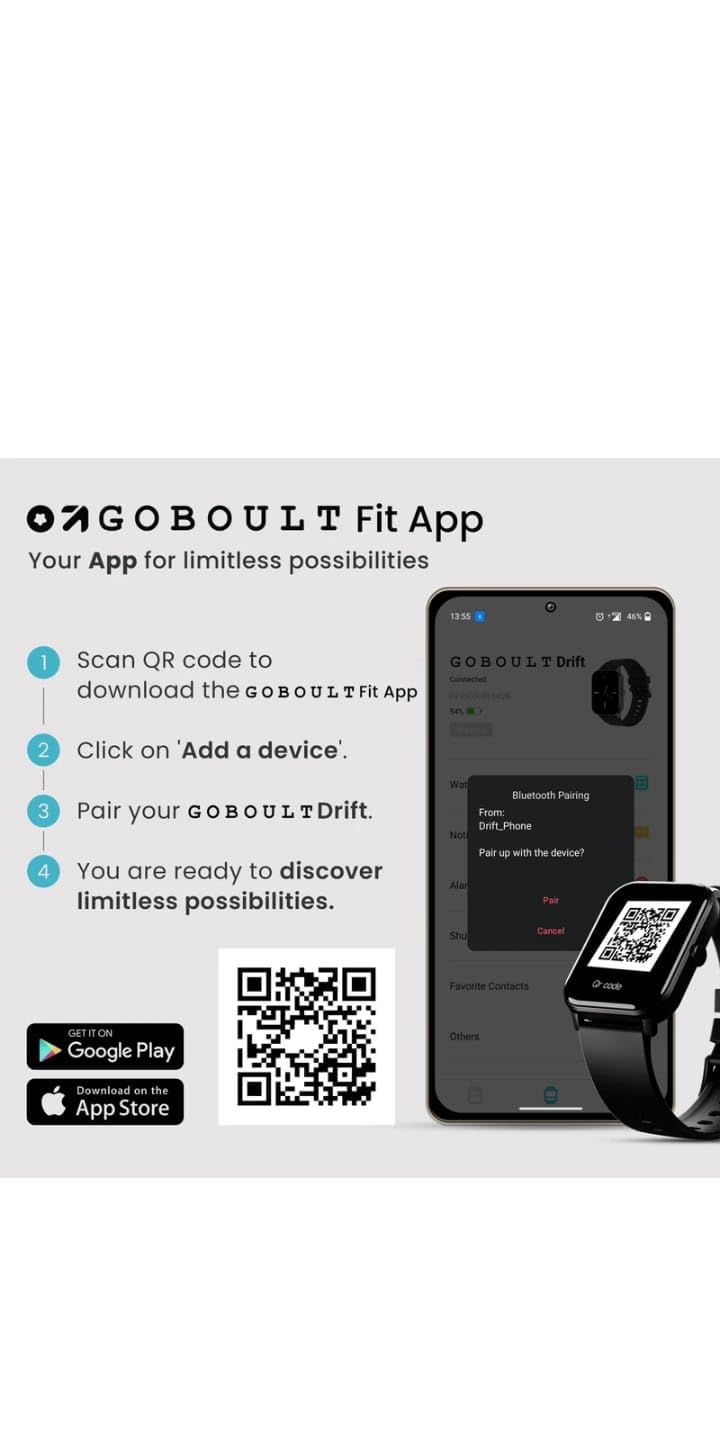
- Scan the QR code provided in the image below or search for "Boult Fit App" in your smartphone's app store (Google Play Store for Android, Apple App Store for iOS).
- Installieren Sie die Anwendung.
- Öffnen Sie die Anwendung und folgen Sie den Anweisungen auf dem Bildschirm, um ein Konto zu erstellen oder sich anzumelden.

Bildbeschreibung: This image displays a smartphone screen with instructions for downloading and pairing the companion app. It shows four steps: "Scan QR code to download the Boult Fit App", "Click on 'Add a device'", "Pair your Boult Drift", and "You are ready to discover limitless possibilities." Below these steps are QR codes for both Google Play and the App Store, along with their respective logos. The right side of the image shows a smartwatch display and a phone screen demonstrating the Bluetooth pairing process within the app.
Download the Boult Fit App: https://app.moyoung.com/app-download/BoultFit
2.3 Koppeln mit Ihrem Smartphone
After installing the app, follow these steps to pair your smart watch:
- Stellen Sie sicher, dass Bluetooth auf Ihrem Smartphone aktiviert ist.
- Open the companion app and navigate to the "Add Device" or "Pair Device" section.
- The app will search for available devices. Select "Laxasfit LF-01" or a similar device name from the list.
- Bestätigen Sie die Kopplungsanfrage gegebenenfalls sowohl auf Ihrem Smartphone als auch auf der Smartwatch.
- Nach der Kopplung synchronisiert die Uhr die Daten mit Ihrem Telefon.
3. Hauptmerkmale
The Laxasfit LF-01 Smart Watch offers a range of features designed to enhance your daily life and fitness tracking.
3.1 Gesundheitsüberwachung
Monitor your vital health parameters directly from your wrist.
- Herzfrequenzmesser: Erfasst Ihre Herzfrequenz den ganzen Tag über.
- Schlaf-Tracking: Analysiert Ihre Schlafmuster, einschließlich Tiefschlaf, Leichtschlaf und Wachzeiten.
- Aktivitätsverfolgung: Erfasst Schritte, zurückgelegte Strecke und verbrannte Kalorien.

Bildbeschreibung: This image shows a collage of smartwatch features. Prominently featured is a smartwatch display showing a heart rate monitor with a graph and current heart rate (108 bpm). Other elements include icons for 7-day battery life, IP68 water resistance, 60 sports modes, mini games, 1.69" HD display, Bluetooth calling, and multiple watch faces.
3.2 Sportmodi
The watch supports over 60 workout modes to accurately track various physical activities.
- Track specific metrics for activities like running, cycling, walking, and more.
- View real-time data such as duration, calories burned, and heart rate during workouts.

Bildbeschreibung: A man is shown performing an exercise with a battle rope, wearing a smartwatch on his wrist. The image highlights the watch's capability to track over 60 workout modes. An overlay shows a smartwatch display with fitness metrics: "Steps 25969", "Distance 10.56 km", and "Calories 2982 Kcal".
3.3 Bluetooth-Anrufe
With its built-in speaker and microphone, the Laxasfit LF-01 allows you to manage calls directly from your wrist when connected to your smartphone via Bluetooth.
- Benachrichtigungen über eingehende Anrufe erhalten.
- Anrufe annehmen oder ablehnen.
- Make calls using the watch's interface (requires phone connection).
Bildbeschreibung: This image shows a smartwatch worn on a wrist, displaying an incoming call notification. The screen shows "Mom" as the caller, along with green (answer) and red (decline) call icons. Text above the watch states "Manage calls, the smart way." and "Bluetooth calling" with "Dedicated Speaker & Microphone" below.
3.4 Anzeige und Zifferblätter
- Anzeigetyp: LCD touchscreen for clear visibility and easy interaction.
- Anpassbare Zifferblätter: Choose from over 140 watch faces via the companion app to personalize your device.
4. Bedienung
4.1 Grundlegende Navigation
- Touch-Screen: Durch Wischen nach links/rechts oder nach oben/unten navigieren Sie durch Menüs und Funktionen. Zum Auswählen tippen.
- Seitentaste: Typically used to wake the screen, return to the home screen, or access the app menu. Refer to the on-screen prompts for specific functions.
4.2 Using Fitness Tracking
So starten Sie ein Training:
- Swipe on the watch face to find the "Workout" or "Sports Modes" icon.
- Tap to select your desired activity (e.g., Running, Cycling).
- Tap "Start" to begin tracking.
- Während des Trainings können Sie view Echtzeitdaten.
- Tap "Pause" or "End" to stop the workout. Data will sync with the app.
4.3 Benachrichtigungen verwalten
Once paired with your smartphone, the watch will display notifications for calls, messages, and other app alerts.
- Wischen Sie vom Zifferblatt nach unten, um view Aktuelle Benachrichtigungen.
- Tap on a notification to read the full message (if supported).
- Notifications can be managed and filtered through the companion app settings.
5. Wartung
5.1 Reinigung Ihrer Smartwatch
- Reinigen Sie das Uhrendisplay und das Armband regelmäßig mit einem weichen, fusselfreien Tuch.amp Tuch.
- Vermeiden Sie die Verwendung aggressiver Chemikalien oder scheuernder Materialien, da diese das Gerät beschädigen können.
- Vor dem Laden sicherstellen, dass die Ladekontakte sauber und trocken sind.
5.2 Batteriepflege
- Vermeiden Sie es, die Uhr extremen Temperaturen auszusetzen.
- Lassen Sie die Uhr nicht über längere Zeit vollständig entladen.
- For optimal battery life, charge the device before it completely runs out of power.
6. Fehlerbehebung
If you encounter issues with your Laxasfit LF-01 Smart Watch, refer to the following common solutions:
- Uhr schaltet sich nicht ein: Stellen Sie sicher, dass die Uhr vollständig aufgeladen ist. Schließen Sie sie für mindestens 30 Minuten an das Ladegerät an.
- Kopplung mit Smartphone nicht möglich:
- Stellen Sie sicher, dass Bluetooth auf Ihrem Telefon aktiviert ist.
- Stellen Sie sicher, dass sich die Uhr in Reichweite Ihres Telefons befindet.
- Starten Sie sowohl Ihr Smartphone als auch Ihre Smartwatch neu.
- Versuchen Sie, das Gerät über die App zu entkoppeln und anschließend erneut zu koppeln.
- Ungenaue Fitnessdaten:
- Achten Sie darauf, dass die Uhr eng am Handgelenk anliegt, etwa eine Fingerbreite oberhalb des Handgelenkknochens.
- Kalibrieren Sie das Gerät über die App, sofern diese Option verfügbar ist.
- Benachrichtigungen werden nicht angezeigt:
- Überprüfen Sie die App-Benachrichtigungseinstellungen auf Ihrem Telefon und in der zugehörigen App.
- Stellen Sie sicher, dass die Uhr ordnungsgemäß über Bluetooth verbunden ist.
- Bildschirm reagiert nicht: Restart the watch by pressing and holding the side button (if applicable) or by connecting it to the charger.
Sollten die Probleme weiterhin bestehen, konsultieren Sie den Hilfebereich der zugehörigen App oder wenden Sie sich an den Kundensupport.
7. Technische Daten
| Besonderheit | Spezifikation |
|---|---|
| Modell | LF-01 |
| Anzeigetyp | LCD |
| Konnektivität | Bluetooth |
| Betriebssystem | Proprietäres Betriebssystem |
| Speicherkapazität | 32 GB |
| Besondere Merkmale | Fitness Tracking, Heart Rate Monitor, Notifications, Sleep Tracking |
| Kompatible Geräte | Smartphone, Tablet |
| Ladezeit | 2 Stunden |
| Material | Kunststoff, Silikon |
| Artikelgewicht | 200 g |
| Ursprungsland | China |
8. Garantie und Support
8.1 Garantieinformationen
Your Laxasfit LF-01 Smart Watch typically comes with a standard warranty. Please refer to your purchase documentation for specific warranty terms and conditions. A 10-day replacement policy may apply, and extended warranty options might be available for purchase.
8.2 Kundendienst
For further assistance, technical support, or warranty claims, please refer to the contact information provided with your product packaging or visit the official Laxasfit website (if available). You may also contact the seller directly for support.