
Einführung
Thank you for choosing the HOSTACK 47-inch Microwave Cabinet with Charging Station. This manual provides essential information for the safe assembly, operation, and maintenance of your new cabinet. Please read these instructions carefully before assembly and retain them for future reference.
Sicherheitshinweise
- Gewichtskapazität: Do not exceed the maximum weight capacity of 280 lbs for the entire unit. Refer to the specifications section for individual shelf and drawer weight limits.
- Engpässe: Exercise caution when opening and closing doors and drawers to avoid pinching fingers or other body parts.
- Kabelmanagement: Ensure proper cable management for all electrical cords connected to the charging station to prevent tripping hazards and maintain a tidy appearance.
- Stabilität: Place the cabinet on a flat, stable surface. If necessary, use wall anchor kits (not included) to secure the cabinet to the wall, especially in households with children or pets, to prevent tipping.
- Elektrische Sicherheit: Only use the integrated charging station for compatible devices and appliances. Do not overload the outlets.
Produkt überview
The HOSTACK 47-inch Microwave Cabinet is designed to provide versatile storage and a convenient charging station for your kitchen, dining room, or living area. It features a spacious countertop, a dedicated microwave compartment, two drawers, and two cabinets with adjustable shelving.

Image: The HOSTACK Microwave Cabinet with a microwave and coffee maker, showcasing its use in a dining room.
Hauptmerkmale:
- Ample Stauraum: A 47-inch wide top surface, two smooth-gliding drawers, a central microwave stand, and two side cabinets with adjustable shelves.
- Eingebaute Ladestation: Integrated electrical outlets (120V/12A, 2 AC outlets) and USB ports (5V/2A, 2 USB ports) with a cable management hole for convenient power access.
- Vielseitiges Design: Suitable for use as a microwave stand, buffet sideboard, coffee bar, or general storage cabinet.
- Langlebige Konstruktion: Crafted from high-grade engineered wood with a sturdy base for enhanced stability and load-bearing capacity.

Image: Detailed diagram showing the dimensions of the cabinet and its components, along with maximum weight capacities for different sections.
Montageanleitung
The HOSTACK Microwave Cabinet is designed for straightforward assembly. All parts are labeled, and a detailed instruction manual is included in the packaging. Please follow the step-by-step guide provided with your product for proper assembly.
- Auspacken und überprüfen: Carefully unpack all components and hardware. Compare them against the parts list in your instruction manual to ensure all pieces are present and undamaged.
- Bereiten Sie Ihren Arbeitsbereich vor: Assemble the cabinet on a clean, flat, and soft surface (e.g., a carpet or blanket) to prevent scratches.
- Folgen Sie der Schritt-für-Schritt-Anleitung: Adhere strictly to the numbered steps in the provided assembly manual. Do not overtighten screws unless specified.
- Montage durch zwei Personen empfohlen: For stability and ease, especially during larger steps, two people are recommended for assembly.
- Werkzeuganforderungen: Basic tools such as a screwdriver are typically required. Power tools can be used with caution to avoid overtightening and damaging components.
Note: If any parts are missing or damaged, please contact customer support for assistance.
Bedienungsanleitung
Verwendung der Ladestation:

Image: The built-in charging station featuring two AC outlets, two USB ports, and an on/off switch.
- Stromanschluss: Stecken Sie das Netzkabel des Schranks in eine normale Wandsteckdose.
- Ein-/Ausschalter: Use the red on/off switch on the charging station to control power to the AC outlets and USB ports.
- AC-Steckdosen: Two 120V/12A AC outlets are available for small kitchen appliances or other electronic devices.
- USB-Anschlüsse: Two 5V/2A USB ports are provided for charging mobile devices.
- Kabelmanagement: Utilize the cable management hole located at the back of the microwave compartment to route appliance cords neatly and safely.
Nutzung von Staufächern:

Image: The dedicated microwave stand area, designed to accommodate a standard microwave oven.
- Microwave Stand: The central open compartment is designed to hold a microwave oven. Ensure the microwave's dimensions fit within the compartment's clearance.
- Schubladen: Two top drawers provide concealed storage for smaller items such as utensils, napkins, or other kitchen accessories.
- Seitenschränke: The two side cabinets feature adjustable shelves, allowing you to customize the storage height for various items like dishes, pantry staples, or small appliances.

Image: An open drawer displaying its capacity for storing jars and small kitchen utensils.
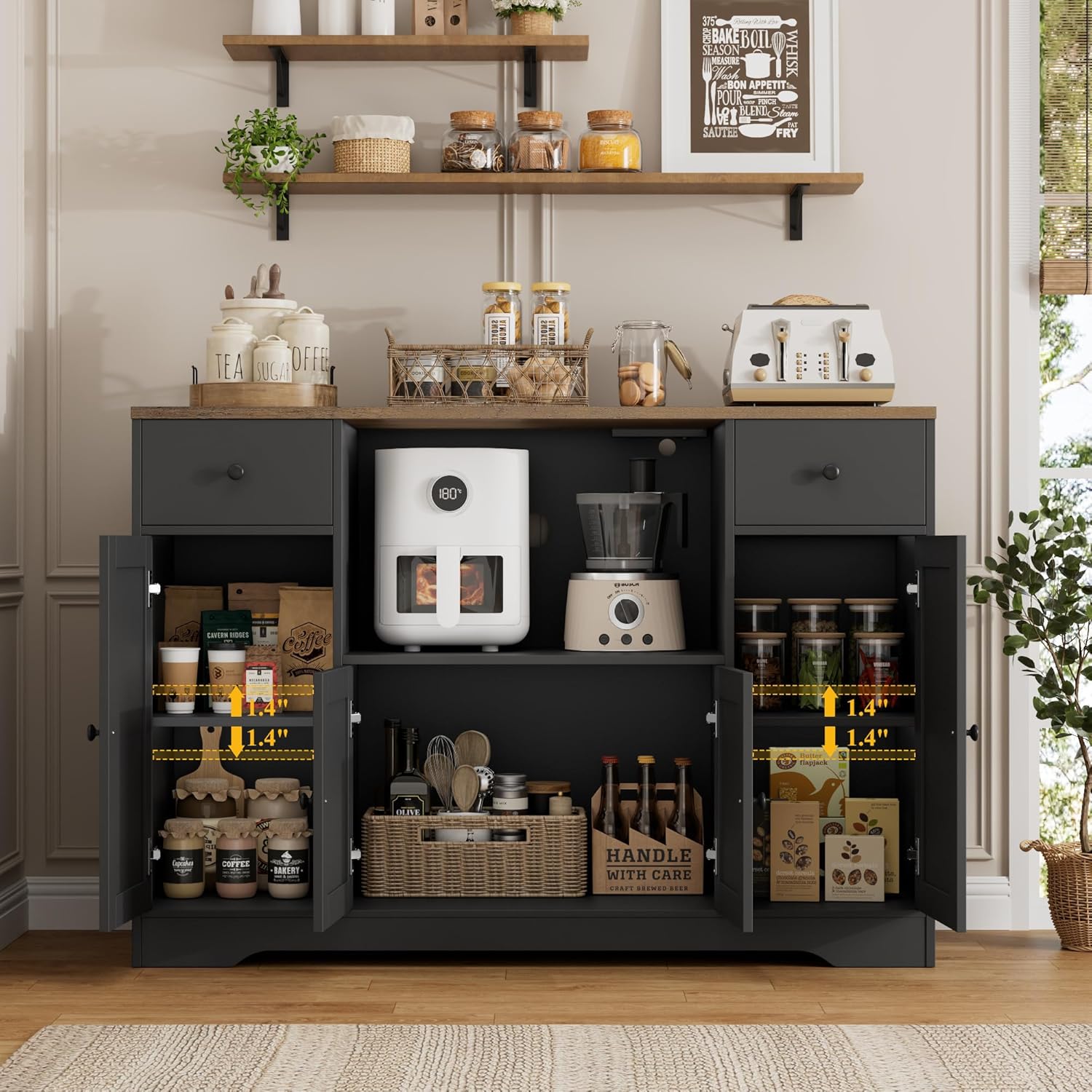
Image: The side cabinets with doors open, showing adjustable shelves and various items stored within.
Wartung
- Reinigung: Wischen Sie Oberflächen mit einem weichen, damp cloth. Avoid harsh chemicals, abrasive cleaners, or excessive moisture, which can damage the engineered wood finish.
- Verschüttungen: Verschüttete Flüssigkeiten sollten sofort aufgewischt werden, um Flecken oder Beschädigungen des Holzes zu vermeiden.
- Hardware: Überprüfen Sie regelmäßig alle Schrauben und Befestigungselemente auf festen Sitz. Ziehen Sie sie gegebenenfalls nach, um die Stabilität zu gewährleisten.
- Vermeiden Sie direktes Sonnenlicht: Längere Einwirkung direkter Sonneneinstrahlung kann zum Ausbleichen oder zur Verfärbung der Oberfläche führen.
- Hitzeschutz: Use coasters or protective pads under hot items placed on the countertop to prevent heat damage.
Fehlerbehebung
| Problem | Mögliche Ursache | Lösung |
|---|---|---|
| Der Schrank ist wackelig oder instabil. | Lose Befestigungselemente; unebener Boden. | Ensure all screws are securely tightened. Adjust the cabinet's position or use shims under the legs if the floor is uneven. |
| Die Schubladen lassen sich nicht leichtgängig öffnen und schließen. | Improper alignment; debris in tracks. | Check drawer runner alignment during assembly. Clean tracks of any dust or debris. |
| Die Ladestation funktioniert nicht. | Power cord not plugged in; switch off; overloaded circuit. | Verify the cabinet's power cord is securely plugged into a functional wall outlet. Ensure the charging station's on/off switch is in the "on" position. Reduce the number of devices connected if overloaded. |
| Microwave does not fit in the compartment. | Microwave dimensions exceed compartment size; power outlet interferes. | Measure your microwave carefully before purchase. Be aware that the integrated power outlet on the top shelf of the microwave compartment may reduce the effective vertical clearance by approximately 2 inches, depending on the plug type. Consider using a microwave with a low-profile plug or a smaller overall height. |
Technische Daten
| Besonderheit | Detail |
|---|---|
| Marke | HOSTACK |
| Modellname | 47-inch Microwave Cabinet with Charging Station |
| Farbe | Schwarz/Rustikales Braun |
| Produktabmessungen (insgesamt) | 15.7"T x 47.2"B x 33.5"H |
| Material | Holzwerkstoff |
| Tragfähigkeit (gesamt) | 280 Pfund |
| Ladestation | 2 AC-Steckdosen (120 V/12 A), 2 USB-Anschlüsse (5 V/2 A) |
| Montage erforderlich | Ja |
| Anzahl der Schubladen | 2 |
| Anzahl der Einlegeböden | 1 (adjustable within side cabinets) |

Image: A visual representation of key product specifications including color, material, dimensions, and assembly details.
Garantie und Support
For warranty information, missing parts, or any product-related inquiries, please refer to the documentation included with your purchase or contact HOSTACK customer support directly. Contact details can typically be found on the manufacturer's webWebsite oder über Ihren Händler.
We are committed to providing quality products and support to our customers.