
1. Einleitung
Vielen Dank für Ihren Einkauf.asing the EasySMX X05PRO Wireless PC Game Controller. This manual provides detailed instructions on how to set up, operate, and maintain your controller. Please read this manual carefully before use to ensure optimal performance and a satisfying gaming experience.
Produkt überview Video-Showasing the EasySMX X05PRO controller's design and key features.
2. Produktüberschreitungview
The EasySMX X05PRO is a versatile wireless game controller designed for a wide range of platforms including PC, Nintendo Switch, iOS, and Android devices. It features advanced technologies such as Hall effect joysticks and triggers, a 1000Hz polling rate, and customizable RGB lighting to enhance your gaming sessions.
Packungsinhalt:
- EasySMX X05PRO Wireless Game Controller
- USB-C-Ladekabel
- 2.4-GHz-Funkempfänger (USB-Dongle)
- Bedienungsanleitung

An image displaying the EasySMX X05PRO controller with its main features such as wireless/wired connection, silent buttons, RGB lighting, 1000Hz polling rate, TURBO function, vibration adjustment, and 1000mAh battery.
3. Einrichtung und Verbindung
The X05PRO controller supports multiple connection methods for various devices.
3.1. 2.4G Wireless Connection (for PC Windows)
- Stecken Sie den 2.4-GHz-Funkempfänger in einen freien USB-Anschluss Ihres PCs.
- Halten Sie die Heim button on the controller until the indicator light flashes rapidly, indicating pairing mode.
- Once connected, the indicator light will become solid. The controller is now ready for use.
3.2. Bluetooth Connection (for Switch, iOS, Android)
- On your device (Switch, iOS, or Android), navigate to the Bluetooth settings and enable Bluetooth.
- On the EasySMX X05PRO controller, press and hold the Bluetooth-Kopplung button (refer to the diagram in Section 2 for button layout) until the indicator light flashes rapidly.
- Select "EasySMX X05PRO" from the list of available devices on your screen.
- Nach erfolgreicher Kopplung leuchtet die Kontrollleuchte am Controller dauerhaft.
3.3. Wired Connection (for PC, Switch, and charging)
- Connect one end of the USB-C cable to the controller and the other end to your device (PC or Switch).
- The controller will automatically switch to wired mode. This mode also charges the controller.

An image illustrating the wireless connection capabilities of the EasySMX X05PRO controller, highlighting its compatibility with PC and other devices.
4. Hauptmerkmale
4.1. Stumme Tasten
The X05PRO features a redesigned full button structure with silicone dampers, ensuring ultra-quiet operation. This design is optimized for late-night gaming sessions, preventing disturbance to family, roommates, or neighbors.

Eine detaillierte view of the controller's buttons, illustrating the silicone damper mechanism for reduced noise during gameplay.
4.2. Dual-Stage Hall-Effekt-Trigger
Experience precise control with adjustable trigger locks, allowing for short (3mm) or long (9mm) stroke distances. The 2+2 built-in rumble motors provide realistic haptic feedback for immersive racing and FPS experiences.
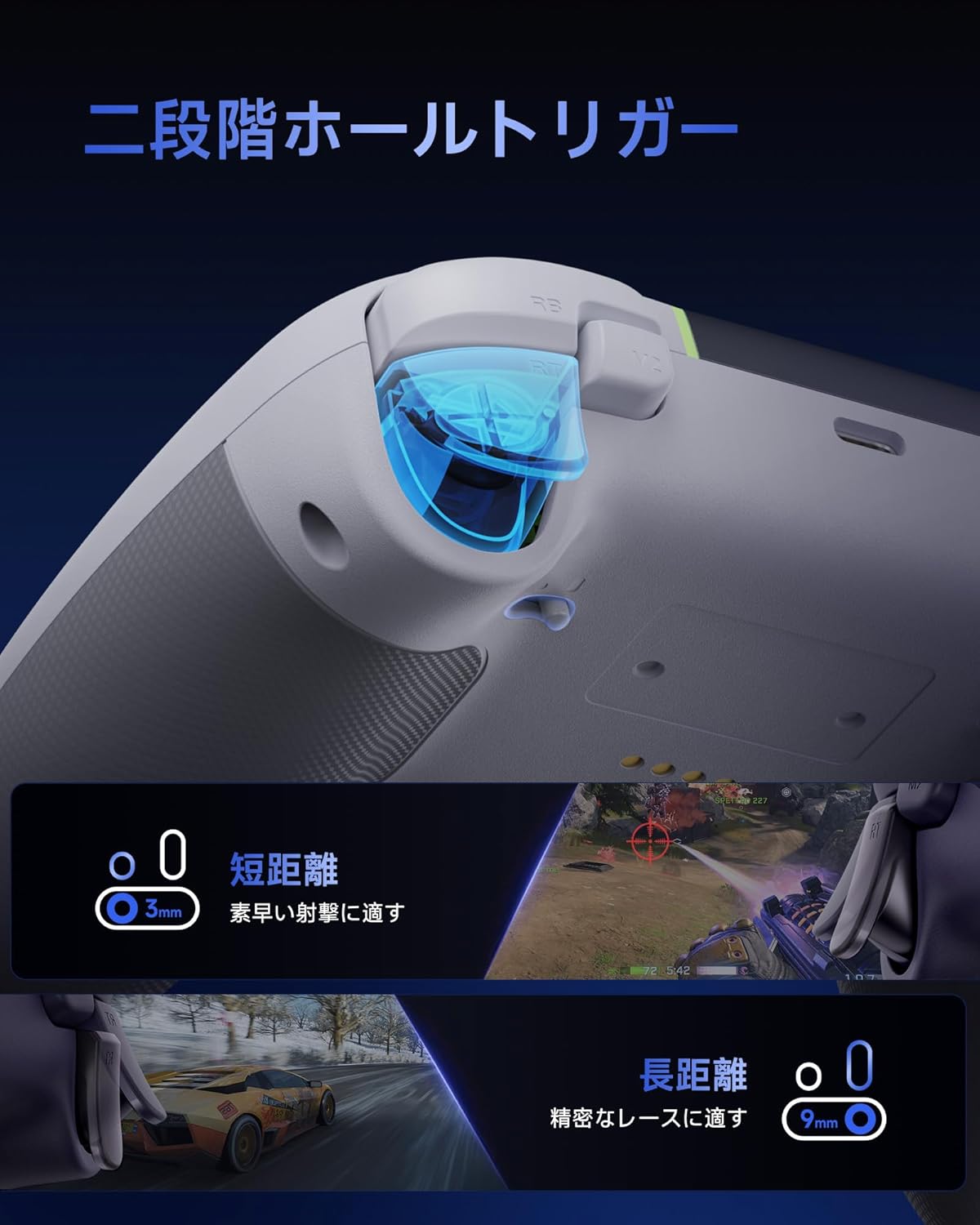
An image demonstrating the dual-stage Hall effect triggers, highlighting the short travel distance for quick shots and long travel for precise racing control.
4.3. Upgraded 8-Way D-Pad
The D-pad incorporates a dome switch and concave pivot structure, enabling smooth diagonal inputs and precise 8-way control. This design is particularly beneficial for fighting games and retro titles requiring accurate directional commands.

An exploded diagram showing the internal components of the upgraded 8-way D-pad, emphasizing its improved design for seamless and precise operation.
4.4. 4-Zone Vibration Feedback
The controller features a 2+2 motor structure that provides immersive 4-zone vibration feedback, enhancing tactile immersion during gameplay. Note: Trigger vibration requires in-game support and may only be available in certain titles.

An illustration of the controller's 4-zone vibration feedback system, depicting the internal motors and their effect on tactile immersion.
4.5. Dynamic RGB Backlight
Personalize your gaming experience with customizable RGB lighting effects. Choose from 7 color combinations and 5 diverse lighting modes (Brightness, Breathing, Colorful, Fade, Off) to match your style or mood.

Ein Bild zeigtasing two controllers with different dynamic RGB lighting effects, illustrating the customizable illumination options.
4.6. Two Programmable Buttons
The controller includes two additional programmable buttons located on the top, designed to prevent accidental presses during intense gameplay, a common issue with traditional back paddles.

A view of the controller's top side, highlighting the two programmable buttons (M1 and M2) and their programming settings.
4.7. 1000Hz Polling Rate & Hall Effect Joysticks
Achieve virtually no input lag with a 1000Hz polling rate in both wired and 2.4G wireless modes. The high-precision 11-bit Hall effect sensors in the joysticks ensure drift-free accuracy and a long operational lifespan.

A diagram illustrating the 1000Hz polling rate and the internal mechanism of the Hall effect joystick, emphasizing drift-free high precision.
4.8. Ergonomic Grip & Long-Life Battery
The controller features a soft-touch silicone coating for a sweat-resistant, non-slip grip, ensuring comfort during extended gaming sessions. A built-in 1000mAh rechargeable battery provides prolonged playtime.

An image highlighting the ergonomic, skin-friendly grip texture and the 1000mAh battery capacity of the controller.
5. Bedienung
5.1. Changing RGB Lighting Modes
To cycle through the 5 RGB lighting modes (Brightness, Breathing, Colorful, Fade, Off) and 7 color combinations, refer to the detailed instructions in the full product manual or the manufacturer's website. Typically, a dedicated button or a combination of buttons is used for this function.
5.2. Programming Buttons (M1/M2)
The M1 and M2 buttons can be programmed to replicate other button inputs. To program:
- Halten Sie die M button (usually located near the D-pad) and the desired programmable button (M1 or M2) simultaneously.
- Die Kontrollleuchte blinkt und signalisiert damit den Programmiermodus.
- Press the button you wish to map (e.g., A, B, X, Y, LB, RB, LT, RT, L3, R3).
- Press the M button again to save the mapping. The indicator light will return to solid.
5.3. Adjusting Trigger Modes
Die Dual-stage triggers can be adjusted for different travel distances. Consult the full product manual for specific button combinations or switches to toggle between short (3mm) and long (9mm) trigger strokes, optimizing for quick actions or precise control.
6. Aufladen des Controllers
The EasySMX X05PRO controller is equipped with a built-in 1000mAh rechargeable Lithium-ion battery.
Ladevorgang:
- Connect the USB-C charging cable to the controller's charging port.
- Connect the other end of the USB-C cable to a USB power source (e.g., PC, USB wall adapter, power bank).
- The indicator light on the controller will show the charging status (e.g., breathing light, solid light when fully charged). Refer to the controller's LED indicators for specific charging status details.
- Eine vollständige Aufladung dauert in der Regel etwa 2-3 Stunden.
7. Spezifikationen
| Besonderheit | Detail |
|---|---|
| Modellnummer | X05PRO |
| Akku-Typ | 1 Lithium-Ionen-Akku (im Lieferumfang enthalten) |
| Batteriekapazität | 1000 mAh |
| Konnektivität | 2.4-GHz-Funkverbindung, Bluetooth, Kabelgebunden (USB-C) |
| Abfragerate | 1000Hz (Wired & 2.4G Wireless), 125Hz (Bluetooth) |
| Trigger-Typ | Dual-Stage Hall-Effekt-Trigger |
| Joystick-Typ | Hall Effect Joysticks (11-bit precision) |
| Steuerkreuz | Upgraded 8-Way D-Pad (Dome switch, concave pivot) |
| Vibration | 4-Zone Vibration Feedback (2+2 motors) |
| Beleuchtung | Dynamic RGB Backlight (7 colors, 5 modes) |
| Programmierbare Tasten | 2 (M1, M2) |
| Maße | 17.9 x 14.7 x 7.4 cm |
| Gewicht | 400 g |
| Ursprungsland | China |

Image showing the EasySMX X05PRO controller and its technical compliance certifications for the Japanese market.
8. Fehlerbehebung
8.1. Controller verbindet sich nicht
- Batterie prüfen: Stellen Sie sicher, dass der Controller ausreichend geladen ist. Schließen Sie ihn zum Laden über ein USB-C-Kabel an.
- Reparatur: For wireless connections, try re-pairing the controller with your device. Follow the steps in Section 3.
- Check Receiver (2.4G): Ensure the 2.4G wireless receiver is securely plugged into a working USB port on your PC. Try a different USB port.
- Bluetooth-Interferenz: If using Bluetooth, ensure no other devices are causing interference. Try disconnecting other Bluetooth devices.
- Kabelverbindung: If wireless connection fails, try connecting the controller directly via USB-C cable to confirm functionality.
8.2. Input Lag or Unresponsive Buttons/Joysticks
- Abfragerate: Ensure you are using 2.4G wireless or wired mode for the optimal 1000Hz polling rate. Bluetooth mode operates at 125Hz, which may feel less responsive in competitive gaming.
- Interferenz: For 2.4G wireless, ensure the receiver is not obstructed and is close to the controller. Avoid areas with high electromagnetic interference.
- Firmware Update: Schauen Sie auf der offiziellen EasySMX-Website nach. webWebsite für alle verfügbaren Firmware-Updates für Ihren Controller.
- Neukalibrierung: Some operating systems or game platforms allow for controller calibration. Refer to your device's settings for this option.
8.3. Vibration funktioniert nicht
- In-Game-Support: Vergewissern Sie sich, dass das Spiel, das Sie spielen, Vibrationsfeedback unterstützt.
- Spieleinstellungen: Überprüfen Sie die Spieleinstellungen, um sicherzustellen, dass die Vibration aktiviert ist.
- Treiberinstallation: For PC, ensure the correct drivers are installed.
9. Wartung
- Reinigung: Reinigen Sie den Controller mit einem weichen, trockenen Tuch. Verwenden Sie keine scharfen Chemikalien oder Scheuermittel.
- Lagerung: Bewahren Sie den Controller an einem kühlen, trockenen Ort fern von direkter Sonneneinstrahlung und extremen Temperaturen auf.
- Batteriepflege: Vermeiden Sie häufiges vollständiges Entladen des Akkus. Laden Sie den Controller regelmäßig auf, auch wenn er längere Zeit nicht benutzt wird, um die Akkuleistung zu erhalten.
- Vermeiden Sie Tropfen: Schützen Sie den Controller vor Stürzen und Stößen, da diese die internen Komponenten beschädigen können.
10. Sicherheitshinweise
- Do not attempt to disassemble or modify the controller. This may void your warranty and cause damage.
- Keep the controller away from water, moisture, and high temperatures.
- Setzen Sie die Batterie keinem Feuer oder extremer Hitze aus.
- Das Produkt und seine Batterie sind gemäß den örtlichen Vorschriften verantwortungsvoll zu entsorgen.
- Dieses Produkt ist kein Spielzeug. Außerhalb der Reichweite von kleinen Kindern aufbewahren.
11. Garantie und Support
EasySMX products come with a standard warranty. For specific warranty terms, duration, and to register your product, please visit the official EasySMX webWebsite oder wenden Sie sich an den Kundendienst.
If you encounter any issues not covered in this manual or require further assistance, please contact EasySMX customer support through their official webWebsite oder die Kontaktinformationen, die Sie bei Ihrem Kauf erhalten haben.
EasySMX Offiziell WebWebsite: www.easysmx.com