
Minuteman EN450G
Minuteman EN450G 450VA Standby-USV Benutzerhandbuch
Model: EN450G
1. Einleitung
This manual provides essential instructions for the safe and efficient operation of your Minuteman EN450G 450VA Standby Uninterruptible Power Supply (UPS). The EN450G is designed to provide reliable backup power and surge protection for various electronic devices, including gaming consoles, desktop PCs, home office equipment, and network devices. Please read this manual thoroughly before installation and use, and retain it for future reference.
2. Wichtige Sicherheitshinweise
WARNING: To reduce the risk of electric shock, fire, or injury to persons, read all instructions before using this product.
- Diese USV enthält gefährliche Stoffetages. Do not attempt to disassemble the unit. Servicing should be performed by qualified service personnel only.
- Schließen Sie keine nicht zum Computer gehörenden Geräte, wie etwa medizinische Geräte, lebenserhaltende Geräte, Mikrowellenherde oder Staubsauger, an die USV an.
- Blockieren Sie keine Lüftungsöffnungen. Sorgen Sie für ausreichende Luftzirkulation um das Gerät herum.
- Do not install the UPS in direct sunlight, near heat sources, or in areas with excessive dust, moisture, or flammable liquids.
- Connect the UPS to a properly grounded AC power outlet.
- The battery is hot-swappable. Exercise caution when replacing the battery. Refer to the Maintenance section for instructions.
- In case of emergency, press the power button to turn off the UPS and disconnect the power cord from the AC power outlet.
3. Produktüberschreitungview
The Minuteman EN450G UPS provides comprehensive power protection. Familiarize yourself with its components:
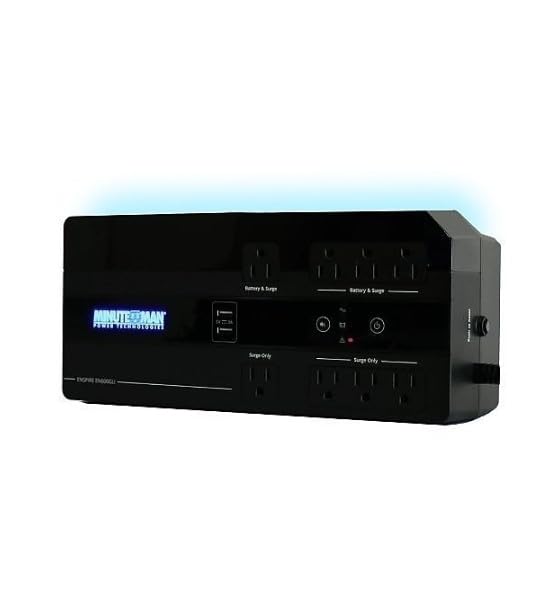
Abbildung 1: Minuteman EN450G UPS Unit. This image displays the Minuteman EN450G UPS unit. The front panel features the 'Minuteman Power Technologies' logo, two USB charging ports, and control buttons. The top surface shows four 'Battery & Surge' protected outlets and four 'Surge Only' outlets, clearly labeled. The unit is black and designed for compact placement.
3.1 Merkmale der Frontplatte
- Netzschalter: Schaltet die USV ein oder aus.
- USB-Ladeanschlüsse: Two ports for charging mobile devices.
- Statusanzeigen: LEDs indicating power status, battery status, and fault conditions.
3.2 Merkmale der Rückseite
- Battery & Surge Outlets (x4): Provide battery backup power and surge protection for critical devices.
- Surge Only Outlets (x4): Provide surge protection only for non-critical devices.
- AC-Eingang: Connects the UPS to the wall power outlet.
- Leistungsschalter: Rücksetzbarer Überlastschutz.
4. Einrichtung und Installation
4.1 Auspacken
Packen Sie das UPS-Gerät vorsichtig aus und überprüfen Sie es auf Transportschäden. Sollten Sie Schäden feststellen, nehmen Sie das Gerät nicht in Betrieb und kontaktieren Sie Ihren Händler.
4.2 Platzierung
The EN450G is designed for versatile placement:
- Desktop: Stellen Sie das Gerät auf eine stabile, ebene Fläche.
- Boden: Position on the floor, ensuring ventilation is not obstructed.
- Wandhalterung: The unit can be mounted on a wall using appropriate hardware (not included). Ensure the mounting surface can support the weight of the UPS.
Ensure the installation area is clean, dry, and has adequate ventilation. Avoid placing the UPS near heat-emitting appliances or in direct sunlight.
4.3 An die Stromversorgung anschließen
- Stellen Sie sicher, dass die USV ausgeschaltet ist.
- Plug the UPS power cord into a grounded 120V AC wall outlet.
- Allow the UPS to charge for at least 8 hours before initial use to ensure optimal battery runtime.
4.4 Geräte anschließen
- Battery & Surge Protected Outlets: Connect critical devices such as your computer, monitor, router, or other essential electronics that require continuous power during outages.
- Steckdosen nur für Überspannungsschutz: Connect non-critical devices like printers, scanners, or desk lamps that only require surge protection.
CAUTION: Do not connect laser printers or shredders to the battery backup outlets, as their high power draw can overload the UPS.
5. Bedienung
5.1 Ein-/Ausschalten der USV
- Zum Einschalten: Press and hold the power button for approximately 2 seconds until you hear a beep and the power indicator illuminates.
- Ausschalten: Press and hold the power button for approximately 2 seconds until you hear a beep and the power indicator turns off.
5.2 Statusanzeigen
The front panel LEDs provide information about the UPS status:
- Grüne LED (durchgehend leuchtend): UPS is operating normally, providing AC power.
- Grüne LED (blinkend) & akustischer Alarm: Die USV wird während eines Ausfalls mit Batteriestrom betrieben.tage.
- Red LED (Solid) & Audible Alarm: Battery low or fault condition. Refer to Troubleshooting.
5.3 Akkulaufzeit
The EN450G provides approximately 3 minutes of runtime at full load (450VA/255W) and 11 minutes at half load. Actual runtime may vary based on connected equipment and battery age.
6. Wartung
6.1 Batteriewechsel
The EN450G features a hot-swappable Sealed Lead Acid (SLA) battery, allowing replacement without interrupting power to connected devices. Batteries typically last 3-5 years depending on usage and environmental conditions. A flashing red LED or continuous alarm may indicate a need for battery replacement.
- Ensure the UPS is connected to AC power and operating normally.
- Locate the battery access panel (refer to product diagram if available).
- Carefully slide out the old battery pack.
- Insert the new, fully charged replacement battery pack, ensuring correct orientation.
- Secure the battery access panel.
- Allow the new battery to charge for 8-12 hours to reach full capacity.
WARNING: Use only approved replacement batteries. Improper battery replacement can result in fire or explosion. Dispose of old batteries properly at a recycling facility.
6.2 Reinigung
Reinigen Sie die Außenseite der USV regelmäßig mit einem weichen, trockenen Tuch. Verwenden Sie keine flüssigen oder Aerosol-Reinigungsmittel. Achten Sie darauf, dass die Lüftungsöffnungen frei von Staub und Schmutz sind.
7. Fehlerbehebung
This section addresses common issues you may encounter with the EN450G UPS. If a problem persists after attempting the solutions below, contact technical support.
| Problem | Mögliche Ursache | Lösung |
|---|---|---|
| Die USV schaltet sich nicht ein. | Batterie nicht angeschlossen oder entladen. Netzkabel nicht angeschlossen. | Stellen Sie sicher, dass der Akku ordnungsgemäß angeschlossen und geladen ist. Verify power cord is securely plugged into wall outlet and UPS. |
| UPS beeps continuously or red LED is solid. | Battery low or fault condition. Overload on battery outlets. | Allow battery to charge. If problem persists, battery may need replacement. Disconnect non-essential devices from battery outlets. Check circuit breaker. |
| Die USV wird häufig im Batteriebetrieb betrieben. | Unstable incoming AC power. UPS sensitivity setting (if applicable, though not specified for this model). | Check the quality of your incoming AC power. Consider connecting to a different outlet. |
| No power from surge-only outlets. | Leistungsschalter ausgelöst. | Press the circuit breaker reset button on the rear panel. Reduce load if necessary. |
8. Spezifikationen
| Besonderheit | Detail |
|---|---|
| Modell | EN450G |
| Kapazität | 450 VA / 255 W. |
| Eingangs-/Ausgangs-Voltage | 120 V Wechselstrom |
| Ausgangswellenform | Simulierte Sinuswelle |
| Verkaufsstellen | 4 x Battery & Surge Protected, 4 x Surge Only |
| Akku-Typ | Sealed Lead Acid (SLA), Hot-Swappable |
| Typische Laufzeit (Volllast) | Bis zu 3 Minuten |
| Typical Runtime (Half Load) | Bis zu 11 Minuten |
| Abmessungen (T x B x H) | 12.8 x 5.7 x 4.1 Zoll (32.5 x 14.5 x 10.4 cm) |
| Gewicht | 4.4 Pfund (2 kg) |
| Montageoptionen | Desktop, Floor, Wall Mount |
9. Garantieinformationen
Please refer to the warranty card included with your product or visit the manufacturer's webDie detaillierten Garantiebedingungen finden Sie auf der Website. Bewahren Sie Ihren Kaufbeleg für Garantieansprüche auf.
10. Technischer Support
If you require technical assistance or have questions regarding your Minuteman EN450G UPS, please contact your dealer or the manufacturer's customer support. Have your model number (EN450G) and serial number ready when contacting support.
For more information, you may visit the official Minuteman webWebsite.
Ask a question about this manual
Ask about setup, troubleshooting, compatibility, parts, safety, or missing instructions. Manuals+ will review the question and use this page’s manual context to help answer it.