
1. Einleitung
Thank you for choosing the suevery Gaming Desktop Computer. This manual provides essential information for setting up, operating, maintaining, and troubleshooting your new computer. This system is equipped with an AMD Ryzen 5 5600GT processor, 16GB DDR4 memory, and a 512GB SSD, designed for efficient performance in various applications, including gaming and multitasking.

Image 1: suevery Gaming Desktop Computer overview, highlighting key specifications like R5-5600GT, 16GB DDR4 RAM, 512GB NVMe SSD, and AMD Radeon GPU.
2. Sicherheitshinweise
Please read and follow these safety guidelines to ensure safe operation and to prevent damage to your computer:
- Stromversorgung: Use only the power adapter provided with your computer. Ensure the power outlet is properly grounded.
- Belüftung: Do not block ventilation openings. Ensure adequate airflow around the computer to prevent overheating.
- Flüssigkeit und Feuchtigkeit: Keep the computer away from liquids and excessive moisture. Do not operate the computer with wet hands.
- Platzierung: Stellen Sie den Computer auf eine stabile, ebene Fläche. Vermeiden Sie es, ihn in der Nähe von Wärmequellen oder in direktem Sonnenlicht aufzustellen.
- Wartung: Do not attempt to service the computer yourself. Refer all servicing to qualified service personnel.
3. Packungsinhalt
Überprüfen Sie, ob alle Artikel im Paket vorhanden sind:
- suevery Gaming Desktop Computer (Tower)
- Stromkabel
- Dokumentation (dieses Handbuch)
4. Installationsanleitung
4.1 Auspacken und Aufstellen
- Carefully remove the computer from its packaging.
- Place the computer on a flat, stable surface with adequate space for ventilation.
- Remove any protective films or packaging materials from the exterior.
4.2 Anschließen von Peripheriegeräten
Connect your monitor, keyboard, mouse, and other peripherals to the appropriate ports on the computer.

Image 2: Rear ports of the suevery Gaming Desktop Computer, including HDMI, VGA, USB, LAN, and Audio Jacks.
- Monitor: Connect your monitor to the HDMI or VGA port on the back of the computer. Ensure the monitor is also powered on.
- Tastatur und Maus: Schließen Sie Ihre Tastatur und Maus an die USB-Anschlüsse an.
- Netzwerk: For a wired connection, connect an Ethernet cable to the LAN port. For Wi-Fi, ensure the Wi-Fi antenna (if external) is connected.
- Audio: Schließen Sie Lautsprecher oder Kopfhörer an die Audiobuchsen an.
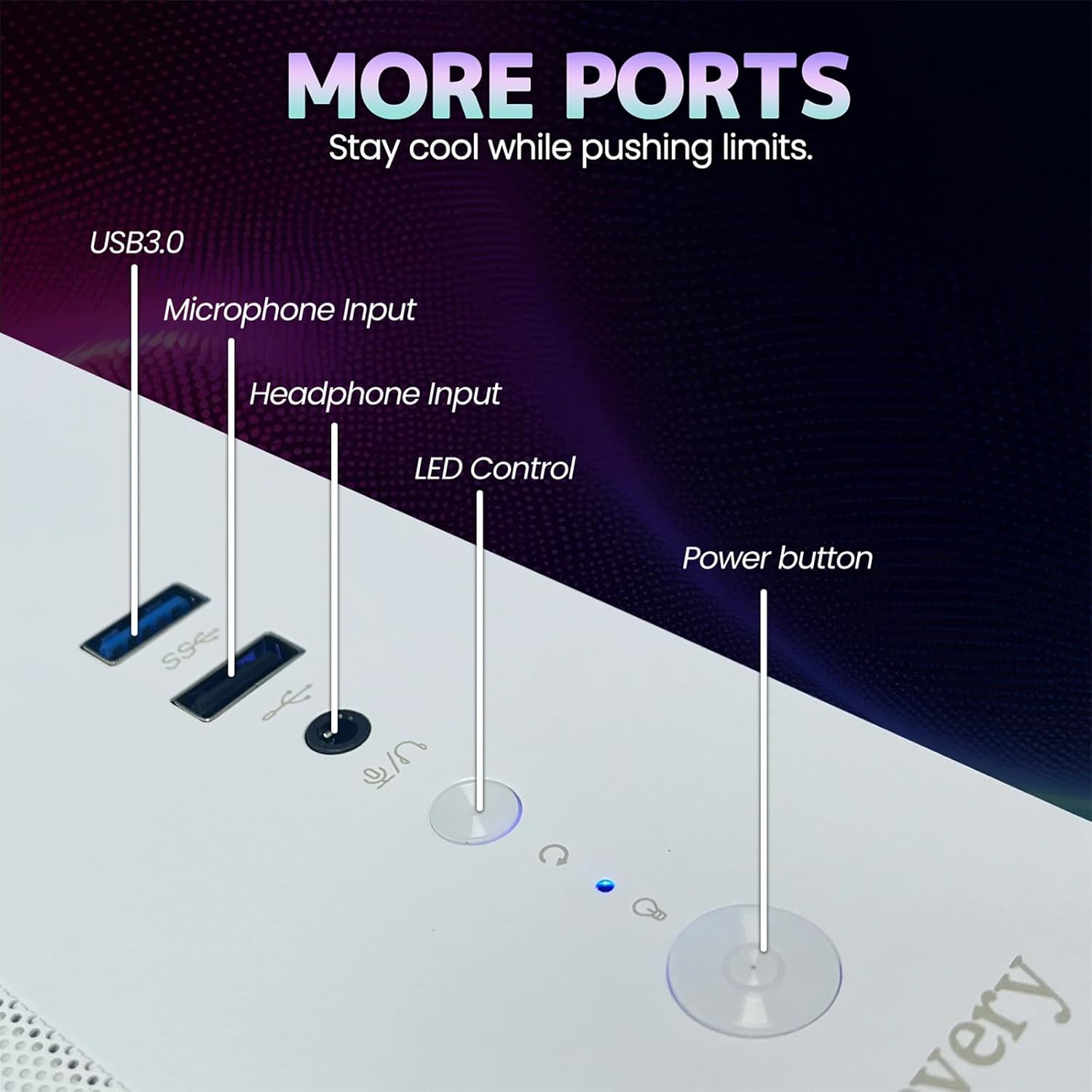
Image 3: Front panel of the suevery Gaming Desktop Computer, showing USB 3.0 ports, Microphone Input, Headphone Input, LED Control button, and Power button.
4.3 Stromanschluss und erster Start
- Connect the power cable to the power input on the back of the computer and then to a wall outlet.
- Drücken Sie den Netzschalter an der Vorderseite des Computers, um ihn einzuschalten.
- The computer comes with DOS pre-installed. You will need to install your preferred operating system (e.g., Windows) to fully utilize the system. Follow the on-screen instructions for OS installation.
5. Bedienungsanleitung
5.1 Ein-/Ausschalten
- So schalten Sie das Gerät ein: Drücken Sie den Netzschalter auf der Vorderseite.
- So schalten Sie das Gerät aus: Nutzen Sie die Herunterfahren-Option Ihres Betriebssystems. Für ein erzwungenes Herunterfahren halten Sie den Netzschalter 5–7 Sekunden lang gedrückt.
5.2 RGB-Beleuchtungssteuerung
Your computer features 5 RGB fans and a tempered glass panel, allowing for customizable lighting effects. Use the dedicated LED Control button on the front panel to cycle through various lighting modes and colors to match your preference.

Abbildung 4: Intern view of the suevery Gaming Desktop Computer, showcasing the RGB fans and internal components.
5.3 Leistung und Multitasking
The AMD Ryzen 5 5600GT processor and 16GB DDR4 memory provide robust performance for demanding applications. You can run office software, stream 4K videos, edit documents, and play games simultaneously without significant lag. The 512GB SSD ensures fast boot times and quick application loading.
6. Wartung
6.1 Reinigung
- Exterieur: Use a soft, dry cloth to wipe the exterior of the computer. Avoid abrasive cleaners or solvents.
- Staub: Periodically use compressed air to clean dust from ventilation openings and fan grilles. Ensure the computer is powered off and unplugged before cleaning.
6.2 Optimaler Luftstrom
The computer features an optimal airflow design to keep components cool. Ensure that the computer's vents are not obstructed to maintain proper cooling and stable temperatures, which is crucial for peak performance and longevity.
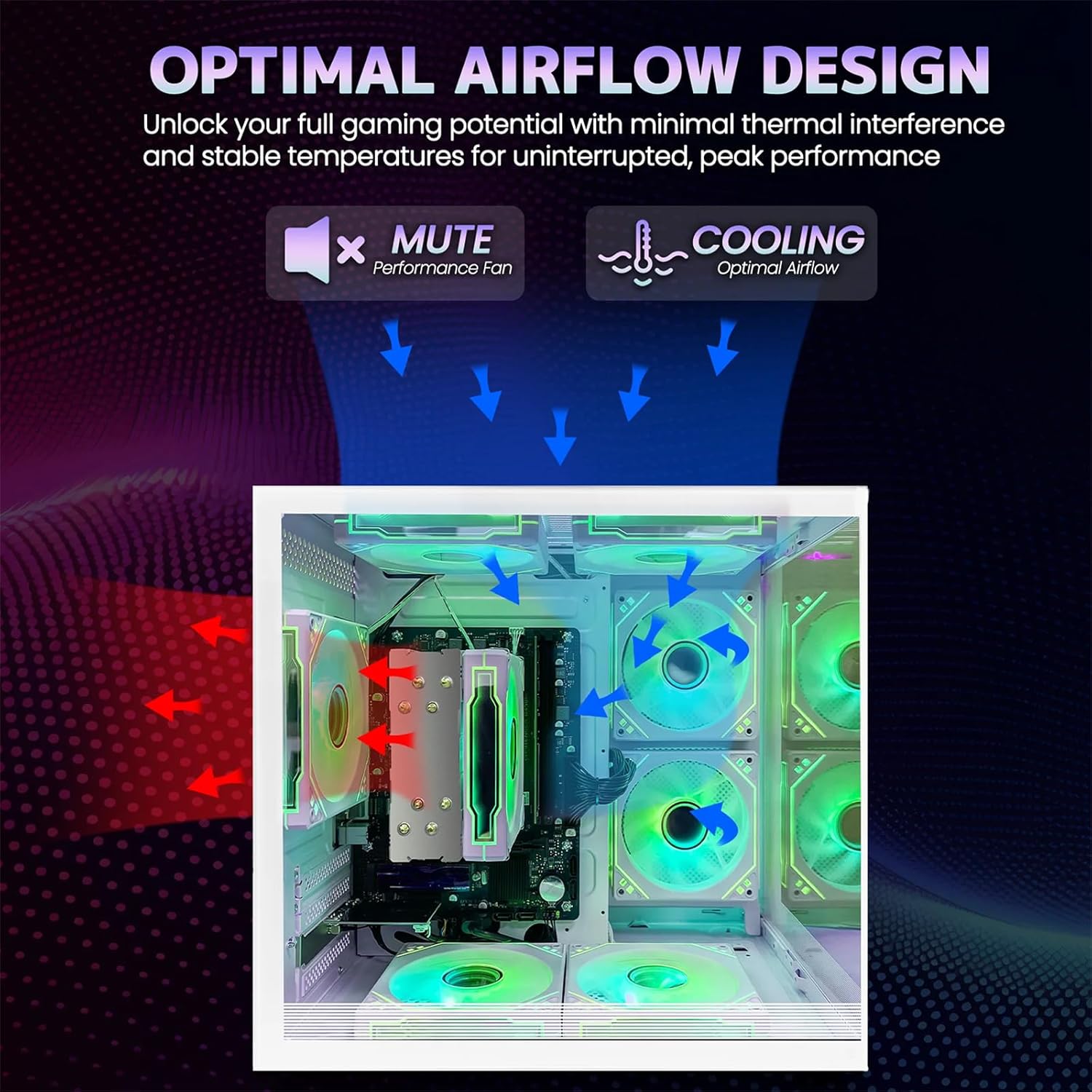
Image 5: Optimal airflow design diagram, showing air intake and exhaust paths for efficient cooling.
7. Fehlerbehebung
If you encounter issues with your computer, refer to the following common troubleshooting steps:
| Problem | Mögliche Lösung |
|---|---|
| Computer does not power on | Check power cable connections to the computer and wall outlet. Ensure the power button is fully pressed. |
| Kein Bild auf dem Monitor | Ensure the monitor is powered on and connected correctly to the computer's video output (HDMI/VGA). Try a different video cable or monitor if available. |
| Keine Internetverbindung (WLAN) | Check if Wi-Fi is enabled in your operating system. Ensure the Wi-Fi antenna is securely connected. Restart your router and computer. |
| Das System ist langsam oder reagiert nicht. | Close unnecessary applications. Check for background processes consuming resources. Ensure adequate ventilation to prevent thermal throttling. |
8. Spezifikationen
Detailed technical specifications for the suevery Gaming Desktop Computer:
| Besonderheit | Detail |
|---|---|
| Marke | Umfrage |
| Modellname | SUT1-5600GT |
| CPU Modell | AMD Ryzen 5 5600GT (6-Core, 12-Thread) |
| CPU-Geschwindigkeit | 3.6 GHz (Base), up to 4.4 GHz (Max Boost) |
| Betriebssystem | DOS (vom Benutzer installierbares Betriebssystem erforderlich) |
| RAM-Speicher | 16 GB DDR4 (3200 MHz) |
| Lagerung | 512 GB SSD (Serial ATA-600) |
| Grafikkarte | Integrated AMD Radeon Vega Graphics (2 GB GDDR5) |
| Konnektivität | Wi-Fi (802.11ax), Ethernet, USB |
| Videoausgang | HDMI, VGA |
| USB-Anschlüsse | 6 Total USB Ports |
| Kühlmethode | Air Cooling (with RGB fans) |
| Energieaufnahme | 400 Watt |
| Farbe | Weiß |
| Abmessungen (ca.) | 13.25 Zoll (Tiefe) x 10.71 Zoll (Breite) x 12.36 Zoll (Höhe) |
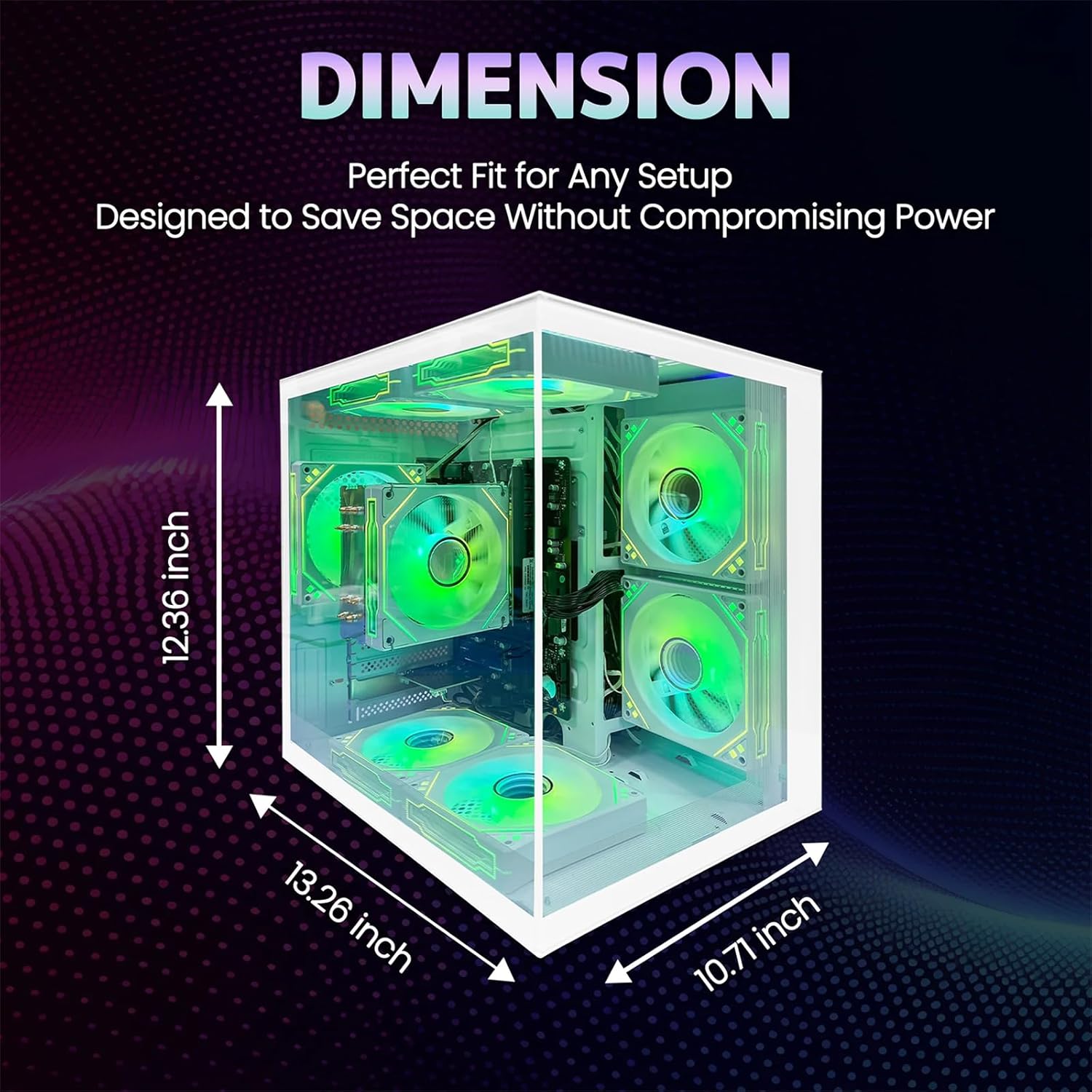
Image 6: Dimensions of the suevery Gaming Desktop Computer case.
9. Garantie und Support
9.1 Produktgarantie
This suevery Gaming Desktop Computer comes with a 1 Jahr Herstellergarantie Diese Garantie gilt ab Kaufdatum und deckt Material- und Verarbeitungsfehler bei normalem Gebrauch ab. Sie deckt keine Schäden ab, die durch Unfälle, Missbrauch, unbefugte Änderungen oder äußere Einflüsse verursacht wurden.
9.2 Kundendienst
For technical assistance, warranty claims, or any questions regarding your suevery Gaming Desktop Computer, please contact our customer support. Refer to the contact information provided on the product packaging or the official suevery webWebsite für die aktuellsten Supportkanäle.