
Einführung
Vielen Dank für Ihren Einkauf.asing the AFEXOA DY29Z Night Light Bluetooth Speaker Alarm Clock. This versatile device combines a Bluetooth speaker, night light, alarm clock, sound machine, and MP3 player into one compact unit. This manual provides detailed instructions for setup, operation, and maintenance to ensure optimal performance and user satisfaction.

Figure 1: AFEXOA DY29Z device highlighting its 5-in-1 functionality.
Sicherheitshinweise
- Setzen Sie das Gerät nicht Wasser oder übermäßiger Feuchtigkeit aus.
- Vermeiden Sie extreme Temperaturen und direkte Sonneneinstrahlung.
- Versuchen Sie nicht, das Gerät selbst zu zerlegen oder zu reparieren. Wenden Sie sich an den Kundendienst, wenn Sie Hilfe benötigen.
- Außerhalb der Reichweite von Kindern und Haustieren aufbewahren.
- Verwenden Sie zum Laden ausschließlich das mitgelieferte Ladekabel oder ein zertifiziertes USB-C-Kabel.
Packungsinhalt
Bitte prüfen Sie das Paket auf folgende Artikel:
- AFEXOA DY29Z Night Light Bluetooth Speaker Alarm Clock
- USB-Ladekabel Typ C.
- Bedienungsanleitung
Produkt überview
Bedienelemente auf der Vorderseite
The front panel features an LED display for time and status, along with several control buttons:
- Timer-Taste: Short press to pause, long press for standby (turns off sound and light).
- Bluetooth-Ein-/Ausschalter: Activates or deactivates Bluetooth mode.
- Previous Track / Volume Down Button: Kurz drücken für vorherigen Titel, lange drücken zum Verringern der Lautstärke.
- Next Track / Volume Up Button: Kurz drücken für nächsten Titel, lange drücken zur Lautstärkeerhöhung.
- Taste für natürliche Klänge und Schlaflieder: Cycles through built-in soothing sounds.
Anschlüsse und Schalter auf der Rückseite
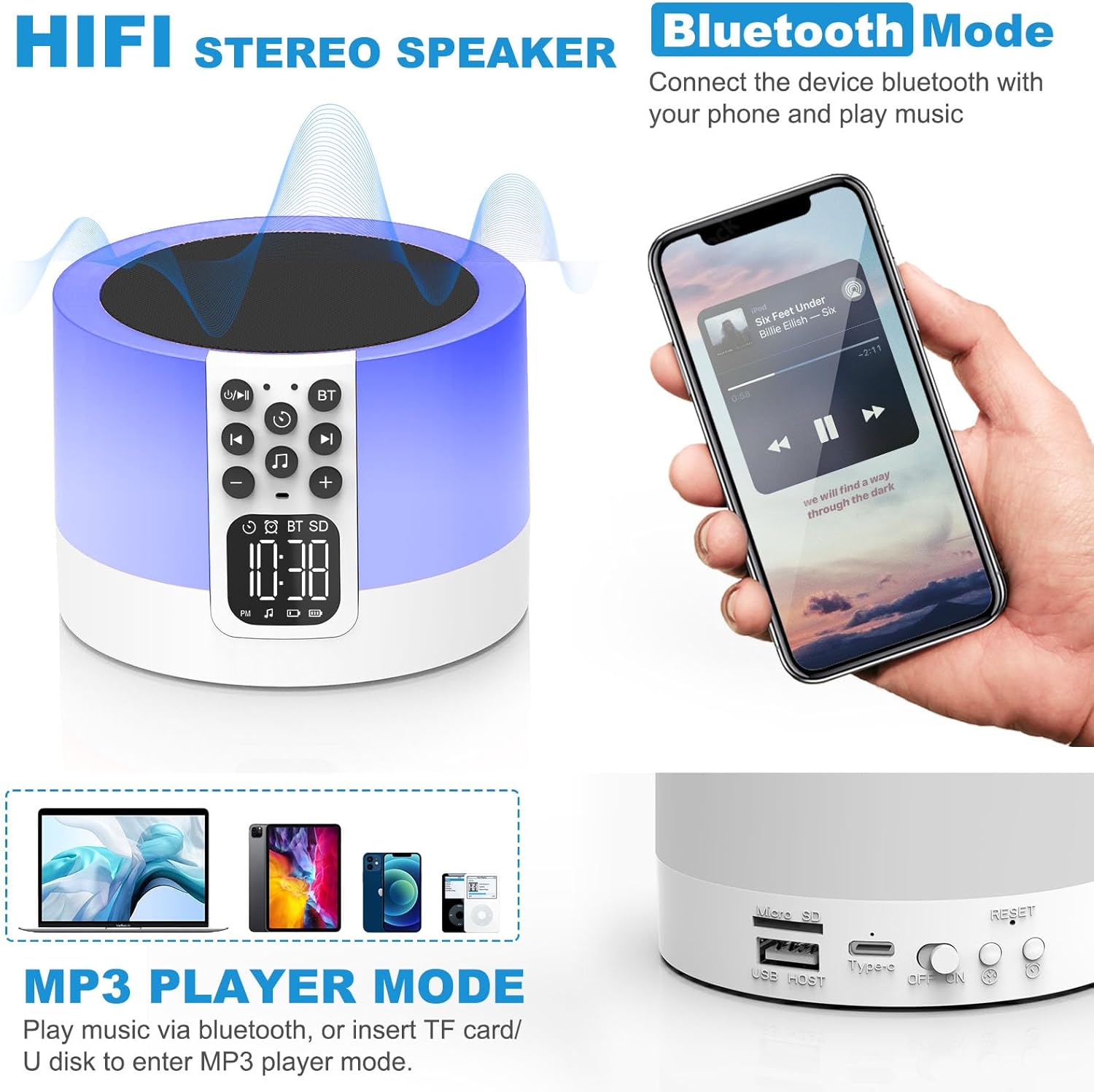
Figure 2: AFEXOA DY29Z showing Bluetooth connectivity and rear ports.
- Micro-SD/TF-Kartensteckplatz: Zum Abspielen von MP3-Dateien files von einer Speicherkarte.
- USB-Hostanschluss: Zum Abspielen von MP3-Dateien files von einem USB-Stick.
- Typ-C-Stromanschluss: Zum Aufladen des Gerätes.
- Ein-/Ausschalter: Hauptnetzschalter für das Gerät.
- Reset-Taste: Small button to reset the device (requires a pin).
- Zeiteinstellungs-Schaltfläche: Short press for 12h/24h mode, long press for time setup.
- Alarm-Einstellungstaste: Zum Einstellen des Weckers.
Aufstellen
1. Aufladen des Geräts
Before first use, fully charge the device. Connect the provided Type-C USB cable to the Type-C power port on the back of the device and plug the other end into a USB power adapter (not included), computer, or power bank.

Figure 3: Charging the device via USB.
2. Uhrzeit einstellen
- Turn on the device using the On/Off switch on the back.
- Long press the 'Time Setup' button on the back until the hour digits flash.
- Use the 'Previous Track / Volume Down' and 'Next Track / Volume Up' buttons on the front to adjust the hour.
- Press the 'Time Setup' button again to switch to minute adjustment. Adjust minutes using the volume buttons.
- Press the 'Time Setup' button a third time to confirm and exit time setting.
- Short press the 'Time Setup' button to toggle between 12-hour and 24-hour display formats.
Bedienungsanleitung
1. Ein-/Ausschalten
Slide the 'On/Off' switch on the back of the device to turn it on or off.
2. Bluetooth-Lautsprechermodus
- Schalten Sie das Gerät ein.
- Press the 'Bluetooth On/Off' button on the front panel. The device will enter pairing mode, indicated by a flashing Bluetooth icon on the display.
- On your smartphone or other Bluetooth-enabled device, search for 'DY29Z' in the Bluetooth settings and select it to pair.
- Sobald die Kopplung hergestellt ist, können Sie Audio von Ihrem Gerät über den Lautsprecher abspielen.
- Use the 'Previous Track / Volume Down' and 'Next Track / Volume Up' buttons to control playback and volume.
3. Nachtlichtfunktion
Das Gerät verfügt über ein berührungsempfindliches Oberflächengitter zur Lichtsteuerung.

Figure 4: Adjusting warm white light brightness via touch control.
- Warmweißes Licht: Tap the top mesh to cycle through 3 levels of warm white brightness (low, medium, high). Tap again to turn off.
- Multicolor Light: Long press the top mesh and then release to activate the ambient light mode, which cycles through various colors.
- Fixed Color Light: While in multicolor cycling mode, long press the top mesh again and release to fix the current color. Repeat to cycle through other fixed colors.

Figure 5: Various multicolor night light options.
4. Weckerfunktion
Set and manage alarms with customizable tones.

Figure 6: Digital alarm clock with wake-up light.
- Einstellen des Alarms: Long press the 'Alarm Setup' button on the back until the alarm hour digits flash. Adjust the hour using the volume buttons. Press 'Alarm Setup' again to set minutes, then press again to confirm.
- Custom Alarm Tone: Insert a USB Flash Drive or Micro SD Card with your favorite MP3 music. The device will automatically use this as the alarm tone.
- Schlummerfunktion: When the alarm sounds, tap the top mesh to activate snooze. The alarm will sound again after 9 minutes. This can be repeated indefinitely.
- Stoppen des Alarms: Press any button (except the top mesh for snooze) to stop the alarm for the day.
5. Sound Machine Function
The device offers 30 built-in soothing sounds to aid sleep and relaxation.
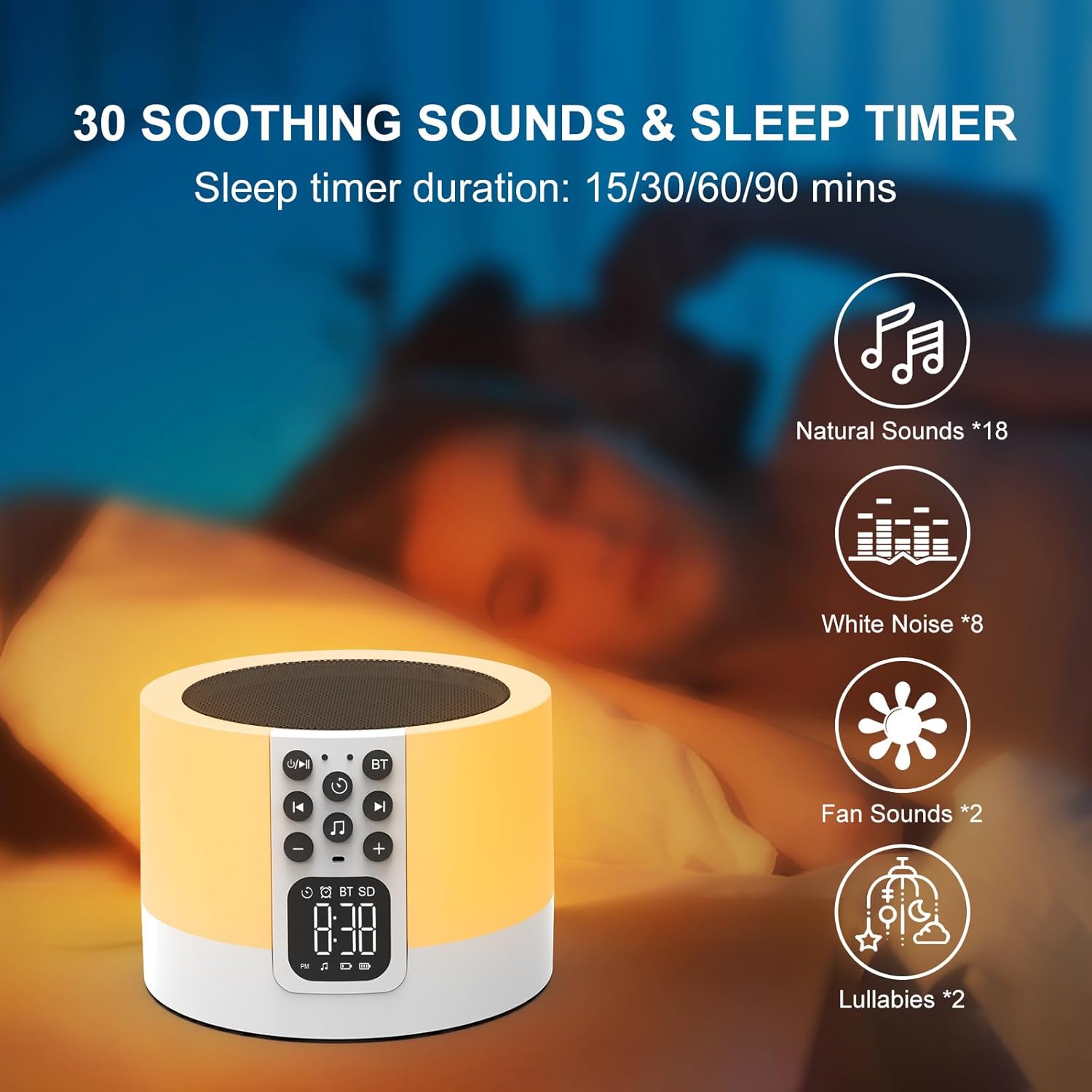
Figure 7: Soothing sounds and sleep timer options.
- Press the 'Natural Sound & Lullaby' button on the front panel to cycle through the 30 available sounds (including white noise, fan noise, pink noise, nature sounds, and lullabies).
- Schlaf-Timer: To set a sleep timer, short press the 'Timer' button repeatedly to select 15, 30, 60, or 90 minutes. The device will automatically turn off after the selected duration.
6. MP3 Player Mode
Play your own music directly from a USB flash drive or Micro SD card.

Figure 8: Using USB flash drives and Micro SD cards for MP3 playback.
- Insert a USB flash drive into the USB HOST port or a Micro SD card into the Micro SD/TF card slot on the back of the device.
- The device will automatically detect the storage and begin playing MP3 files.
- Use the 'Previous Track / Volume Down' and 'Next Track / Volume Up' buttons to navigate tracks and adjust volume.
7. Freisprechen
When connected via Bluetooth to a smartphone, the device can be used for hands-free calls.
- When a call comes in, the device will ring.
- Press the 'Timer' button (which also functions as Play/Pause) to answer an incoming call.
- Press the 'Timer' button again to end the call.
Wartung
- Reinigen Sie das Gerät mit einem weichen, trockenen Tuch. Verwenden Sie keine Scheuermittel oder Lösungsmittel.
- Stellen Sie sicher, dass alle Anschlüsse frei von Staub und Schmutz sind.
- Bewahren Sie das Gerät an einem kühlen, trockenen Ort auf, wenn es längere Zeit nicht benutzt wird.
Fehlerbehebung
| Problem | Mögliche Ursache | Lösung |
|---|---|---|
| Gerät lässt sich nicht einschalten. | Der Akku ist leer. Der Netzschalter ist ausgeschaltet. | Charge the device fully. Ensure the On/Off switch is in the 'On' position. |
| Verbindung via Bluetooth nicht möglich. | Bluetooth not enabled on device or phone. Device is already paired with another unit. | Ensure Bluetooth is active on both devices. Disconnect from other devices. Restart pairing process. |
| Aus dem Lautsprecher kommt kein Ton. | Die Lautstärke ist zu niedrig. Das Gerät ist pausiert. Der falsche Modus wurde ausgewählt. | Increase volume. Press the 'Timer' button to unpause. Ensure correct mode (Bluetooth, MP3, Sound Machine) is active. |
| Nachtlicht funktioniert nicht. | Device is off or in standby. | Ensure the device is powered on. Tap the top mesh to activate the light. |
| Der Alarm ertönt nicht. | Alarm not set correctly. Volume too low. | Verify alarm time and activation. Increase device volume. |
Technische Daten
| Besonderheit | Detail |
|---|---|
| Marke | AFEXOA |
| Modellnummer | DY29Z |
| Konnektivitätstechnologie | Bluetooth, USB |
| Audioausgabemodus | Stereo |
| Material | Acrylnitril-Butadien-Styrol (ABS) |
| Lautsprechertyp | Tragbarer Bluetooth-Lautsprecher |
| Zusätzliche Merkmale | Alarm, Illuminated, Mood Light, Noise Machine, Timer |
| Kontrollmethode | Berühren |
| Stromquelle | Batteriebetrieben |
| Anzahl Batterien | 1 Lithium-Ionen (im Lieferumfang enthalten) |
| Kompatible Geräte | Laptop, MP3-Player, Smartphone, Tablet |
Garantie und Support
This product comes with a limited warranty. For detailed warranty information or technical support, please refer to the product packaging or contact AFEXOA customer service. Keep your purchase receipt for warranty claims.