
1. Einleitung
The Caytail DK201 is a 2K wireless outdoor PTZ security camera designed for comprehensive surveillance. Featuring a high-capacity 5200 mAh battery and a 3W high-efficiency solar panel, it offers an eco-friendly and economical power solution, ensuring continuous operation. With a 360° ultra-wide field of view and IP65 certification, it is suitable for various outdoor environments.
This camera provides clear and precise 2K HD images, including color night vision. It is equipped with intelligent PIR motion detection and two-way audio for communication and immediate alerts.
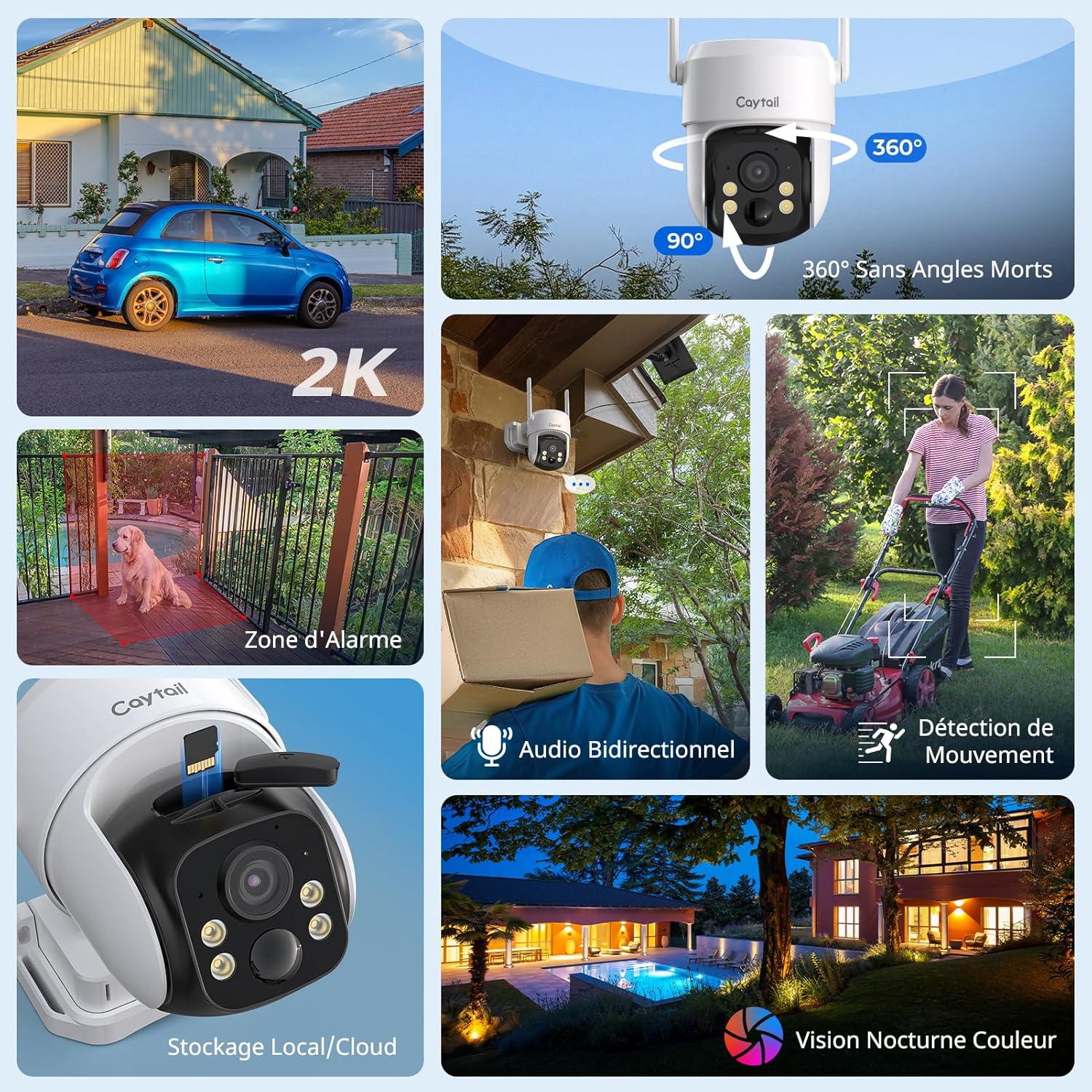
Figure 1: Caytail DK201 Camera Key Features Overview
2. Lieferumfang
Bitte überprüfen Sie, ob alle Artikel im Paket vorhanden sind:
- Caytail 2K Wireless Outdoor PTZ Security Camera
- Sonnenkollektor (3 W)
- Montagehalterung
- Installationshandbuch
- Schrauben und Dübel für die Montage
3. Einrichtung und Installation
3.1 Physische Installation
The camera is designed for outdoor use and can be mounted on walls, trees, or roofs. Use the provided screws and mounting bracket for secure installation. Ensure the solar panel is positioned to receive maximum direct sunlight throughout the day for optimal charging.

Figure 2: Outdoor Installation with Solar Panel
3.2 App Configuration (Ubox App)
Follow these steps to connect your camera to the Ubox app:
- Download the Ubox App: Suchen nach "Ubox" on the App Store (iOS) or Google Play Store (Android) and install it.
- Ein Konto erstellen: Open the Ubox app and register for a new account, then log in.
- Kamera zurücksetzen: Press and hold the reset button on the camera for more than 3 seconds until it enters pairing mode.
- Gerät hinzufügen: In the app, click the "+" icon to add a new device and select "Configure Wi-Fi Device".
- Mit WLAN verbinden: Select your 2.4 GHz Wi-Fi network and enter the password to complete the connection. (Note: The camera only supports 2.4 GHz Wi-Fi networks).

Figure 3: Ubox App Connection Steps
4. Bedienungsanleitung
4.1 Live View und PTZ-Steuerung
Access the live video feed through the Ubox app. Use the on-screen controls to pan (360° horizontally) and tilt (90° vertically) the camera to adjust the viewing angle. This allows for comprehensive coverage without blind spots.

Figure 4: 360° Pan and 90° Tilt Functionality
4.2 Bewegungserkennung und Benachrichtigungen
The camera features intelligent PIR motion detection. When motion is detected, you will receive immediate alarm notifications on your phone via the Ubox app. The camera can also trigger a sound alarm to deter intruders.
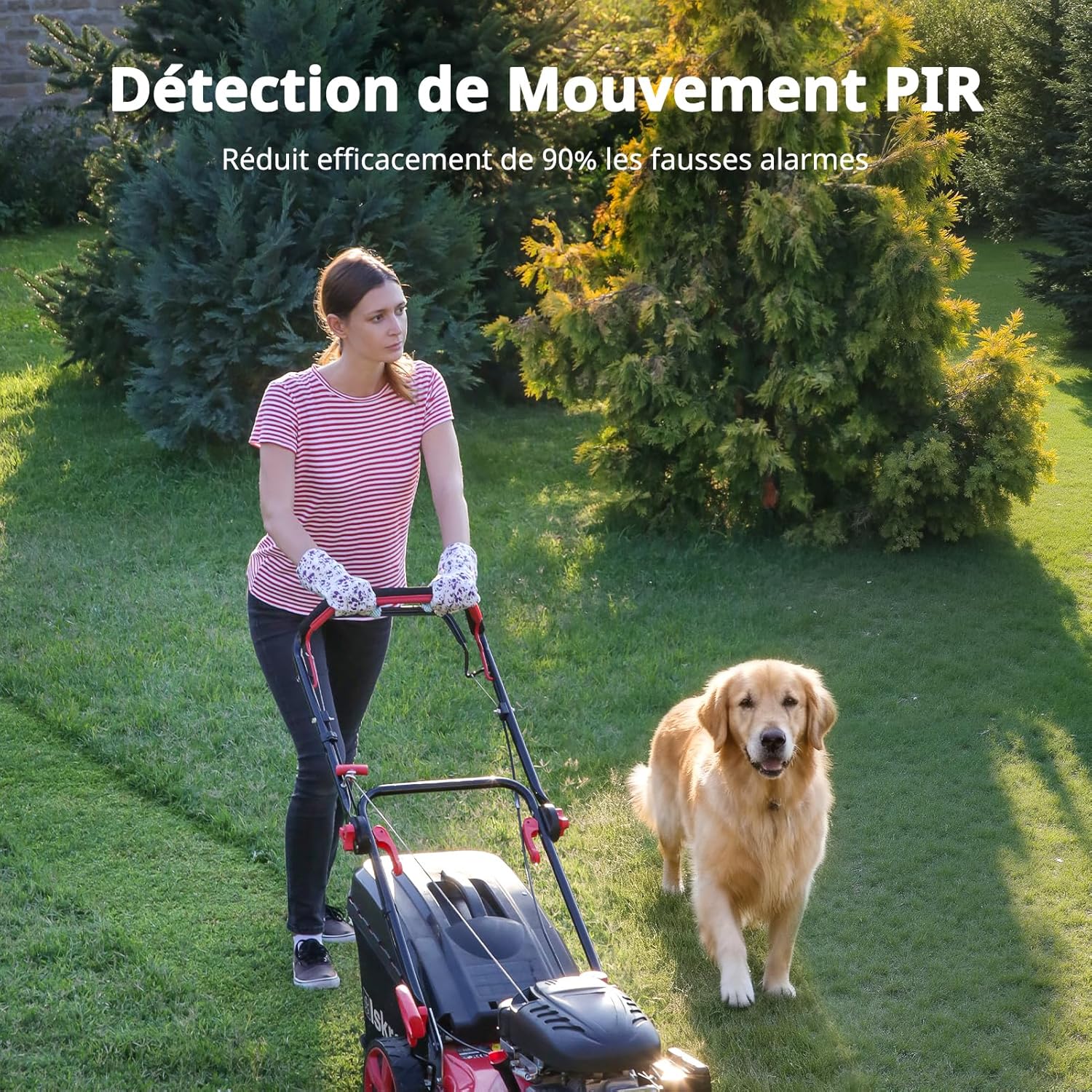
Figure 5: PIR Motion Detection in Action
4.3 Zwei-Wege-Audio
Utilize the built-in microphone and speaker for two-way communication. This allows you to speak with visitors or deter unwanted individuals remotely through the app.

Abbildung 6: Zwei-Wege-Audiokommunikation
4.4 Nachtsicht
The camera provides 2K HD color night vision. In low-light conditions, the camera will activate a warm light to capture clear, full-color images up to 10 meters.

Abbildung 7: 2K HD Farb-Nachtsicht
4.5 Speichermöglichkeiten
Die Kamera unterstützt zwei Speichermethoden:
- MicroSD-Karte: Compatible with microSD cards up to 128 GB for local storage and loop recording.
- Cloud-Speicher: A 30-day free trial of cloud storage is available. Choose the storage method that best suits your needs.

Figure 8: MicroSD and Cloud Storage Options
5. Wartung
The Caytail DK201 camera is IP65 certified, making it resistant to dust and water. This ensures reliable operation in various weather conditions.
- Reinigung: Reinigen Sie die Kameralinse und das Solarpanel regelmäßig mit einem weichen, fusselfreien Tuch.amp Stoff, um klare Sicht und effizientes Aufladen mit Solarenergie zu gewährleisten.
- Platzierung des Solarmoduls: Ensure the solar panel remains free from obstructions (e.g., leaves, dirt) that could reduce its charging efficiency.
- Firmware-Updates: Prüfen Sie regelmäßig die Ubox-App auf Firmware-Updates, um sicherzustellen, dass Ihre Kamera über die neuesten Funktionen und Sicherheitsverbesserungen verfügt.

Abbildung 9: IP65-Wetterbeständigkeit
6. Fehlerbehebung
If you encounter issues with your Caytail DK201 camera, please refer to the following common solutions:
- Kamera stellt keine Verbindung zum WLAN her:
- Stellen Sie sicher, dass Ihr WLAN-Netzwerk mit 2.4 GHz arbeitet. Die Kamera unterstützt keine 5-GHz-Netzwerke.
- Überprüfen Sie, ob das WLAN-Passwort korrekt ist.
- Place the camera closer to your Wi-Fi router to improve signal strength. Thick walls can reduce signal range.
- Starten Sie Ihren Router und die Kamera neu und versuchen Sie dann, die Verbindung wiederherzustellen.
- Schlechte Bildqualität:
- Reinigen Sie die Kameralinse, um Schmutz oder Flecken zu entfernen.
- Stellen Sie sicher, dass sich keine Hindernisse im Sichtfeld der Kamera befinden. view.
- Check your internet connection speed. A stable connection is required for high-quality streaming.
- Akku lädt nicht:
- Stellen Sie sicher, dass das Solarpanel sauber ist und täglich mehrere Stunden direktes Sonnenlicht erhält.
- Verify the connection cable between the solar panel and the camera is secure.
- In prolonged cloudy weather, the battery may drain. Consider temporarily charging the camera via USB if available.
- Bewegungserkennung funktioniert nicht:
- Check the motion detection settings in the Ubox app to ensure it is enabled and sensitivity is adjusted correctly.
- Stellen Sie sicher, dass sich keine Gegenstände (z. B. Äste, Fahnen) in der Nähe befinden, die durch Bewegungen Fehlalarme auslösen könnten.
For further assistance, please contact Caytail customer support.
7. Spezifikationen
| Besonderheit | Spezifikation |
|---|---|
| Modellname | DK201 |
| Marke | Caytail |
| Konnektivitätstechnologie | Wireless, Wi-Fi (2.4 GHz) |
| Auflösung | 2K (3 Megapixels effective) |
| Schwenken/Neigen (PTZ) | 360 ° Horizontal, 90 ° Vertikal |
| Nachtsicht | Color Night Vision (up to 10 meters) |
| Bewegungserkennung | PIR-Bewegungsmelder |
| Audio | Zwei-Wege-Audio |
| Stromquelle | Solar Panel (3W) / Built-in 5200 mAh Battery |
| Lagerung | MicroSD (up to 128 GB), Cloud Storage |
| Wetterbeständigkeit | IP65 Wasserdicht |
| Kompatible Geräte | Smartphone (Ubox App) |
| Maße | 15 x 12 x 12 cm |
| Gewicht | 300 Gramm |
8. Garantie und Support
For warranty information and technical support, please refer to the documentation included with your product or contact Caytail customer service directly. Amazon's return policy allows for returns within 30 days of purchase.
Kontaktinformationen: Please visit the official Caytail website or refer to your purchase receipt for customer support details.