
1. Einleitung
This manual provides essential instructions for the installation, operation, and maintenance of your Real HD DS-2CD1083G2-LIUF 4K 8MP Smart Hybrid Light IP Bullet PoE Camera. Please read this manual thoroughly before using the product to ensure proper and safe operation. This camera is designed for outdoor security surveillance, offering 4K resolution, advanced AI detection, and robust weather protection.
2. Sicherheitshinweise
- Ensure the power supply (12V DC or PoE) meets the camera's requirements.
- Setzen Sie die Kamera keinen extremen Temperaturen, hoher Luftfeuchtigkeit oder korrosiven Umgebungen aus.
- Avoid pointing the lens directly at strong light sources for extended periods.
- Installation should be performed by qualified personnel and comply with local electrical codes.
- Vor jeglichen Wartungs- oder Reinigungsarbeiten die Stromzufuhr unterbrechen.
3. Packungsinhalt
Überprüfen Sie, ob alle Artikel im Paket vorhanden sind:
- Real HD DS-2CD1083G2-LIUF IP Bullet PoE Camera (1 unit)
- Befestigungsschrauben und Dübel
- Wasserdichter Stecker für Ethernet-Kabel
- Kurzanleitung (falls enthalten)
Note: SD card and power adapter are not included.
4. Produktüberschreitungview
The DS-2CD1083G2-LIUF is an 8MP 4K IP bullet camera featuring a 2.8mm wide-angle lens, Smart Hybrid Light technology, and advanced human and vehicle detection capabilities. It is designed for outdoor use with an IP67 weatherproof rating.

Abbildung 4.1: The camera provides 4K Ultra HD resolution for clear surveillance footage.
Hauptmerkmale:
- 4K 8MP Auflösung: Captures detailed video at 3840 × 2160 pixels.
- 2.8 mm festes Objektiv: Provides a wide 112° horizontal field of view.
- Smart Hybrid Light: Combines IR and white light for clear night vision, including color images in low light.
- Personen- und Fahrzeugerkennung: AI-powered analytics reduce false alarms.
- H.265+ Komprimierung: Efficient video encoding saves storage and bandwidth.
- Eingebautes Mikrofon: Zur Audioüberwachung.
- SD-Kartensteckplatz: Supports up to 512GB for local storage (SD card not included).
- IP67 Wetterfest: Robustes Design für den Einsatz im Außenbereich.
- PoE (Stromversorgung über Ethernet): Simplifies installation with single cable for power and data.
5. Einrichtung und Installation
5.1 Physische Installation
Die Kamera ist für die Wandmontage vorgesehen. Wählen Sie einen geeigneten Standort, der die gewünschten Bedingungen bietet. viewing angle and is within reach of your network cable.
- Montageort: Select a sturdy wall or surface. Ensure the camera's field of view ist ungehindert.
- Bohrlöcher: Use the provided mounting template (if available) or the camera base to mark and drill pilot holes for screws.
- Sichere Kamera: Attach the camera base to the wall using the supplied screws and wall plugs.
- Winkel anpassen: Loosen the adjustment screws to position the camera lens for optimal coverage, then tighten them to secure the angle.

Abbildung 5.1: The IP67 weatherproof design ensures reliable outdoor performance.
5.2 Netzwerkverbindung (PoE)
The camera supports Power over Ethernet (PoE), allowing a single Ethernet cable to provide both power and data connection.
- Ethernet-Kabel anschließen: Connect one end of an Ethernet cable to the camera's RJ45 port. Use the waterproof connector to protect the connection if installing outdoors.
- Verbindung zum PoE-Gerät herstellen: Connect the other end of the Ethernet cable to a PoE-enabled NVR, PoE switch, or PoE injector.
- Alternative Power (12V DC): If not using PoE, connect a 12V DC power adapter (not included) to the camera's power input and an Ethernet cable to a standard network switch/router.
5.3 Erstkonfiguration
After connecting the camera to your network, you will need to activate and configure it.
- Kamera entdecken: Use the manufacturer's SADP tool or your NVR's device search function to find the camera's IP address on your network.
- Kamera aktivieren: The camera will likely be inactive upon first use. Set a strong password for the camera.
- Zugang Web Schnittstelle: Öffnen Sie ein web browser (e.g., Chrome, Firefox) and enter the camera's IP address. Log in with the newly set password.
- Netzwerkeinstellungen: Configure network settings (e.g., static IP, DNS) if necessary.
- Zeiteinstellungen: Stellen Sie das korrekte Datum und die korrekte Uhrzeit für eine genaue Zeiterfassung ein.amps.
6. Bedienungsanleitung
6.1 Zugriff auf Live View und Wiedergabe
You can access the camera's live view und aufgenommenes Essentage via its web interface or a compatible NVR/client software.
- Web Browser: Log into the camera's web interface. Navigate to the "Live View" section to see real-time footage. For playback, go to the "Playback" section and select the desired date and time.
- NVR: If connected to an NVR, access the camera's feed and recordings through the NVR's interface. Refer to your NVR's manual for specific instructions.
6.2 Aufzeichnungsverwaltung
The camera supports various recording methods.
- SD-Kartenspeicher: Insert a microSD/SDHC/SDXC card (up to 512GB, not included) into the camera's card slot. Format the card via the web interface. Configure recording schedules and event-triggered recording.
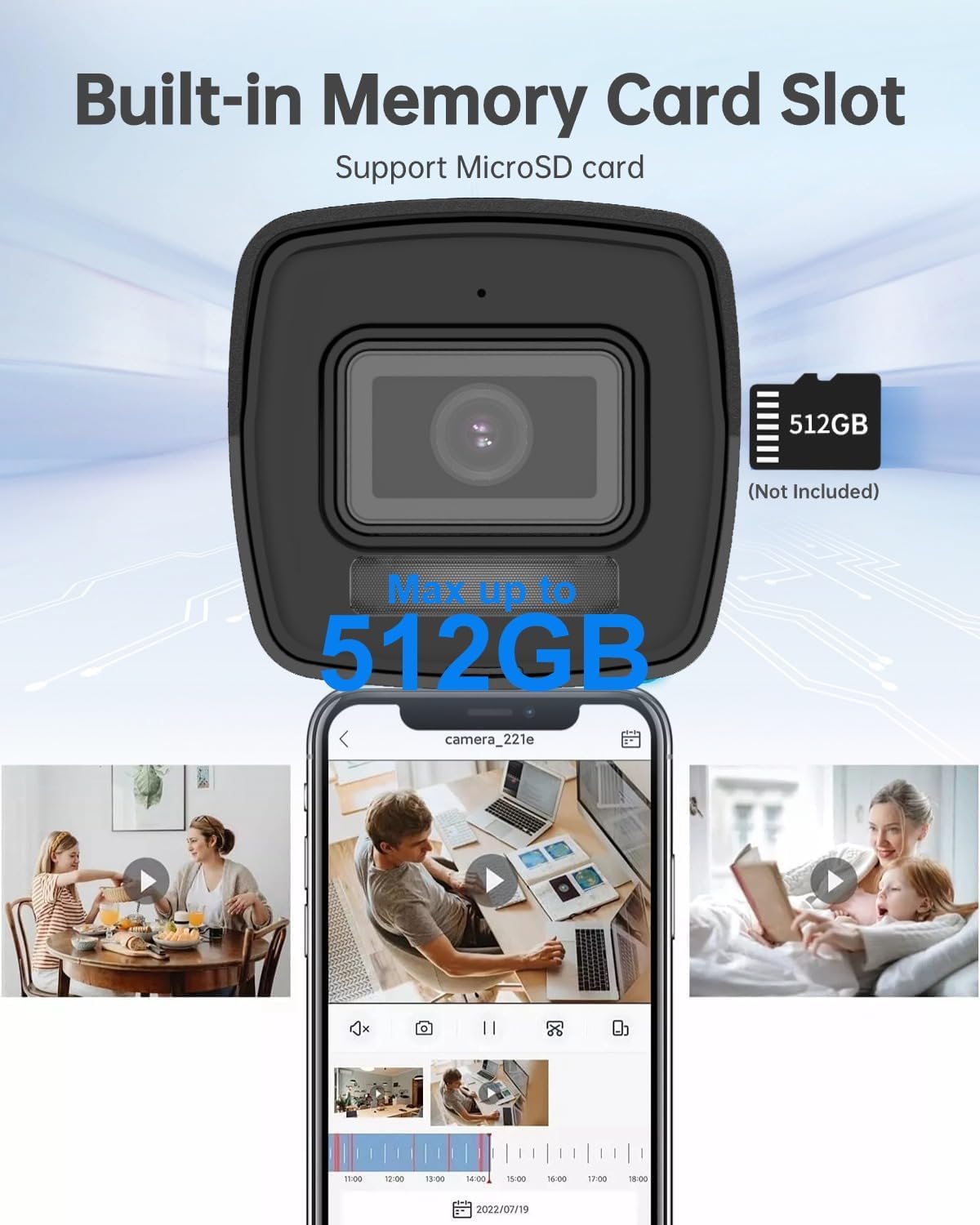
Abbildung 6.1: The camera features a built-in memory card slot supporting up to 512GB for local storage.
- NAS-Speicher: Configure Network Attached Storage (NFS, SMB/CIFS) for remote recording.
- H.265+ Komprimierung: The camera utilizes H.265+ video compression to optimize storage space and bandwidth without compromising video quality.

Abbildung 6.2: H.265+ compression reduces data usage by up to 80% compared to H.264.
6.3 Smart Features (AI Detection)
The camera's advanced AI capabilities provide intelligent detection and reduce false alarms.
- Personen- und Fahrzeugerkennung: Configure detection zones and sensitivity in the camera's web interface. The system can differentiate between humans, vehicles, and other moving objects like raindrops or leaves.
- Linienüberschreitungserkennung: Set up virtual lines, and the camera will trigger an alarm when an object crosses them in a specified direction.
- Einbruchserkennung: Define virtual regions, and the camera will alert you if an object enters and loiters within that area.
- Unattended Baggage/Object Removal: Configure specific areas for detecting objects left behind or removed.

Abbildung 6.3: Smart AI detection accurately identifies humans and vehicles, reducing false alarms.
6.4 Audioüberwachung
The built-in microphone allows for real-time audio monitoring. Enable and adjust audio settings via the camera's web Schnittstelle.
6.5 Night Vision and Smart Hybrid Light
The camera features advanced infrared technology and Smart Hybrid Light for clear imaging in various lighting conditions.
- IR-Modus: Provides black and white video in complete darkness with a range of up to 98 feet.
- Smart Hybrid Light: In low-light conditions, the camera can automatically switch to a mode that uses supplemental white light to provide full-color images. This can be configured in the camera settings.

Abbildung 6.4: Advanced Infrared Technology (EXIR 2.0) enhances night vision clarity.
7. Wartung
7.1 Reinigung
- Wischen Sie die Kameralinse und das Kameragehäuse vorsichtig mit einem weichen, fusselfreien Tuch ab.amp Tuch.
- Verwenden Sie keine aggressiven Chemikalien oder Scheuermittel.
- Achten Sie darauf, dass keine Feuchtigkeit in das Kameragehäuse eindringt.
7.2 Firmware-Updates
Überprüfen Sie regelmäßig die Herstellerangaben. website for firmware updates. Updating firmware can improve performance, add new features, and enhance security. Follow the instructions provided with the firmware update package carefully.
7.3 Speicherverwaltung
Regelmäßig review und verwaltet aufgezeichnetetage. If using an SD card, ensure it is functioning correctly and has sufficient space. Consider backing up important footage to an NVR or NAS.
8. Fehlerbehebung
| Problem | Mögliche Ursache | Lösung |
|---|---|---|
| Kein Bild-/Videofeed | No power; Network cable disconnected; Incorrect IP address; Camera not activated. | Check power supply (PoE or 12V DC); Verify Ethernet cable connection; Ensure correct IP address and network settings; Activate camera and set password. |
| Schlechte Bildqualität | Dirty lens; Insufficient lighting; Incorrect video settings. | Clean the lens; Ensure adequate lighting or enable Smart Hybrid Light; Adjust image settings (brightness, contrast, sharpness) in the web Schnittstelle. |
| False alarms from detection | Sensitivity too high; Detection zones too wide; Environmental factors (e.g., moving branches). | Adjust detection sensitivity; Refine detection zones to exclude irrelevant areas; Utilize human/vehicle detection to filter out non-human/vehicle movements. |
| Cannot record to SD card | SD card not inserted; SD card not formatted; SD card full or faulty. | Insert SD card correctly; Format SD card via web interface; Replace SD card if faulty. |
9. Spezifikationen
| Besonderheit | Detail |
|---|---|
| Modellname | DS-2CD1083G2-LIUF |
| Bildsensor | 1/2.7" Progressive Scan CMOS |
| Effektive Standbildauflösung | 8 MP (3840 × 2160) |
| Min. Beleuchtung | 0.01 Lux @ (F2.0, AGC ON), 0 Lux with Light |
| Linse | 2.8mm Feste Linse |
| Viewing-Winkel | Horizontales Sichtfeld 112°, Vertikales Sichtfeld 61°, Diagonales Sichtfeld 134° |
| Tag & Nacht | Auto |
| Digitale Rauschunterdrückung | 3D-DNR |
| Videokomprimierung | H.265+/H.265/H.264+/H.264/MJPEG |
| Max. Bildauflösung | 3840 × 2160 @ 15fps |
| Bildverbesserung | BLC/3D DNR/HLC/ROI |
| Netzwerkspeicher | microSD/SDHC/SDXC card (512GB max), NAS (NFS, SMB/CIFS), ANR |
| Kommunikationsschnittstelle | 1 RJ45 10M / 100M Ethernet interface |
| Verhaltensanalyse | Erkennung von Linienüberschreitungen, Einbrucherkennung, Erkennung von unbeaufsichtigtem Gepäck, Erkennung von Objektentfernungen |
| Stromversorgung | 12 VDC ± 25 %, PoE (802.3af, Klasse 3) |
| Energieaufnahme | max. 10 Watt |
| Wetterfest | IP67 |
| Nachtsichtbereich | 98 Fuß |
| Verwendung im Innen- und Außenbereich | Im Freien |
| Material | Metall, Kunststoff |
| Maße | 6.7 x 6.7 x 6 Zoll (ungefähr) |
10. Garantie und Support
For warranty information, technical support, or service inquiries, please contact the Real HD Store or your authorized dealer. Keep your purchase receipt as proof of purchase.
Besuchen Sie die Real HD Store on Amazon für weitere Informationen und Supportressourcen.