
1. Einleitung
This manual provides detailed instructions for the safe and efficient operation of your NBD 5K 64MP Digital Camera, model S110-WM. Please read this manual thoroughly before using the camera and retain it for future reference. This camera features 5K video recording, 64-megapixel still image capture, 16x digital zoom, autofocus, anti-shake functionality, a 3-inch 180-degree rotatable display, Wi-Fi connectivity, and includes wide-angle and macro lenses.
2. Packungsinhalt
Bitte prüfen Sie, ob alle unten aufgeführten Artikel in Ihrem Paket enthalten sind. Sollten Artikel fehlen oder beschädigt sein, kontaktieren Sie bitte unseren Kundenservice.
- NBD 5K 64MP Digital Camera Body (S110-WM)
- Weitwinkelobjektiv
- Makro-Objektiv
- Wiederaufladbare Lithium-Ionen-Akkus (x2)
- Ladegerät
- USB-Kabel
- 64GB TF Karte
- Kameragurt
- Bedienungsanleitung

Image: Contents of the NBD 5K 64MP Digital Camera package, including the camera body, lenses, batteries, charger, cables, TF card, and strap.
3. Einrichtung
3.1. Einbau und Aufladen der Batterie
- Öffnen Sie die Abdeckung des Batteriefachs an der Unterseite der Kamera.
- Insert the lithium-ion battery, ensuring the correct orientation as indicated inside the compartment.
- Schließen Sie den Batteriefachdeckel fest.
- To charge, connect the camera to a power source using the provided USB cable and charger. The charging indicator light will show the charging status.
The camera comes with two 1500mAh high-capacity lithium-ion batteries, allowing for extended shooting time. The advanced battery charger also functions as a charging station.
3.2. Installation der TF-Karte
- Suchen Sie den TF-Kartensteckplatz an der Seite der Kamera.
- Insert the 64GB TF card into the slot with the metal contacts facing down, aligning it with the icon.
- Drücken Sie die Karte vorsichtig hinein, bis sie einrastet. Zum Herausnehmen drücken Sie die Karte erneut hinein, bis sie herausspringt.

Image: Visual guide for inserting and removing the TF card. Push until it clicks to lock, push again to release.
3.3. Objektivaufsatz
The camera includes a wide-angle lens and a macro lens. These 52mm detachable lenses can be screwed onto the front of the main camera lens.
- Weitwinkelobjektiv: Erweitert das Anwendungsgebiet von view up to 120 degrees, suitable for landscapes and group shots.
- Makroobjektiv: Allows for close-up photography, capturing fine details of small subjects.

Image: The NBD digital camera shown with its detachable wide-angle and macro lenses, highlighting their use for different photographic needs.
4. Bedienungsanleitung
4.1. Ein-/Ausschalten
Zum Ein- oder Ausschalten der Kamera den Ein-/Ausschalter (normalerweise mit einem Ein-/Ausschaltersymbol gekennzeichnet) gedrückt halten.
4.2. Grundlegende Fotomodi
The camera offers various shooting modes accessible via the mode dial or menu. These include:
- Fotomodus: Zum Aufnehmen von Standbildern.
- Videomodus: Für Videoaufnahmentage.
- Zeitlupe: Zeichnet Videos mit einer höheren Bildrate für die Zeitlupenwiedergabe auf.
- Zeitraffer: Captures a series of photos over time and combines them into a video.
- Filtermodus: Applies various creative filters to your photos and videos.
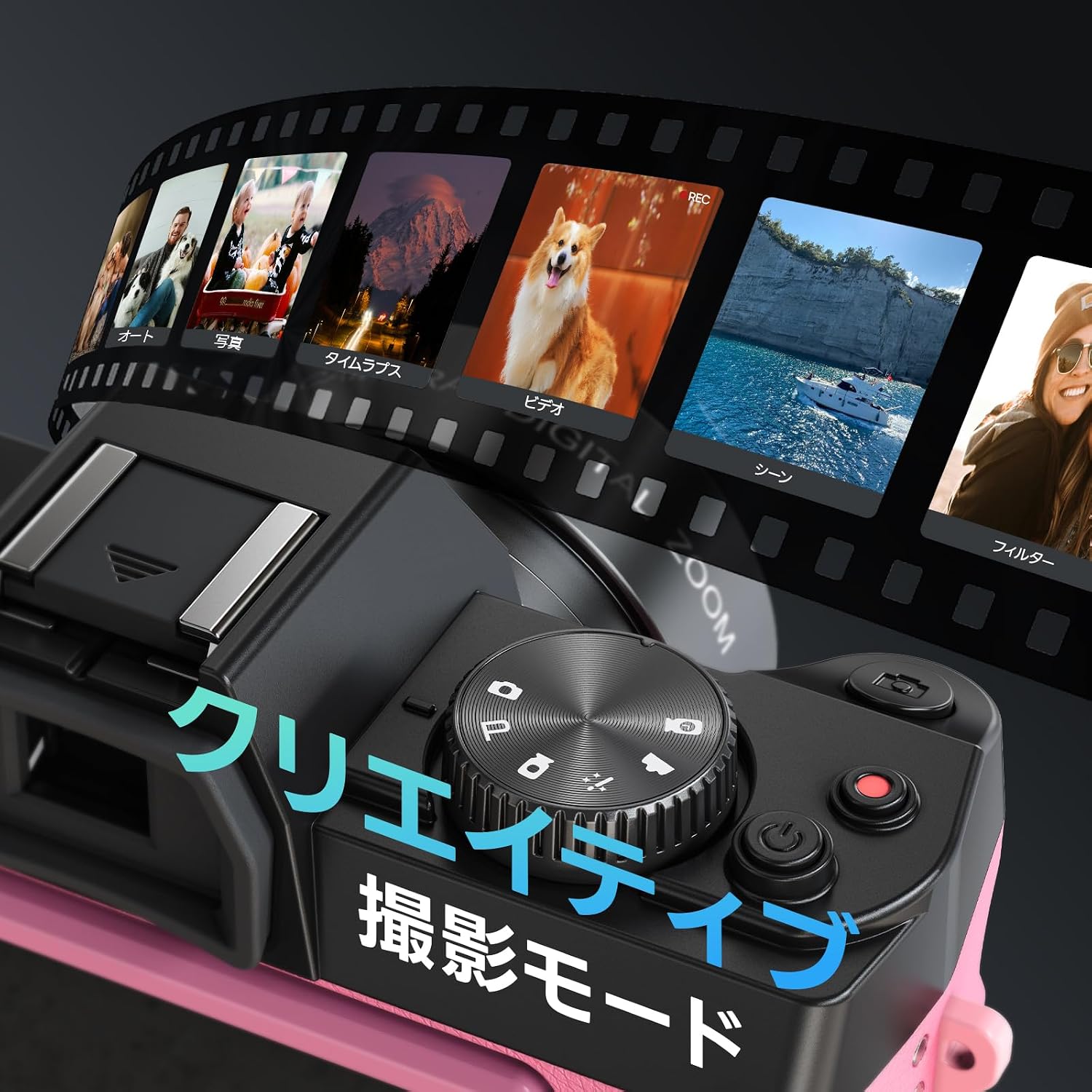
Image: The camera's display showing various creative shooting modes like Photo, Video, Time-Lapse, and Filters.
4.3. Autofocus and Anti-shake
The camera features autofocus and anti-shake functions to ensure clear and stable images.
- Autofokus: Half-press the shutter button to activate autofocus. The camera will focus on the subject, indicated by a green frame on the screen.
- Anti-Shake: This feature automatically stabilizes your shots, reducing blur caused by camera movement.

Image: Instructions on how to use autofocus by half-pressing the shutter button to achieve a clear focus.

Image: A comparison showing the effect of the anti-shake feature, with a clear image on the left and a blurred image on the right when anti-shake is off.
4.4. Digitalzoom
The camera supports up to 16x digital zoom. Use the zoom controls (usually marked 'W' for wide and 'T' for telephoto) to adjust the magnification.

Image: Visual representation of the 16x digital zoom capability, showing different levels of magnification from 4x to 16x.
4.5. 180° Flip Screen
The 3-inch LCD screen can be rotated 180 degrees, making it ideal for selfies and vlogging. Adjust the screen to your desired angle for easy framing and monitoring.

Image: The NBD camera with its screen flipped 180 degrees, demonstrating its utility for self-recording or vlogging.
4.6. WLAN-Konnektivität und App-Steuerung
The camera supports Wi-Fi for seamless transfer of photos and videos to your smartphone and remote control via a dedicated app.
- Turn on Wi-Fi in the camera's settings menu.
- Scan the QR code displayed on the camera screen or refer to the manual to download the companion app on your smartphone. App herunterladen
- Connect your smartphone to the camera's Wi-Fi hotspot. The hotspot name and password will be displayed on the camera screen.
- Once connected, you can use the app to remotely control shooting, adjust settings, preview in real-time, and transfer files.

Image: A step-by-step visual guide for connecting the camera to a smartphone via Wi-Fi and using the app for remote control and file Übertragung.
The camera can also function as a webKamera, wenn sie über USB an einen Computer angeschlossen ist.
4.7. Adjusting Image and Video Quality
You can adjust the resolution and aspect ratio for both photos and videos through the camera's menu.
- Press the 'Fn' (Function) key to access quick settings.
- Navigate using the arrow keys to select "Image Resolution" or "Video Resolution".
- Drücken Sie „OK“, um Ihre Auswahl zu bestätigen.
Available photo resolutions include up to 64MP. Video resolutions include 5K 25FPS, 4K 30FPS, 2K 30FPS, 1080P 60FPS/30FPS, and 720P 120FPS/60FPS.

Image: A visual guide demonstrating how to access and change image and video quality settings using the 'Fn' button and navigation keys.
4.8. Continuous Shooting and Self-Timer
The camera supports continuous shooting for capturing fast-moving subjects and a self-timer for delayed shots.
- Dauerfeuer: Allows you to capture multiple frames per second.
- Selbstauslöser: Options typically include 2s, 5s, and 10s delays before taking a photo.

Image: A sequence of images demonstrating the continuous shooting mode, capturing a person jumping with a basketball.

Image: Three images showing the self-timer function with 2-second, 5-second, and 10-second delay options for group photos.
4.9. Eingebauter Blitz
The camera includes a built-in flash for illuminating subjects in low-light conditions. It can be turned on or off as needed.

Image: The NBD camera with its built-in flash activated, illuminating a subject in a dark environment, compared to the same scene without flash.
5. Wartung
- Reinigen Sie die Kamera mit einem weichen, trockenen Tuch. Vermeiden Sie die Verwendung von scharfen Chemikalien oder scheuernden Materialien.
- Clean the lens gently with a lens cleaning cloth and solution. Do not touch the lens surface with your fingers.
- Bewahren Sie die Kamera an einem trockenen, kühlen Ort fern von direkter Sonneneinstrahlung und extremen Temperaturen auf.
- Wenn die Kamera längere Zeit nicht verwendet wird, entnehmen Sie die Batterie.
6. Fehlerbehebung
| Problem | Mögliche Ursache | Lösung |
|---|---|---|
| Die Kamera lässt sich nicht einschalten. | Die Batterie ist leer oder falsch eingesetzt. | Laden Sie den Akku auf oder setzen Sie ihn wieder richtig ein. |
| Bilder sind verschwommen. | Autofocus not engaged, anti-shake off, or insufficient light. | Half-press shutter to focus, ensure anti-shake is on, or use flash/better lighting. |
| Es kann keine Verbindung zum WLAN hergestellt werden. | Incorrect password, Wi-Fi not enabled on camera, or app issue. | Verify Wi-Fi settings and password, restart camera and phone app. |
| TF card error. | Card incorrectly inserted or corrupted. | Re-insert the TF card. If the issue persists, try formatting the card (this will erase all data) or use a different card. |
7. Spezifikationen
| Besonderheit | Detail |
|---|---|
| Modellname | S110-WM |
| Marke | Keine Angabe |
| Fotosensor-Technologie | CMOS |
| Maximale Bildauflösung | 64 Megapixel |
| Auflösung der Videoaufnahme | 5K, 4K, 2K, 1080P, 720P |
| Digital Zoom | 16x |
| Bildschirmgröße | 3 Zoll |
| Besondere Merkmale | 180° Flip Screen, Autofocus, Anti-shake, Wi-Fi, WebNockenfunktion |
| Objektivtyp | Macro/Wide-angle (52mm detachable lenses included) |
| Mindestens erweiterte ISO | 100 |
| Maximum Expanded ISO | 6400 |
| File Format | MOV, JPG |
| Art der Expositionskontrolle | Auto, Manuell |
| Verschlusszeit | 1/3 bis 1/2000 Sekunden |
| Akku-Typ | Lithium-ion (1500mAh x2) |
| Inklusive Speicherkarte | 64GB TF Karte |
| Produktgewicht | 442 Gramm |
| Abmessungen (T x B x H) | 12.6 x 11 x 8.2 cm |
| Herkunft | China |
8. Garantie und Support
Dieses Produkt wird mit einem 1 Jahr Garantie from the date of purchase. For warranty claims, technical support, or any inquiries regarding your NBD Digital Camera, please contact NBD customer service through the retailer where you purchased the product or visit the official NBD webWebsite für Support-Kontaktinformationen.
Bitte bewahren Sie Ihren Kaufbeleg zur Überprüfung der Garantie auf.


