
1. Einleitung
The DUSONLAP E6 AI Translation Earbuds are designed to facilitate communication across language barriers, offer music playback, and handle phone calls. These earbuds feature advanced translation capabilities, a comfortable open-ear design, and extended battery life, making them suitable for various daily activities and international interactions.
2. Lieferumfang
Prüfen Sie nach dem Öffnen der Verpackung, ob alle unten aufgeführten Artikel vorhanden sind:
- DUSONLAP E6 Translation Earbuds (Left & Right)
- Fast-Charging Case
- Typ C Ladekabel
- Bedienungsanleitung
- Translation Manual

Image: Package contents of the DUSONLAP E6 AI Translation Earbuds.
3. Produktüberschreitungview
3.1 Hauptmerkmale
- Drei-in-Eins-Funktionalität: Combines translation, music playback, and phone calls.
- HiFi-Audio: Equipped with 14.2mm Hi-Fi dynamic drivers for clear sound.
- ENC-Geräuschunterdrückung: Filters up to 90% of background noise for calls.
- Umfassende Sprachunterstützung: Supports 164 languages without subscription.
- Mehrere Übersetzungsmodi: Includes Free Talk, Headset + Phone, Translation Machine, Photo Translation, Voice Memo, and AI Chat modes.
- KI-Chat-Modus: Integrates OpenAI 4.0 mini API for intelligent conversations.
- Offenes Ohr-Design: Ergonomic ear hook design for comfort and situational awareness.
- Bluetooth 5.4: Ensures instant pairing and stable transmission up to 15 meters.
- Verlängerte Akkulaufzeit: Up to 8 hours per charge, 32 hours with charging case.
- IPX7 Wasserdicht: Beständig gegen Schweiß, Regen und Spritzwasser.
3.2 Komponenten

Image: Internal structure of the earbud, showing the 14.2mm driver and sound features.
The earbuds feature a 14.2mm dynamic driver for audio output and are designed for clear calls and language translation. The charging case includes a digital display for battery levels.
4. Einrichtung
4.1 Aufladen der Ohrhörer und des Ladecase
Vor dem ersten Gebrauch die Ohrhörer und das Ladecase vollständig aufladen.
- Legen Sie die Ohrhörer in das Ladeetui.
- Verbinden Sie das Typ-C-Ladekabel mit dem Ladeanschluss am Gehäuse und mit einer Stromquelle.
- Das digitale Display am Ladecase zeigt den Akkustand in Prozent an.tage.
- Eine vollständige Ladung ermöglicht bis zu 8 Stunden Wiedergabezeit für die Ohrhörer und insgesamt 32 Stunden mit dem Ladecase.
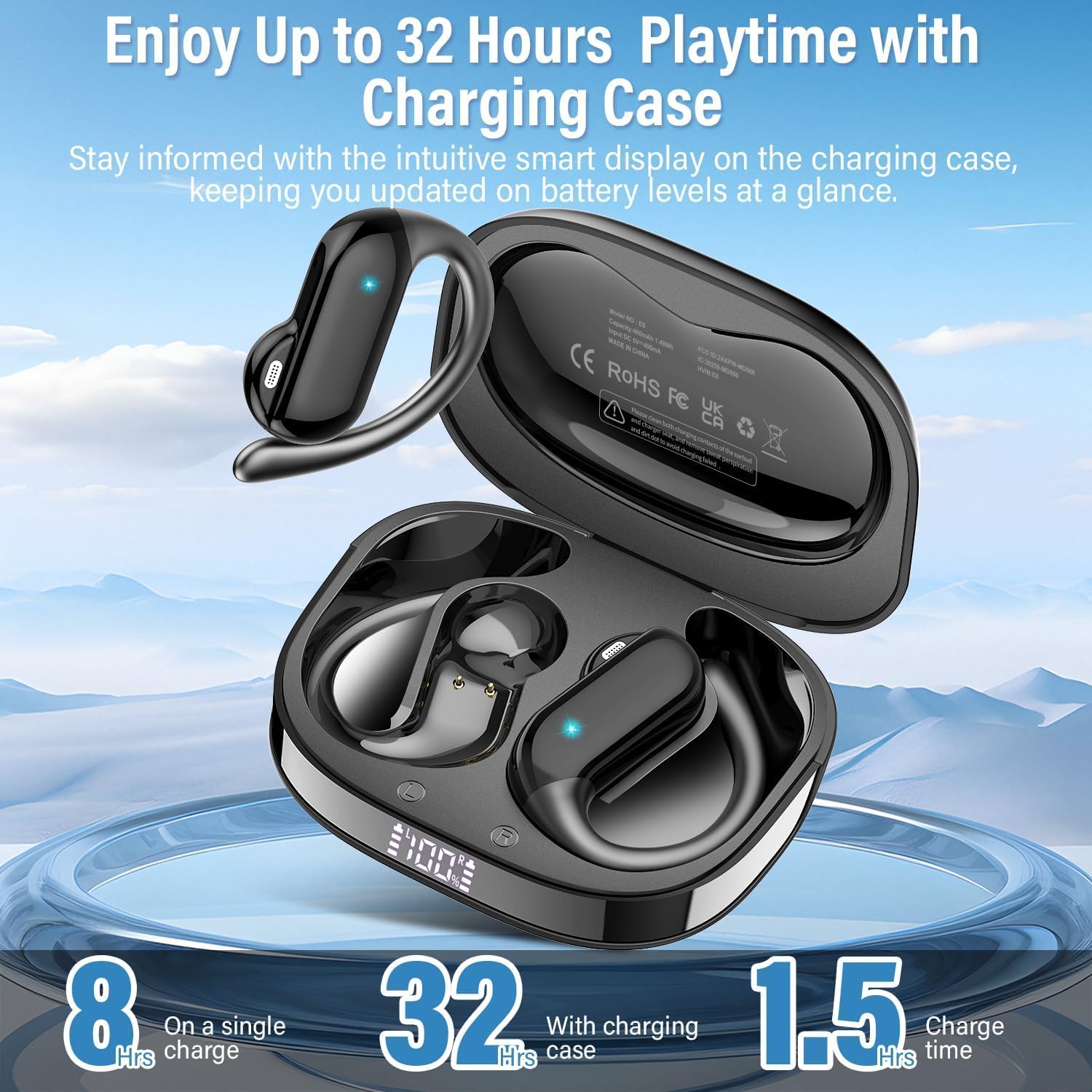
Image: Earbuds in charging case showing battery life.
4.2 Bluetooth-Kopplung
- Öffnen Sie das Ladeetui. Die Ohrhörer wechseln automatisch in den Kopplungsmodus.
- On your device (phone, tablet, laptop), enable Bluetooth and search for "DUSONLAP E6".
- Select "DUSONLAP E6" to connect. The earbuds will automatically pair after the initial connection.
4.3 App-Installation und -Bindung
To utilize the translation features, download the "Ear Dance" application.
- Scan the QR code provided in the translation manual or visit earjoy.watchfun.cn/app-download-h5?appCode=eardance um die "Ear Dance"-App herunterzuladen.
- After installing, launch the "Ear Dance" application.
- Ensure Bluetooth is enabled and the earbuds are connected to your device. The app should automatically detect the earbuds.
- Navigate to the "My" page within the app and click "Bind Device".
- Scan the authorization QR code from the translation manual or manually enter the code to complete the binding process.

Image: Steps for connecting earbuds to the "Ear Dance" app.
5. Bedienungsanleitung
5.1 Tragen der Ohrhörer
The DUSONLAP E6 earbuds feature an open-ear design for comfort and awareness of surroundings.
- Nehmen Sie die Ohrhörer aus dem Ladeetui.
- Hang the ear hook over the top of your ear.
- Adjust the earbud to sit comfortably and securely, ensuring the speaker is positioned near your ear canal without being inserted directly into it.

Image: Proper way to wear the open-ear earbuds.
5.2 Grundlegende Bedienelemente (Touch)
Die Ohrhörer verfügen über Touch-Bedienelemente für verschiedene Funktionen:
- Lautstärke +: Single tap (x1) on the right earbud.
- Lautstärke -: Single tap (x1) on the left earbud.
- Abspielen/Pause: Tippen Sie zweimal (x2) auf einen der Ohrhörer.
- Sprachassistent: Dreimaliges Tippen (x3) auf einen der Ohrhörer.
- Nächster Titel: Long press (2S) on the right earbud.
- Vorheriges Lied: Long press (2S) on the left earbud.
- Anruf annehmen: Tippen Sie zweimal (x2) auf einen der Ohrhörer.
- Auflegen/Anruf ablehnen: Einen der Ohrhörer 2 Sekunden lang drücken.

Image: DUSONLAP E6 touch control functions.
5.3 Übersetzungsmodi
The "Ear Dance" app offers multiple translation modes:
- Freisprechmodus: Earbuds automatically detect and translate languages in real-time. Both parties can wear an earbud for seamless conversation.

Abbildung: Freisprechmodus in Aktion.
- Headset- und Telefonmodus: One person wears the headset, while the other taps the phone to initiate two-way translation. Useful for quick interactions like ordering food.

Image: Headset + Phone Mode for two-way interaction.
- Übersetzungsmaschinenmodus: Click the language button in the app to translate, and the phone speaker will play the translated audio.

Abbildung: Benutzeroberfläche des Übersetzungsmaschinenmodus.
- Fotoübersetzungsmodus: Use your phone's camera through the app to instantly recognize and translate text from images.

Image: Photo Translation Mode in use.
- Sprachmemo-Modus: Converts spoken language into text. Note: Recording is limited to 30 minutes; for longer sessions, save and restart.

Image: Voice Memo Mode for speech-to-text.
- KI-Chat-Modus: Utilizes OpenAI 4.0 mini API for intelligent conversations and detailed responses. Note: Does not support real-time data like weather or dates.

Abbildung: Benutzeroberfläche des KI-Chatmodus.
5.4 Audio & Video Call Translation
The earbuds support real-time language conversion during audio and video calls, enabling cross-lingual communication.

Image: Audio and video call translation feature.
5.5 Sprachunterstützung
The DUSONLAP E6 earbuds support 164 languages, covering a wide range of global communication needs.
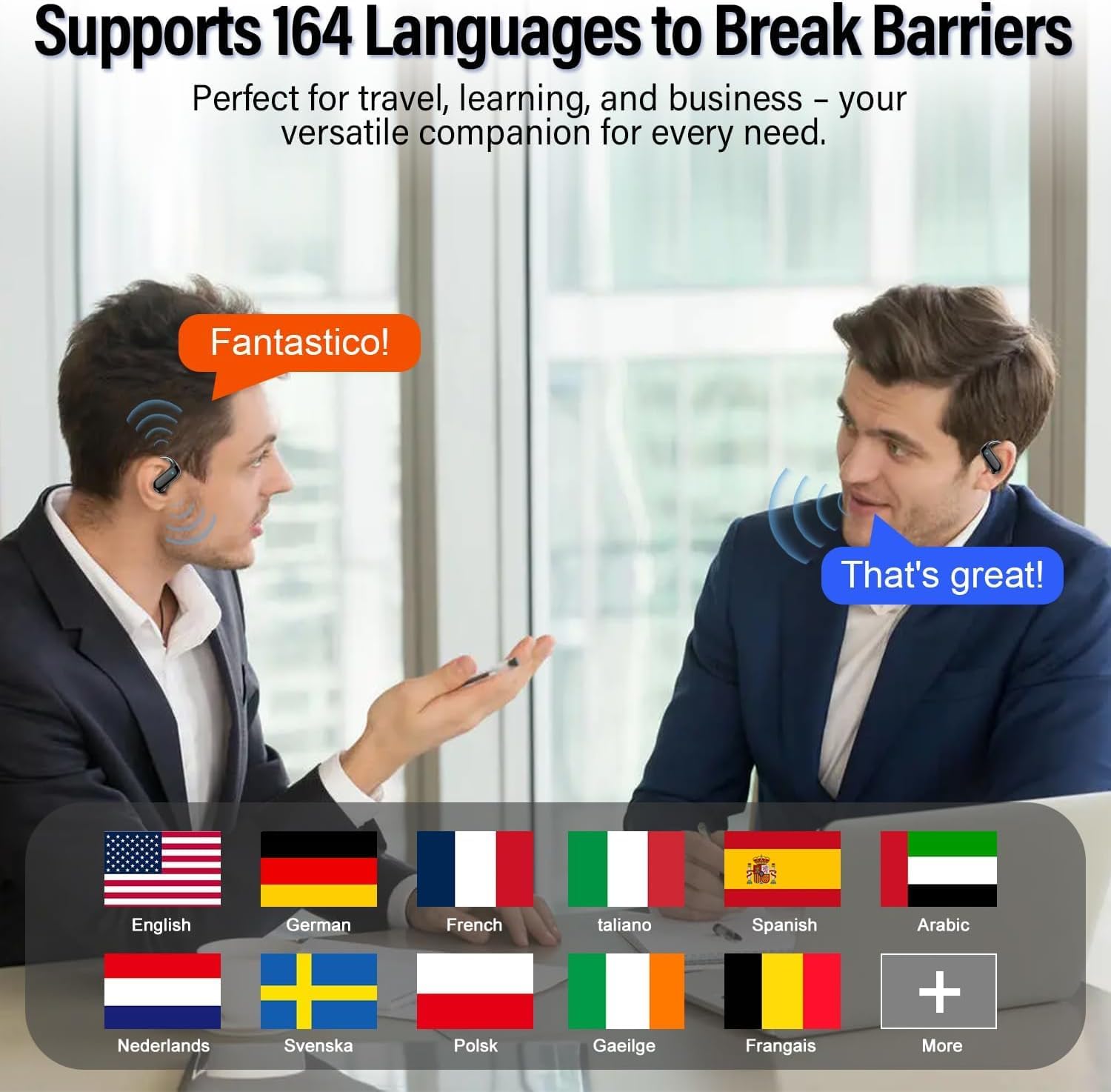
Image: Supported languages by DUSONLAP E6.
6. Wartung
6.1 Reinigung
- Reinigen Sie die Ohrhörer und das Ladecase regelmäßig mit einem weichen, trockenen, fusselfreien Tuch.
- Vermeiden Sie die Verwendung von Scheuermitteln, Lösungsmitteln oder Aerosolsprays.
- Stellen Sie sicher, dass die Ladekontakte an beiden Ohrhörern und am Ladecase sauber und trocken sind.
6.2 Wasserbeständigkeit
The earbuds are IPX7 waterproof, meaning they can withstand sweat, rain, and splashes. However, they are not designed for swimming or prolonged submersion. Ensure the earbuds are dry before placing them back in the charging case to prevent damage.

Image: IPX7 Water Resistance.
6.3 Speicherung
Bewahren Sie die Ohrhörer bei Nichtgebrauch im Ladecase auf, um sie zu schützen und geladen zu halten. Vermeiden Sie extreme Temperaturen und direkte Sonneneinstrahlung.
7. Fehlerbehebung
| Problem | Mögliche Ursache | Lösung |
|---|---|---|
| Die Ohrhörer lassen sich nicht einschalten. | Schwache Batterie. | Legen Sie die Ohrhörer in das Ladecase und laden Sie sie vollständig auf. |
| Kopplung mit dem Gerät nicht möglich. | Bluetooth ist deaktiviert, die Ohrhörer befinden sich nicht im Kopplungsmodus oder das Gerät ist zu weit entfernt. | Ensure Bluetooth is on, open case to enter pairing mode, keep devices close. Forget previous pairings and try again. |
| Translation not working or delayed. | Poor internet connection, app not properly bound, or incorrect language settings. | Check internet connection. Ensure earbuds are bound in the "Ear Dance" app. Verify selected languages are correct. Restart the app. |
| Die Klangqualität ist schlecht. | Earbuds not positioned correctly, low battery, or interference. | Adjust earbuds for a better fit. Charge earbuds. Move away from sources of interference. |
8. Spezifikationen
| Besonderheit | Detail |
|---|---|
| Marke | DUSONLAP |
| Modellnummer | E6 |
| Platzierung des Ohrs | Offenes Ohr |
| Lärmschutz | Aktive Geräuschunterdrückung (ENC für Anrufe) |
| Konnektivitätstechnologie | Kabellos (Bluetooth) |
| Bluetooth-Version | 5.4 |
| Bluetooth-Reichweite | 15 Meter |
| Akkulaufzeit (Ohrhörer) | Bis zu 8 Stunden |
| Gesamte Akkulaufzeit (mit Hülle) | Bis zu 32 Stunden |
| Wasserbeständigkeit | IPX7 |
| Audiotreibertyp | Dynamischer Treiber (14.2 mm) |
| Kontrollmethode | App, Berühren |
| Unterstützte Sprachen | 164 |
| KI-Integration | OpenAI 4.0 mini API |
9. Garantie und Support
DUSONLAP provides a 2 Jahr Garantie for the E6 AI Translation Earbuds. For warranty claims, technical support, or any inquiries, please contact DUSONLAP customer service through their official channels or the retailer where the product was purchased.
10. Produktvideos
10.1 Wireless Translator Earbuds - Easy Real-Time Translation
Video demonstrating the real-time translation capabilities and ease of use of the DUSONLAP E6 earbuds.
10.2 How These Earbuds Work
Detailed video explaining the functionality and various features of the DUSONLAP E6 AI Translation Earbuds.