
Einführung
This instruction manual provides detailed information for the safe and effective use of your NBD S205D 8K 64MP Digital Camera. Please read this manual thoroughly before operating the device and retain it for future reference. The NBD S205D is designed for high-quality photo and video capture, featuring 8K video recording, a 64MP sensor, autofocus, 16x digital zoom, and Wi-Fi connectivity.
Sicherheitshinweise
- Die Kamera darf weder Wasser noch übermäßiger Feuchtigkeit ausgesetzt werden.
- Vermeiden Sie es, die Kamera fallen zu lassen oder starken Stößen auszusetzen.
- Halten Sie die Kamera von starken Magnetfeldern fern.
- Versuchen Sie nicht, die Kamera zu zerlegen oder zu verändern. Dadurch erlischt die Garantie.
- Use only NBD-approved accessories and power adapters.
- Bewahren Sie die Kamera bei Nichtgebrauch an einem kühlen, trockenen Ort auf.
- Außerhalb der Reichweite von Kindern aufbewahren.
Packungsinhalt
Überprüfen Sie, ob alle Artikel in Ihrem Paket vorhanden sind:
- NBD S205D Digital Camera
- 2 x Lithium-ion Batteries (2000 mAh each)
- 64 GB Micro SD-Karte
- USB-Ladekabel
- Benutzerhandbuch (dieses Dokument)
- Kameragurt
- Microphone (if included in kit)
Produkt überview
Machen Sie sich mit den Komponenten der Kamera vertraut.
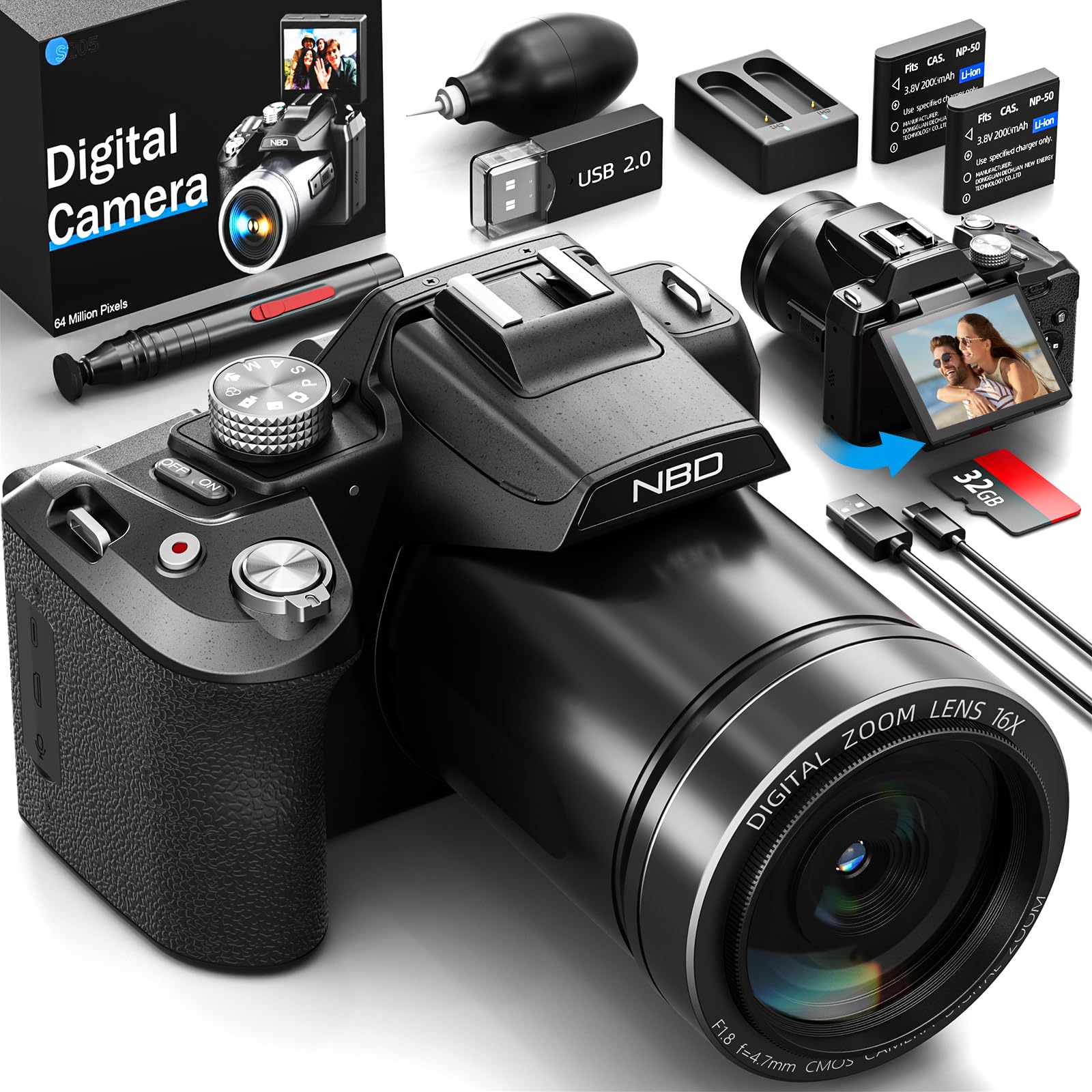
Bild: Vorderseite view of the NBD S205D Digital Camera, showing the lens, flash, and the 3-inch 180-degree rotatable screen in an open position. The camera body is deep black.
Schlüsselkomponenten:
- Linse: Captures images and videos. Features F1.8 night vision.
- Blitz: Sorgt für Beleuchtung bei schwachen Lichtverhältnissen.
- 3" 180° Rotatable Screen: Für die Bildkomposition, reviewing content, and vlogging.
- Netzschalter: Schaltet die Kamera ein/aus.
- Auslöser: Press halfway to focus, fully to capture a photo.
- Modus-Wahlrad: Selects shooting modes (e.g., Photo, Video, Playback).
- Zoomhebel: Controls digital zoom (up to 16x).
- Navigationstasten: Zur Menünavigation und Einstellungsanpassung.
- Mikrofoneingang: Für den Anschluss eines externen Mikrofons.
- USB-Anschluss: Zum Aufladen und zur Datenübertragung.
- SD-Kartensteckplatz: Zum Einlegen der Micro-SD-Karte.
- Batteriefach: Houses the Lithium-ion batteries.
Aufstellen
1. Aufladen der Akkus
- Öffnen Sie die Abdeckung des Batteriefachs.
- Insert the two provided Lithium-ion batteries, ensuring correct polarity.
- Schließen Sie den Batteriefachdeckel.
- Connect the camera to a power source using the USB charging cable. The charging indicator will illuminate.
- Charge until the indicator light changes or turns off, indicating a full charge.
2. Einlegen der Micro-SD-Karte
- Suchen Sie den SD-Kartensteckplatz an der Seite der Kamera.
- Insert the 64GB Micro SD card with the gold contacts facing down, until it clicks into place.
- Zum Herausnehmen die Karte vorsichtig drücken, bis sie herausspringt.
- Notiz: Um Datenbeschädigung zu vermeiden, stellen Sie sicher, dass die Kamera ausgeschaltet ist, bevor Sie die SD-Karte einlegen oder entnehmen.
3. Erstes Einschalten
- Halten Sie den Ein-/Ausschalter gedrückt, bis der Bildschirm aufleuchtet.
- Follow the on-screen prompts to set the language, date, and time.
Bedienungsanleitung
1. Fotos machen
- Turn the Mode Dial to Fotomodus.
- Nutzen Sie den drehbaren Bildschirm, um Ihren Bildausschnitt festzulegen.
- Press the Shutter button halfway down to activate autofocus. The focus frame will turn green when focused.
- Press the Shutter button fully to capture the photo.
- Use the Zoom Lever to adjust the 16x digital zoom.
2. Videos aufnehmen
- Turn the Mode Dial to Videomodus.
- Press the Shutter button to start recording. A red indicator will appear on the screen.
- Drücken Sie den Auslöser erneut, um die Aufnahme zu stoppen.
- The camera supports resolutions up to 8K/30FPS and 4K/60FPS. Adjust video resolution in the camera settings menu.
3. Wiedergabemodus
- Turn the Mode Dial to Wiedergabemodus.
- Use the Navigation buttons to browse through your photos and videos.
- Press the OK/Enter button to view ein Foto oder ein Video abspielen.
4. Wi-Fi-Konnektivität
- Enable Wi-Fi in the camera's settings menu.
- Download the NBD camera app on your smartphone or tablet.
- Connect your smart device to the camera's Wi-Fi network (SSID and password displayed on camera screen).
- Use the app to remotely control the camera, transfer files und teilen Sie Inhalte.
5. Night Vision (F1.8 Lens)
The camera's F1.8 lens is designed to capture significantly more light in low-light conditions, enhancing image clarity and detail without requiring additional settings. Simply use the camera as normal in dim environments.
Wartung
- Reinigung der Linse: Verwenden Sie ein weiches, fusselfreies Tuch, das speziell für Kameraobjektive entwickelt wurde. Verwenden Sie keine scheuernden Materialien oder aggressive Chemikalien.
- Reinigen des Bildschirms: Wipe the screen gently with a microfiber cloth.
- Körperreinigung: Verwenden Sie ein weiches, trockenes Tuch, um das Kameragehäuse abzuwischen. Bei hartnäckigem Schmutz leicht andrücken.ampspülen Sie das Tuch mit Wasser aus.
- Lagerung: When not in use for extended periods, remove the batteries and store the camera in a dry, dust-free environment.
- Batteriepflege: Um die Batterieleistung zu erhalten, sollten Sie die Batterien regelmäßig aufladen, auch wenn sie nicht vollständig entladen sind.
Fehlerbehebung
| Problem | Mögliche Ursache | Lösung |
|---|---|---|
| Die Kamera lässt sich nicht einschalten. | Die Batterie ist leer oder falsch eingesetzt. | Laden Sie die Batterien vollständig auf. Achten Sie darauf, dass die Batterien mit der richtigen Polarität eingelegt sind. |
| Es dürfen keine Fotos/Videos aufgenommen werden. | Die SD-Karte ist voll, gesperrt oder nicht eingelegt. | Insert a formatted SD card. Check if the SD card's write-protect switch is off. Delete unnecessary files oder ersetzen Sie die Karte. |
| Bilder sind verschwommen. | Lens is dirty, camera shake, or focus issue. | Clean the lens. Hold the camera steady or use a tripod. Ensure autofocus locks before shooting. |
| Die WLAN-Verbindung schlägt fehl. | Incorrect password, camera Wi-Fi not enabled, or app issue. | Verify Wi-Fi is enabled on the camera. Re-enter password. Restart camera and smart device. Reinstall the app if necessary. |
| Kurze Akkulaufzeit. | Frequent use of flash, Wi-Fi, or high-resolution recording. | Reduce use of power-intensive features. Carry spare charged batteries. |
Technische Daten
| Modellnummer | NBD-EU-S205D (S205D) |
| Sensor Technology | CMOS, 1/2-inch |
| Maximale Bildauflösung | 64 Megapixels (via interpolation) |
| Auflösung der Videoaufnahme | 8K/30FPS, 5K, 4K/60FPS, 2K, 1080P, 720P |
| Blendenöffnung | F1.8 (Night Vision) |
| Zoomtyp | 16-facher Digitalzoom |
| Anzeige | 3-inch 180° Rotatable OLED Screen (360 x 640 resolution) |
| Fokustyp | Automatisch, Manuell |
| Bildstabilisierung | Digitales |
| Konnektivität | WLAN, USB |
| Speichermedien | Micro-SD-Karte (bis zu 128 GB, 64 GB enthalten) |
| File Formate | MP4 (Video), JPEG (Photo) |
| Akku-Typ | Lithium-ion (2 x 2000 mAh included) |
| Abmessungen (L x B x H) | 12.7 x 12.5 x 8.5 cm |
| Gewicht | Ca. 500g |
| Farbe | Tiefes Schwarz |
Garantie und Support
The NBD S205D Digital Camera comes with a lebenslange Garantie, covering manufacturing defects and malfunctions under normal use. For warranty claims or technical assistance, please contact NBD customer support.
NBD offers 24/7 Kundensupport to assist you with any questions or issues you may encounter. Please refer to the contact information provided on the NBD official webWebsite oder Ihre Produktverpackung für Supportkanäle.
Notiz: Die Garantie deckt keine Schäden ab, die durch Missbrauch, Unfälle, nicht autorisierte Reparaturen oder normale Abnutzung verursacht wurden.