
1. Einleitung
The Bushnell Spot On 22MP 1080p HD Trail Camera (Model 66063CCW) is designed for capturing high-resolution images and videos of wildlife and outdoor activities. Featuring a durable, weather-resistant design and advanced imaging capabilities, this camera is suitable for various outdoor monitoring needs. Its compact size and treebark camouflage pattern allow for discreet placement in natural environments.
2. Packungsinhalt
Bitte überprüfen Sie, ob alle unten aufgeführten Artikel in Ihrem Paket enthalten sind:
- Bushnell Spot On 22MP 1080p HD Trail Camera
- 16 GB SD-Karte
- AA Batteries (Quantity: 8)
- Befestigungsgurt

Abbildung 2.1: Included accessories with the Bushnell Spot On Trail Camera. This image shows the trail camera, a 16GB SD card, eight AA batteries, and a mounting strap, all essential for immediate use.
3. Hauptmerkmale
- Hochauflösende Bilder: Captures 22 MP still images for clear and detailed photos.
- Full-HD-Video: Records 1080p HD video footage.
- Advanced Auto Exposure: Prevents overexposed or "white out" images, ensuring better clarity.
- Hohe Auslösegeschwindigkeit: A rapid 0.4-second trigger speed minimizes missed shots of fast-moving subjects.
- Low Glow IR Night Vision: Features 80-foot (24.4 meters) Low Glow Infrared illumination for discreet night-time recording without startling wildlife.
- Kompaktes und diskretes Design: Slim construction with a treebark camouflage pattern for easy concealment.
- Wetterbeständigkeit: Durable construction designed to withstand various outdoor elements and conditions.
4. Einrichtung
4.1. Einlegen der Batterie
- Open the camera housing latch located on the side of the unit.
- Locate the battery compartment. Insert eight (8) AA batteries, ensuring correct polarity (+/-) as indicated inside the compartment.
- Schließen Sie den Batteriefachdeckel fest.
4.2. Einlegen der SD-Karte
- Suchen Sie bei geöffnetem Kameragehäuse den SD-Kartensteckplatz.
- Insert the provided 16GB SD card into the slot with the label facing up, until it clicks into place.
- Zum Entfernen der SD-Karte diese vorsichtig hineindrücken, bis sie einrastet, dann loslassen, und sie wird ausgeworfen.
4.3. Montage der Kamera
The camera can be mounted using the included mounting strap or a tripod (not included).
- Verwendung des Montagebandes: Thread the strap through the slots on the back of the camera. Secure the camera to a tree or post at the desired height and angle. Ensure the camera is stable and pointed towards the area you wish to monitor.
- Verwendung eines Stativs: The camera features a standard 1/4"-20 tripod mount on the bottom for alternative mounting options.

Abbildung 4.1: Hinteren view of the Bushnell Spot On Trail Camera. This image highlights the mounting strap slots and the product information label, which includes the model number and regulatory marks.
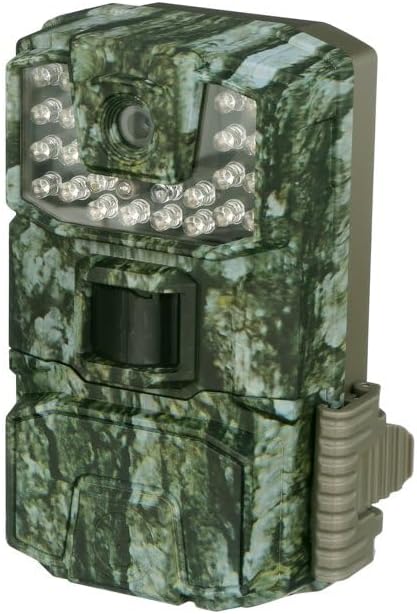
Abbildung 4.2: Front view of the Bushnell Spot On Trail Camera. This image displays the camera lens, the motion sensor, and the array of Low Glow IR LEDs for night vision.
5. Bedienung der Kamera
5.1. Ein-/Ausschalten
To power on the camera, slide the power switch to the "ON" position. To power off, slide the switch to "OFF".
5.2. Modusauswahl
The camera typically features different operating modes, such as Photo, Video, and Setup. Use the internal controls (buttons and display) to navigate and select your desired mode.
5.3. Datum und Uhrzeit einstellen
Access the "Setup" mode to configure the current date and time. This ensures accurate timestamps on your captured images and videos.
5.4. Aufnehmen von Bildern und Videos
Once configured and placed, the camera will automatically capture images or videos based on motion detection and your selected settings. The 0.4-second trigger speed ensures quick capture.
5.5. ViewAufgenommene Medien
Zu view images and videos, remove the SD card from the camera and insert it into a compatible device (e.g., computer, card reader). Alternatively, some models may feature an internal display for review.
6. Wartung
- Reinigung: Use a soft, dry cloth to clean the camera lens and IR sensors. Avoid abrasive materials or harsh chemicals.
- Batteriepflege: Replace all batteries simultaneously with new ones. Do not mix old and new batteries or different battery types. Remove batteries if the camera will be stored for extended periods to prevent leakage.
- SD-Kartenverwaltung: Regularly format your SD card to maintain optimal performance and prevent data corruption. Back up important files vor der Formatierung.
- Lagerung: Bewahren Sie die Kamera bei Nichtgebrauch an einem kühlen, trockenen Ort auf.
7. Fehlerbehebung
| Problem | Mögliche Ursache | Lösung |
|---|---|---|
| Die Kamera lässt sich nicht einschalten. | Niedrige oder leere Batteriespannung; falsche Batteriepolarität. | Replace all batteries with fresh AA batteries, ensuring correct polarity. |
| Es wurden keine Bilder/Videos aufgenommen. | SD-Karte voll oder beschädigt; falsche Einstellungen; Bewegungssensor blockiert. | Format the SD card; check camera settings (e.g., mode, sensitivity); ensure clear line of sight for the motion sensor. |
| Schlechte Bild-/Videoqualität. | Dirty lens; low light conditions; subject too far or too close. | Clean the camera lens; adjust camera placement for optimal lighting and distance. |
| Nachtsicht funktioniert nicht. | IR sensors blocked or dirty; insufficient power. | Clean IR sensors; ensure batteries are fully charged. |
8. Spezifikationen
| Modellname | Spot On |
| Modellnummer | 66063CCW |
| Bildauflösung | 22 Megapixel |
| Videoauflösung | 1080p HD |
| Auslösegeschwindigkeit | 0.4 Sekunden |
| Nachtsichtbereich | 80 feet (Low Glow IR) |
| Stromquelle | 8x AA-Batterien |
| Erinnerung | SDHC Card (up to 32GB, 16GB included) |
| Konnektivitätstechnologie | SDHC |
| Verwendung im Innen- und Außenbereich | Im Freien |
| Montagetyp | Baumhalterung |
| Wasserbeständigkeit | Wasserfest |
| Artikelabmessungen (L x B x H) | 14 x 10.2 x 7.6 Zentimeter |
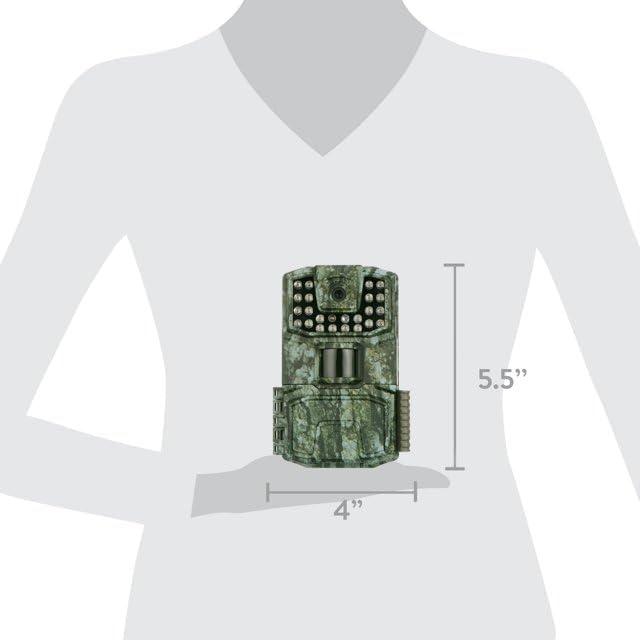
Abbildung 8.1: Dimensions of the Bushnell Spot On Trail Camera. The diagram indicates a height of 5.5 inches and a width of 4 inches, providing a visual reference for its compact size.
9. Garantieinformationen
The Bushnell Spot On 22MP 1080p HD Trail Camera is covered by a 1 Jahr Herstellergarantie from the date of purchase. This warranty covers defects in materials and workmanship under normal use. For specific terms, conditions, and claim procedures, please refer to the official Bushnell webWebsite oder wenden Sie sich an den Kundendienst.
10. Kundendienst
For technical assistance, troubleshooting beyond this manual, or warranty claims, please contact Bushnell Customer Support:
- WebWebsite: Visit the official Bushnell webWebsite mit FAQs, Produktregistrierung und Support-Ressourcen.
- Kontaktinformationen: Refer to the Bushnell website for current phone numbers and email addresses for your region.
When contacting support, please have your product model number (66063CCW) and proof of purchase readily available.