
1. Einleitung
The AJAZZ AK029 is a high-performance one-handed mechanical gaming keyboard designed for precision and speed. It features a compact 29-key layout, magnetic switches, an 8000Hz polling rate, and 0.01mm RT precision for an ultra-responsive gaming experience. This manual provides detailed instructions for setup, operation, maintenance, and troubleshooting.

Image: The AJAZZ AK029 one-handed gaming keyboard, showcasing its compact design and dimensions (155mm length, 122mm width, 33mm height).

Bild: Ein überview of the AK029 gaming keyboard, highlighting its sleek design and gaming features.

Image: The AK029 keyboard being used in various scenarios, including gaming, video editing, and 3D modeling, demonstrating its versatility.
2. Einrichtung
Packungsinhalt
- AJAZZ AK029 Keyboard Body
- USB-C-Kabel (1.6 m)
- Tastenkappenabzieher
- Ersatzschalter
- Abnehmbarer Tragegurt
- Bedienungsanleitung

Image: The complete package contents of the AJAZZ AK029, including the keyboard, USB-C cable, keycap puller, spare switches, and user manual.
Anschließen der Tastatur
- Verbinden Sie das USB-C-Ende des mitgelieferten Kabels mit dem USB-C-Anschluss der Tastatur.
- Connect the other end of the USB cable to an available USB port on your computer (Windows or Mac).
- Die Tastatur wird von Ihrem Betriebssystem automatisch erkannt.
3. Bedienungsanleitung
Hauptfunktionen und Layout
The AK029 features a 29-key layout optimized for gaming and productivity. Many keys have secondary functions accessible via the Fn Schlüssel.
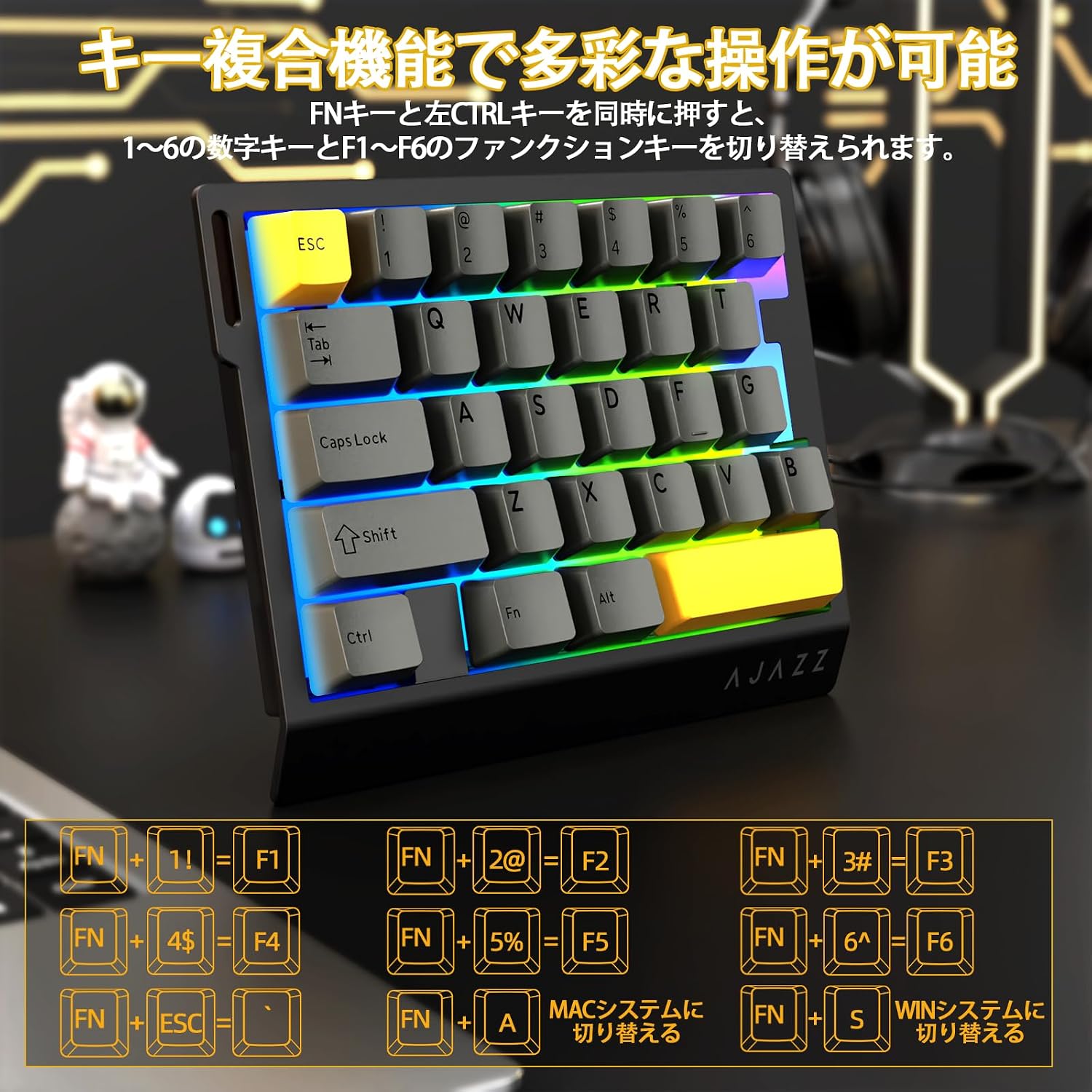
Image: Diagram illustrating the various FN key combinations for accessing secondary functions, such as F1-F6, tilde, and system switching.
- FN + 1-6: Switches between number keys (1-6) and function keys (F1-F6). Default is number keys.
- FN + Esc: Tilde (~)
- FN+A: Switches to Mac mode.
- FN+S: Switches to Windows mode.
Note: When using Mac mode on a Windows PC, the Windows key and Alt key functions may be reversed.
RGB-Beleuchtungsmodi
The keyboard features vibrant RGB backlighting with multiple customizable effects.

Image: The keyboard displaying its colorful RGB backlight, which can be customized with various effects.
- FN + Tab: Cycles through 20 different RGB lighting modes.
- Fn + G: Increases backlight brightness (5 levels). Backlight flashes 3 times at maximum brightness.
- FN+F: Decreases backlight brightness (5 levels). Backlight flashes 3 times at minimum brightness.
- FN+V: Changes the direction of the lighting effect.
- Fn + B: Changes the backlight color.
- Fn + T: Increases the speed of the lighting effect (5 levels). Backlight flashes 3 times at maximum speed.
- FN+R: Decreases the speed of the lighting effect (5 levels). Backlight flashes 3 times at minimum speed.
- FN+C: Toggles side light mode (Streaming RGB constant light - Rainbow Breath - Off). Default is Streaming.
- FN+X: Toggles backlight on/off (side lights remain on).
- FN + Space (long press 3-5 seconds): Resets lighting settings to factory defaults. Keyboard lights flash 3 times.
Anzeige Lamps
- Feststelltaste: Pressing the Caps Lock key illuminates a white LED (uppercase input ON). Pressing it again turns off the LED (lowercase input).
- Systemanzeige: The main key area lights flash 3 times to indicate successful system switching.
Web Treiberanpassung
The dedicated driver software allows for extensive customization of key functions, macros, and RGB lighting effects. This enables true personalization to match individual playstyles and preferences.

Bild: Screenshot von web driver interface, showing options for custom keys, lighting effects, macro management, and performance settings.
Treiber WebWebsite: https://ajazz.driveall.cn/#/
4. Wartung
Reinigung
- Verwenden Sie ein weiches, trockenes Tuch, um die Tastaturoberfläche abzuwischen.
- For dust between keycaps, use compressed air.
- Vermeiden Sie die Verwendung aggressiver Chemikalien oder Scheuermittel.
Hot-Swappable Switch Replacement
The AK029 supports hot-swappable magnetic switches, allowing for easy replacement and customization.

Bild: Nahaufnahme view of the hot-swappable magnetic switches, showing the mechanism and keycap removal tool.
- Verwenden Sie den Tastenkappenabzieher, um die gewünschte Tastenkappe vorsichtig zu entfernen.
- Use the switch puller to firmly grip the top and bottom tabs of the switch.
- Pull the switch straight upwards to remove it from the keyboard.
- Align the pins of the new switch with the holes on the keyboard.
- Gently push the new switch vertically until it clicks into place.
5. Fehlerbehebung
Tastatur reagiert nicht
- Stellen Sie sicher, dass das USB-C-Kabel sowohl mit der Tastatur als auch mit dem Computer fest verbunden ist.
- Versuchen Sie, die Tastatur an einen anderen USB-Anschluss Ihres Computers anzuschließen.
- Testen Sie die Tastatur an einem anderen Computer, um ein computerspezifisches Problem auszuschließen.
- Starten Sie Ihren Computer neu.
RGB Backlight Not Working or Incorrect
- Ensure the backlight is not turned off (FN + X).
- Adjust brightness using FN + G (increase) and FN + F (decrease).
- Cycle through lighting modes using FN + Tab.
- Perform a factory reset for lighting settings by long-pressing FN + Space for 3-5 seconds.
Key Input Issues or Inaccurate Response
- Ensure the correct system mode (Windows/Mac) is selected using FN + A or FN + S.
- If a specific key is not responding, try replacing its switch using the hot-swap procedure.
- Update the keyboard firmware using the dedicated web Treibersoftware.
- Check for any physical obstructions under the keycap or switch.
6. Spezifikationen
| Besonderheit | Beschreibung |
|---|---|
| Marke | A.JAZZ |
| Modell | AK029 |
| Konnektivität | USB-C kabelgebunden |
| Tastenbelegung | 29 Keys (One-Handed) |
| Schaltertyp | Magnetic Switches (Hot-Swappable) |
| Abfragerate | 8000 Hz |
| Latenz | 0.125 ms extrem niedrige Latenz |
| RT Precision | 0.01mm (0.03mm detection increments) |
| Scanrate | 130 |
| Hintergrundbeleuchtung | RGB (20 lighting modes) |
| Schlüssel-Rollover | Vollständiges N-Key-Rollover |
| Plattenmaterial | Aluminiumlegierung |
| Ton DampEnde | 5-Layer Structure (PO sandwich cotton, IXPE switch pad, PET sound sheet, EPDM cotton, silicone gel) |
| Ergonomie | Ergonomic design with stepped curved keycaps and wrist rest |
| Kompatibles Betriebssystem | Windows, MAC |
| Maße | 155 mm (L) x 122 mm (B) x 33 mm (H) |
| Gewicht | Ca. 300g |
| Kabellänge | 1.6 m |

Image: Detailed basic specifications of the AK029 keyboard, including brand, model, connectivity, dimensions, and lighting.

Abbildung: Explosionszeichnung view of the keyboard's internal structure, highlighting the 5-layer sound dampening system and aluminum alloy plate for enhanced stability and acoustics.

Image: Illustration of the ergonomic design of the AK029, featuring stepped keycaps and a wrist rest for comfortable long-term use.
7. Garantie und Support
Garantieinformationen
The AJAZZ AK029 keyboard comes with a 1-year manufacturer's warranty from the date of purchase. This warranty covers defects in materials and workmanship under normal use.
Kundenservice
For technical assistance, warranty claims, or any other inquiries, please contact AJAZZ customer support through their official webWebsite oder den Händler, bei dem das Produkt gekauft wurde.
Offiziell WebWebsite: https://ajazz.driveall.cn/#/