
1. Einleitung
The AJAZZ AKP03 Macro Keypad Stream Controller is a versatile device designed to enhance productivity and streamline workflows for gamers, streamers, and professionals. Featuring six programmable keys with LCD displays, three physical knobs, and three toggle switches, it offers extensive customization options for various tasks.
This manual provides detailed instructions for setting up, operating, and maintaining your AKP03 device, ensuring optimal performance and user experience.
2. Produktmerkmale
- Six Programmable Macro Keys: Customizable LCD displays for single or continuous actions.
- Three Physical Knobs: For precise control over various functions.
- Three Toggle Switches: Additional control options.
- Ein-Klick-Bedienung: Instant execution of macro commands, text input, application launches, and media control.
- Intuitive Driver Software: Drag-and-drop functionality for easy key assignment and property configuration.
- Breite Kompatibilität: Seamless integration with platforms like Streamlabs, Twitch, YouTube, and various software applications on Windows and Mac.
- Removable 40° Stand: Provides an ergonomic viewing angle and stable placement.

Abbildung 2.1: Überview of the AJAZZ AKP03 Macro Keypad, highlighting its programmable buttons, toggle switches, and scroll wheels.
3. Packungsinhalt
Überprüfen Sie, ob alle Artikel in Ihrem Paket vorhanden sind:
- AJAZZ AKP03 Macro Keypad Stream Controller
- USB-C-auf-USB-A-Kabel
- Removable 40° Stand
- Benutzerhandbuch (dieses Dokument)
4. Einrichtung
4.1 Physische Verbindung
- Attach the removable 40° stand to the bottom of the AKP03 for an ergonomic angle, if desired.
- Connect the provided USB-C cable to the USB-C port on the AKP03.
- Verbinden Sie das USB-A-Ende des Kabels mit einem freien USB-Anschluss an Ihrem Computer (PC oder Mac).
- Das Gerät schaltet sich automatisch ein.

Figure 4.1: Attaching the removable 40° stand to the AKP03.
4.2 Softwareinstallation
To unlock the full customization capabilities of your AKP03, you must install the dedicated driver software.
- Öffnen Sie Ihr web browser and navigate to the official AJAZZ webWebsite: www.a-jazz.com.
- Locate the 'Driver Download' section.
- Suchen nach 'AKP03' or browse for the corresponding driver for your model.
- Download the driver software compatible with your operating system (Windows or macOS).
- Führen Sie das Installationsprogramm aus und befolgen Sie die Anweisungen auf dem Bildschirm, um die Installation abzuschließen.
- Starten Sie Ihren Computer neu, wenn Sie dazu aufgefordert werden.
Video 4.1: Demonstrates the software installation process and initial setup for the AJAZZ Macro Keypad.
5. Bedienungsanleitung
5.1 Customizing Keys and Knobs
The AKP03's driver software provides a user-friendly interface for customization:
- Launch the 'Stream Dock AJAZZ' software from your desktop or applications folder.
- The software will display a visual representation of your AKP03.
- To assign an action, drag and drop a desired function (e.g., launch application, media control, macro command) from the software's library onto one of the six programmable keys.
- For knobs, select the knob in the software and assign functions such as volume control, scrolling, or zooming.
- You can configure properties for each assigned action, including specific file Wege, web URLs, or macro sequences.
- The LCD displays on the keys will update to show the assigned icon or text.
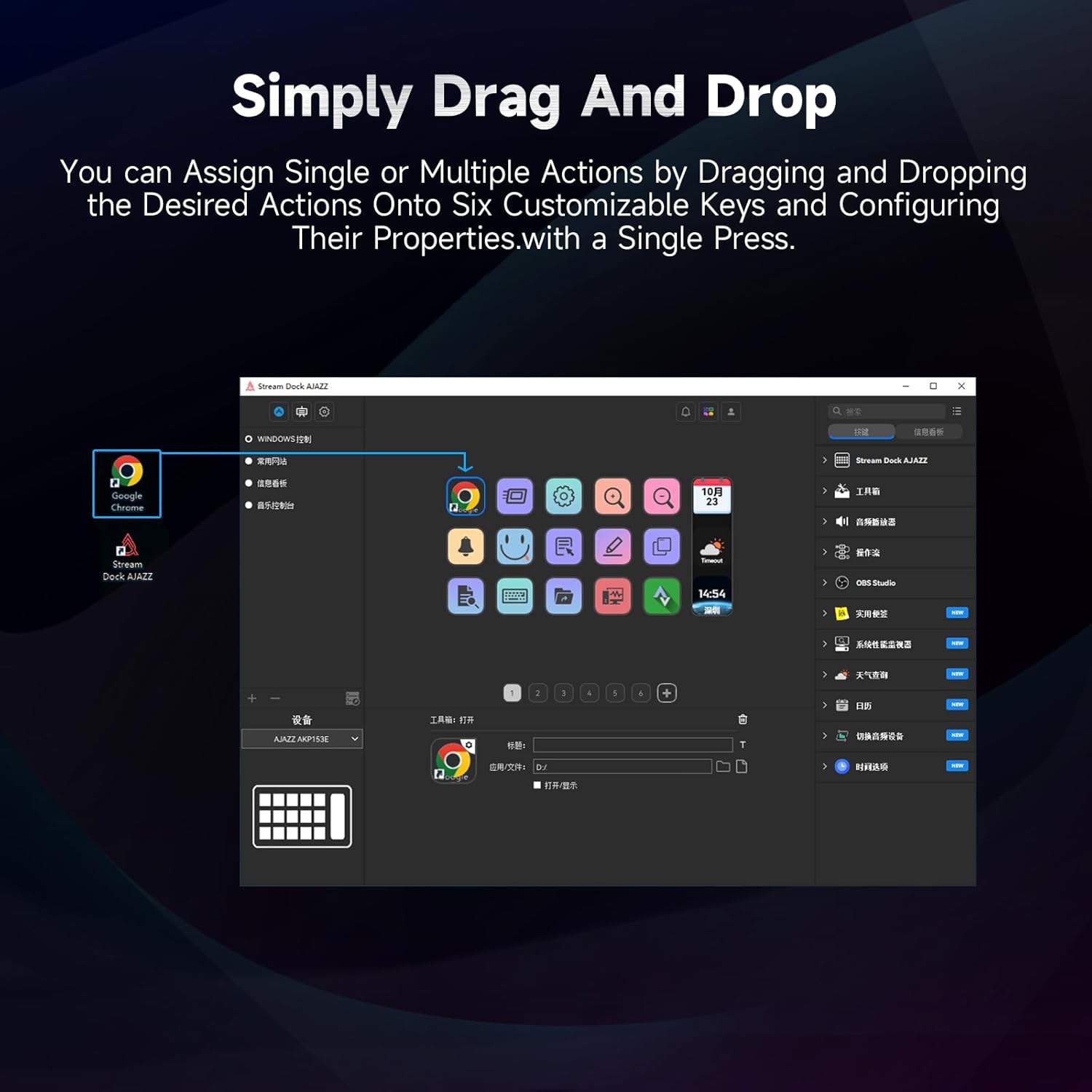
Figure 5.1: Customizing keys using the drag-and-drop interface in the AJAZZ software.
Video 5.1: Demonstration of assigning actions to keys for launching web pages and software with a single click.
5.2 Using Profiles and Pages
The software supports multiple profiles and pages, allowing you to switch between different sets of key assignments for various applications or tasks.
- Erstellen Sie einen neuen Profifiles for specific games, editing software, or streaming setups.
- Innerhalb jedes Profisfile, you can create multiple pages of key assignments, accessible by navigating through the device's buttons or software interface.
- The AKP03 automatically switches to the relevant profile when a linked application is in focus.
Video 5.2: Illustrates the multi-functional capabilities and profile switching of the AKP03 for various tasks.
6. Wartung
To ensure the longevity and optimal performance of your AJAZZ AKP03, follow these maintenance guidelines:
- Reinigung: Use a soft, dry cloth to wipe the surface of the device. Avoid abrasive cleaners or solvents.
- Lagerung: Bewahren Sie das Gerät an einem kühlen, trockenen Ort fern von direkter Sonneneinstrahlung und extremen Temperaturen auf.
- Kabelpflege: Um Beschädigungen zu vermeiden, sollte das USB-Kabel nicht übermäßig gebogen oder verdreht werden.
- Software-Updates: Schauen Sie regelmäßig bei AJAZZ vorbei. webWebsite für Software- und Firmware-Updates, um Kompatibilität und Zugriff auf neue Funktionen zu gewährleisten.
7. Fehlerbehebung
If you encounter issues with your AKP03, refer to the following common troubleshooting steps:
- Gerät nicht erkannt:
- Ensure the USB cable is securely connected to both the AKP03 and your computer.
- Versuchen Sie, eine Verbindung zu einem anderen USB-Anschluss herzustellen.
- Starten Sie Ihren Computer neu.
- Verify that the driver software is correctly installed and up to date.
- Tasten reagieren nicht:
- Check the software to ensure keys are properly assigned and the correct profile ist aktiv.
- Ensure the driver software is running in the background.
- Softwareprobleme:
- Installieren Sie die Treibersoftware neu.
- Check for software updates on the AJAZZ webWebsite.
8. Spezifikationen
| Besonderheit | Detail |
|---|---|
| Marke | AJAZZ |
| Modellname | AKP03 |
| Kompatible Geräte | PCs, Laptops |
| Controllertyp | Tastatur |
| Konnektivitätstechnologie | USB-C |
| Anzahl der Tasten | 6 Programmable Keys (with LCD displays), 3 Physical Knobs, 3 Toggle Switches |
| Artikelgewicht | 0.32 Kilogramm |
| Artikelabmessungen (L x B x H) | 5 x 3 x 2 Zoll |
| Stromquelle | Kabelgebundene Elektrik |
9. Garantie und Support
9.1 Garantieinformationen
The AJAZZ AKP03 Macro Keypad Stream Controller comes with a 1 Jahr eingeschränkte Garantie Diese Garantie gilt ab Kaufdatum und deckt Herstellungsfehler und Funktionsstörungen bei normalem Gebrauch ab. Sie deckt keine Schäden ab, die durch Missbrauch, Unfälle, unbefugte Änderungen oder unsachgemäße Installation verursacht wurden.
Bitte bewahren Sie Ihren Kaufbeleg für Garantieansprüche auf.
9.2 Kundendienst
For technical assistance, troubleshooting, or warranty inquiries, please contact AJAZZ customer support:
- WebWebsite: www.a-jazz.com (Refer to the 'Support' or 'Contact Us' section)
- E-Mail: [Insert Customer Support Email, if available]
- Telefon: [Insert Customer Support Phone Number, if available]
Unser Support-Team steht Ihnen bei Fragen oder Anliegen zu Ihrem Produkt gerne zur Verfügung.