
1. Einleitung
This manual provides detailed instructions for the safe and efficient use of your Surfans F20 Pro Android Hi-Res Music Player. Please read this manual thoroughly before operating the device and retain it for future reference.
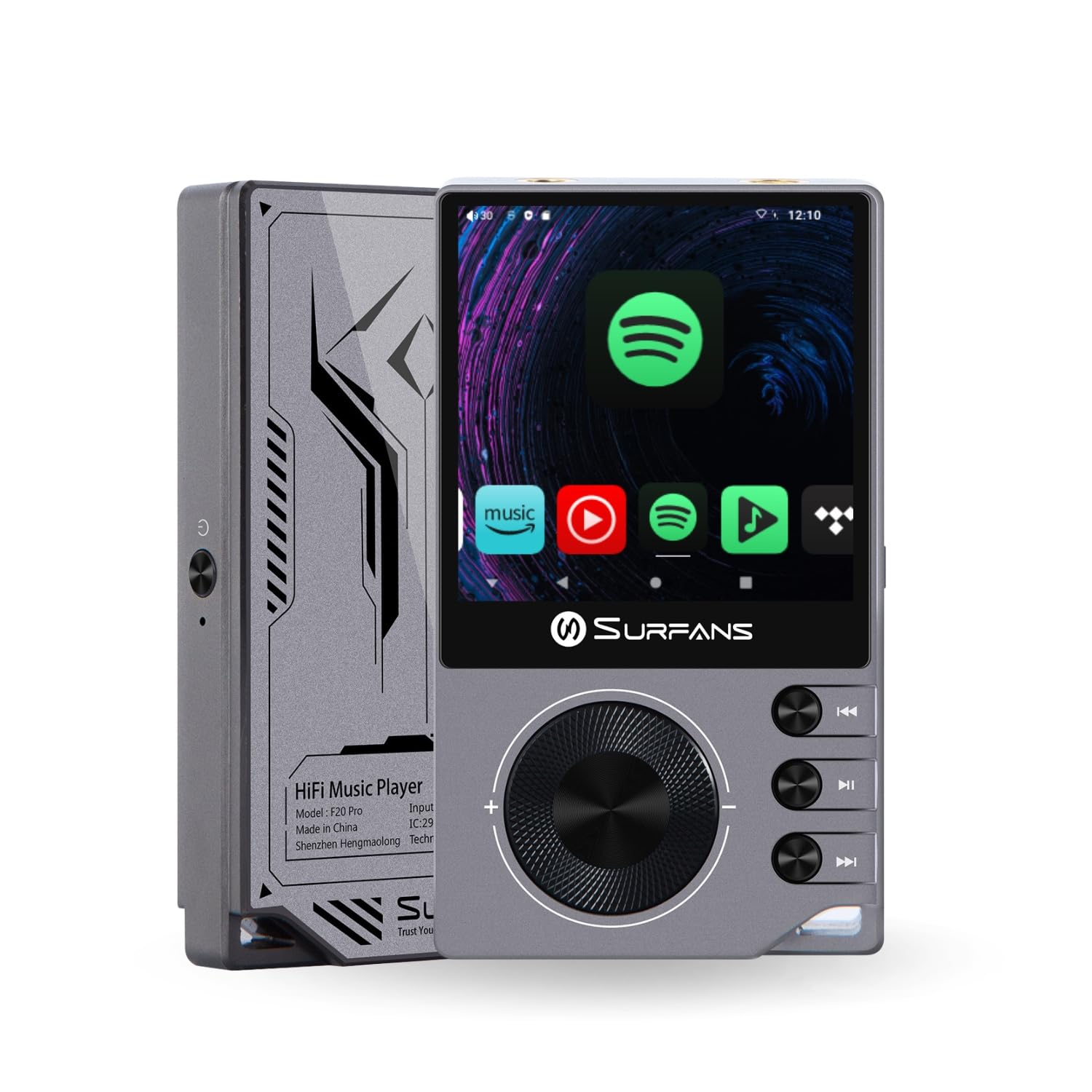
The Surfans F20 Pro Hi-Res Music Player, showcasing its compact design and touchscreen interface.
2. Packungsinhalt
Überprüfen Sie, ob alle Artikel im Paket vorhanden sind:
- Surfans F20 Pro Hi-Res Music Player
- USB-Typ-C-Kabel
- 32 GB MicroSD Memory Card (pre-installed or separate)
- Schutzhülle
- Benutzerhandbuch (dieses Dokument)
3. Gerät überview
Familiarize yourself with the physical components and ports of your F20 Pro player.

Vorder- und Rückseite view of the Surfans F20 Pro, highlighting its robust CNC metal chassis and button layout.
3.1. Hauptmerkmale
- Dual ESS9018Q2M DACs: For high-fidelity audio processing.
- Octa-Core Android 12 System: Enables streaming app compatibility and smooth operation.
- 3.5mm Single-Ended & 4.4mm Balanced Outputs: Versatile headphone connectivity.
- Bluetooth 5.0 mit LDAC: High-quality wireless audio transmission.
- Dualband-WLAN (2.4 GHz & 5 GHz): For stable internet connectivity.
- Erweiterbarer Speicher: Supports up to 1TB via MicroSD card.
- 2.7-Zoll-Touchscreen: Intuitive Benutzeroberfläche.
4. Einrichtung
4.1. Aufladen des Geräts
Before first use, fully charge the F20 Pro. Connect the included USB Type-C cable to the device's charging port and a compatible USB power adapter (not included) or computer USB port. The charging indicator will show the charging status.
4.2. Einlegen einer microSD-Karte
The F20 Pro supports MicroSD cards up to 1TB for expanded storage. Locate the MicroSD card slot on the side of the device. Gently insert the card until it clicks into place. To remove, push the card in again until it springs out.
4.3. Erstes Einschalten
Halten Sie den Ein-/Ausschalter gedrückt, bis der Bildschirm aufleuchtet. Folgen Sie den Anweisungen auf dem Bildschirm, um die Ersteinrichtung abzuschließen, einschließlich Sprachauswahl und WLAN-Verbindung.
4.4. Verbinden mit Wi-Fi
Navigieren Sie zu Einstellungen > Netzwerk & Internet > WLAN. Select your desired network and enter the password if prompted. The F20 Pro supports both 2.4GHz and 5GHz Wi-Fi bands.

The Surfans F20 Pro demonstrating its dual-band Wi-Fi capability for fast and stable connections.
4.5. Bluetooth-Kopplung
So verbinden Sie Bluetooth-Kopfhörer oder -Lautsprecher:
- Stellen Sie sicher, dass sich Ihr Bluetooth-Gerät im Kopplungsmodus befindet.
- On the F20 Pro, go to Einstellungen > Verbundene Geräte > Neues Gerät koppeln.
- Select your device from the list and confirm pairing.

An illustration of the Bluetooth 5.0 chip, indicating support for high-resolution wireless audio codecs like LDAC.
5. Bedienung des Geräts
5.1. Grundlegende Navigation
The F20 Pro features a 2.7-inch touchscreen for navigation. Swipe to scroll, tap to select, and use the physical buttons for quick controls:
- Netzschalter: Power on/off, screen on/off.
- Lautstärkerad: Regelt die Lautstärke der Audioausgabe.
- Schaltflächen zur Wiedergabesteuerung: Wiedergabe/Pause, Nächster Titel, Vorheriger Titel.
5.2. Musikwiedergabe
The F20 Pro supports various audio formats including DSD512, 192kHz/24bit, FLAC, WAV, WMA, M4A, MP3, MP2, and AAC.
5.2.1. Lokal Files
Musik übertragen files to the device's internal storage or MicroSD card via USB connection to a computer. Use the pre-installed music player application to browse and play your library.
5.2.2. Streaming-Anwendungen
The Android 12 operating system allows installation of streaming apps like Spotify, Apple Music, Tidal, or YouTube. Connect to Wi-Fi and download apps from the Google Play Store or other compatible sources.

The Surfans F20 Pro's screen showing various streaming application icons, demonstrating its Android capabilities.
5.3. Kopfhöreranschlüsse
The device offers both single-ended and balanced audio outputs.
- 3.5-mm-Single-Ended-Ausgang: Standard headphone jack (125mW/32Ω).
- 4.4 mm symmetrischer Ausgang: For enhanced audio performance with compatible headphones (500mW/32Ω).

Nahaufnahme view of the 3.5mm single-ended and 4.4mm balanced audio output ports on the Surfans F20 Pro.
6. Wartung
6.1. Reinigung
Use a soft, dry, lint-free cloth to clean the device. Avoid using abrasive cleaners or solvents, which may damage the surface.
6.2. Software-Updates
Periodically check for software updates to ensure optimal performance and access to new features. Updates can typically be found in Einstellungen > System > Systemupdate.
6.3. Batteriepflege
Um die Akkulaufzeit zu verlängern, sollte das Gerät nicht häufig vollständig entladen werden. Bewahren Sie das Gerät bei längerer Nichtbenutzung an einem kühlen, trockenen Ort auf.

Eine interne view of battery cells, representing the long-lasting battery capacity of the F20 Pro.
7. Fehlerbehebung
If you encounter issues with your F20 Pro, refer to the following common problems and solutions:
| Problem | Mögliche Ursache | Lösung |
|---|---|---|
| Gerät lässt sich nicht einschalten | Niedriger Akkustand; Systemabsturz | Laden Sie das Gerät auf; Halten Sie den Netzschalter 10-15 Sekunden lang gedrückt, um einen Neustart zu erzwingen. |
| Keine Tonausgabe | Volume too low; Incorrect output selected; Faulty headphones | Increase volume; Check headphone connection; Test with different headphones. |
| Keine Verbindung zum WLAN möglich | Falsches Passwort; Außerhalb der Reichweite; Routerproblem | Verify password; Move closer to router; Restart router. |
| Langsame Performance/App-Abstürze | Zu viele Apps laufen; zu wenig Speicherplatz; veraltete Software | Close background apps; Free up storage; Check for system updates. |
8. Spezifikationen
Detailed technical specifications for the Surfans F20 Pro:
| Besonderheit | Detail |
|---|---|
| Marke | Surfans |
| Modellname | F20 PRO |
| DAC-Chips | Dual ESS9018Q2M |
| Betriebs-Amps | Dual OPA1612 |
| Betriebssystem | Android 12 |
| RAM | 3 GB |
| Interner Speicher | 32 GB |
| Erweiterbarer Speicher | Bis zu 1 TB über MicroSD-Karte |
| Bildschirmgröße | 2.73 Zoll |
| Konnektivität | Aux, Bluetooth 5.0 (LDAC), USB Type-C, Wi-Fi (2.4GHz & 5GHz) |
| Audioausgänge | 3.5mm Single-Ended (125mW/32Ω), 4.4mm Balanced (500mW/32Ω) |
| Unterstützte Audioformate | DSD512, 192kHz/24bit, FLAC, WAV, WMA, M4A, MP3, MP2, AAC |
| Farbe | Grau |

An illustration of the dual ESS9018K2M DAC chips, central to the F20 Pro's high-resolution audio capabilities.
9. Garantieinformationen
The Surfans F20 Pro comes with a 1 Jahr Garantie Diese Garantie gilt ab Kaufdatum und deckt Herstellungs- und Verarbeitungsfehler bei normalem Gebrauch ab. Sie deckt keine Schäden ab, die durch Missbrauch, Unfälle, nicht autorisierte Änderungen oder normale Abnutzung verursacht wurden. Bitte bewahren Sie Ihren Kaufbeleg für Garantieansprüche auf.
10. Kundendienst
For further assistance, technical support, or warranty inquiries, please contact Surfans customer service through the official website or your retailer. You may also find additional resources and FAQs online.