1. Einleitung
Thank you for choosing the Vannect X390S 6-in-1 Folding Treadmill. This manual provides essential information for the safe and efficient operation, maintenance, and troubleshooting of your new fitness equipment. Please read this manual thoroughly before initial use and retain it for future reference.
2. Wichtige Sicherheitshinweise
Um das Risiko schwerer Verletzungen zu verringern, beachten Sie beim Benutzen dieses Laufbands stets die grundlegenden Sicherheitsvorkehrungen. Lesen Sie vor Gebrauch alle Anweisungen.
- Ensure the safety lock is properly engaged before starting any exercise.
- Die maximale Benutzergewichtskapazität für dieses Laufband beträgt 150 kgDiese Grenze darf nicht überschritten werden.
- Halten Sie Kinder und Haustiere während des Betriebs vom Laufband fern.
- Stellen Sie das Laufband auf eine ebene, stabile Fläche mit ausreichendem Freiraum um das Laufband herum.
- Tragen Sie geeignete Sportschuhe und -kleidung.
- Wenn Sie Schmerzen, Schwindel oder Kurzatmigkeit verspüren, beenden Sie das Training sofort.
- Halten Sie sich beim Starten und Anhalten des Laufbands immer an den Handläufen fest.
- Ziehen Sie den Netzstecker des Laufbands aus der Steckdose, wenn es nicht benutzt wird oder vor Reinigungs- und Wartungsarbeiten.
3. Packungsinhalt
Überprüfen Sie, ob alle Komponenten im Paket vorhanden sind:
- Vannect X390S Folding Treadmill
- Magnetische Fernbedienung
- Sicherheitsschlüssel
- Netzkabel
- Benutzerhandbuch (dieses Dokument)
- Schmierstoff (zur Wartung)
4. Einrichtung
The Vannect X390S treadmill is designed for minimal setup and comes largely pre-assembled, ready for immediate use.
- Auspacken: Nehmen Sie das Laufband vorsichtig aus der Verpackung.
- Platzierung: Position the treadmill on a flat, stable surface. Ensure there is sufficient space around the unit for safe operation.
- Entfaltung (falls zutreffend): If the treadmill is in its folded state, gently unfold it according to the diagrams below until it locks into the upright position.
- Stromanschluss: Stecken Sie das Netzkabel in eine geerdete Steckdose.
- Sicherheitsschlüssel: Befestigen Sie den Sicherheitsschlüsselclip an Ihrer Kleidung und stecken Sie das magnetische Ende in den dafür vorgesehenen Schlitz an der Konsole. Das Laufband funktioniert nicht ohne den Sicherheitsschlüssel.

Figure 4.1: The treadmill's ultra-thin design (13.5 cm) allows for easy storage under furniture or against a wall. It features transport wheels for effortless movement.
5. Bedienungsanleitung
The Vannect X390S offers multiple control methods and exercise modes to suit your fitness needs.
5.1-Kontrollmethoden
You can control the treadmill using the console display, the magnetic remote control, or the dedicated mobile application.

Figure 5.1: The treadmill console features an LED display showing speed, time, distance, and calories. Control is available via the console, remote, or app.
- Konsolenanzeige: The integrated LED display clearly shows time, calories burned, step count, speed (1-12 KM/H), and distance. Touch controls on the console allow for direct adjustment.
- Magnetische Fernbedienung: Use the remote to start/stop the treadmill and adjust speed. Its magnetic design allows it to be securely attached to the treadmill console, preventing loss.
- Mobile Anwendung: Connect via Bluetooth to the Vannect app for advanced control, real-time data synchronization, and access to various exercise programs.
5.2 Neigungseinstellung
The treadmill features a manual incline adjustment of up to 9% to simulate uphill walking or running, enhancing calorie burn and muscle engagement.

Figure 5.2: Manual incline adjustment from 0% to 9% allows for varied workout intensity, simulating outdoor terrain.
5.3 Trainingsmodi
The 6-in-1 design supports various activities:
- Work Mode (1-3 km/h): Ideal for light walking while working or reading.
- Gehmodus (4-6 km/h): Suitable for brisk walking.
- Jogging Mode (7-9 km/h): For a moderate jogging pace.
- Laufmodus (10-12 km/h): For higher intensity running workouts.
- Climbing Mode (9% Incline): Engages more muscles and increases calorie expenditure.

Figure 5.3: The treadmill supports various exercise modes from walking to running and incline training.
6. App-Konnektivität
Enhance your workout experience by connecting your Vannect X390S treadmill to the mobile application via Bluetooth.
- Laden Sie die App herunter: Suchen nach the official Vannect fitness app on your mobile device's app store (e.g., Google Play Store or Apple App Store).
- Bluetooth aktivieren: Stellen Sie sicher, dass Bluetooth auf Ihrem Mobilgerät aktiviert ist.
- Paarung: Open the Vannect app and follow the on-screen instructions to pair with your treadmill.
- Merkmale: Once connected, the app will synchronize real-time movement data such as speed, calories, and more. You can track your progress, participate in challenges, and access updated exercise programs. The treadmill is compatible with popular fitness apps like Zwift, Kinomap, and Fitshow.

Figure 6.1: The mobile app provides scientific and intelligent training programs, syncing data in real-time.
7. Wartung
Regelmäßige Wartung gewährleistet die Langlebigkeit und optimale Leistung Ihres Laufbands.
- Reinigung: Wischen Sie das Laufband mit einem Desinfektionsmittel ab.amp Nach jedem Gebrauch mit einem Tuch abwischen, um Schweiß und Staub zu entfernen. Scheuermittel vermeiden.
- Schmierung: The running belt requires periodic lubrication to reduce friction and wear. Apply the provided special treadmill lubricant under the belt as instructed in the lubricant's packaging, typically every few months depending on usage.
- Riemenspannung und -ausrichtung: Check the running belt tension and alignment regularly. If the belt slips or moves off-center, refer to the troubleshooting section or contact customer support for adjustment instructions.
- Motor: The 2.75 HP motor is designed for quiet operation (<25 dB) and low maintenance, with a lifespan exceeding 5000 hours.

Figure 7.1: The 2.75 HP motor offers a long lifespan and quiet operation, requiring minimal maintenance.
8. Fehlerbehebung
Sollten Sie Probleme mit Ihrem Laufband haben, beachten Sie bitte die folgenden häufig auftretenden Probleme und Lösungen:
| Problem | Mögliche Ursache | Lösung |
|---|---|---|
| Laufband startet nicht | Netzkabel nicht angeschlossen, Sicherheitsschlüssel nicht eingesteckt, Schutzschalter ausgelöst. | Check power connection, ensure safety key is fully inserted, reset circuit breaker if necessary. |
| Laufband rutscht oder ruckelt | Die Riemenspannung ist zu gering, der Riemen muss geschmiert werden. | Adjust belt tension (refer to specific instructions or contact support), apply lubricant as per maintenance section. |
| Ungewöhnliche Geräusche während des Betriebs | Lose Bauteile, Motorprobleme, Riemenreibung. | Check for loose screws and tighten. If noise persists, contact customer support. |
| App-Verbindungsprobleme | Bluetooth off, app not updated, pairing failed. | Ensure Bluetooth is on, update the app, try re-pairing the device. |
If the problem persists after attempting these solutions, please contact Vannect customer support.
9. Spezifikationen
| Marke | Vannect |
| Modellnummer | X390S |
| Motorleistung | 2.75 PS |
| Geschwindigkeitsbereich | 1 - 12 km/h |
| Neigung | Manual 0% - 9% |
| Max. Benutzergewicht | 150 kg |
| Laufbandbreite | 40 cm (ca.) |
| Stoßdämpfung | 5-layer anti-slip surface, 8 silicone shock absorbers |
| Geräuschpegel | <25 dB |
| Konnektivität | Bluetooth, Mobile App |
| Anzeige | Doppelte LED |
| Montage erforderlich | Nein (sofort einsatzbereit) |
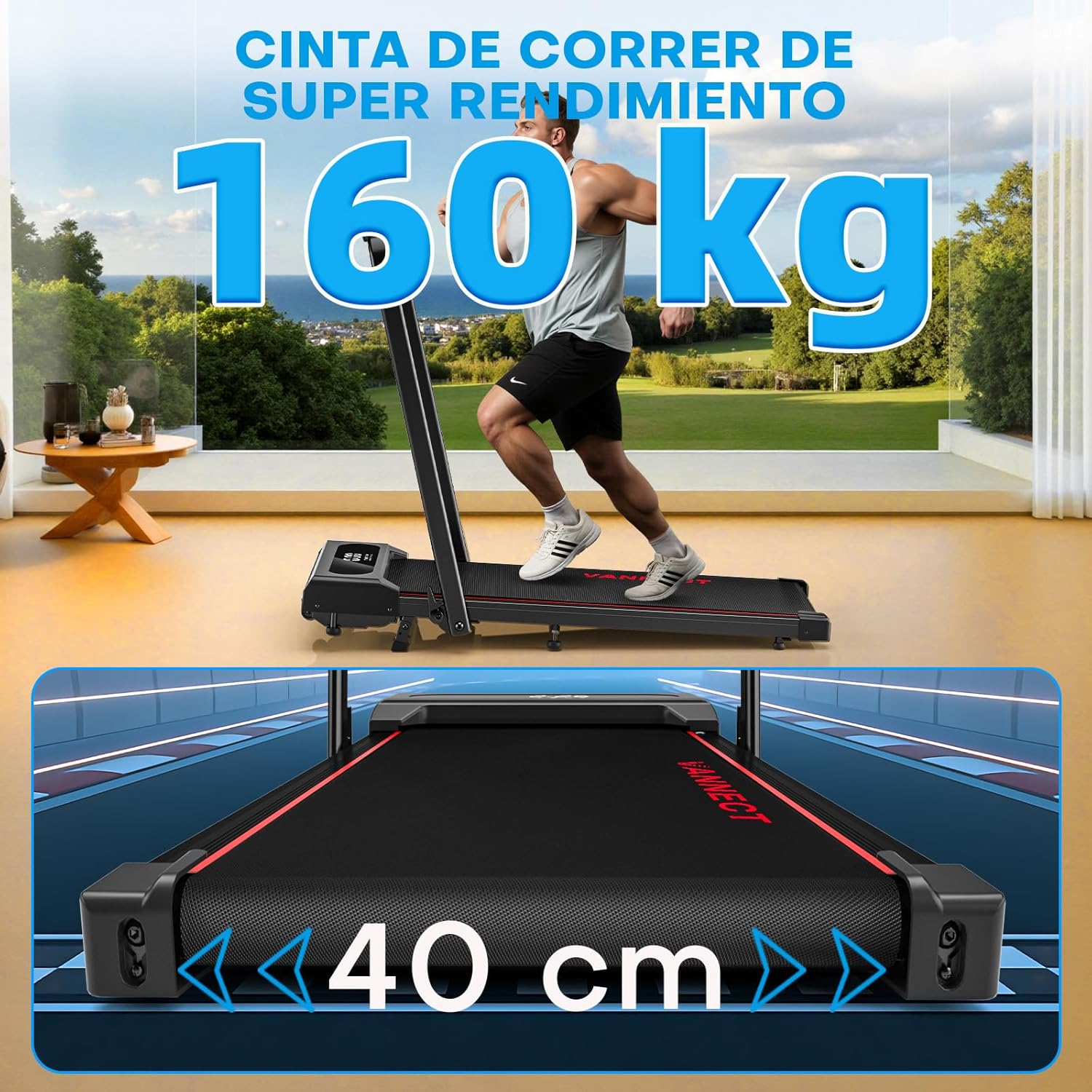
Figure 9.1: The treadmill supports users up to 150 kg (160 kg in image, using 150kg from feature bullets for consistency) and features a 40 cm wide running belt for comfort.

Figure 9.2: Advanced cushioning with 5 anti-slip layers and 8 silicone shock absorbers effectively protects joints and reduces muscle pressure.
10. Garantie und Support
Vannect is committed to providing high-quality products and excellent customer service.
- Garantie: Vannect offers a 5 Jahre kostenloser Austauschservice for eligible parts.
- Technische Unterstützung: Genießen 24-Stunden-Support for any issues you may encounter.
For warranty claims, technical assistance, or any product-related inquiries, please contact Vannect customer service through the official webWebsite oder Ihre Einkaufsplattform.