
1. Einleitung
The ASUS ROG Strix GS-BE12000 is a high-performance tri-band WiFi 7 router designed for demanding network environments, including gaming, streaming, and smart home integration. This manual provides essential information for setting up, operating, maintaining, and troubleshooting your router to ensure optimal performance and security.

Bild: Überview of the ASUS ROG Strix GS-BE12000 Router highlighting its design and key features.
2. Packungsinhalt
Prüfen Sie, ob alle Artikel in Ihrer Produktverpackung enthalten sind:
- ASUS ROG Strix GS-BE12000 Tri-Band Gaming Router
- Netzteil
- RJ-45 Kabel
- Kurzanleitung
- Garantiekarte
3. Einrichtung
Follow these steps for initial setup of your ASUS ROG Strix GS-BE12000 router:
- Schließen Sie den Router an:
- Connect the power adapter to the router's DC-in port and plug it into a power outlet.
- Connect one end of the provided RJ-45 cable to your modem's LAN port and the other end to the router's 2.5G WAN port.
- Optionally, connect your computer to one of the router's LAN ports using an Ethernet cable for initial configuration.
- Einschalten: Press the power button on the router. Wait for the indicator lights to stabilize, typically indicating a successful connection.
- Anfangskonfiguration:
- Öffnen Sie ein web Browser auf Ihrem angeschlossenen Computer oder Mobilgerät.
- Navigate to the router's default IP address (usually
router.asus.comor192.168.1.1). - Follow the on-screen instructions in the Quick Internet Setup wizard to configure your internet connection, Wi-Fi network name (SSID), and password.

Bild: Rückseite view of the router displaying the 2.5G WAN port and multiple 2.5G LAN ports for wired connections.
4. Bedienungsanleitung
4.1. Wi-Fi 7 Tri-Band Connectivity
The GS-BE12000 supports Wi-Fi 7 (802.11be) with tri-band operation (2.4 GHz, 5 GHz, and 6 GHz) for maximum throughput and reduced latency. It features 320 MHz channels on the 6 GHz band, Multi-Link Operation (MLO), and 4K-QAM for enhanced performance.

Image: Visual representation of Wi-Fi 7 tri-band capabilities, including 6 GHz, 5 GHz, and 2.4 GHz speeds, MLO, and 4K-QAM.
4.2. Kabelgebundene Verbindung
The router offers a robust wired capacity of up to 20G, featuring one 2.5G WAN port and seven 2.5G LAN ports. This allows for high-speed connections to multiple devices, ideal for gaming consoles, PCs, and network-attached storage (NAS).

Image: Diagram detailing the router's wired ports, including 2.5G WAN, 2.5G LAN, and dedicated gaming ports.
4.3. Game Acceleration and ROG Gaming Network
Utilize the ROG-exclusive Gaming Network for one-tap SSID game acceleration. This feature streamlines advanced network settings to prioritize gaming traffic, ensuring low ping and reduced lag. The Smart Home Master function allows for easy setup of subnetworks for IoT devices and VPNs.

Image: User interface showing options for ROG Exclusive Gaming Network and Smart Home Master for network management.
4.4. AiMesh Compatibility
The GS-BE12000 is AiMesh compatible, allowing you to create a seamless whole-home mesh Wi-Fi system by adding other AiMesh-compatible ASUS routers. This extends coverage and eliminates Wi-Fi dead zones.

Image: Diagram showing how AiMesh extends Wi-Fi coverage throughout a multi-room environment.
5. Wartung
Regular maintenance ensures the longevity and optimal performance of your router:
- Firmware-Updates: Regularly check for and install the latest firmware updates via the ASUS Router app or web Schnittstelle. Firmware-Updates beinhalten oft Leistungsverbesserungen, Sicherheitspatches und neue Funktionen.
- Physische Reinigung: Keep the router in a well-ventilated area. Periodically clean dust from the vents and surfaces using a soft, dry cloth. Avoid using liquid cleaners.
- Neustart: Sollten Netzwerkprobleme auftreten, versuchen Sie, den Router neu zu starten, indem Sie ihn für 30 Sekunden vom Stromnetz trennen und ihn dann wieder anschließen.
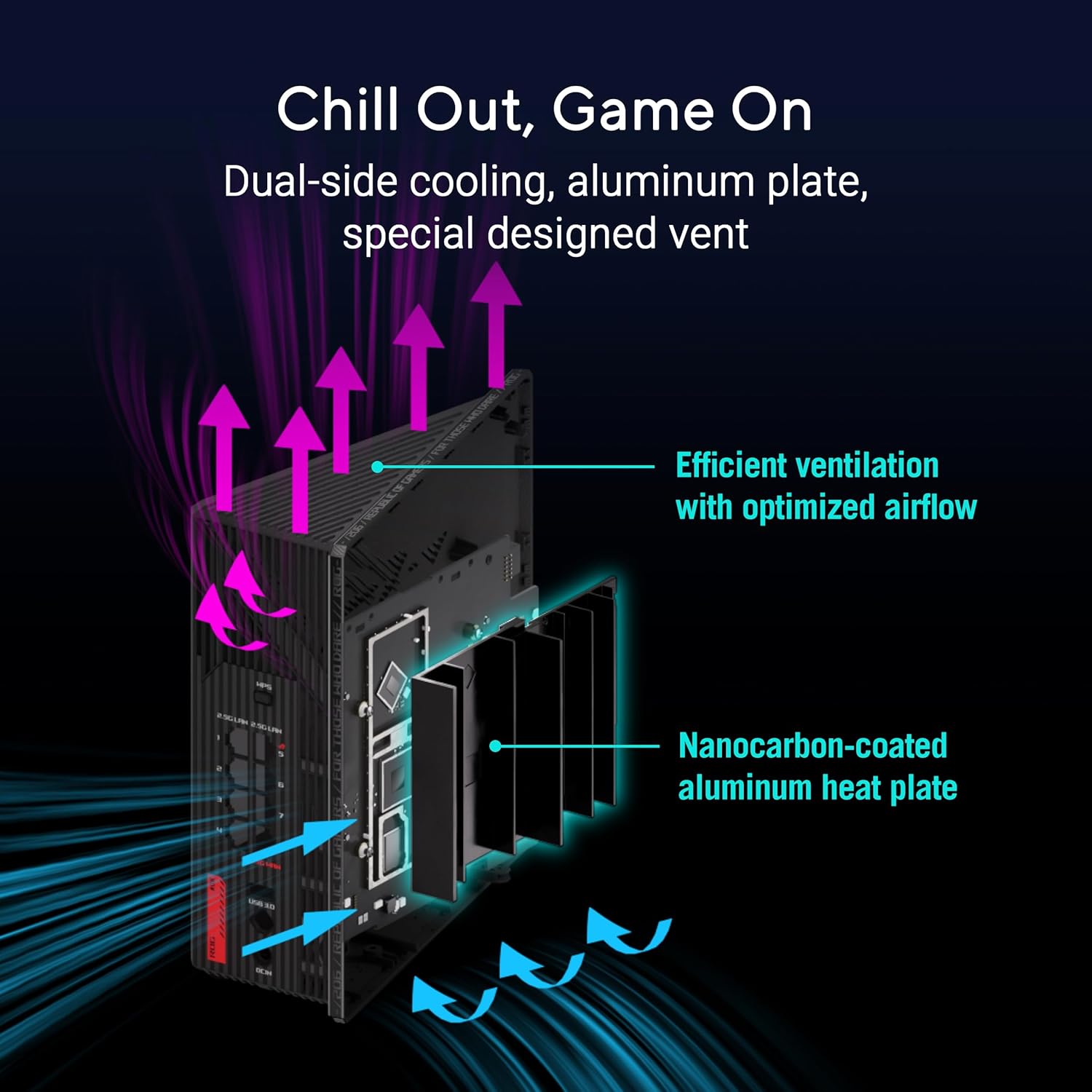
Bild: Intern view of the router highlighting its dual-side cooling and nanocarbon-coated aluminum heat plate for efficient heat dissipation.
6. Fehlerbehebung
Sollten Sie Probleme mit Ihrem Router haben, beachten Sie bitte die folgenden gängigen Lösungsansätze:
- Keine Internetverbindung:
- Überprüfen Sie alle Kabelverbindungen (Strom, WAN, LAN), um sicherzustellen, dass sie fest sitzen.
- Starten Sie Ihr Modem und Ihren Router neu.
- Überprüfen Sie den Verbindungsstatus Ihres Internetdienstanbieters (ISP).
- Langsame WLAN-Geschwindigkeit:
- Stellen Sie sicher, dass Ihre Geräte mit dem entsprechenden WLAN-Band verbunden sind (6 GHz oder 5 GHz für höhere Geschwindigkeiten).
- Um Störungen zu vermeiden, sollte der Router von anderen elektronischen Geräten entfernt aufgestellt werden.
- Aktualisieren Sie die Firmware und die Gerätetreiber Ihres Routers.
- Wi-Fi Drops:
- Check for physical obstructions or distance from the router. Consider using AiMesh nodes for extended coverage.
- Ensure the router is placed centrally in your home.
For more detailed troubleshooting or advanced issues, consult the official ASUS support webWebsite oder wenden Sie sich an den Kundendienst.
7. Spezifikationen
| Besonderheit | Beschreibung |
|---|---|
| Marke | ASUS |
| Modellname | GS-BE12000 |
| Frequenzbandklasse | Tri-Band (2.4 GHz, 5 GHz, 6 GHz) |
| Wireless-Standard | WiFi 7 (802.11be), WiFi 6 (802.11ax) |
| Datenübertragungsrate | Bis zu 12000 Mbit/s |
| Wired Capacity | Up to 20G (1x 2.5G WAN, 7x 2.5G LAN) |
| CPU | 2.0 GHz Quad-Core |
| RAM | 2 GB |
| Antennen | 8 Interne Antennen |
| Abdeckung | Bis zu 3000 m². |
| Security Protocol | AiProtection Pro, WPA/WPA2/WPA3 Personal/Enterprise |
| Kontrollmethode | App, Druckknopf |
| Abmessungen (L x B x H) | 8.9 Zoll L x 3.5 Zoll B x 8.9 Zoll H |
| Artikelgewicht | 2.04 Pfund |
8. Garantie und Support
The ASUS ROG Strix GS-BE12000 comes with a 3 Jahr Garantie from the manufacturer. For warranty claims, technical support, or additional product information, please visit the official ASUS support website or the ASUS Store.
ASUS Store: Besuchen Sie den ASUS Store auf Amazon