
1. Einleitung
This manual provides comprehensive instructions for the TALIX AuraHalo G1 Open-Ear Headphones. Please read this manual carefully before use to ensure proper operation and to maximize the product's performance and lifespan. Keep this manual for future reference.
2. Produktüberschreitungview
The TALIX AuraHalo G1 headphones feature an innovative open-ear design, allowing you to enjoy audio while remaining aware of your surroundings. They are ultra-lightweight, weighing only 5.2 grams per earbud, and offer a comfortable, secure fit. Equipped with Bluetooth 5.3, these headphones provide stable connectivity and clear sound, suitable for both iOS and Android devices. An IPX4 waterproof rating ensures durability against sweat and light rain.

Image: TALIX AuraHalo G1 Open-Ear Headphones in their charging case.
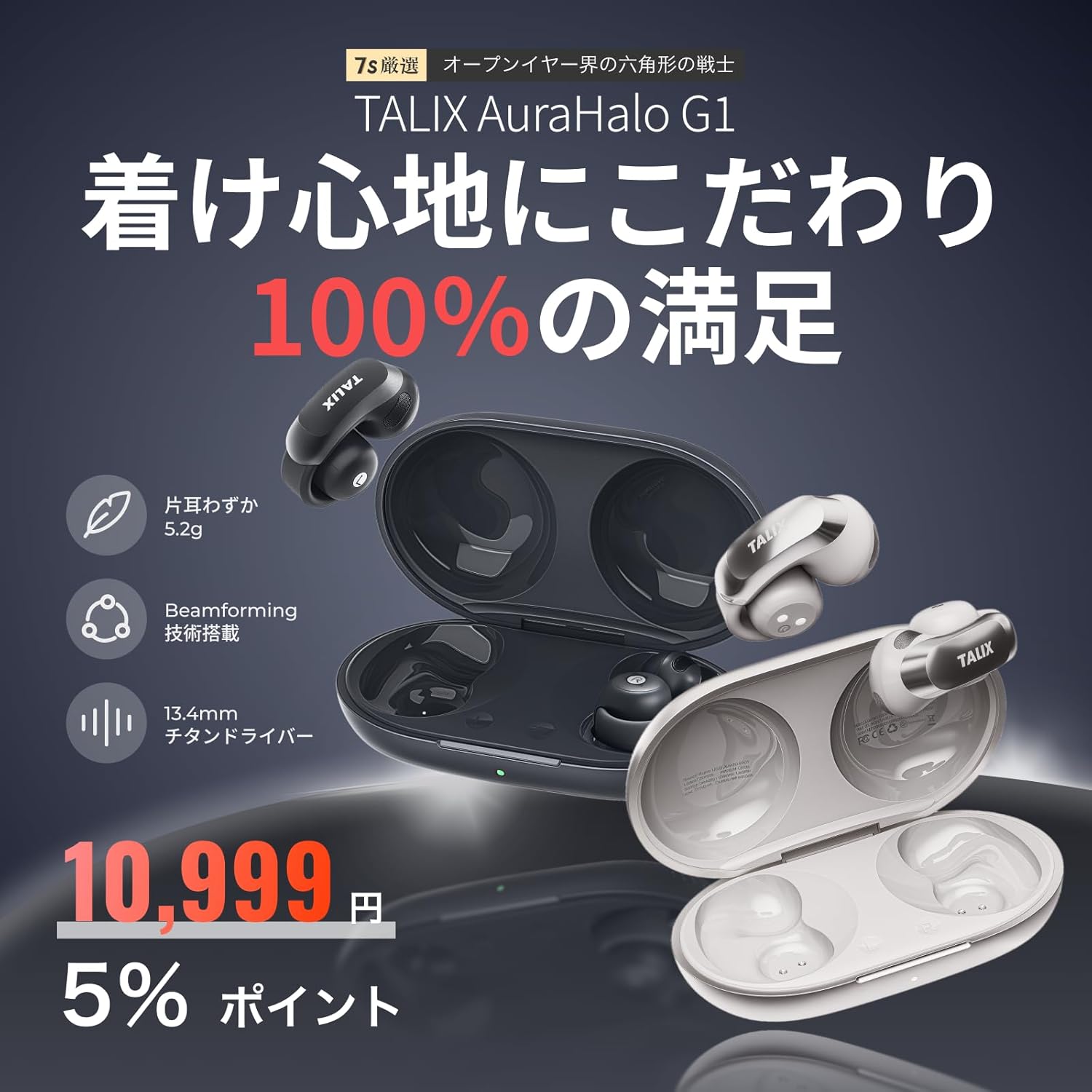
Bild: Überview of TALIX AuraHalo G1 highlighting key features: 5.2g ultra-lightweight, Beamforming technology, and 13.4mm Titanium Driver.
3. Packungsinhalt
Bitte überprüfen Sie, ob alle Artikel im Paket vorhanden sind:
- TALIX AuraHalo G1 Earbuds (Left and Right) x 1
- Ladekoffer x 1
- USB-C-Ladekabel x 1
- Benutzerhandbuch x 1

Image: Contents of the TALIX AuraHalo G1 package, including earbuds, charging case, USB-C cable, and manual.
4. Einrichtung
4.1 Laden
Vor dem ersten Gebrauch die Ohrhörer und das Ladecase vollständig aufladen.
- Legen Sie die Ohrhörer in das Ladeetui.
- Verbinden Sie das USB-C-Ladekabel mit dem Ladeanschluss am Gehäuse und einer Stromquelle.
- The indicator lights on the case will show the charging status. A full charge takes approximately 1.5 hours.
4.2 Paarung
- Öffnen Sie das Ladecase. Die Ohrhörer wechseln automatisch in den Kopplungsmodus, was durch eine blinkende LED-Leuchte angezeigt wird.
- Aktivieren Sie Bluetooth auf Ihrem Gerät (Smartphone, Tablet usw.).
- Suchen nach "TALIX AuraHalo G1" in the list of available Bluetooth devices and select it to connect.
- Sobald die Verbindung hergestellt ist, hört die LED-Anzeige an den Ohrhörern auf zu blinken.
4.3 Tragen der Ohrhörer
Für optimalen Klang und Tragekomfort achten Sie bitte darauf, dass die Ohrhörer richtig sitzen.
- Gently stretch the ear hook and place it over your ear.
- Adjust the earbud so the speaker part is directed towards your ear canal.
- Ensure the L (left) and R (right) markings match your ears. Do not excessively bend or stretch the ear hook.

Image: Visual guide demonstrating the correct way to wear the TALIX AuraHalo G1 earbuds, showing proper ear hook placement and speaker alignment, alongside examples of incorrect wearing.
5. Bedienungsanleitung
5.1 Berührungssteuerung
The TALIX AuraHalo G1 earbuds feature intuitive touch controls on each earbud. The functions may vary slightly between the left and right earbuds.

Image: Diagram illustrating the touch control functions for the TALIX AuraHalo G1 earbuds.
| Aktion | Linker Ohrhörer | Rechter Ohrhörer |
|---|---|---|
| Doppeltippen | Anruf annehmen/beenden, Musik abspielen/pausieren | Anruf annehmen/beenden, Musik abspielen/pausieren |
| Dreifach tippen | Reject Incoming Call, Previous Track | Reject Incoming Call, Next Track |
| Langes Drücken | Sprachassistent aktivieren | Sprachassistent aktivieren |
5.2 Anruffunktionen
- Anrufe entgegennehmen / beenden: Tippen Sie zweimal auf einen der Ohrhörer.
- Anrufe ablehnen: Dreimaliges Tippen auf einen der Ohrhörer.
- The built-in microphone with Beamforming technology enhances call clarity by reducing ambient noise.
5.3 Musikwiedergabe
- Abspielen/Pause: Tippen Sie zweimal auf einen der Ohrhörer.
- Nächster Titel: Tippen Sie dreimal auf den rechten Ohrhörer.
- Vorheriges Lied: Tippen Sie dreimal auf den linken Ohrhörer.
5.4 Sprachassistent
- Aktivieren: Long press either earbud to activate your device's voice assistant (e.g., Siri, Google Assistant).
6. Wartung
6.1 Reinigung
- Reinigen Sie die Ohrhörer und das Ladecase regelmäßig mit einem weichen, trockenen, fusselfreien Tuch.
- Verwenden Sie keine Scheuermittel, Lösungsmittel oder Aerosolsprays.
- Achten Sie darauf, dass keine Feuchtigkeit in den Ladeanschluss oder die Lautsprechergitter eindringt.
6.2 Speicherung
- Bewahren Sie die Ohrhörer bei Nichtgebrauch in ihrem Ladeetui auf, um sie zu schützen und geladen zu halten.
- An einem kühlen, trockenen Ort ohne direkte Sonneneinstrahlung und extreme Temperaturen lagern.
6.3 Wasserdichtigkeit (IPX4)
The TALIX AuraHalo G1 earbuds are rated IPX4, meaning they are resistant to splashing water from any direction. This makes them suitable for use during workouts or in light rain. However, they are not designed for swimming or submersion in water. Do not expose them to pressurized water or high-velocity water.

Image: Visual representation of TALIX AuraHalo G1 earbuds with IPX4 water resistance, showing protection against splashes.
7. Fehlerbehebung
If you encounter any issues with your TALIX AuraHalo G1 headphones, please refer to the following common solutions:
- Kein Ton/Geringe Lautstärke:
- Stellen Sie sicher, dass die Ohrhörer ordnungsgemäß aufgeladen sind.
- Überprüfen Sie die Lautstärke sowohl auf Ihrem Gerät als auch an den Ohrhörern.
- Ensure the earbuds are correctly paired and connected to your device.
- Try cleaning any debris from the speaker grilles.
- Kopplung fehlgeschlagen:
- Stellen Sie sicher, dass Bluetooth auf Ihrem Gerät aktiviert ist.
- Ensure the earbuds are in pairing mode (flashing LED).
- Schalten Sie Bluetooth an Ihrem Gerät aus und wieder ein.
- Entfernen Sie das Gerät aus Ihrer Bluetooth-Liste und versuchen Sie es erneut mit einer Kopplung.
- Stellen Sie sicher, dass die Ohrhörer nicht mit einem anderen Gerät verbunden sind.
- Intermittierende Verbindung:
- Stellen Sie sicher, dass sich Ihr Gerät innerhalb der Bluetooth-Reichweite (typischerweise 10 Meter) und ohne größere Hindernisse befindet.
- Vermeiden Sie starke elektromagnetische Störungen.
- Koppeln Sie die Ohrhörer erneut mit Ihrem Gerät.
- Ohrhörer werden nicht aufgeladen:
- Stellen Sie sicher, dass das Ladekabel sowohl mit dem Gehäuse als auch mit der Stromquelle fest verbunden ist.
- Prüfen Sie, ob das Ladecase selbst mit Strom versorgt wird.
- Reinigen Sie die Ladekontakte an den Ohrhörern und am Etui.
- Versuchen Sie es mit einem anderen USB-C-Kabel oder Netzteil.
- Touch-Bedienelemente reagieren nicht:
- Achten Sie darauf, dass Ihre Finger sauber und trocken sind, wenn Sie Touch-Bedienelemente verwenden.
- Starten Sie die Ohrhörer neu, indem Sie sie in das Ladecase legen und wieder herausnehmen.
Sollte das Problem weiterhin bestehen, wenden Sie sich bitte an den Kundendienst.
8. Spezifikationen
| Besonderheit | Spezifikation |
|---|---|
| Modellname | OW5405 |
| Marke | TALIX |
| Konnektivitätstechnologie | Bluetooth |
| Drahtlose Kommunikationstechnologie | Bluetooth 5.3 |
| Platzierung des Ohrs | Offenes Ohr |
| Kopfhörerstil | Ear Cuff |
| Steuerungstyp | Touch-Steuerung |
| Lärmschutz | Call Noise Cancellation (Beamforming) |
| Product Weight (per earbud) | 5.2 Gramm |
| Wasserbeständigkeit | IPX4 (wasserdicht) |
| Ladezeit | 1.5 Stunden |
| Gesamtspielzeit (mit Ladecase) | Bis zu 28 Stunden |
| Playtime (earbuds only) | Bis zu 7 Stunden (bei 50 % Lautstärke) |
| Kompatible Geräte | Android, iOS |
| Material | Silikon, Kunststoff |
| Empfindlichkeit | 126 dB |
| Frequenzgang | 20 Hz (Note: Full range typically 20Hz-20kHz, only lower bound provided) |
9. Garantie und Support
9.1 30-Day Return Guarantee
Returns are accepted within 30 days of purchase if the product is unopened and in a resalable condition. Please note that opened or used items, as well as included accessories or promotional gifts, are not eligible for return or exchange due to customer reasons.
9.2 Product Warranty (12 Months)
If a product defect occurs within 12 months from the order date, an exchange will be provided upon confirmation by our store. This warranty does not cover defects resulting from normal wear and tear, customer negligence, or improper use. Examples of improper use include, but are not limited to, earbuds soaked in sodium chloride from sweat and left in the charging case, leading to electrochemical reactions or oxidative corrosion. Please be aware of these exclusions.

Image: Information regarding the 30-day return guarantee and 12-month product warranty for TALIX AuraHalo G1.
9.3 Kundendienst
For further assistance or inquiries, please contact TALIX customer support through the retailer where you purchased the product.