
1. Einleitung
This manual provides essential information for the safe and effective installation, operation, and maintenance of the Walfront NLQ1H-63/4P Dual Power Automatic Transfer Switch (ATS). Please read this manual thoroughly before attempting to install or operate the device. Keep this manual for future reference.
The Walfront NLQ1H-63/4P ATS is designed to automatically switch between two power sources, ensuring a continuous and uninterrupted power supply for critical loads. It features both automatic and manual operation modes and is suitable for various applications including households, machinery production, and high-rise buildings.
2. Sicherheitshinweise
WARNUNG: Stromschlaggefahr. Installation und Wartung dürfen nur von qualifiziertem Fachpersonal durchgeführt werden.
- Vor der Installation oder Wartung des ATS müssen stets alle Stromquellen getrennt werden.
- Stellen Sie sicher, dass das Gerät ordnungsgemäß geerdet ist.
- Prüfen Sie, ob alle Drahtverbindungen sicher und gemäß dem Schaltplan korrekt sind.
- Das ATS darf nicht in Betrieb genommen werden, wenn es beschädigt erscheint.
- Tragen Sie beim Arbeiten an elektrischen Anlagen geeignete persönliche Schutzausrüstung (PSA).
- The device housing is made of PC fire retardant material to prevent fire spread.
3. Produktüberschreitungview
The Walfront NLQ1H-63/4P is a robust dual power automatic transfer switch designed for reliable power management.
Hauptmerkmale:
- Automatische Stromumschaltung: Ensures seamless power switching between supplies for uninterrupted operation.
- Fernbedienung: Equipped with a fire power interface for noiseless, energy-saving operation.
- Feuerfestes Gehäuse: Constructed from PC fire retardant material to prevent fire spread and damage, ensuring safety.
- Vielseitige Bedienung: Features both automatic and manual modes for easy use and reliable performance.
- Mehrere Anwendungen: Suitable for various settings including households, machinery production, and high-rise buildings.
Komponenten und Abmessungen:
The following images illustrate the Walfront NLQ1H-63/4P ATS, highlighting its overall design and key dimensions.
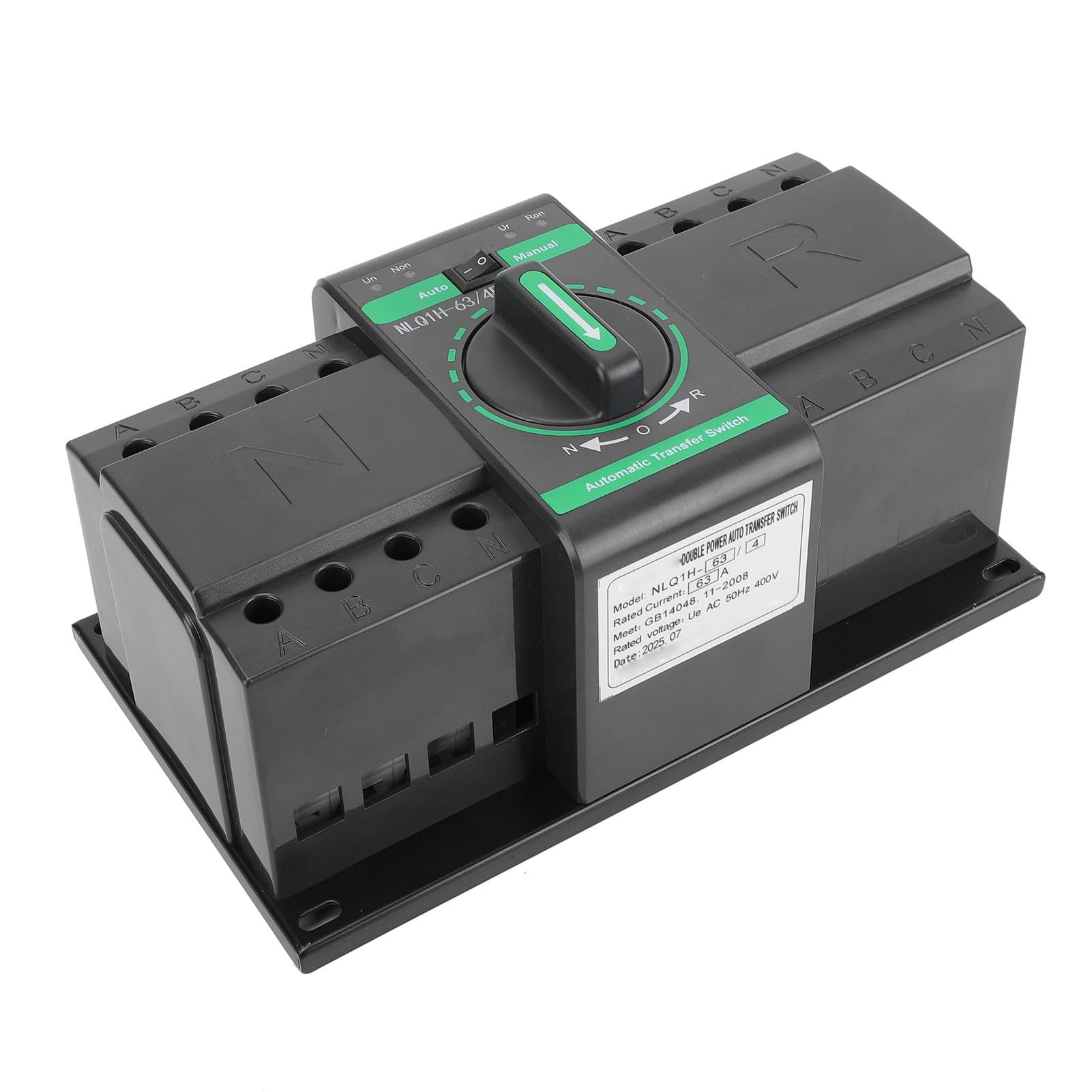
Abbildung 1: Vorderseite view of the Walfront NLQ1H-63/4P Automatic Transfer Switch.

Figure 2: Dimensions of the Walfront NLQ1H-63/4P Automatic Transfer Switch. The device measures approximately 235mm (9.25in) in length, 138mm (5.43in) in width, and 110mm (4.33in) in height.
For detailed component identification and wiring terminals, refer to the setup section.
4. Spezifikationen
| Spezifikation | Wert |
|---|---|
| Modell | NLQ1H-63/4P |
| Nennvolumentage | Wechselstrom 400 V |
| Nennstrom | 63 A |
| Nennfrequenz | 50 Hz |
| Bemessungskurzschlussstrom | 3 kA |
| Mechanical Life (Automatic) | 3000 Mal |
| Mechanical Life (Manual) | 1500 Mal |
| Material | PC Fire Retardant, Silver |
| Artikelabmessungen (L x B x H) | 9.44 x 5.9 x 4.72 Zoll (235 x 138 x 110 mm) |
| Montagetyp | Wandhalterung |
| Internationale Schutzbewertung | IP20 |
| Spezifikation erfüllt | ISO 9001 |
5. Einrichtung und Installation
Proper installation is crucial for the safe and reliable operation of the ATS. This device is designed for wall mounting.
Wiring Diagram and Terminal Identification:
The ATS requires connection to two separate power sources (e.g., utility grid and generator) and the load. Carefully follow the wiring diagram provided on the device and illustrated below.

Abbildung 3: Ausführlich view of the Walfront NLQ1H-63/4P ATS showing common incoming wiring terminals (N, A, B, C), backup incoming wiring terminals (N, A, B, C), common closing power indicator (Un), backup outgoing power indicator (Ur), manually switching handle, and fixed installation holes.
- Montage: Securely mount the ATS to a wall using appropriate fasteners through the fixed installation holes. Ensure the mounting surface is stable and can support the weight of the device.
- Power Source 1 (Common Incoming): Connect the main power source (e.g., utility grid) to the terminals labeled 'N', 'A', 'B', 'C' on the left side of the switch (Common Incoming Wiring Terminal).
- Power Source 2 (Backup Incoming): Connect the backup power source (e.g., generator) to the terminals labeled 'N', 'A', 'B', 'C' on the right side of the switch (Backup Incoming Wiring Terminal).
- Lastanschluss: Connect the electrical load to the output terminals of the ATS.
- Steuerverkabelung: Connect any necessary control wiring, such as for the fire power interface, to the designated terminals.
- Überprüfung: After all connections are made, double-check all wiring for correctness and tightness. Ensure no loose wires are present.
IMPORTANT: Always consult a qualified electrician for installation to ensure compliance with local electrical codes and safety standards.
6. Bedienungsanleitung
The Walfront NLQ1H-63/4P ATS offers both automatic and manual operation modes.
Betriebsarten:
- Automatikmodus (Auto): In this mode, the ATS will automatically detect the availability of power from both sources and switch to the preferred source. If the primary source fails, it will automatically transfer to the backup source. When the primary source is restored, it will switch back. To select automatic mode, turn the central rotary handle to the 'Auto' position. The 'Un' indicator (Common closing power indicator) and 'Ur' indicator (Backup outgoing power indicator) will illuminate to show the active power source.
- Manueller Modus (Manuell): This mode allows for manual switching between power sources. To select manual mode, turn the central rotary handle to the 'Manual' position. You can then manually switch between the 'N' (Normal/Common) and 'R' (Reserve/Backup) positions using the handle. This mode is useful for maintenance or specific operational requirements.
The central rotary handle on the front of the device (see Figure 3) is used to select between 'Auto' and 'Manual' modes, and for manual switching between 'N' and 'R' positions when in manual mode.
7. Wartung
Regelmäßige Wartung trägt dazu bei, die Langlebigkeit und den zuverlässigen Betrieb Ihres ATS zu gewährleisten.
- Sichtprüfung: Überprüfen Sie das ATS regelmäßig auf Anzeichen von physischen Schäden, lockeren Verbindungen oder Überhitzung.
- Reinigung: Halten Sie das Gerät sauber und frei von Staub und Schmutz. Verwenden Sie zum Reinigen ein trockenes, weiches Tuch. Verwenden Sie keine flüssigen Reinigungsmittel.
- Anschlussdichtheit: Annually, or as needed, check the tightness of all terminal connections to prevent arcing and overheating.
- Funktionstest: Periodically test the automatic transfer function by simulating a primary power failure (if safe to do so) to ensure it switches correctly to the backup source.
CAUTION: Always disconnect power before performing any maintenance or cleaning.
8. Fehlerbehebung
If you encounter issues with your Walfront NLQ1H-63/4P ATS, refer to the following common troubleshooting steps:
| Problem | Mögliche Ursache | Lösung |
|---|---|---|
| ATS does not transfer power automatically. | ATS is in manual mode. No power detected from primary or backup source. Faulty control wiring. | Switch to 'Auto' mode. Check power supply to both sources. Inspect control wiring for damage or incorrect connections. |
| Keine Stromversorgung. | Beide Stromquellen sind ausgeschaltet. Lose Lastanschlüsse. Interner Fehler. | Prüfen Sie, ob beide Stromquellen aktiv sind. Check and tighten load wiring connections. Wenden Sie sich an qualifiziertes Servicepersonal. |
| Indicators not illuminating. | No power to the ATS. Faulty indicator light. | Check power supply to the ATS. If power is present, the indicator may need replacement (contact support). |
If the problem persists after attempting these solutions, contact Walfront customer support or a qualified electrician.
9. Garantie und Support
For warranty information, technical support, or service inquiries regarding your Walfront NLQ1H-63/4P Dual Power Automatic Transfer Switch, please contact Walfront customer service through their official channels. Refer to your purchase documentation or the Walfront webDie genauen Garantiebedingungen und Kontaktdaten finden Sie auf der Webseite.
Walfront Customer Support:
- Besuchen Sie die Walfront Store on Amazon für weitere Informationen.
- Refer to your product packaging for direct contact information.