
Einführung
Thank you for choosing the JUOVI 65W 20000mAh Portable Charger. This high-capacity power bank is designed to provide reliable and fast charging for a wide range of devices, including laptops, tablets, and smartphones. Please read this manual carefully to ensure proper use and optimal performance of your device.
Packungsinhalt
- 1 × JUOVI 65W 20000mAh Power Bank
- 1 × USB-C to USB-C Cable (1 ft)
- 1 × Benutzerhandbuch
Produkt überview
Machen Sie sich mit den Komponenten Ihrer JUOVI Powerbank vertraut:

Figure 1: JUOVI Power Bank with USB-C and USB-A ports, and digital display.
- USB-C Ports (C1 IN/OUT, C2 IN/OUT): Two ports supporting 65W PD 3.0 fast charging for both input and output.
- USB-A Ports (USB1 OUT, USB2 OUT): Two ports supporting 30W fast charging output.
- Digitaler Bildschirm: Zeigt den Batterieprozentsatz in Echtzeit antage und Ladezustand.
- Netzschalter: Activates the display and controls charging modes.
Hauptmerkmale
65W High-Speed Laptop Charging & PD 3.0 Fast Charging
The power bank features dual USB-C ports capable of delivering 65W PD 3.0 fast charging. This allows for rapid recharging of compatible laptops, such as a 14-inch MacBook Pro to 50% in approximately 40 minutes, and an iPhone to 60% in just 30 minutes. It provides efficient power for laptops, tablets, and phones during travel or daily use.
Massive 20000mAh Capacity & Charge 4 Devices Simultaneously
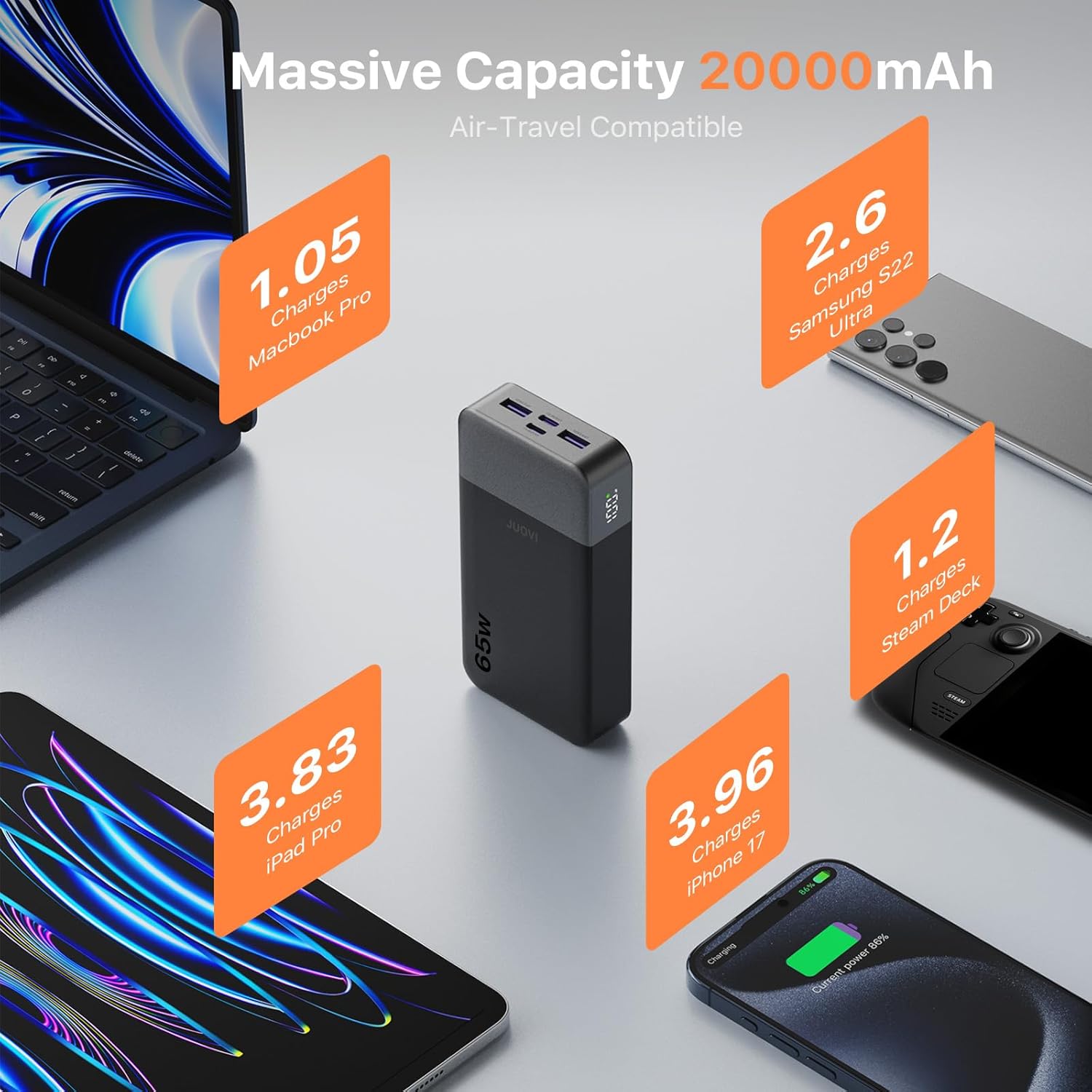
Figure 2: High capacity of JUOVI Power Bank for multiple devices.
With a 20000mAh battery, this power bank offers extended power. It includes 2 USB-C (65W) and 2 USB-A (30W) ports, enabling simultaneous charging of up to four devices, such as a laptop, tablet, phone, and earbuds. It is designed for travel, camping, flights, and daily commutes.

Figure 3: Charging multiple devices with the JUOVI Power Bank.
Dual-Mode Charging for All Devices & Trickle Mode
This charger supports a default high-power mode for laptops and tablets. For delicate devices like AirPods, Bluetooth headphones, and smartwatches, a simple double-press of the power button activates Low-Current Mode (Trickle Mode), providing safe and gentle charging to preserve battery health.
Smart Digital Display & Real-Time Power Monitoring
The integrated digital display provides real-time visibility of the remaining battery percentage and current charging status. This feature helps users accurately monitor power levels and plan usage without unexpected shutdowns.
Sicherheitsschutz

Figure 4: JUOVI Power Bank's 6-way safety protection features.
The power bank is engineered with a multi-protection system that guards against overcharging, overheating, short-circuit, and overcurrent. An intelligent chip monitors voltage and current in real-time, adjusting output for safe operation.
Aufstellen
Aufladen der Powerbank
- Connect the provided USB-C to USB-C cable to one of the power bank's USB-C (IN/OUT) ports.
- Schließen Sie das andere Ende des Kabels an ein kompatibles USB-C-Wandladegerät (nicht im Lieferumfang enthalten) mit einer Mindestausgangsleistung von 45 W an, um eine optimale Ladegeschwindigkeit zu gewährleisten.
- Das Digitaldisplay zeigt den Akkustand in Prozent an.tage increasing, indicating that the power bank is charging.
- Once the display shows 100%, the power bank is fully charged.
Bedienungsanleitung
Aufladen Ihrer Geräte
- Batteriestand prüfen: Drücken Sie einmal die Einschalttaste, um view der aktuelle Batterieprozentsatztage auf der Digitalanzeige.
- Gerät verbinden:
- For laptops and fast-charging devices, use a USB-C to USB-C cable and connect to either USB-C (IN/OUT) port.
- For other devices, use a compatible USB-A cable and connect to either USB-A (OUT) port.
- Ladevorgang einleiten: The power bank will automatically begin charging your device. The digital display will show the charging status.
- Optimales Laden: For maximum charging speed, it is recommended to charge one device at a time, especially high-power devices like laptops. Charging multiple devices simultaneously may reduce power per port.
Activating Trickle Mode (Low-Current Mode)
Trickle Mode is ideal for charging low-power devices such as wireless earbuds, smartwatches, or Bluetooth headphones, preventing overcharging and preserving their battery life.
- Connect your low-power device to any available output port on the power bank.
- Double-press the power button. The digital display will show a small icon (e.g., "L" or a specific symbol) indicating that Trickle Mode is active.
- To exit Trickle Mode and return to standard charging, double-press the power button again.
Technische Daten
| Modellnummer | J2931 |
| Batteriekapazität | 20000 mAh |
| Maximale Ausgangsleistung | 65 W |
| USB-C-Anschlüsse | 2 (C1 IN/OUT, C2 IN/OUT) - up to 65W PD 3.0 |
| USB-A-Anschlüsse | 2 (USB1 OUT, USB2 OUT) - up to 30W |
| Technische Daten | 5.39 x 2.76 x 1.04 Zoll |
| Artikelgewicht | 14.1 Unzen |
| Besondere Merkmale | Automatische Abschaltung, Digitalanzeige, Schnellladung, Überladeschutz, Kurzschlussschutz |
Fehlerbehebung
- Gerät lädt nicht:
- Stellen Sie sicher, dass die Powerbank ausreichend geladen ist.
- Vergewissern Sie sich, dass das Ladekabel sowohl mit der Powerbank als auch mit Ihrem Gerät fest verbunden ist.
- Versuchen Sie es mit einem anderen Ladekabel oder Anschluss.
- Prüfen Sie, ob Ihr Gerät mit den Ausgangsspezifikationen der Powerbank kompatibel ist.
- Langsames Laden:
- Stellen Sie sicher, dass Sie ein Schnellladekabel verwenden und Ihr Gerät Schnellladen unterstützt.
- If multiple devices are connected, disconnect some to allow higher power output to a single device.
- Check if Trickle Mode is accidentally activated (double-press power button to toggle).
- Powerbank lädt nicht:
- Ensure the USB-C cable is connected to an IN/OUT port and to a functional wall adapter.
- Versuchen Sie es mit einem anderen Netzadapter oder einer anderen Steckdose.
- Use the provided USB-C to USB-C cable for optimal input charging.
Wartung
- Die Powerbank sollte vor extremen Temperaturen, direkter Sonneneinstrahlung und Flüssigkeiten geschützt werden.
- Bei Nichtgebrauch an einem kühlen, trockenen Ort aufbewahren.
- Lassen Sie das Gerät nicht fallen und setzen Sie es keinen starken Stößen aus.
- Reinigen Sie die Oberfläche mit einem weichen, trockenen Tuch. Verwenden Sie keine scharfen Chemikalien oder Scheuermittel.
- Laden Sie die Powerbank mindestens einmal alle drei Monate auf, um die Batterieleistung zu erhalten, wenn sie über längere Zeiträume gelagert wird.
Garantie und Support
For warranty information or technical support, please refer to the contact details provided on the product packaging or visit the official JUOVI webBewahren Sie Ihren Kaufbeleg als Kaufnachweis für Garantieansprüche auf.