
1. Einleitung
Thank you for choosing the Angrox Backlit Universal Remote Control for LG Smart TVs. This remote is designed to provide a seamless and enhanced television viewing experience, especially in low-light conditions. It serves as a direct replacement for your original LG TV remote, offering broad compatibility and ease of use without requiring complex setup procedures. This manual provides detailed instructions for setting up, operating, maintaining, and troubleshooting your new remote control.
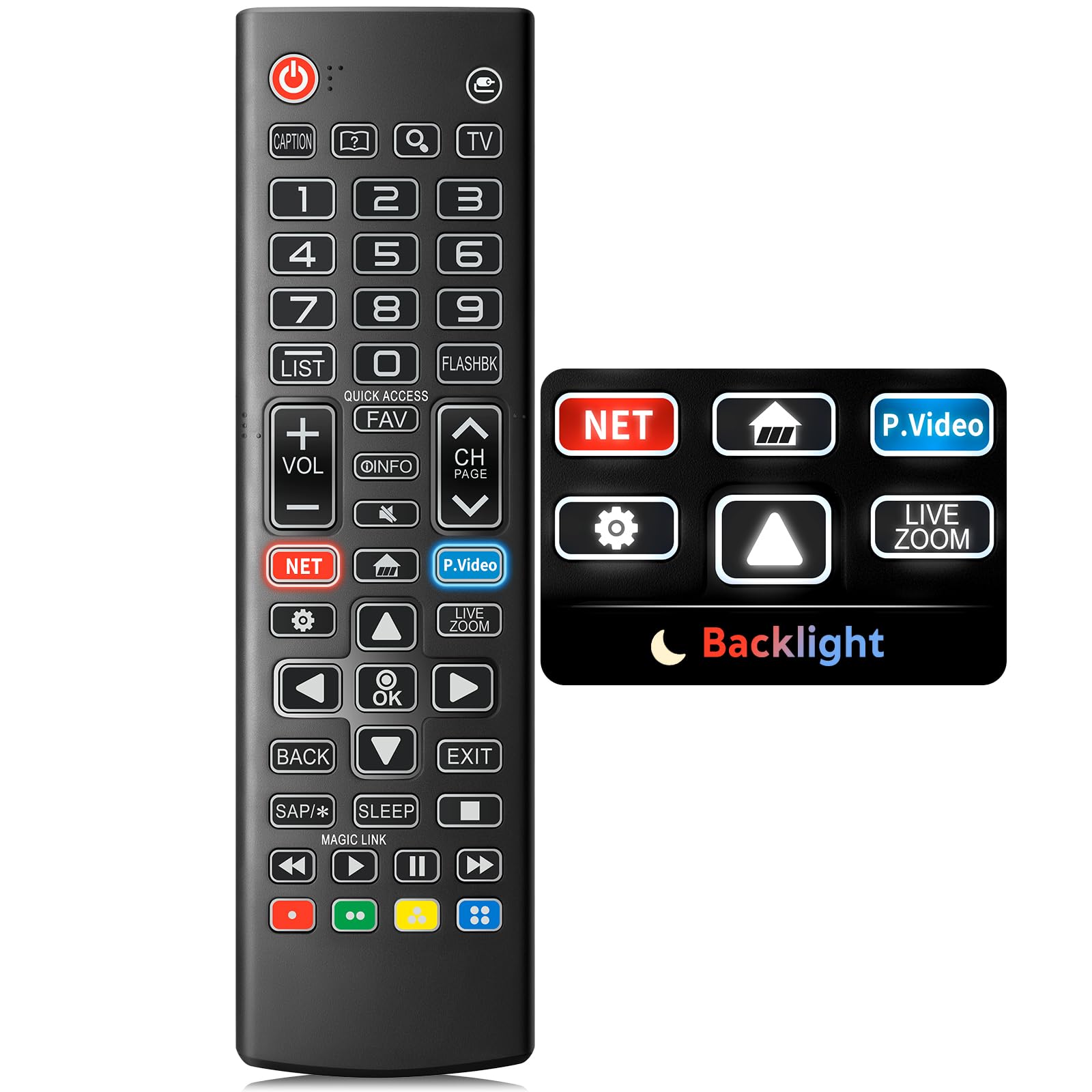
Image: The Angrox Backlit Universal Remote Control, a sleek black remote with clearly labeled buttons.
2. Hauptmerkmale
- Easy Nighttime Operation: Features soft glow buttons that illuminate, allowing for clear visibility and use in dark environments without causing glare. The backlight activates with any button press and automatically turns off after 10 seconds of inactivity.
- Universelle Kompatibilität: Designed as a direct replacement for LG TV remotes, compatible with all LG TV models. No programming or complex pairing is required; it works immediately out of the box.
- High-Quality Performance: Equipped with sensitive buttons and stable signal transmission for smooth and responsive operation.
- Ergonomisches Design: Shaped to fit comfortably in the hand, reducing fatigue during extended use. The button layout is intuitive for users of all ages.
- Langlebig und zuverlässig: Constructed from high-quality, sturdy materials to withstand daily use and accidental drops, ensuring a long lifespan.

Image: A comparison showing the remote control with its backlight off and then with its buttons illuminated, highlighting the easy nighttime operation feature.

Image: The remote control displayed alongside various LG TV models (OLED, UHD, QNED, NanoCell), illustrating its broad compatibility.
3. Einrichtungsanweisungen
3.1 Einlegen der Batterie
- Suchen Sie die Batteriefachabdeckung auf der Rückseite der Fernbedienung.
- Schieben Sie den Deckel nach unten oder drücken Sie den Riegel, um das Fach zu öffnen.
- Legen Sie zwei (2) AAA-Batterien ein und achten Sie darauf, dass die positiven (+) und negativen (-) Anschlüsse mit den Markierungen im Batteriefach übereinstimmen.
- Setzen Sie die Abdeckung des Batteriefachs wieder ein, indem Sie sie so weit hineinschieben, bis sie sicher einrastet.
Notiz: Batteries are not included with the remote control. Please use new AAA alkaline batteries for optimal performance.

Image: A visual guide demonstrating the correct insertion of two AAA batteries into the remote control's battery compartment.
3.2 Erste Verwendung (Keine Kopplung erforderlich)
The Angrox Backlit Universal Remote Control is designed for immediate use with LG Smart TVs. No pairing or programming steps are necessary. Once batteries are installed, the remote is ready to control your LG television.
4. Bedienungsanleitung
This section details the functions of the buttons on your Angrox remote control.

Image: A comprehensive layout of the remote control, with labels pointing to each button and describing its primary function.
4.1 Grundfunktionen
- Leistung (
 ): Schaltet den Fernseher ein oder aus.
 - Eingang (): Changes the input source (e.g., HDMI 1, HDMI 2).
- Lautstärke erhöhen/verringern (VOL +/-): Regelt die Lautstärke.
- Kanal auf/ab (CH Page): Ändert den Fernsehkanal.
- Stumm (): Schaltet den TV-Ton stumm oder hebt die Stummschaltung auf.
- Zifferntasten (0-9): Direkte Eingabe von Kanalnummern oder anderen numerischen Werten.
- Navigationstasten (Auf/Ab/Links/Rechts): Dient zum Durchblättern von Menüs und Optionen.
- OK-Taste: Selects menu items or confirms your input.
4.2 Sonderfunktionstasten
- Netflix-Schaltfläche: Launches the Netflix application directly.
- Amazon Prime Video-Schaltfläche: Launches the Amazon Prime Video application directly.
- Schnellzugriff: A feature that allows you to enter a specified app or Live TV directly by pressing and holding the number buttons.
- Liste: Ruft die Liste der gespeicherten Programme auf.
- Flashback: Kehrt zur vorherigen viewed channel or input.
- Info: Displays information on the current program.
- Favoriten: Greifen Sie auf Ihre Lieblingssenderliste zu.
- Die Einstellungen (): Accesses the Quick Settings menu.
- Zurück: Löscht die Bildschirmanzeigen und kehrt zum Fernsehbildschirm zurück viewing.
- Ausfahrt: Beendet das aktuelle Menü.
- Schlafen: Accesses the sleep timer.
- Media Control Buttons (Play, Pause, Stop, Fast Forward, Rewind): Controls media content playback.
4.3 Hintergrundbeleuchtungsfunktion
The remote control features a soft backlight for easy use in the dark. Simply press any button, and the backlight will turn on. It will automatically turn off after 10 seconds of inactivity to conserve battery life.
Video: A demonstration of the Angrox Backlit Remote for LG Smart TV, showcasing its easy nighttime use and responsive buttons. This video highlights the convenience of the backlit feature in dark environments.
5. Spezifikationen
| Marke | Angrox |
| Modellname | AKB75095307 |
| Modellnummer | AKB75095307 |
| Besondere Merkmale | Backlit, Ergonomic, Lightweight, No Programming Required, Universal |
| Kompatible Geräte | Television (All LG TV models) |
| Maximale Anzahl unterstützter Geräte | 1 |
| Konnektivitätstechnologie | Infrarot |
| Anzahl der Tasten | 30 |
| Controllertyp | Tastensteuerung |
| Maximale Reichweite | 10 Meter (ungefähr 33 Fuß) |
| Anzahl der benötigten Batterien | 2 AAA-Batterien |
| Akku-Typ | Alkalisch |
| Artikelabmessungen (L x B x H) | 9.25 Zoll L x 1.89 Zoll B x 0.73 Zoll H |
6. Fehlerbehebung
Sollten Sie Probleme mit Ihrer Fernbedienung haben, beachten Sie bitte die folgenden gängigen Lösungsansätze:
- Fernbedienung reagiert nicht:
- Achten Sie darauf, dass die Batterien mit der richtigen Polarität (+/-) eingelegt sind.
- Ersetzen Sie die alten Batterien durch neue AAA-Alkalibatterien.
- Prüfen Sie, ob sich Hindernisse zwischen der Fernbedienung und dem Infrarotempfänger des Fernsehers befinden.
- Ensure you are within the maximum operating range (10 meters) of the TV.
- Hintergrundbeleuchtung funktioniert nicht:
- Verify battery power. Low batteries may affect backlight functionality.
- Die Hintergrundbeleuchtung schaltet sich nach 10 Sekunden Inaktivität automatisch aus. Durch Drücken einer beliebigen Taste kann sie wieder aktiviert werden.
- Specific buttons not working (e.g., Netflix, Amazon Prime):
- Ensure your LG Smart TV is connected to the internet and the respective applications are installed and updated.
- Some smart TV features or app shortcuts may vary slightly depending on your TV's model and region.
- Remote feels sluggish or unresponsive:
- Ersetzen Sie die Batterien durch neue.
- Clean the remote's infrared emitter (at the top) and the TV's IR receiver with a soft, dry cloth to ensure a clear signal path.
7. Wartung
To ensure the longevity and optimal performance of your Angrox remote control, follow these maintenance guidelines:
- Reinigung: Use a soft, dry cloth to clean the remote's surface. Avoid using liquid cleaners, aerosols, or harsh chemicals, as they may damage the remote.
- Batteriewechsel: Replace batteries promptly when the remote's performance declines or if the backlight becomes dim. Remove batteries if the remote will not be used for an extended period to prevent leakage.
- Lagerung: Bewahren Sie die Fernbedienung an einem kühlen, trockenen Ort fern von direkter Sonneneinstrahlung, extremen Temperaturen und hoher Luftfeuchtigkeit auf.
- Vermeiden Sie Tropfen: While durable, repeated drops can damage internal components. Handle the remote with care.
8. Garantie und Support
8.1 Garantieinformationen
The Angrox Backlit Universal Remote Control (Model AKB75095307) is covered by a 90 Tage Garantie from the date of purchase. This warranty covers manufacturing defects and ensures the product functions as described under normal use. It does not cover damage caused by misuse, accidents, unauthorized modifications, or normal wear and tear.
8.2 Kundendienst
For any questions, technical assistance, or warranty claims, please contact Angrox customer support through the retailer where you purchased the product or visit the official Angrox store online. Please have your purchase receipt and product model number available when contacting support.