
1. Einleitung
The SENTKENG Y03008 InstaVision 1080P WiFi Camera is an indoor security camera designed for monitoring your home, baby, or pets. It offers 1080P Full HD video, pan and tilt functionality for wide coverage, two-way audio communication, infrared night vision, and intelligent motion detection. This manual provides essential information for setting up, operating, and maintaining your camera.
2. Sicherheitshinweise
- Stellen Sie sicher, dass die Kamera nur in Innenräumen verwendet wird.
- Verwenden Sie ausschließlich das mitgelieferte Netzteil und Kabel.
- Halten Sie das Gerät von Wasser, Feuchtigkeit und extremen Temperaturen fern.
- Versuchen Sie nicht, die Kamera selbst zu zerlegen oder zu reparieren. Wenden Sie sich bei Problemen an den Support.
- Außerhalb der Reichweite von Kindern und Haustieren aufbewahren.
3. Packungsinhalt
Bitte prüfen Sie das Paket auf folgende Artikel:
- SENTKENG Y03008 InstaVision 1080P WiFi Camera
- Bedienungsanleitung
- Typ C Ladekabel
- Wandhalterung
- Schraubenpaket

Image: The camera, Type-C charging cable, wall bracket, screw package, and instruction manual are included in the box.
4. Produktüberschreitungview
Machen Sie sich mit den Hauptkomponenten Ihrer Kamera vertraut:
- Kameraobjektiv: Captures 1080P Full HD video.
- Lautsprecher: Für die bidirektionale Audiokommunikation.
- Storage Card Slot: Insert a microSD card (up to 128GB, not included) for local storage.
- Reset-Schlüssel: Dient dazu, die Kamera auf die Werkseinstellungen zurückzusetzen.
- Typ-C-Ladeanschluss: Schließen Sie hier das Netzkabel an.
Bild: Eine detaillierte view of the camera highlighting the camera lens, speaker, storage card slot, reset key, and Type-C charging port.
5. Installationsanleitung
5.1 Powering On and App Installation
- Einschalten: Connect the camera to a power outlet using the provided Type-C charging cable and power adapter. The camera will power on automatically.
- Download the InstaVision App: Suchen nach 'InstaVision' in your smartphone's app store (iOS or Android) and download the application.
- Registrieren/Anmelden: Open the InstaVision app and follow the on-screen instructions to register a new account or log in if you already have one.

Image: The camera next to a smartphone displaying the InstaVision app's welcome screen, illustrating the easy connection process.
5.2 Mit WLAN verbinden
- Gerät hinzufügen: In the InstaVision app, tap the '+' icon or 'Add Device' to begin the pairing process.
- Kameratyp auswählen: Wählen Sie das passende Kameramodell aus der Liste aus.
- Folgen Sie den Anweisungen in der App: The app will guide you through connecting the camera to your 2.4GHz Wi-Fi network. Ensure your phone is connected to the same 2.4GHz Wi-Fi network during setup.
- Bestätigung: Sobald die Verbindung hergestellt ist, ändert sich die Kontrollleuchte der Kamera, und die App bestätigt die erfolgreiche Kopplung.
5.3 Installationsoptionen
The SENTKENG Y03008 camera offers flexible installation:
- Tabletop Mount (Freestanding): Place the camera on any flat surface such as a table, shelf, or desk. Ensure it has a clear view des Bereichs, den Sie überwachen möchten.
- Deckenmontage: Use the included wall bracket and screws to mount the camera to the ceiling. After mounting, you may need to adjust the image orientation in the InstaVision app settings.

Bild: Examples of camera placement, showing both flat surface installation and ceiling mounting options.
6. Bedienungsanleitung
6.1 Live View und Wiedergabe
Once connected, open the InstaVision app to access the live video feed from your camera. You can view Echtzeit footage und review recorded events from anywhere, anytime.
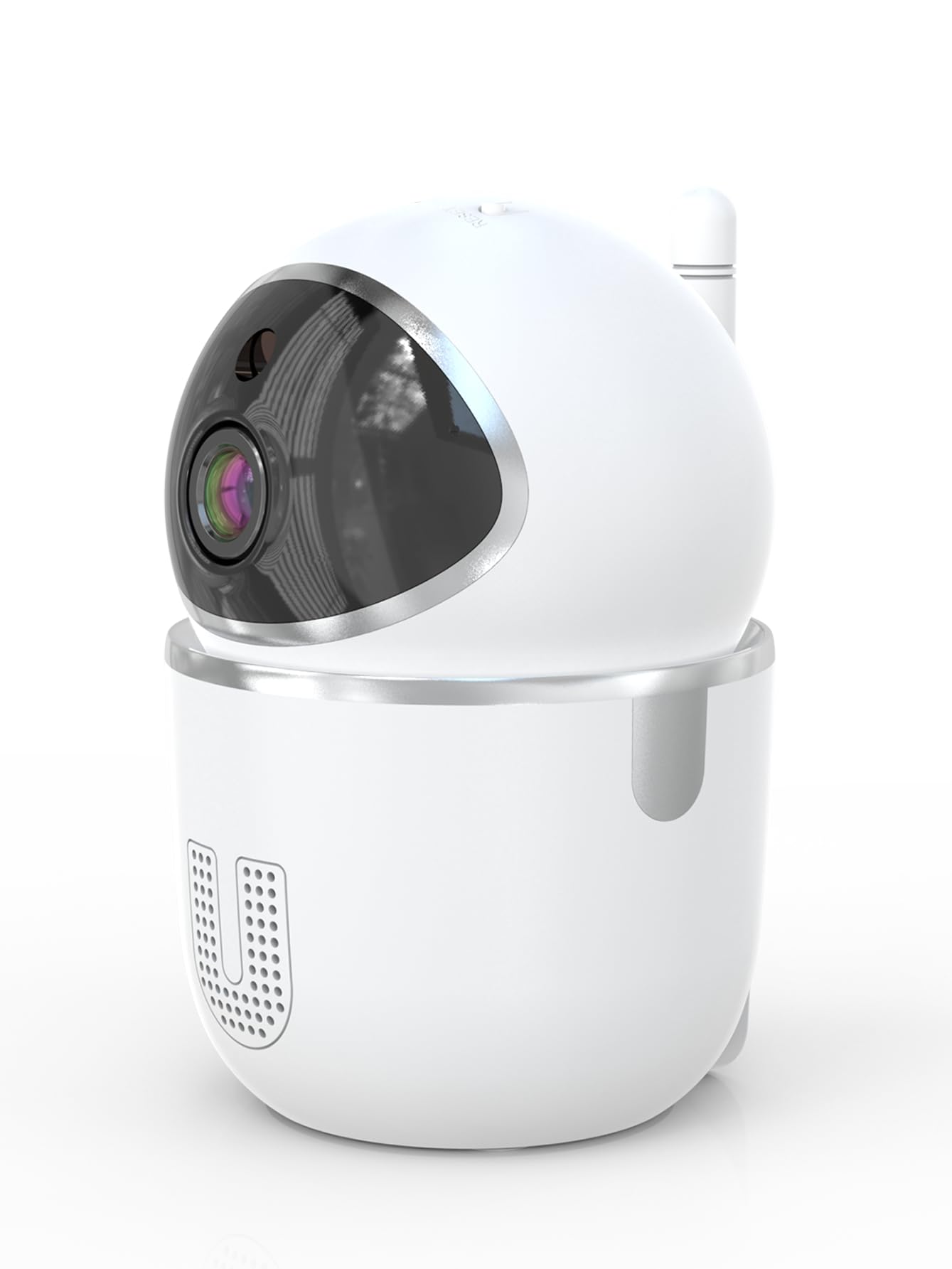
Image: A smartphone displaying the live video feed from the camera, showing a living room scene.
6.2 Schwenk- und Neigesteuerung
Die Kamera fernsteuern viewing angle through the InstaVision app. The camera supports 355° horizontal rotation and 90° vertical tilt, allowing you to cover a wide area with minimal blind spots.

Image: The camera illustrating its pan (355°) and tilt (90°) capabilities, showing the range of motion.
6.3 Zwei-Wege-Audio
The built-in microphone and speaker enable real-time two-way communication. Tap the microphone icon in the app to speak through the camera, and listen to audio from the camera's surroundings.
6.4 Nachtsicht
The camera is equipped with powerful infrared LEDs, providing clear black-and-white video footage in low-light conditions or complete darkness, ensuring 24/7 monitoring.
6.5 Bewegungserkennung und Benachrichtigungen
The camera detects motion and sends instant notifications to your smartphone. You can customize motion detection sensitivity and alert schedules within the InstaVision app.

Image: A smartphone screen showing a list of motion detection events and alerts, indicating human presence.
6.6 Speichermöglichkeiten
- MicroSD-Kartenspeicher: Insert a microSD card (up to 128GB, not included) into the camera's card slot for local recording. The camera will automatically overwrite the oldest footage, wenn die Karte voll ist.
- Cloud-Speicher: An optional cloud service is available via a paid InstaVision app subscription. This provides secure off-site storage for your recordings.

Image: The camera with visual cues indicating support for both local microSD card storage (up to 128GB) and optional cloud storage.
6.7 AI Detection (Subscription)
With a paid InstaVision app subscription, you can access advanced AI-powered features such as recognizing people, pets, and specific human actions. This allows for more precise alerts and faster searching of recorded events.

Image: A smartphone screen demonstrating the contextual AI search feature, allowing users to quickly find specific events like package deliveries or pet movements.
6.8 Mehrbenutzer Viewing
Share access to your camera's live feed with family members or trusted individuals through the InstaVision app, allowing multiple users to view gleichzeitig mit der Kamera.

Image: The camera surrounded by multiple smartphones, illustrating the multi-user viewing capability for real-time online monitoring.
7. Wartung
- Reinigung: Reinigen Sie Objektiv und Gehäuse der Kamera mit einem weichen, trockenen Tuch. Verwenden Sie keine flüssigen Reiniger oder Sprays.
- Firmware-Updates: Regularly check the InstaVision app for available firmware updates. Keeping your camera's firmware updated ensures optimal performance and security.
- MicroSD-Kartenverwaltung: If using a microSD card, periodically check its status in the app. Format the card if necessary to maintain recording quality.
8. Fehlerbehebung
8.1 Kamera verbindet sich nicht mit WLAN
- Stellen Sie sicher, dass Ihr WLAN-Netzwerk mit 2.4 GHz arbeitet. Die Kamera unterstützt kein 5-GHz-WLAN.
- Prüfen Sie, ob Ihr WLAN-Passwort korrekt eingegeben wurde.
- Bringen Sie die Kamera näher an Ihren WLAN-Router heran.
- Starten Sie Ihren Router und die Kamera neu.
- Perform a factory reset on the camera using the reset key and try connecting again.
8.2 Kein Videofeed
- Vergewissern Sie sich, dass die Kamera eingeschaltet und mit dem WLAN verbunden ist.
- Überprüfen Sie Ihre Internetverbindung.
- Restart the InstaVision app.
8.3 Bewegungserkennung funktioniert nicht
- Ensure motion detection is enabled in the InstaVision app settings.
- Passen Sie die Empfindlichkeit der Bewegungserkennung an.
- Check the detection zone settings to ensure the desired area is covered.
8.4 Probleme mit der Zwei-Wege-Audioübertragung
- Ensure your phone's microphone is enabled for the InstaVision app.
- Überprüfen Sie die Lautstärkeeinstellungen an Ihrem Telefon und in der App.
- Ensure there are no obstructions blocking the camera's speaker or microphone.
9. Spezifikationen
| Modellname | Y03008 InstaVision |
| Verwendung im Innen- und Außenbereich | Innenbereich |
| Auflösung der Videoaufnahme | 1080p Full HD |
| Schwenk-/Neigebereich | 355 ° Horizontal, 90 ° Vertikal |
| Konnektivitätstechnologie | Drahtlos (2.4-GHz-WLAN) |
| Stromquelle | Kabelgebundene Elektrik |
| Nachtsichtbereich | 8 Meter |
| Speicheroptionen | MicroSD card (up to 128GB, not included), Cloud Storage (optional subscription) |
| Besondere Merkmale | 2-Way Audio, PTZ Technology, Motion Detection, AI Detection (subscription) |
| Technische Daten | 3.18 x 2.63 x 4.02 Zoll |
| Artikelgewicht | 8.5 Unzen |
10. Garantie und Support
10.1 Garantieinformationen
For detailed warranty information, please refer to the documentation included with your purchase or visit the official SENTKENG webBewahren Sie Ihren Kaufbeleg für Garantieansprüche auf.
10.2 Kundendienst
If you encounter any issues or have questions regarding your SENTKENG Y03008 InstaVision Camera, please contact SENTKENG customer support through the InstaVision app or the official SENTKENG webUnsere Website. Unser Support-Team steht Ihnen gerne zur Verfügung.