
1. Zu Endeview
The Xiaomi Redmi Note 15 Pro 5G is a high-performance smartphone designed for robust daily use. It features a massive 6580 mAh battery, IP66/IP68 dust and water resistance, a 200 MP camera, and a 6.83-inch 1.5K AMOLED display. This manual provides essential information for setting up, operating, and maintaining your device.

Bild: Mehrere views of the Xiaomi Redmi Note 15 Pro 5G smartphone, showcasing sein Design und Kameramodul.
2. Lieferumfang
Upon unboxing your Xiaomi Redmi Note 15 Pro 5G, you should find the following items:
- Xiaomi Redmi Hinweis 15 Pro 5G Smartphone
- USB Cable (USB Type-C)
- SIM-Auswurfwerkzeug
- Schutzhülle
- Holding Ring (Keyring)
Note: A power adapter is not included with this device.
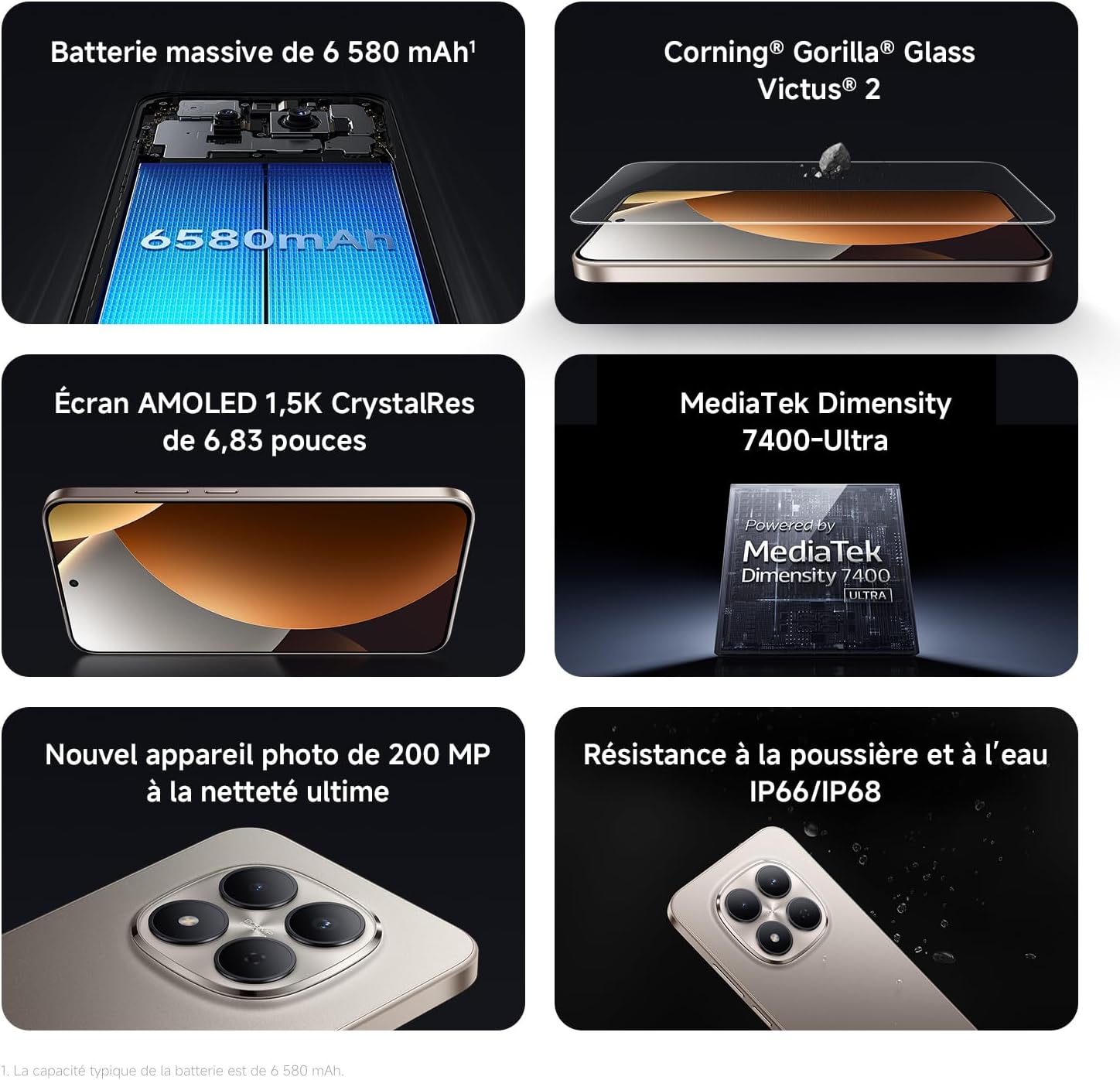
Image: Contents of the Xiaomi Redmi Note 15 Pro 5G box, showing the smartphone, USB-C cable, SIM ejection tool, protective case, and holding ring.
3. Hauptmerkmale
- Massive 6580 mAh Battery with 45W Turbo Charging: Equipped with an ultra-large silicon-carbon battery for extended usage while maintaining a slim and light design. Supports 45W turbo charging and up to 22.5W reverse charging.
- IP66 / IP68 Dust and Water Resistance: The device has successfully passed 2-meter water resistance tests for 24 hours. It is designed to withstand daily splashes, accidental immersion, or drops in water without affecting performance.
- New 200 MP Ultra-Clear Camera System: Features a 4th generation 200 MP main sensor combined with a large 1/1.4-inch sensor, offering unprecedented image detail.
- Immersive 6.83-inch 1.5K Eye-Care AMOLED Display: Utilizes flagship-level luminous materials for reduced power consumption and a peak brightness of 3200 nits, ensuring clear visibility even in bright sunlight.
- KI-Assistent: Intelligent optimization with a single gesture, enhancing imaging capabilities and creative efficiency.
- Corning Gorilla Glass Victus 2: Reinforced front glass for enhanced shock and scratch resistance, ensuring long-term durability.
- MediaTek Dimensity 7400-Ultra Processor: Built on a 4nm TSMC process with an octa-core architecture up to 2.6 GHz, providing powerful multitasking, smooth gaming, and stable performance.
- Xiaomi HyperOS 2: Offers a faster, smarter, and smoother user experience with 6 years of security updates.

Image: Diagram illustrating the 6580 mAh battery capacity of the Redmi Note 15 Pro 5G.

Image: The Redmi Note 15 Pro 5G with water droplets, demonstrating its IP66/IP68 dust and water resistance.

Bild: Nahaufnahme view of the 200 MP camera module on the Redmi Note 15 Pro 5G.

Image: The 6.83-inch 1.5K AMOLED display of the Redmi Note 15 Pro 5G with its specifications.

Image: Before and after images demonstrating AI photo optimization on the Redmi Note 15 Pro 5G.

Image: Illustration of Corning Gorilla Glass Victus 2 durability on the Redmi Note 15 Pro 5G.

Image: Technical image showing RAM chips, indicating up to 24GB RAM with memory extension on the Redmi Note 15 Pro 5G.

Image: Screenshot of the Xiaomi HyperOS 2 interface on the Redmi Note 15 Pro 5G.
4. Einrichtung
4.1. Einlegen der SIM-Karte
- Suchen Sie den SIM-Karten-Einschub an der Seite Ihres Geräts.
- Insert the SIM ejection tool into the small hole next to the tray and press firmly until the tray pops out.
- Place your Nano-SIM card(s) into the tray with the gold contacts facing down. Ensure they are correctly aligned.
- Carefully push the SIM card tray back into the device until it clicks into place.
4.2. Erste Inbetriebnahme und Einrichtung
- Halten Sie den Ein-/Ausschalter (normalerweise auf der rechten Seite) gedrückt, bis das Xiaomi-Logo erscheint.
- Folgen Sie den Anweisungen auf dem Bildschirm, um Ihre Sprache und Region auszuwählen und eine Verbindung zu einem WLAN-Netzwerk herzustellen.
- Melden Sie sich mit Ihrem Google-Konto an oder erstellen Sie ein neues, um auf Google-Dienste und den Play Store zuzugreifen.
- Set up your screen lock (PIN, pattern, password, fingerprint, or face unlock) for security.
- Review and accept the terms and conditions to complete the setup process.
5. Bedienungsanleitung
5.1. Grundlegende Navigation
- Startbildschirm: Durch Wischen nach links oder rechts können Sie zwischen den Startbildschirmen wechseln.
- App-Schublade: Wischen Sie vom unteren Bildschirmrand nach oben, um auf alle installierten Anwendungen zuzugreifen.
- Benachrichtigungen & Schnelleinstellungen: Wischen Sie vom oberen Bildschirmrand nach unten zu view Benachrichtigungen und Schnellzugriff auf die Einstellungen.
- Aktuelle Apps: Swipe up from the bottom and hold, or tap the square navigation button (if enabled) to see recently used applications.
5.2. Kameranutzung
The 200 MP camera system offers various modes for capturing photos and videos.
- Öffnen Sie die Kamera-App von Ihrem Startbildschirm oder aus der App-Übersicht.
- Swipe left or right on the screen to switch between modes like Photo, Video, Portrait, Pro, and more.
- Tippen Sie auf den Auslöser, um ein Foto aufzunehmen, oder auf die Aufnahmetaste, um die Videoaufnahme zu starten/stoppen.
- Use the zoom options (e.g., 0.6x, 1x, 2x) or pinch to zoom for different perspectives.
- Access settings (gear icon) for advanced options like resolution, aspect ratio, and AI enhancements.

Image: A hand holding the Redmi Note 15 Pro 5G, displaying the camera interface with various modes and controls.
5.3. Anzeigeeinstellungen
Customize your display for optimal viewing und Komfort.
- Gehe zu Einstellungen > Anzeige.
- Adjust brightness, enable Adaptive brightness, or activate Reading mode for eye comfort.
- Change the Refresh rate (up to 120Hz) for smoother scrolling and animations.
- Select Color scheme and adjust color temperature to your preference.
5.4. Batteriemanagement
Optimize your battery life and utilize charging features.
- Zugang Einstellungen > Akku Zu view usage statistics and enable Battery Saver modes.
- Use the provided USB Type-C cable with a compatible 45W charger for turbo charging.
- To use reverse charging, connect a compatible device to your smartphone via a USB-C to USB-C cable.
6. Medienintegration
6.1. Produktüberschreitungview Video
Video: Ein vom Verkäufer bereitgestelltes Video überview of the Redmi Note 15 Pro, showcasing its design, interface, and camera features. This video highlights the device's smooth operation and aesthetic appeal.
7. Wartung
7.1. Reinigen Ihres Geräts
- Verwenden Sie ein weiches, fusselfreies Tuch, um den Bildschirm und das Gehäuse Ihres Telefons zu reinigen.
- Vermeiden Sie die Verwendung aggressiver Chemikalien oder Scheuermittel.
- For speaker and port cleaning, the device features a function to expel water and dust. Access this feature through the settings or a dedicated app.

Image: Screenshot of the Redmi Note 15 Pro 5G showing a speaker cleaning function on the screen, which uses high-frequency vibration to expel residual water and dust.
7.2. Software-Updates
Prüfen Sie regelmäßig, ob Software-Updates verfügbar sind, und installieren Sie diese, um optimale Leistung, Sicherheit und Zugriff auf neue Funktionen zu gewährleisten.
- Gehe zu Einstellungen > Über das Telefon > MIUI-Version (oder HyperOS-Version), um nach Updates zu suchen.
8. Fehlerbehebung
8.1. Gerät reagiert nicht
- Um einen Neustart zu erzwingen, halten Sie den Netzschalter etwa 10-15 Sekunden lang gedrückt.
- If the issue persists, ensure the device is charged. Connect it to a charger and wait a few minutes before attempting to power it on again.
8.2. Probleme mit der Netzwerkverbindung
- Toggle Airplane mode on and off from Quick Settings.
- Starten Sie Ihr Gerät neu.
- Prüfen Sie, ob Ihre SIM-Karte richtig eingelegt ist.
- Gehe zu Einstellungen > SIM-Karten & Mobilfunknetze to ensure your mobile data is enabled and the correct network type is selected.
8.3. Abstürzende oder einfrierende Apps
- Clear the cache and data of the problematic app (Einstellungen > Apps > Apps verwalten > [App-Name] > Daten löschen).
- Deinstallieren Sie die App und installieren Sie sie erneut.
- Stellen Sie sicher, dass die Software Ihres Geräts auf dem neuesten Stand ist.
8.4. Werksreset
If you encounter persistent issues, a factory reset may be necessary. Warnung: Dadurch werden alle Daten auf Ihrem Gerät gelöscht. Sichern Sie wichtige Daten, bevor Sie fortfahren.
- Gehe zu Einstellungen > Über das Telefon > Zurücksetzen auf Werkseinstellungen.
- Folgen Sie den Anweisungen auf dem Bildschirm, um den Reset zu bestätigen.
9. Spezifikationen
| Besonderheit | Detail |
|---|---|
| Marke | XIAOMI |
| Modellname | Redmi Note 15 Pro 5G |
| Betriebssystem | HyperOS |
| RAM | 12 GB |
| Speicherkapazität | 512 GB |
| CPU Modell | Mediatek Dimensity 7400 |
| Bildschirmgröße | 6.83 Zoll |
| Bildschirmauflösung | 1560 x 720 |
| Bildwiederholrate | 120 Hz |
| Anzeigetyp | AMOLED |
| Mobilfunkanbieter | Freigeschaltet |
| Farbe | Schwarz |
| SIM-Kartensteckplätze | Dual-SIM |
| Eingangs-Schnittstelle | USB Typ C |
| Wasserbeständigkeit | Waterproof (IP66/IP68) |
| Auflösung der Frontkamera | 20 Megapixel |
| Auflösung der Rückkamera | 200 Megapixel |
| Batteriekapazität | 6580 mAh |
| Zellulartechnologie | 5G |
| Konnektivitätstechnologie | Bluetooth, NFC, USB, WLAN |
| Modelljahr | 2026 |

Image: Technical specifications and feature legends for the Redmi Note 15 Pro 5G.
10. Garantie und Support
Your Xiaomi Redmi Note 15 Pro 5G comes with a 2 Jahr Herstellergarantie. Diese Garantie deckt Material- und Verarbeitungsfehler bei normalem Gebrauch ab.
For warranty claims, technical support, or service inquiries, please contact Xiaomi customer service or visit the official Xiaomi support webBewahren Sie Ihren Kaufbeleg zur Überprüfung der Garantie auf.