
1. Einleitung
The LAUNCH X431 PRO3S+ Elite is an advanced, all-in-one bidirectional scan tool designed for comprehensive vehicle diagnostics and maintenance. Featuring the SmartLinkC V2.0 communication interface, it supports a wide range of protocols including J2534, CANFD, DoIP, D-PDU, and FCA. This device offers OE-level full system diagnostics, intelligent topology mapping, over 60 service functions, and extensive vehicle coverage, making it an essential tool for professional mechanics and serious DIY enthusiasts.

Figure 1.1: LAUNCH X431 PRO3S+ Elite highlighting key features like Topology Mapping, J2534 Protocols, and 3000+ Active Tests.
2. Einrichtung und Erstkonfiguration
2.1 Packungsinhalt
Vor Beginn der Arbeiten überprüfen Sie bitte, ob alle Artikel im Paket vorhanden sind:
- X431 PRO3S+ ELITE Display Tablet
- SmartLink C V2.0 Kommunikationsschnittstelle
- Tragetasche
- HD15F-zu-OBDII-16-Stecker
- DB15F auf HD15F Kabel
- Netzstecker für Großbritannien/EU/USA
- Netzwerkkabel
- USB-Kabel Typ A - Typ B
- USB-Kabel Typ A - Typ C
- Bedienungsanleitung
- PIN Envelope (for software activation)
- Kurzanleitung
- Non-16 Pin Adapter Box containing: BENZ-38, BMW-20, HONDA-3, TOYOTA-17, GM/VAZ-12, TOYOTA-22, CHRYSLER-6, KIA-20, BENZ-14, FORD 6+1, NISSAN14+16, MITSUBISHI/HYUNI-12+16 connectors
- Stromkabelklemmen
- Sicherungen
Video 2.1: Unboxing the LAUNCH X431 PRO3S+ ELITE SMARTLINKC and reviewing seinen Inhalt.
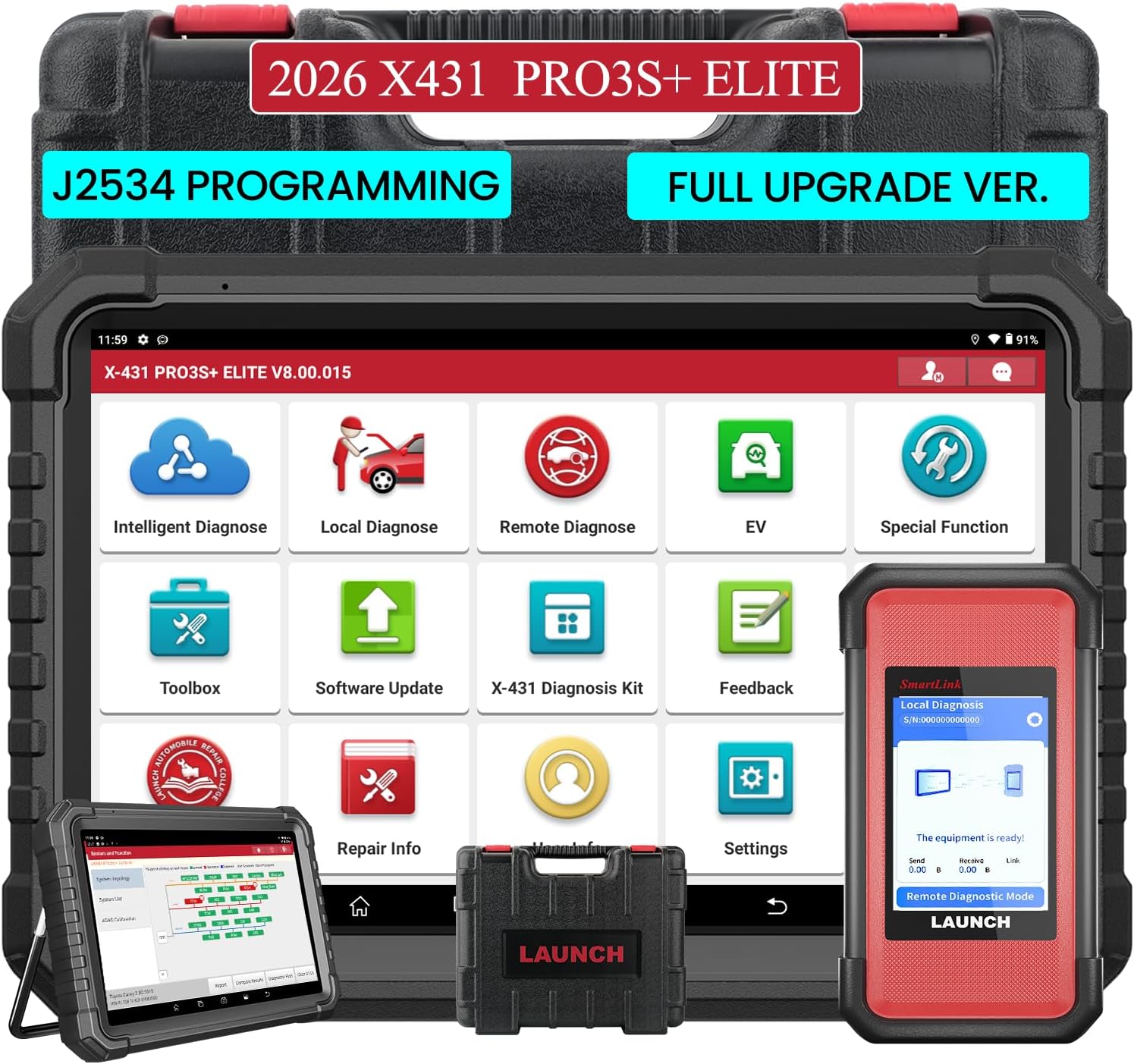
Figure 2.1: The LAUNCH X431 PRO3S+ Elite Display Tablet and the SmartLink C V2.0 communication interface.

Abbildung 2.2: Rückseite view of the tablet showing the kickstand and the SmartLink C V2.0 module.
2.2 Einschalten und Ersteinrichtung
- Zum Einschalten des Tablets den Ein-/Ausschalter gedrückt halten.
- Folgen Sie den Anweisungen auf dem Bildschirm, um Ihre Sprache und Zeitzone auszuwählen und eine Verbindung zu einem WLAN-Netzwerk herzustellen.
- Register your device using the serial number and activation code found in the PIN envelope.
- Perform a system update to ensure all software and diagnostic applications are up to date.
Video 2.2: A detailed guide on how to use the LAUNCH X431 PRO3S+ ELITE, including initial setup steps.
3. Bedienungsanleitung
3.1 Verbindung mit dem Fahrzeug
- Suchen Sie den OBD-II-Anschluss des Fahrzeugs (normalerweise unter dem Armaturenbrett).
- Connect the SmartLink C V2.0 to the vehicle's OBD-II port using the appropriate connector (OBDII 16-pin or a specific non-16 pin adapter).
- Ensure the SmartLink C V2.0 is powered on (it typically draws power from the vehicle's OBD-II port).
- On the X431 PRO3S+ Elite tablet, select 'Local Diagnose' or 'Intelligent Diagnose' to establish communication with the vehicle.

Figure 3.1: The LAUNCH X431 PRO3S+ Elite supports a wide range of vehicle makes and models, including HD Trucks and New Energy Vehicles.
3.2 Diagnosefunktionen
The device offers a comprehensive suite of diagnostic capabilities:
- Intelligente Diagnose: Automatically identifies vehicle VIN, reads all system fault codes, and provides a health report.
- Topologie-Mapping: Visually displays the vehicle's system network, showing the status of each control unit (normal, abnormal, scanned, not equipped) for quick identification of issues.
- Fehlercodes lesen und löschen: Access and clear Diagnostic Trouble Codes (DTCs) from all available vehicle systems (Engine, ABS, SRS, Transmission, etc.).
- Live-Datenstrom: View real-time data parameters in various formats (text, graph, analog) to monitor vehicle performance and pinpoint intermittent issues.
- Active Test / Bi-directional Control: Send commands to vehicle components to test their functionality (e.g., activate cooling fan, open/close windows, test fuel pump).
- Special Functions (60+): Perform various maintenance and service functions such as Oil Reset, ABS Brake Bleed, EPB Reset, SAS Calibration, BMS Reset, Injector Reset, Throttle Adaptation, and more.
- Steuergerätecodierung: Match component control modules, customize OE settings, perform adaptive data setting, and activate advanced functions.
- J2534-Programmierung: Utilize the SmartLinkC V2.0 as a J2534 PassThru device for OEM diagnostic software to perform ECU programming and reprogramming.
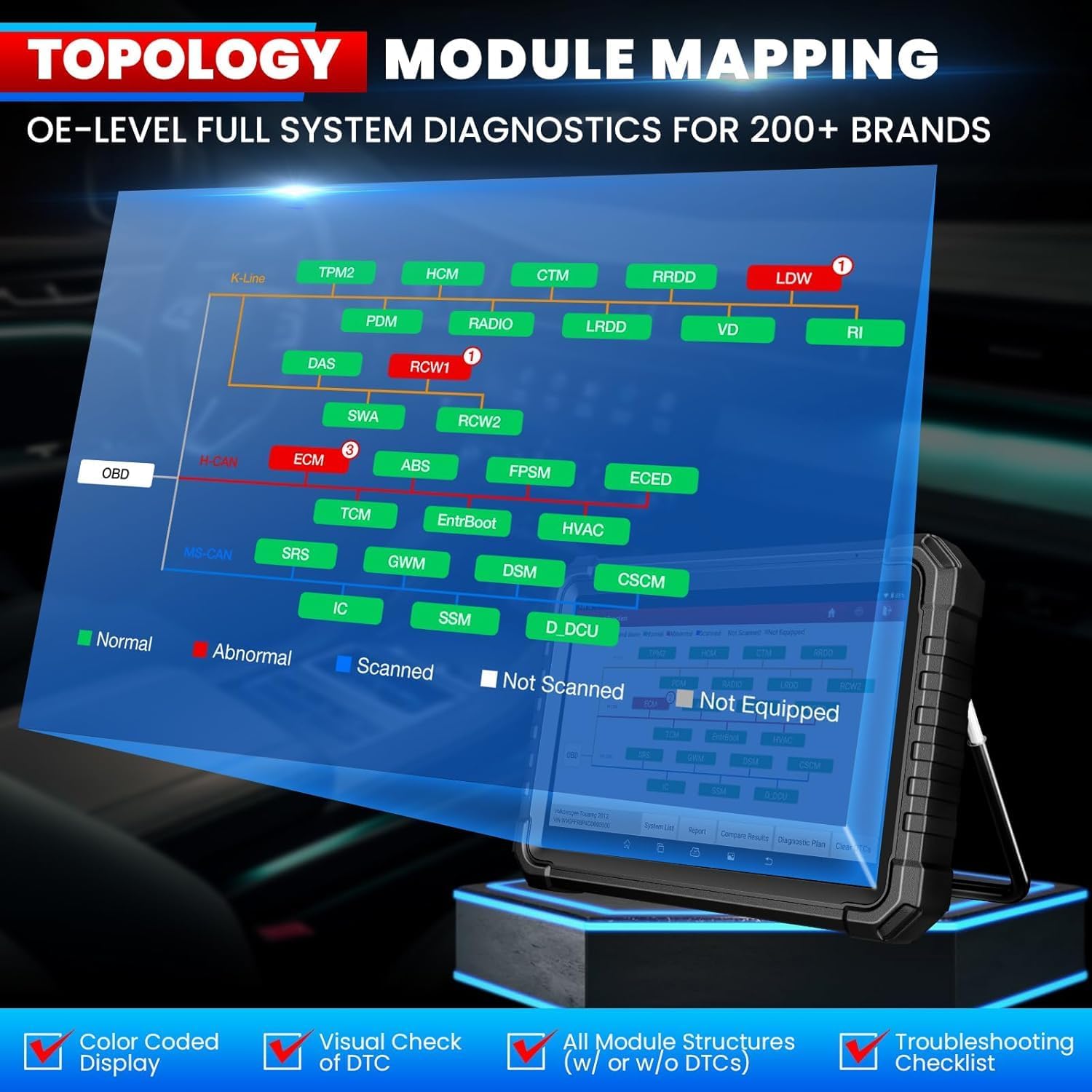
Figure 3.2: Intelligent Topology Mapping provides a visual overview of vehicle systems and their status.

Figure 3.3: Demonstrates Bi-Directional Control (Active Test) capabilities and OE-Level All System Diagnostics.

Figure 3.4: A selection of over 60 hot service functions, including Oil Reset, ABS Bleeding, and EPB Reset.
3.3 Ferndiagnose
The SmartLink C V2.0 supports remote diagnosis, allowing you to connect with other professionals or receive remote assistance for complex issues.
4. Wartung
4.1 Softwareaktualisierungen
Your LAUNCH X431 PRO3S+ Elite includes 2 years of free software updates. Regularly check for and install updates to ensure optimal performance and access to the latest vehicle models and functions. Connect the tablet to a stable Wi-Fi network and navigate to the 'Software Update' section in the main menu.
Video 4.1: This video confirms the authenticity of LAUNCH products and highlights the importance of software updates.
4.2 Gerätepflege
- Keep the tablet and SmartLink C V2.0 clean and free from dust and debris.
- Um Beschädigungen zu vermeiden, bewahren Sie das Gerät bei Nichtgebrauch in der mitgelieferten Tragetasche auf.
- Vermeiden Sie es, das Gerät über längere Zeit extremen Temperaturen oder direkter Sonneneinstrahlung auszusetzen.
- Charge the tablet regularly to maintain battery health.
5. Fehlerbehebung
- Gerät lässt sich nicht einschalten: Ensure the battery is charged or connect the device to a power source.
- Kommunikationsfehler mit dem Fahrzeug: Verify the SmartLink C V2.0 is securely connected to the OBD-II port and the correct adapter is used. Check vehicle ignition status.
- Probleme mit Software-Updates: Ensure a stable Wi-Fi connection. If registration issues occur, contact customer service for assistance.
- Product already registered: If prompted that the product has already been registered during initial setup, contact customer service for a replacement service or to clear the registered information.
6. Spezifikationen
| Besonderheit | Spezifikation |
|---|---|
| Marke | START |
| Modell | X-431 PRO3(PRO3S + ELITE) / LAUNCH PRO3S+ ELITE SMARTLINKC |
| Betriebssystem | Android 10.0 |
| CPU | 4-Kern-Prozessor, 2.0 GHz |
| Konnektivität | 2.4 GHz/5 GHz WLAN |
| Batteriekapazität | 6300 mAh/7.6 V |
| Bildschirmgröße | 10.1 Inches Touchscreen |
| Kamera | 8 Megapixel |
| Speicher Speicher | 4 GB RAM + 64 GB ROM |
| Unterstützte Protokolle | J2534, CANFD/DoIP/D-PDU/FCA |
| Unterstützte Sprachen | 25+ Software Languages (e.g., EN, DE, FR, SP, JP) |
| Technische Daten | 7 Zoll L x 14 Zoll B x 17.3 Zoll H |
| Artikelgewicht | 15 Pfund |
| Passform für Fahrzeuge | Universelle Passform |
7. Garantie und Support
The LAUNCH X431 PRO3S+ Elite comes with a commitment to customer satisfaction:
- Software-Updates: Enjoy 2 years of free software updates to keep your device current with the latest vehicle models and diagnostic functions.
- Rückgaberecht: Es gilt ein 90-tägiges Rückgabe- und Umtauschrecht.
- Kundendienst: LAUNCH provides 100% customer service and online support (7/24/365).
For any questions or assistance, please refer to the contact information provided in the product documentation or on the official LAUNCH webWebsite.