
1. Wichtige Sicherheitshinweise
Before using the THERUN Walking Pad Treadmill, please read all instructions carefully to ensure safe operation and prevent injury. Keep this manual for future reference.
- Stellen Sie das Laufband auf eine ebene, stabile Fläche.
- Sorgen Sie für ausreichend Freiraum rund um das Laufband (mindestens 2 cm an den Seiten und nach hinten).
- Lassen Sie während des Betriebs keine Kinder oder Haustiere in die Nähe des Laufbands.
- Die maximale Benutzergewichtskapazität beträgt 120 kg (265 lbs).
- Tragen Sie stets geeignete Sportschuhe.
- Wenn Sie Schmerzen, Schwindel oder Kurzatmigkeit verspüren, beenden Sie das Training sofort.
- Ziehen Sie den Netzstecker des Laufbands aus der Steckdose, wenn es nicht benutzt wird oder bevor Sie es reinigen/warten.
- Benutzen Sie das Laufband nicht, wenn es beschädigt ist oder nicht richtig funktioniert. Wenden Sie sich an den Kundendienst.
2. Produktüberschreitungview
The THERUN YT05-CP Walking Pad Treadmill is a compact and portable fitness device designed for home and office use. It features a 2.5 HP motor, LED display, and app connectivity for enhanced workout tracking and control.

Abbildung 2.1: Vorderseite view of the THERUN Walking Pad Treadmill.
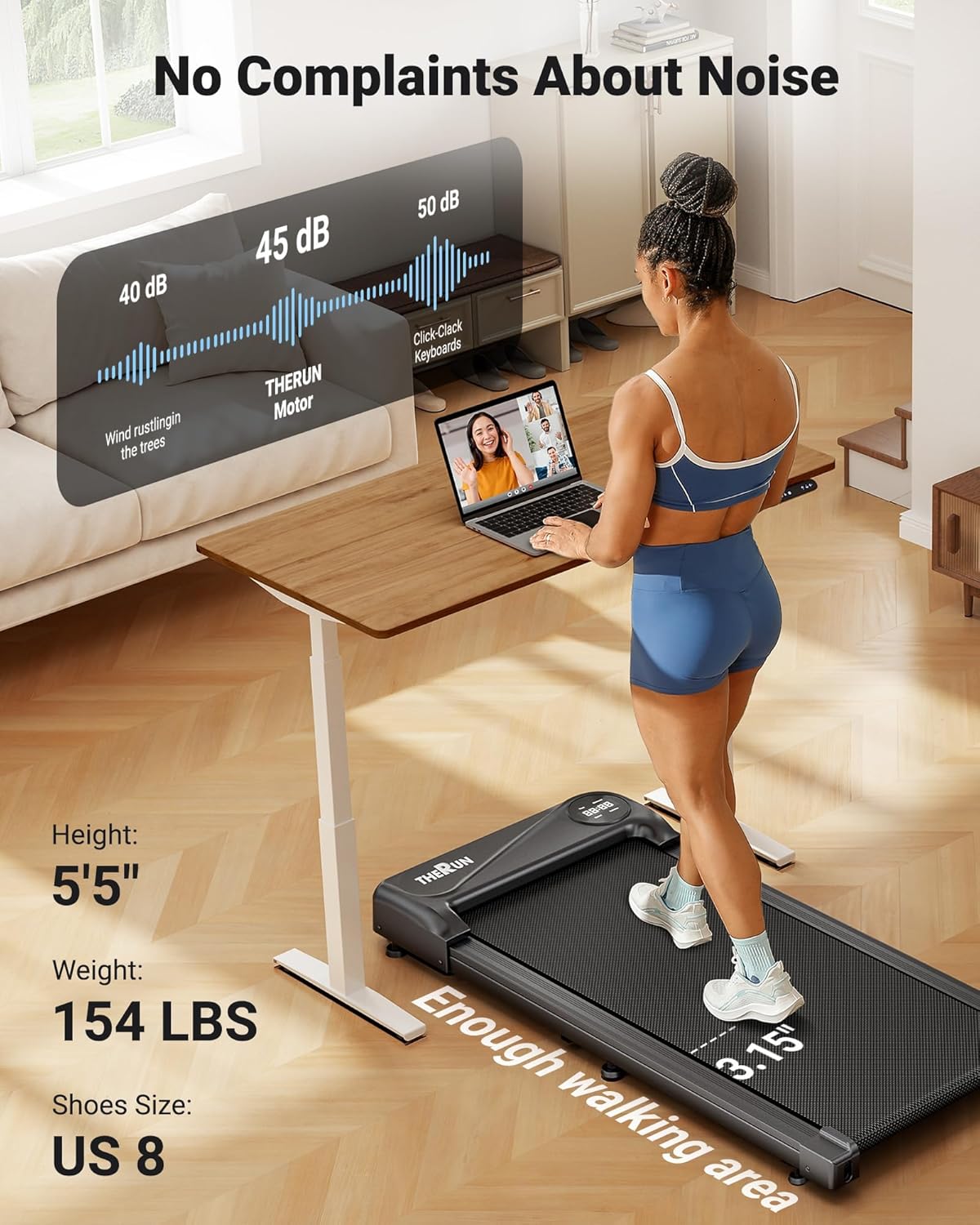
Abbildung 2.2: Seite view of the THERUN Walking Pad Treadmill, highlighting its low profile.
3. Einrichtung und Installation
The THERUN YT05-CP Walking Pad Treadmill requires no assembly and is ready for use directly out of the box.
- Auspacken: Nehmen Sie das Laufband vorsichtig aus der Verpackung. Bewahren Sie die Verpackung für die spätere Lagerung oder den Transport auf.
- Platzierung: Place the treadmill on a firm, level surface. Ensure there is sufficient space around the unit for safe operation. The compact design allows for placement under desks or in small areas.
- Stromanschluss: Schließen Sie das Netzkabel an das Laufband und anschließend an eine geerdete Steckdose an.
- Erstprüfung: Vor dem ersten Gebrauch sicherstellen, dass das Laufband mittig sitzt und frei von Hindernissen ist.

Figure 3.1: The treadmill is ready to use without installation. Includes remote control and user manual.
4. Bedienungsanleitung
The treadmill can be operated via the included remote control or through a compatible mobile application.
4.1 Ein-/Ausschalten
- To power on, connect the treadmill to a power source and press the power button on the unit or remote control. The LED display will illuminate.
- To power off, press the power button again. Unplug the unit from the wall when not in use.
4.2 Verwenden der Fernbedienung
The remote control allows for easy adjustment of speed.
- Start/Stopp: Press the start/stop button to begin or end a workout.
- Geschwindigkeitsanpassung: Verwenden Sie die Tasten „+“ und „-“, um die Geschwindigkeit zu erhöhen oder zu verringern. Der Geschwindigkeitsbereich liegt zwischen 0.6 und 3.8 mph.
4.3 App-Konnektivität
This walking pad can be linked to three compatible applications, allowing for enhanced control, scenario switching, and exercise data recording.
- Download one of the compatible fitness apps to your smartphone or tablet.
- Stellen Sie sicher, dass Bluetooth auf Ihrem Gerät aktiviert ist.
- Open the app and follow the on-screen instructions to pair with your THERUN treadmill.
- Once connected, you can control speed, track progress, and access various workout modes through the app.

Figure 4.1: App integration for personalized workouts and virtual scenery runs.
4.4 LED-Anzeige
The integrated LED display shows essential workout information such as speed, time, distance, and calories burned.
4.5 Geräuscharmer Betrieb
The treadmill is equipped with a 2.5 HP motor designed for quiet operation, producing approximately 45 dB of noise. This is comparable to ambient library noise, ensuring minimal disturbance during use.

Figure 4.2: The 45 dB motor ensures quiet operation, suitable for home or office environments.
5. Wartung
Regelmäßige Wartung gewährleistet die Langlebigkeit und optimale Leistung Ihres Laufbands.
- Reinigung: Wischen Sie die Laufbandoberfläche mit einem Tuch ab.amp Nach jedem Gebrauch mit einem Tuch abwischen. Vermeiden Sie die Verwendung von Scheuermitteln oder Lösungsmitteln.
- Riemenschmierung: The running belt may require lubrication periodically. Refer to the specific instructions in the included user manual for your model regarding lubrication frequency and type of lubricant.
- Riemeneinstellung: If the running belt shifts to one side or slips, it may need adjustment. Consult the detailed instructions in the full user manual for proper belt centering and tensioning procedures.
- Lagerung: When not in use, the compact design and built-in transport wheels allow for easy movement and storage under furniture or in narrow spaces.

Figure 5.1: The treadmill's compact design and transport wheels facilitate easy storage.
6. Fehlerbehebung
Sollten Sie Probleme mit Ihrem Laufband haben, beachten Sie bitte die folgenden gängigen Lösungsansätze:
- Das Laufband lässt sich nicht einschalten: Ensure the power cord is securely plugged into both the treadmill and a functional electrical outlet. Check if the power switch on the treadmill is in the 'ON' position.
- Running belt stops or slows unexpectedly: Check the power connection. Ensure the maximum weight capacity (265 lbs) is not exceeded. The belt may require lubrication or adjustment.
- Fernbedienung reagiert nicht: Tauschen Sie die Batterien in der Fernbedienung aus. Stellen Sie sicher, dass sich keine Hindernisse zwischen der Fernbedienung und dem Empfänger des Laufbands befinden.
- Probleme mit der App-Verbindung: Ensure Bluetooth is enabled on your device and the app is updated to the latest version. Try restarting both the treadmill and your device.
For persistent issues or problems not listed here, please contact THERUN customer support.
7. Spezifikationen
| Besonderheit | Spezifikation |
|---|---|
| Marke | THERUN |
| Modellname | YT05-CP |
| Produktabmessungen (L x B x H) | 41.9"T x 19.6"B x 4.5"H |
| Artikelgewicht | 34.4 Pfund |
| Material | Legierter Stahl |
| Höchstgeschwindigkeit | 3.8 Meilen pro Stunde |
| Mindestgeschwindigkeit | 0.6 Meilen pro Stunde |
| Besonderheit | App-Konnektivität |
| Zielgruppe | Erwachsene |
| Maximale Leistung | 2.5 PS |
| Montage erforderlich | NEIN |
| Anzeigetyp | LED |
| Maximalgewichtsempfehlung | 265 Pfund |
| Geräuschpegel | Ca. 45 dB |
8. Garantie und Support
8.1 Garantieinformationen
Your purchase includes a 1-year protection plan. This warranty covers manufacturing defects and ensures the product meets quality standards under normal use.
8.2 Kundendienst
For any questions, concerns, or assistance with your THERUN Walking Pad Treadmill, our professional support team is available. Please contact us via email for product guides, documents, or troubleshooting assistance.

Figure 8.1: THERUN offers exclusive after-sales service and support for your treadmill.