
Einführung
This manual provides detailed instructions for the installation, operation, and maintenance of your JOYING JY-HT142N4 car stereo system. Designed specifically for the Honda Civic 2012, this unit integrates advanced features such as wireless CarPlay, Android Auto, GPS navigation, and a 9-inch IPS touchscreen display. Please read this manual thoroughly before installation and use to ensure proper function and to maximize your user experience.
Setup und Installation
The JOYING JY-HT142N4 car stereo is designed for a plug-and-play installation in the Honda Civic 2012. It supports OEM amplifiers, subwoofers, reverse cameras, and steering wheel controls. All necessary cables are supplied to facilitate a straightforward installation process without requiring cable cutting.
Packungsinhalt
Vor Beginn der Installation prüfen Sie bitte, ob alle Komponenten vorhanden sind:
- 9" radio unit (1)
- Single Din Cage (1)
- Left & Right Bracket (1 pair)
- WLAN-Antenne (1)
- GPS-Antenne (1)
- 4G-Antenne (2)
- Externes Mikrofon (1)
- USB-Kabel (2)
- AR-Kabel (1)
- Flachbandkabel für Bildschirm (1)
- Stromkabel (1)
- Benutzerhandbuch (1)
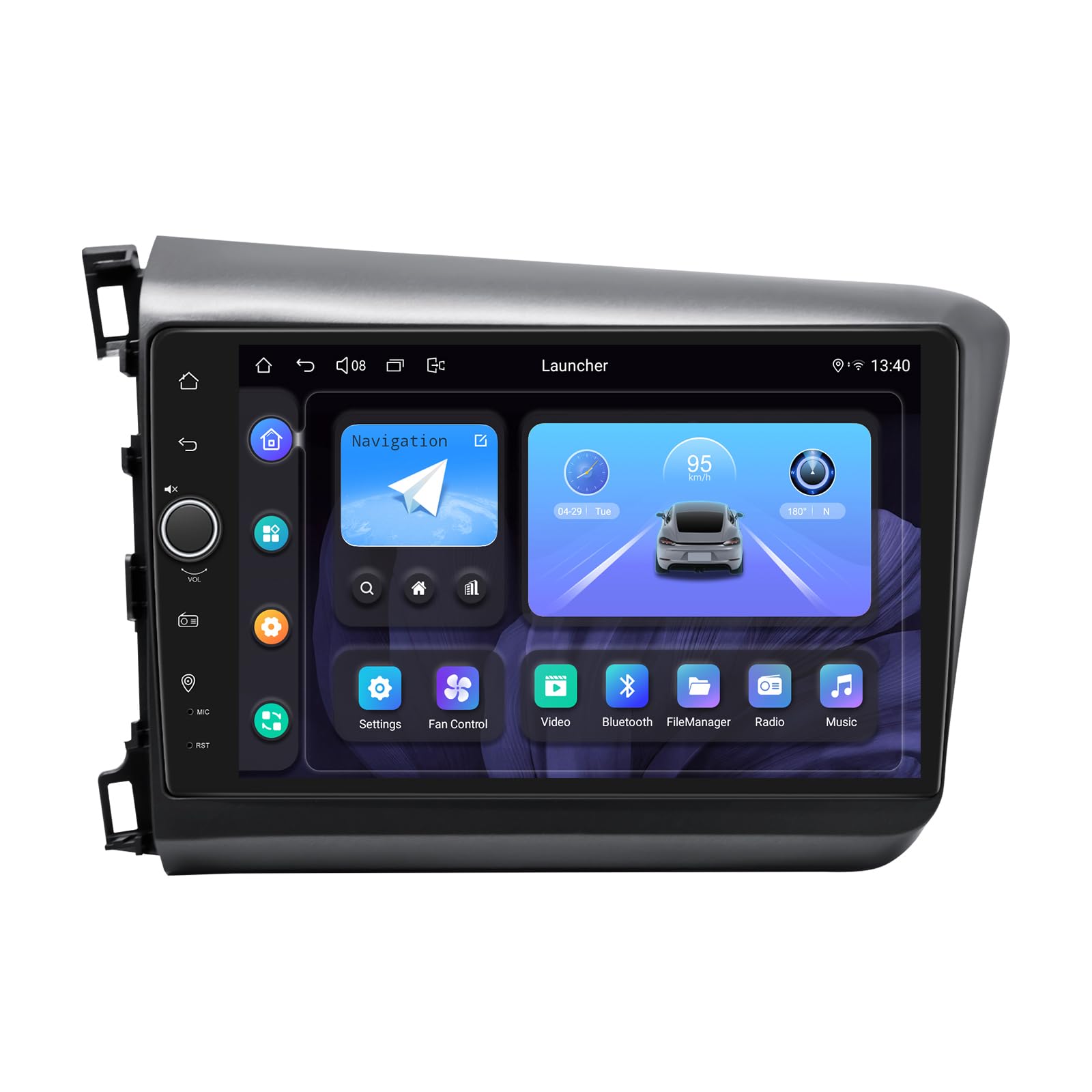
Image: The JOYING JY-HT142N4 car stereo unit, showcasing its 9-inch display and Android 13 operating system, designed for the Honda Civic 2012.
Kompatibilitätsprüfung
Ensure your vehicle's dashboard configuration matches the compatible designs. This unit is designed for specific Honda Civic 2012 models.

Image: Visual guide indicating compatible and incompatible dashboard configurations for the Honda Civic 2012. Dashboards with a standard radio or premium audio system are compatible, while those with a factory navigation system are not.
CAN Bus Protocol Setting
If your vehicle is equipped with a CAN bus system, it is crucial to set the communication protocol switch on the back of the unit to the 'CAN' position. This ensures proper communication between the car stereo and your vehicle's systems.

Image: Close-up of the rear of the car stereo unit, highlighting the CAN bus protocol switch. Ensure the white button is set to the 'CAN' side for vehicles with CAN bus.
Bedienungsanleitung
Kabelloses CarPlay und Android Auto
The unit supports both wireless CarPlay and Android Auto for seamless smartphone integration. Connect your mobile phone via USB cable or Bluetooth to share your phone's apps on the larger screen, enabling navigation, hands-free calls, and music playback.

Image: Displays the user interface for both Apple CarPlay and Android Auto, showing how smartphone applications are mirrored and controlled on the car stereo screen.
GPS-Navigation
The system features precise GPS navigation with included GPS antennas for enhanced satellite signal reception. This ensures faster and more accurate real-time navigation. Offline maps are supported; you can download map data for specific areas and use them without an internet connection. You can also synchronize mobile phone map data via CarPlay or Android Auto.
Audiofunktionen
Experience high-quality sound with the built-in TDA7851 DSP chip and a 48-band graphic equalizer. The unit provides 4x50W maximum output power and supports aftermarket amplifiers with 4 audio outputs, 1 SUB output, Fiber Optical output, and SPDIF Coaxial output for ultimate sound quality.

Image: Illustrates the audio features, including the TDA7851 DSP chip, 48-band graphic equalizer, 4x50W max output, and various audio outputs for aftermarket ampVerstärkerunterstützung.
Video: Demonstrates the user interface for various in-car navigation and entertainment system features, including Bluetooth, equalizer settings, and FM radio. This video provides a general overview der Fähigkeiten des Systems.
Bluetooth 5.1
With Bluetooth 5.1, enjoy wireless audio streaming and hands-free calling through the built-in microphone, ensuring a safer driving experience without distractions.
4G-Modul
Insert a SIM card into the built-in 4G module for internet access. Note that this module supports data connectivity but not phone calls or SMS messages. Supported bands include FDD-LTE: B2/B4/B5/B7/B12/B13/B14/B17/B25/B26/B38/B66/B71 and TDD-LTE: B41.
Multitasking mit geteiltem Bildschirm
The unit supports split-screen functionality, allowing you to run two applications simultaneously. To use, tap the recent apps icon, then select the split-screen function for the desired app, and choose a second app from the recent list.

Image: Illustrates the process of activating and using the split-screen multitasking feature, showing two applications running side-by-side on the display.
Personalisierte Einstellungen
Customize your car stereo experience with various personalized settings, including changeable car boot logos, customizable wallpapers, adjustable screen brightness, and changeable button colors.

Image: Displays the personalized settings interface, showing options for car boot logo, customizable wallpapers, adjustable screen brightness, and changeable button colors.
HDMI-Ausgang
The HDMI output provides a full digital image and sound interface, allowing for synchronized output of uncompressed audio and video signals to external displays, such as headrest monitors. This enables passengers to watch movies while the driver uses the main screen for navigation.

Image: Demonstrates the HDMI output feature, showing the car stereo connected to rear projection screens for passenger entertainment and the unit's HDMI output port.
Andere Eigenschaften
- Schnellstart: Quick startup time for immediate use.
- Bild-in-Bild: View content in a smaller window while using another application.
- 3 USB-Anschlüsse: Zum Anschluss verschiedener USB-Geräte.
- Micro-SD-Kartensteckplatz: Für zusätzlichen Stauraum.
- 4G-SIM-Kartensteckplatz: For mobile data connectivity.

Image: Icons illustrating additional features such as Fast Boot, GPS Navigation, AM/FM Radio, Hands-free Call, Picture-in-Picture, 3 USB Ports, Micro SD Card Slot, and 4G SIM Card Slot.
Wartung
To ensure the longevity and optimal performance of your JOYING car stereo, follow these maintenance guidelines:
- Bildschirmreinigung: Verwenden Sie ein weiches, fusselfreies Tuch, um den Touchscreen vorsichtig abzuwischen. Bei hartnäckigen Flecken etwas nachhelfen.ampReinigen Sie das Tuch mit Wasser oder einem für Bildschirme geeigneten Reiniger. Vermeiden Sie aggressive Chemikalien oder Scheuermittel.
- Allgemeine Reinigung: Keep the unit and surrounding dashboard area free from dust and debris. Use a soft brush or compressed air to clean vents and ports.
- Temperaturkontrolle: The unit features a dual heat sink design for superior heat dissipation. Avoid blocking the ventilation openings to maintain proper airflow and prevent overheating. The system can be configured to set a warning value for CPU temperature, activating the cooling fan automatically if exceeded.

Image: Diagram illustrating the upgraded dual heat sink cooling system with integrated fans, designed to improve temperature control and performance stability.
WiFi Signal Optimization
The unit includes an independent WiFi antenna to ensure stable signal quality and fast internet access. Ensure the antenna is properly connected and positioned for optimal reception.

Image: Close-up of the rear of the unit showing the connection point for the independent WiFi antenna, which supports 802.11a/b/g/n/AC standards across 2.4GHz/5GHz spectral bands.
Fehlerbehebung
If you encounter issues with your JOYING car stereo, refer to the following common problems and solutions:
- Kein Strom: Überprüfen Sie alle Stromanschlüsse und Sicherungen. Stellen Sie sicher, dass das Gerät ordnungsgemäß im Kabelbaum sitzt.
- Kein Ton: Verify speaker connections. Check audio settings, including volume levels and equalizer settings. Ensure external ampDie Verstärker (falls verwendet) sind eingeschaltet und ordnungsgemäß angeschlossen.
- GPS-Signalverlust: Stellen Sie sicher, dass die GPS-Antenne fest angeschlossen ist und freie Sicht zum Himmel hat. Vermeiden Sie es, sie unter Metallgegenständen zu platzieren.
- Probleme mit der Bluetooth-Konnektivität: Stellen Sie sicher, dass Bluetooth sowohl am Autoradio als auch an Ihrem Mobilgerät aktiviert ist. Versuchen Sie, die Geräte zu entkoppeln und erneut zu koppeln.
- Touchscreen reagiert nicht: Perform a soft reset of the unit (refer to the device's specific reset procedure, often a small reset button). If the issue persists, contact support.
- CarPlay/Android Auto verbindet sich nicht: Ensure your phone's operating system is up to date. Try connecting with a different USB cable if using a wired connection. Verify that the CarPlay/Android Auto app is enabled on the head unit.
For persistent issues not covered here, please contact JOYING customer support.
Technische Daten
| Marke | FREUDE |
| Modellname | JY-HT142 |
| Modellnummer | JY-HT142N4 |
| Fahrzeug-Servicetyp | Honda Civic 2012 |
| Bildschirmgröße | 9 Zoll |
| Anzeigetyp | LED, Capacitive Touchscreen |
| Betriebssystem | Android 13 |
| Speicherkapazität | 64 GB |
| Konnektivitätstechnologie | Bluetooth 5.1, Ethernet, USB, Wi-Fi (5G), 4G Module |
| Supported Navigation Systems | BeiDou, GLONASS, GPS |
| Audioausgabemodus | Stereo, Optical Fiber, Coaxial Digital |
| Besondere Merkmale | Wireless CarPlay, Android Auto, Touchscreen, DSP Chip, 48-Band Graphic Equalizer, HDMI Output, Split-screen, Fast Boot |
| Im Lieferumfang enthaltene Komponenten | 9" radio, Single Din Cage, Brackets, WiFi Antenna, GPS Antenna, 4G Antennas, External Mic, USB Cables, AR Cable, Screen Ribbon Cable, Power Cable, User Manual |
| Artikelabmessungen L x B x H | 9 Zoll L x 9 Zoll B x 9 Zoll H |

Image: Displays the dimensions of the 9-inch radio unit and a detailed view of the rear panel with all connection ports labeled, including USB, HDMI, optical, and various audio inputs/outputs.
Garantieinformationen
The JOYING JY-HT142N4 car stereo comes with a 2 Jahr Garantie from the date of purchase. This warranty covers manufacturing defects and malfunctions under normal use. Please retain your proof of purchase for warranty claims. For detailed terms and conditions, refer to the warranty card included in your package or contact JOYING customer support.
Kundenservice
For technical assistance, troubleshooting, or any questions regarding your JOYING JY-HT142N4 car stereo, please contact JOYING customer support. You can typically find contact information on the official JOYING website or through the retailer where you purchased the product. When contacting support, please have your model number (JY-HT142N4) and purchase details readily available.