
1. Installationsanleitung
This section provides detailed instructions for assembling your FLEXISPOT ErgoX Max Ergonomic Office Chair. Please follow the steps carefully to ensure proper setup and functionality.
1.1 Auspacken und Komponentenidentifizierung
Carefully unpack all components from the box. Verify that all parts listed in the user manual are present. Assembly tools are included.

Image: All components of the FLEXISPOT ErgoX Max Ergonomic Office Chair laid out on the floor before assembly.
1.2 Montageschritte
- Befestigen Sie die Basis: Secure the five-star aluminum base with casters. Ensure casters are firmly inserted.
- Gaslift einbauen: Insert the gas lift cylinder into the center of the five-star base.
- Sitzmechanismus montieren: Befestigen Sie den Sitzmechanismus mit den mitgelieferten Schrauben an der Unterseite des Sitzkissens. Achten Sie darauf, dass die Vorderseite des Mechanismus mit der Vorderseite des Sitzes abschließt.
- Sitz mit Gasdruckfeder verbinden: Setzen Sie den montierten Sitz vorsichtig auf den Gasdruckfederzylinder.
- Armlehnen anbringen: Befestigen Sie die 5D-verstellbaren Armlehnen mit den dafür vorgesehenen Schrauben an der Sitzbasis.
- Rückenlehne anbringen: Connect the backrest to the seat mechanism. Ensure all screws are tightened securely.
- Kopfstütze montieren: Attach the 4D adjustable headrest to the top of the backrest.
- Install Footrest (Optional): If included, attach the retractable footrest to the designated points on the chair.
Assembly required. Comes with user manual and assembly tools. Do not exceed the maximum weight capacity of 661 lbs. Always follow the assembly instructions carefully.
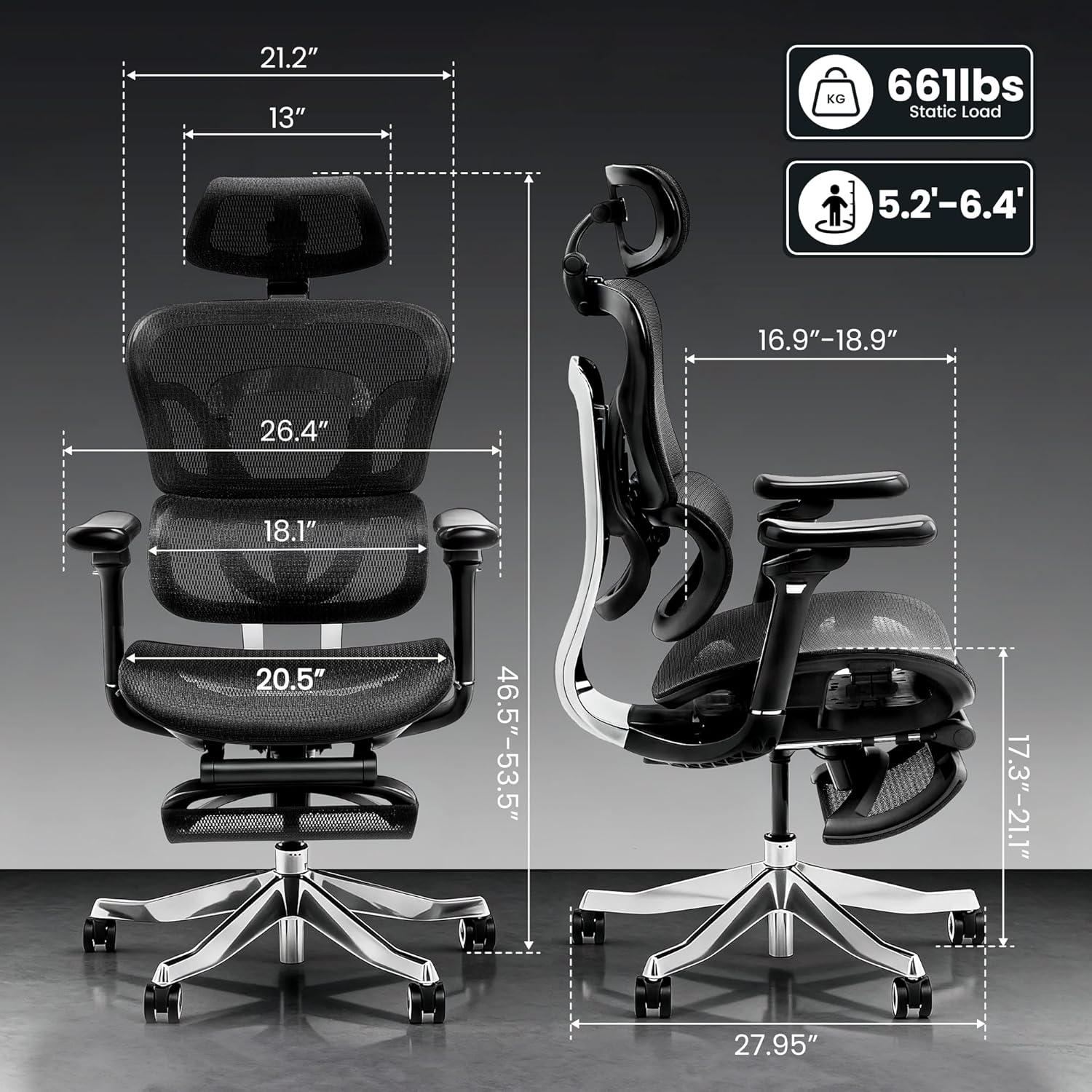
Image: Detailed dimensions of the FLEXISPOT ErgoX Max Ergonomic Office Chair, including height, width, and depth, along with its 661 lbs static load capacity.
2. Bedienungsanleitung
Your ErgoX Max chair offers extensive adjustability to customize your seating experience for optimal comfort and ergonomic support.
2.1 Chair Height Adjustment
- Locate the lever on the right side, beneath the seat.
- To raise the chair, lift the lever while taking your weight off the seat.
- To lower the chair, lift the lever while remaining seated.
2.2 Recline System
The chair features a 3-level recline system, allowing you to transition from work mode to relax mode.
- Neigungswinkel: Adjust the recline angle between 104°, 113°, and 123.5° using the lever on the left side.
- Backrest Forward Tilt: The backrest can tilt forward 2-8° for precise back positioning.

Image: Illustration of the 3-level recline system, showing adjustable angles from 104° to 123.5°.
2.3 Armlehnenverstellung
The 5D adjustable PU armrests provide multi-directional support.
- Höhenverstellung: Press the button on the side of the armrest to raise or lower it.
- Forward/Backward/Pivot: Armrests can slide forward/backward and pivot inward/outward for optimal positioning.

Image: Visual guide demonstrating the multi-directional adjustments of the 5D armrests, including height, forward/backward, and pivot functions.
2.4 Einstellung der Lendenwirbelstütze
The 4D adaptive lumbar support automatically adjusts to your posture. You can also fine-tune it manually.
- Tiefeneinstellung: Use the knob on the side of the backrest to adjust the depth of the lumbar support.
- Höhenverstellung: The lumbar support can be moved up or down to align with your lower back curve.

Image: Illustration of the 4D adaptive lumbar support, highlighting its pull-out design for precise back positioning and lasting comfort.
2.5 Kopfstützeneinstellung
The 4D headrest allows for height, angle, and depth customization for neck comfort.
- Höhenverstellung: Schieben Sie die Kopfstütze nach oben oder unten, bis Sie die gewünschte Höhe erreicht haben.
- Winkeleinstellung: Tilt the headrest forward or backward.
- Tiefeneinstellung: Adjust the depth to provide optimal neck support.

Image: Visual guide demonstrating the height, angle, and depth customization options for the 4D adjustable headrest.
2.6 Retractable Footrest (Optional)
The optional retractable footrest can be pulled out for a complete reclining and relaxation experience.
- Pull the footrest out from beneath the seat when needed.
- Push it back in when not in use to save space.
3. Wartung
Proper maintenance will extend the life and appearance of your ergonomic office chair.
3.1 Reinigungshinweise
- Mesh Components: For the mesh backrest and seat, use dry methods only. A soft brush or vacuum cleaner with a brush attachment can be used to remove dust and debris.
- Rahmen und Basis: Wipe the aluminum alloy frame and base with a soft, dry cloth. Avoid abrasive cleaners.
- Armlehnen: Clean padded armrests with a dry cloth. For stubborn spots, a slightly damp Ein Tuch kann verwendet werden, anschließend sollte es sofort getrocknet werden.
- Avoid contact with liquids directly on mesh or padded surfaces.
3.2 Allgemeine Pflege
- Überprüfen Sie regelmäßig alle Schrauben und Bolzen auf festen Sitz. Ziehen Sie sie gegebenenfalls nach.
- Avoid placing heavy objects on the armrests or backrest when not in use.
- Ensure smooth and silent mobility by keeping the electroplated chrome casters clean and free of debris.
4. Fehlerbehebung
Sollten Sie Probleme mit Ihrem Stuhl haben, beachten Sie bitte die unten aufgeführten häufigen Probleme und Lösungen.
| Problem | Mögliche Ursache | Lösung |
|---|---|---|
| Der Stuhl ist nicht höhenverstellbar. | Gaslift nicht eingerastet oder defekt. | Stellen Sie sicher, dass der Höhenverstellhebel vollständig eingerastet ist. Sollte das Problem weiterhin bestehen, wenden Sie sich bitte an den Kundendienst. |
| Stuhl wackelt oder fühlt sich instabil an | Lose Schrauben oder ungleichmäßige Montage. | Check and tighten all assembly screws, especially those connecting the base and seat mechanism. Ensure the chair is on a flat surface. |
| Backrest does not recline | Recline lock engaged. | Disengage the recline lock lever. If still stuck, ensure no obstruction is preventing movement. |
| Die Rollen rollen nicht reibungslos | Fremdkörper in den Rollen oder beschädigte Rollen. | Clean any hair or debris from the caster wheels. If damaged, consider replacing casters. |
If you cannot resolve the issue using these steps, please contact FLEXISPOT customer support.
5. Produktspezifikationen
| Besonderheit | Detail |
|---|---|
| Marke | FLEXISPOT |
| Modellname | Ergonomic Executive Chair (FLEXISPOT ERGOX MAX) |
| Farbe | Obsidianschwarz |
| Material | Aluminum, Mesh, Nylon |
| Technische Daten | 27.95"T x 27.95"B x 53.5"H |
| Artikelgewicht | 46 Pfund |
| Maximalgewichtsempfehlung | 661 Pfund |
| Zurück Stil | High-back, Mesh |
| Besondere Merkmale | Adjustable Headrest, Adjustable Height, Ergonomic, Adjustable Armrest, Dynamic Lumbar Support, Tilt, Back Support, Adjustable Recliner |
| Anzahl der Liegepositionen | 3 |
| UPC | 840460490979 |
6. Garantie und Support
FLEXISPOT hat sich der Bereitstellung qualitativ hochwertiger Produkte und der Kundenzufriedenheit verschrieben.
6.1 Produktgarantie
This product may be eligible for a 3-Year Protection Plan. Please refer to your purchase documentation for specific warranty details and coverage.
6.2 Kundendienst
For any questions, troubleshooting assistance, or warranty claims, please contact FLEXISPOT customer support. Contact information can typically be found on the manufacturer's weboder auf Ihrem Kaufbeleg.