
1. Einleitung
This manual provides detailed instructions for the assembly, operation, and maintenance of your FLEXISPOT CyberX 71-Inch RGB LED Electric Gaming Standing Desk. Please read this manual thoroughly before use to ensure proper function and safety. Keep this manual for future reference.
2. Sicherheitshinweise
- Vergewissern Sie sich vor der Verwendung, dass alle Komponenten sicher befestigt sind.
- Überschreiten Sie nicht die maximale Tragfähigkeit von 352 kg.
- Halten Sie Kinder und Haustiere während der Höhenverstellung vom Schreibtisch fern.
- Avoid placing liquids directly on the desk surface without a cup holder to prevent spills and potential damage to electronics.
- Die elektrischen Bauteile des Schreibtisches dürfen nicht demontiert oder verändert werden. Wenden Sie sich im Servicefall an den Kundendienst.
- Ensure power cables are properly managed to prevent tripping hazards or damage.
3. Packungsinhalt
Bitte prüfen Sie vor Beginn der Montage, ob alle Teile vorhanden sind. Sollten Teile fehlen oder beschädigt sein, wenden Sie sich bitte an den Kundendienst.
- Schreibtisch (1)
- Desk Legs with Dual Motors (2)
- Querträger-/Rahmenkomponenten
- Gamepad-Style Joystick Controller (1)
- Netzteil und Kabel
- Kabel-Organizer (1)
- Pokalhalter (1)
- Rotating Headphone Stand (1)
- Montagezubehör (Schrauben, Werkzeuge)

4. Aufbau und Montage
Assembly is straightforward and typically takes approximately 45 minutes. It is recommended to have assistance due to the weight of the components.
4.1 Rahmenmontage
- Packen Sie alle Komponenten aus und legen Sie sie auf einer sauberen, ebenen Fläche aus.
- Attach the crossbar components to the desk legs using the provided hardware. Ensure all screws are tightened securely.
- Connect the motor cables to the main control hub.
4.2 Desktop Attachment
- Carefully place the desktop upside down on a soft, protective surface.
- Position the assembled frame onto the desktop, aligning the pre-drilled holes.
- Secure the desktop to the frame using the provided screws. Ensure the cable management tray and control box are properly positioned before fully tightening the desktop.
4.3 Zubehörinstallation
- Attach the cup holder and rotating headphone stand to the desired locations on the desktop edges.
- Install the cable organizer and cable management tray underneath the desktop.
- Connect the RGB LED strips to the designated ports on the control hub.

4.4 Montage-Video-Referenz
For a visual guide on the assembly process, refer to the following video:
5. Bedienungsanleitung
5.1 Höhenverstellung
The desk features a gamepad-style joystick controller for intuitive height adjustment. The 3-stage legs allow for a lifting range from 24.4 inches to 50 inches.
- Höhe einstellen: Use the joystick to move the desk up or down. The LED display will show the current height.
- Speichervoreinstellungen: The controller includes three memory presets (1, 2, 3). To save a height, adjust the desk to the desired level, press the 'M' button, then press the desired preset number (1, 2, or 3). To recall a saved height, simply press the corresponding preset number.

5.2 RGB-LED-Beleuchtung
The desk features integrated 3-sided RGB LED strips to enhance your workspace ambiance.
- Farbwechsel: Use the left/right controls on the joystick to cycle through various RGB lighting colors and effects.

5.3 Video Demonstrating Operation
Observe the desk's operation, including height adjustment and RGB lighting, in the following video:
6. Funktionen vorbeiview
- Immersive RGB LED Lighting: Integrated 3-sided RGB LED strips provide dynamic lighting.
- Gamepad-Style Joystick Controller: Features an LED display with multi-color RGB lighting and 3 memory presets for height adjustment.
- Dual Motor Powerful Lift: Crafted with aerospace-grade steel and dual motors, supporting up to 352 lbs with smooth, quiet height adjustments.
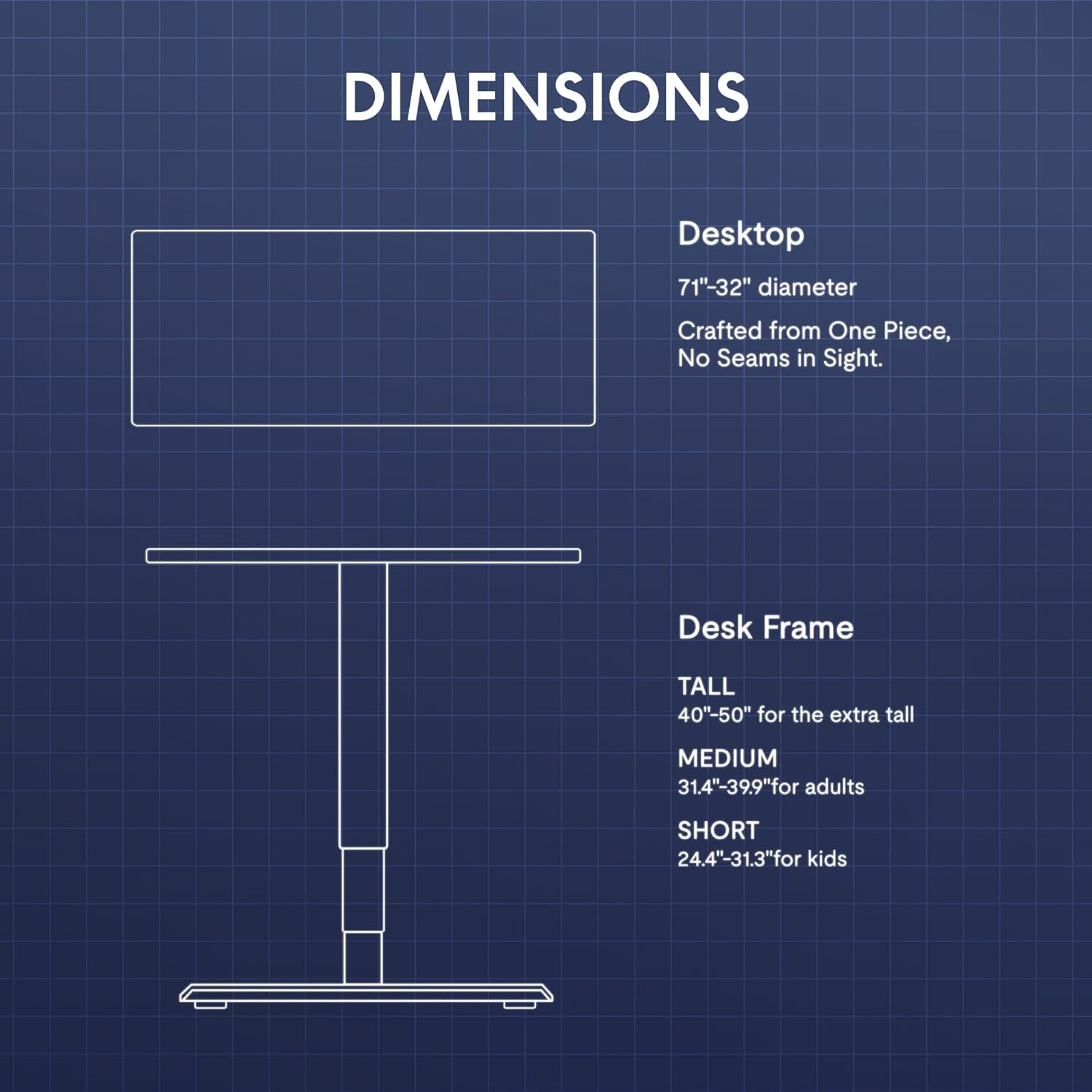
- Extended 3-Stage Height Range: 24.4"–50" lifting range for superior stability and accommodation of various user heights.
- Carbon Fiber Texture Desktop: Ein langlebiges und ästhetisch ansprechendesasing-Oberfläche.
- Integriertes Kabelmanagement: Includes a cable organizer and a cable management tray to keep wires tidy.
- Praktisches Zubehör: Features a removable cup holder and a rotating headphone stand.

7. Wartung
- Reinigung: Wischen Sie die Tischoberfläche mit einem weichen, fusselfreien Tuch ab.amp Tuch. Vermeiden Sie Scheuermittel oder aggressive Chemikalien.
- Inspektion: Überprüfen Sie regelmäßig alle Schrauben und Verbindungen auf festen Sitz.
- Kabelmanagement: Regularly inspect cables for wear or damage and ensure they are neatly organized to prevent interference with desk movement.
8. Fehlerbehebung
| Problem | Mögliche Ursache | Lösung |
|---|---|---|
| Der Schreibtisch bewegt sich nicht. | Stromkabel getrennt; Überlastung; Motorfehler | Check power connections; Reduce weight on desk; Unplug for 10 seconds and replug. |
| Ungleichmäßige Höheneinstellung | Blockade; Sensorproblem | Clear any obstructions; Perform a reset (refer to controller instructions). |
| RGB-Lichter funktionieren nicht | RGB cable disconnected; Controller issue | Check RGB cable connections to the control hub; Ensure controller is powered. |
Sollten die Probleme weiterhin bestehen, wenden Sie sich bitte an den Kundendienst.
9. Spezifikationen
| Besonderheit | Detail |
|---|---|
| Marke | FLEXISPOT |
| Modell | CyberX |
| Desktop-Abmessungen | 71 Zoll B x 32 Zoll T |
| Höhenbereich | 24.4" - 50" |
| Tragfähigkeit | Bis zu 352 Pfund |
| Motortyp | Dual Motor, 3-Stage Beine |
| Besondere Merkmale | RGB LED Lighting, Gamepad-Style Joystick Controller, Memory Presets, Cable Management, Cup Holder, Headphone Stand |
| Material | Wood (Top), Metal (Base) |
| Farbe | Weißer Rahmen + weiße Oberseite |
| Montage erforderlich | Ja |
10. Garantie und Support
The FLEXISPOT CyberX desk comes with a 5-year coverage on the frame and motors, and a 3-year protection on electronics and the controller. This warranty covers manufacturing defects and ensures reliable operation under normal use.
For technical support, warranty claims, or any inquiries, please contact FLEXISPOT customer service through their official webWebsite oder den Händler, bei dem das Produkt gekauft wurde.