
1. Produktüberschreitungview
The HIWONDER ROSOrin ROS2 Robot Car Advanced Kit is a versatile platform designed for education and development in artificial intelligence and robotics. It operates on the ROS2 framework and is compatible with Jetson and Raspberry Pi systems.
Zu den Hauptmerkmalen gehören:
- ROS2 Framework & High-Performance Hardware: Integrates LiDAR, a 3D Depth Camera, and an AI Voice module for real-time object detection (YOLO series), SLAM mapping, and Large Language Model (LLM) processing.
- Multimodal AI & LLM Integration: Supports leading LLMs (e.g., ChatGPT, Gemini, Grok, Llama) for semantic understanding, task decomposition, natural language interaction, and intelligent path planning.
- SLAM & 3D Vision Perception: Features Gmapping, Hector, and Cartographer SLAM for centimeter-level mapping accuracy. Utilizes OpenCV and MediaPipe for 3D visual tracking, gesture control, and dynamic obstacle avoidance.
- 3-in-1 Versatile Chassis: Allows switching between Mecanum, Ackermann, and differential drive chassis configurations, complemented by a swing arm suspension system for stable movement across varied terrains.
- Comprehensive Educational Resources: Includes tutorials, open-source code, and AI project examples to facilitate learning and development in ROS2 applications.

Figure 1: ROSOrin Robot Car showcasing its capabilities in SLAM mapping, 3D spatial recognition, intelligent autonomous driving, and route planning.

Figure 2: Demonstrating the robot's advanced AI model-fused SLAM mapping and navigation, including environmental perception and semantic understanding.
2. Aufbau und Montage
This section outlines the steps for assembling and preparing your ROSOrin Advanced Kit for initial use.
2.1 Packliste
Überprüfen Sie, ob alle Komponenten in Ihrem Set vorhanden sind:
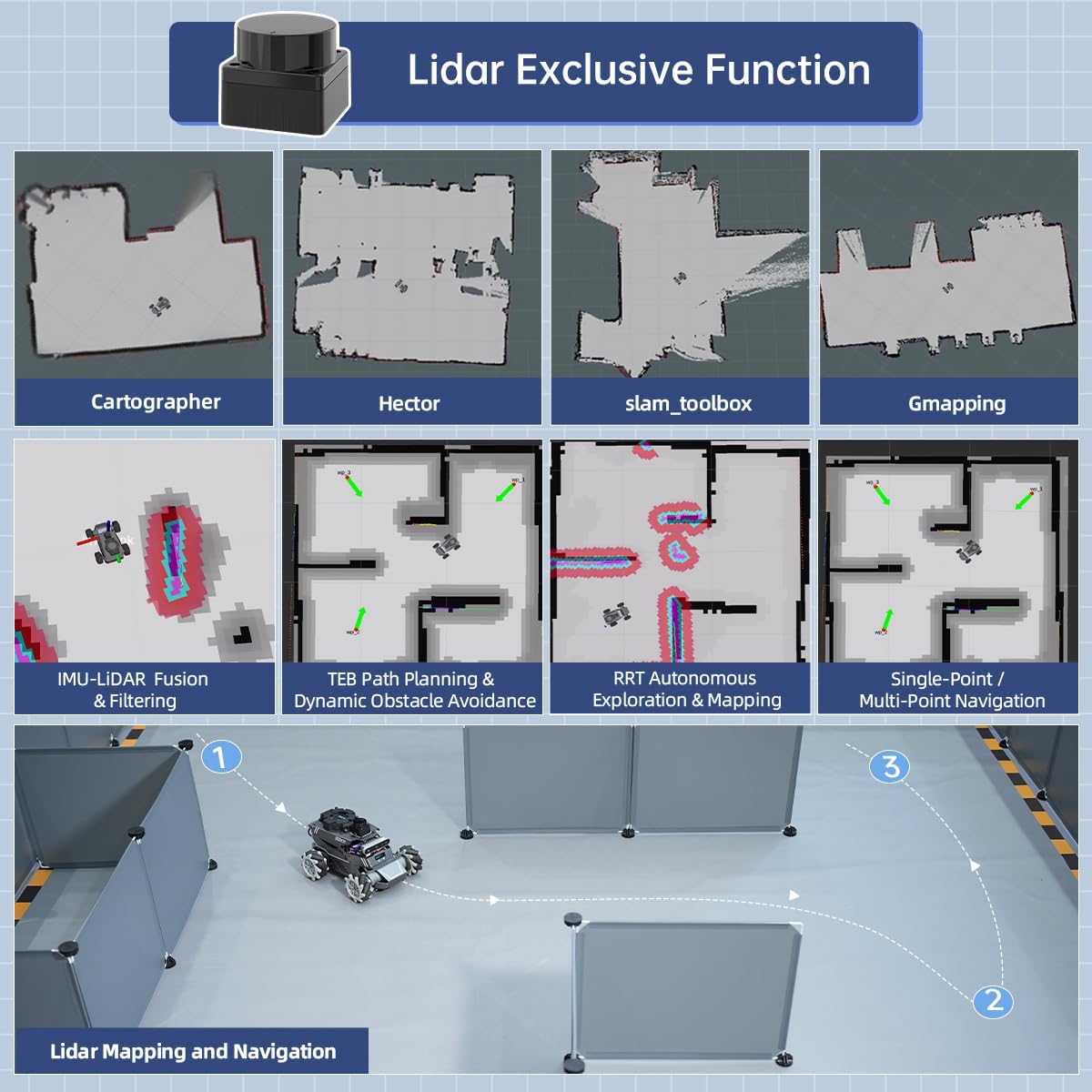
Figure 3: Contents of the ROSOrin Advanced Packing List.
- ROSOrin Robot Chassis (assembled, LiDAR included)
- Aurora930 Pro 3D Depth Camera
- WonderEcho Pro AI Voice Interaction Box
- Wireless Controller & Receiver
- EVA Ball (40mm)
- Kartenleser
- 12.6V 2A Charger (DC 5.5*2.5)
- Data Cable (250mm)
- Type-C Cable (280mm)
- Inbusschlüssel
- 3-in-1 Chassis Pack (includes additional wheels for chassis conversion)
- Accessory Bag (screws, tools)
- Benutzerhandbuch (dieses Dokument)
2.2 Erste Montage
- Gehäusekonfiguration: The ROSOrin kit supports three chassis types: Mecanum, Ackermann, and Differential Drive. Select your desired chassis type and assemble the corresponding wheels and components from the 3-in-1 Chassis Pack. Refer to the detailed assembly guide provided online for specific steps.
- Camera and Voice Module Installation: Securely attach the Aurora930 Pro 3D Depth Camera and the WonderEcho Pro AI Voice Interaction Box to the designated mounting points on the robot chassis. Connect them using the provided cables.
- Stromanschluss: Connect the 12.6V 2A charger to the robot's power input. Ensure the robot is fully charged before first use.
- Controller-Kopplung: Insert the wireless controller receiver into a USB port on the robot's main control unit. Power on the wireless controller and ensure it pairs successfully with the robot.
2.3 Software-Setup
The ROSOrin operates on the ROS2 framework. Detailed instructions for flashing the operating system (Ubuntu 22.04 for Jetson/Raspberry Pi 5) and installing the necessary ROS2 packages and libraries are available on the official HIWONDER documentation website. It is recommended to follow these instructions carefully for optimal performance.
3. Bedienungsanleitung
The ROSOrin robot car offers various operational modes and functionalities leveraging its advanced AI and sensor suite.
3.1-Kontrollmethoden
The robot can be controlled via multiple interfaces:
- Drahtloser Controller: Use the included gamepad for direct manual control of movement and basic functions.
- WonderAI App: A dedicated mobile application provides an intuitive interface for controlling the robot, viewing sensor data, and initiating AI tasks.
- PC-Software: Advanced users can interact with the robot through PC-based software, allowing for complex programming, debugging, and real-time data analysis.
- Sprachinteraktion: The integrated AI Voice module enables natural language commands for various tasks.

Abbildung 4: Überview of available control methods for the ROSOrin robot.
3.2 Core Functionalities
The ROSOrin is equipped with a wide range of functions for AI and robotics development:
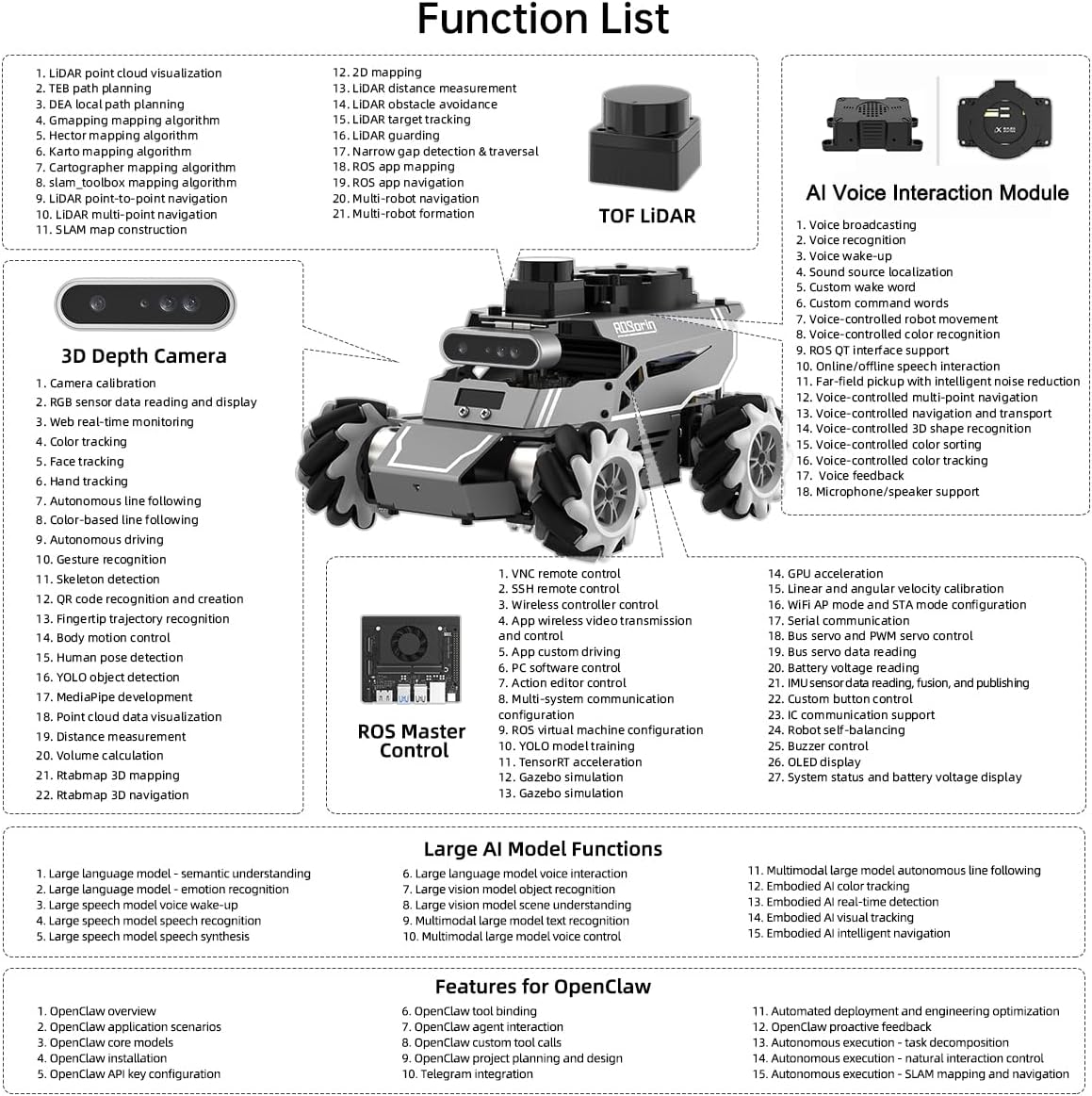
Figure 5: Comprehensive list of ROSOrin's functions and features.
- SLAM Mapping & Navigation: Utilize LiDAR and 3D Depth Camera data for simultaneous localization and mapping. Supported algorithms include Gmapping, Hector, Cartographer, and SLAM Toolbox. The robot can perform single-point and multi-point navigation.
- 3D Vision Perception: The Aurora930 Pro 3D Depth Camera provides depth data, point cloud data, and supports advanced features like ORBSLAM2/3, RTAB-Map 3D visual mapping, object volume measurement, and edge detection.
- AI Vision Interaction: Capabilities include color tracking, face tracking, QR code control, line following, KCF object tracking, gesture control, MediaPipe pose detection, and deep learning target tracking.
- Sprachinteraktion: The AI Voice Interaction Module enables voice broadcasting, voice wake-up, sound source localization, custom command words, and natural language interaction.
- Autonomes Fahren: Implement road sign detection, lane keeping, autonomous parking, and turning decision-making using deep learning frameworks like PyTorch and OpenCV.

Abbildung 6: Bspamples of Large AI Model-Driven Embodied AI Applications.
3.3 Chassis Switching
The 3-in-1 chassis design allows for flexible adaptation to different environments and research needs. To switch between Mecanum, Ackermann, and Differential Drive chassis, follow the detailed mechanical assembly instructions provided in the online documentation. This typically involves replacing the wheel sets and potentially adjusting suspension components.

Figure 7: The versatile 3-in-1 chassis expansion options.
4. Produktvideos
4.1 3-in-1 Chassis Overview
Video 1: This video demonstrates the flexible switching capabilities of the ROSOrin's 3-in-1 chassis, highlighting Mecanum, Differential, and Ackermann configurations.
4.2 AI Large Model & ROS2 Robot Car Features
Video 2: This video provides an in-depth look at the AI Large Model and ROS2 capabilities of the robot car, including SLAM mapping, navigation, scene understanding, and voice interaction.
5. Wartung
Proper maintenance ensures the longevity and optimal performance of your ROSOrin robot car.
- Reinigung: Regularly clean the robot's exterior with a soft, dry cloth. Avoid using harsh chemicals or abrasive materials. Ensure sensors (LiDAR, camera) are free from dust and obstructions.
- Batteriepflege: Charge the battery fully before storage if the robot will not be used for an extended period. Avoid completely draining the battery. Store the robot in a cool, dry place.
- Software-Updates: Periodically check the HIWONDER official webWebsite für Software- und Firmware-Updates, um sicherzustellen, dass Sie über die neuesten Funktionen und Fehlerbehebungen verfügen.
- Komponenteninspektion: Routinely inspect wheels, chassis connections, and cable integrity for any signs of wear or damage. Replace worn parts as necessary.
6. Fehlerbehebung
This section provides general guidance for common issues. For more detailed troubleshooting, refer to the online documentation or contact HIWONDER support.
| Problem | Mögliche Ursache | Lösung |
|---|---|---|
| Der Roboter lässt sich nicht einschalten. | Low battery; Power cable disconnected; Power switch off | Charge battery; Check power connections; Ensure power switch is ON |
| Wireless controller unresponsive | Controller not paired; Low controller battery; Receiver disconnected | Re-pair controller; Replace controller batteries; Check receiver connection |
| SLAM mapping errors | LiDAR/Camera obstructed; Poor lighting; Software configuration issue | Clear sensors; Ensure adequate lighting; Verify software settings and calibration |
| Sprachbefehle werden nicht erkannt | Microphone obstructed; Background noise; Incorrect command phrasing | Clear microphone; Reduce noise; Use clear, defined commands |
7. Spezifikationen
Detailed technical specifications for the HIWONDER ROSOrin Advanced Kit:
| Besonderheit | Detail |
|---|---|
| Markenname | HIWONDER |
| Modellname | ROSOrin |
| Modellnummer | B0G2GPKZGZ |
| Ausgabe | Advanced, No Controller |
| Materialtyp | Metall |
| Farbe | Schwarz |
| Artikelabmessungen (L x B x H) | 8.9" x 8.3" x 6.5" |
| Stromquelle | Manual (referring to battery charging) |
| Betriebsmodus | Automatisch |
| Lernziel | ROS2 & Programming |
| Empfohlene Verwendung | Educational purposes, AI and robotics projects, Advanced applications (autonomous driving, 3D recognition) |
| Zusätzliche Merkmale | AI Integration, Advanced Sensors, Voice Interaction |
7.1 Key Components Specifications
Detailed specifications for the primary sensors and modules:
| Komponente | Schlüsselparameter |
|---|---|
| Aurora930 Pro Depth Camera | Depth data format: 16-bit Row; Depth resolution: 640x400@12fps; Depth accuracy: ±8mm@1m; Interface: USB 2.0; OS compatibility: Linux/ARM64/ROS/Windows |
| STL-19P D500 LiDAR | Ranging principle: TOF; Scanning range: 360°; Ranging radius: 12m (white object), 8m (black object); Scanning frequency: 7-13Hz (10Hz by default) |
| WonderEcho Pro AI Voice Interaction Box | Product dimensions: 72*40*26mm; Power supply: DC 5V; Communication interface: Type C; Recognition range: <5m (quiet), <1m (noisy) |
| Hall Encoder Geared Motor | Nennvolumentage: 12V; Stall torque: 15kg.cm; Rated speed: 85rpm; Encoder specification: AB Dual-Phase Encoder |
| Lithiumbatterie | Battery capacity: 6000mAh; Battery voltage: 11.1V; Charger: 12.6V |
8. Support und Ressourcen
For further assistance, detailed documentation, and community support, please visit the official HIWONDER webWebsite:
- Offiziell WebWebsite: www.hiwonder.com
- Online-Dokumentation: Access comprehensive guides, tutorials, and open-source code for the ROSOrin Advanced Kit.
- Technische Unterstützung: Contact HIWONDER customer service for technical inquiries and troubleshooting assistance.