
Einführung
Thank you for choosing the MACAP MI40 Luxe On-Demand Espresso Grinder. This manual provides essential information for the safe and efficient operation, maintenance, and care of your new grinder. Please read all instructions carefully before use and retain this manual for future reference.

The MACAP MI40 Luxe On-Demand Espresso Grinder, featuring a sleek black finish and integrated touchscreen display.
Sicherheitshinweise
Beachten Sie beim Gebrauch elektrischer Geräte stets die grundlegenden Sicherheitsvorkehrungen, um das Risiko von Bränden, Stromschlägen und Verletzungen zu verringern.
- Lesen Sie vor der Inbetriebnahme des Mahlwerks alle Anweisungen sorgfältig durch.
- Die Mühle, das Kabel und der Stecker dürfen nicht in Wasser oder andere Flüssigkeiten getaucht werden.
- Ziehen Sie den Stecker aus der Steckdose, wenn das Gerät nicht benutzt wird, bevor Sie Teile montieren oder demontieren und bevor Sie es reinigen.
- Vermeiden Sie den Kontakt mit beweglichen Teilen.
- Betreiben Sie kein Gerät mit beschädigtem Kabel oder Stecker oder wenn das Gerät eine Fehlfunktion aufweist oder auf andere Weise beschädigt wurde. Wenden Sie sich für Hilfe an den Kundendienst.
- Die Verwendung von Zubehör, das vom Hersteller nicht empfohlen oder verkauft wird, kann zu Bränden, Stromschlägen oder Verletzungen führen.
- Nicht im Freien verwenden.
- Lassen Sie das Kabel nicht über die Kante eines Tisches oder einer Theke hängen und berühren Sie keine heißen Oberflächen.
- Vor der Inbetriebnahme sicherstellen, dass der Deckel des Trichters fest verschlossen ist.
- Only grind whole roasted coffee beans. Do not grind other substances such as nuts, spices, or instant coffee.
Aufstellen
1. Auspacken
- Entnehmen Sie vorsichtig alle Komponenten aus der Verpackung.
- Inspect the grinder for any signs of damage. If damaged, do not operate and contact your retailer.
- Entfernen Sie alle Schutzfolien und Verpackungsmaterialien.
2. Komponentenidentifikation
Familiarize yourself with the main parts of your MI40 Luxe grinder:
- Trichter: Fasst ganze Kaffeebohnen.
- Trichterdeckel: Covers the hopper.
- Einstellrad für den Schleifgrad: Located below the hopper, used to set grind fineness.
- Touchscreen-Display: For programming and selecting dosing options.
- Dosing Spout: Dort wird gemahlener Kaffee ausgegeben.
- Siebträgerhalter: Unterstützt den Siebträger während des Mahlvorgangs.
- Stromschalter: Located on the side of the grinder.
3. Erstmontage
- Install the Hopper: Place the hopper onto the grinder body, ensuring it seats correctly. Rotate it slightly until it locks into position.
- Install the Hopper Lid: Place the lid securely on top of the hopper.
4. Platzierung
Stellen Sie die Mühle auf eine stabile, ebene und trockene Oberfläche. Sorgen Sie für ausreichende Belüftung um das Gerät herum.
5. Stromanschluss
Stecken Sie das Netzkabel in eine geerdete Steckdose. Stellen Sie sicher, dass die Lautstärketage matches the specifications listed on the grinder's rating label.
Bedienungsanleitung
1. Filling the Hopper
Heben Sie den Deckel des Bohnenbehälters an und füllen Sie die ganzen gerösteten Kaffeebohnen hinein. Nicht überfüllen. Deckel wieder fest verschließen.
2. Grind Adjustment (Nice Grind Control Dial)
The MI40 Luxe features a stepless grind adjustment dial for precise control. To adjust the grind fineness:
- Turn the grinder ON using the power switch.
- Rotate the grind adjustment dial. Turning it clockwise results in a finer grind, and counter-clockwise results in a coarser grind.
- For espresso, start with a fine setting and adjust incrementally based on extraction time and taste. It is recommended to adjust the grind while the burrs are running to prevent jamming.

Detaillierte view of the Nice Grind Control Dial for precise grind fineness adjustment.
3. Touchscreen Dosing
The touchscreen allows for programmable dosing for single and double shots.
- Einschalten: Ensure the grinder is powered on. The touchscreen will illuminate.
- Dosis auswählen: On the main screen, you will see icons for single and double shot doses. Tap the desired dose icon.
- Adjust Dose Time (if needed): To program the dose time, press and hold the desired dose icon until it enters programming mode. Use the '+' and '-' buttons on the screen to adjust the grinding time in seconds. Tap the icon again to save.
- Place Portafilter: Position your portafilter securely in the portafilter holder beneath the dosing spout.
- Beginnen Sie mit dem Schleifen: Tap the selected dose icon once to start grinding. The grinder will automatically stop after the programmed time.
- Manuelles Schleifen: Some models may offer a manual grind option, typically by pressing a dedicated button or holding a dose icon briefly. Refer to the on-screen prompts.
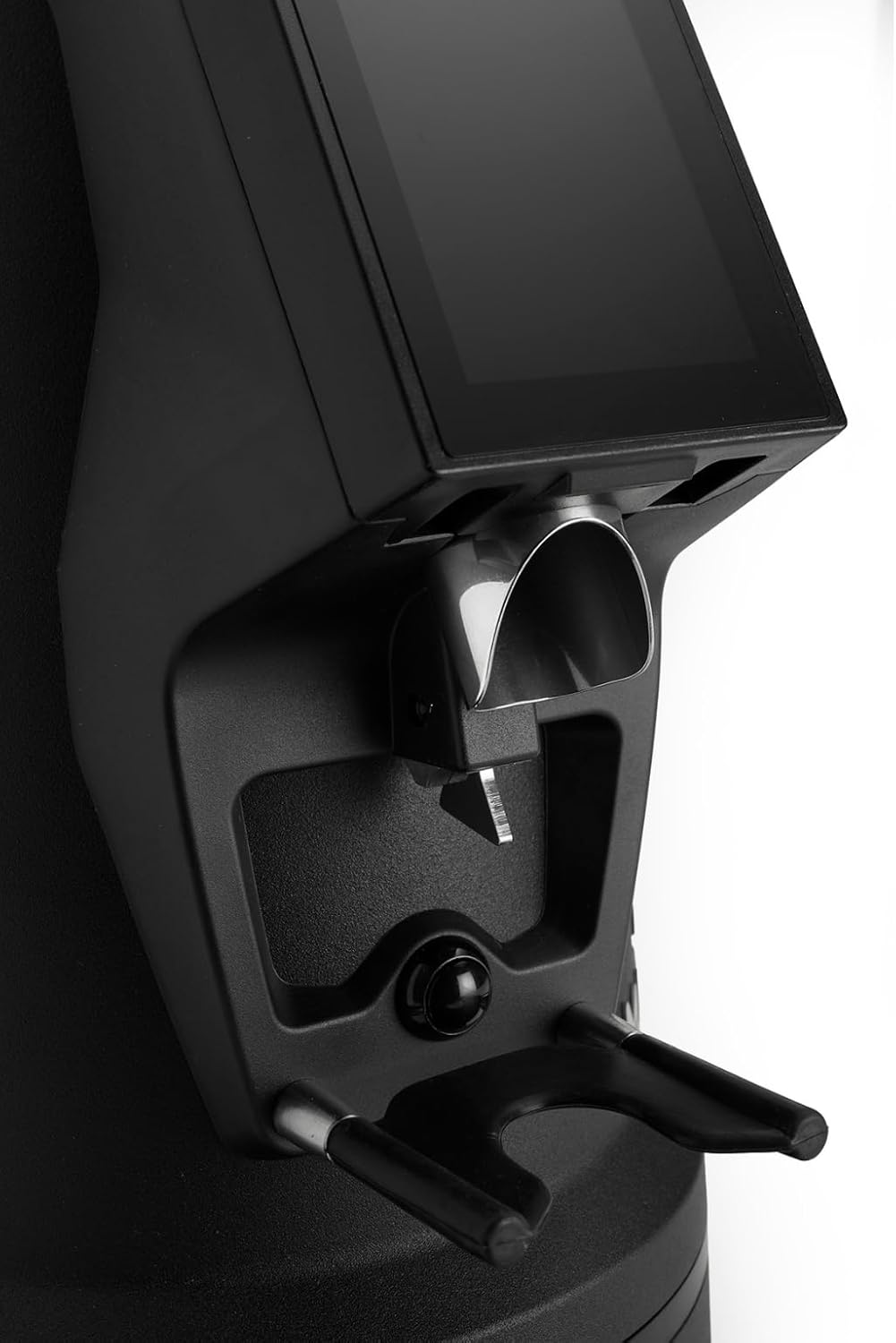
The dosing spout and portafilter holder, designed for efficient and clean coffee dispensing.
Wartung
Regular cleaning and maintenance ensure optimal performance and longevity of your grinder.
1. Tägliche Reinigung
- Trichter: Empty any remaining beans and wipe the inside of the hopper with a dry cloth.
- Dosing Spout: Use a brush or vacuum cleaner to remove any residual coffee grounds from the dosing spout and portafilter holder area.
- Exterieur: Wischen Sie die Außenseite der Mühle mit Ad abamp Mit einem Tuch abwischen. Keine Scheuermittel verwenden und das Gerät nicht in Wasser tauchen.
2. Burrs Cleaning (Weekly/Bi-weekly)
To maintain grind consistency, the burrs should be cleaned regularly.
- Den Schleifer vom Stromnetz trennen: Always disconnect the power before cleaning the burrs.
- Trichter entfernen: Empty the hopper and remove it from the grinder body.
- Access Burrs: Depending on the model, you may need to unscrew the top burr carrier. Refer to the specific instructions for your MI40 Luxe model.
- Grate reinigen: Use a stiff brush or a vacuum cleaner to remove all coffee grounds from both the stationary and rotating burrs. Do not use water.
- Zusammenbauen: Carefully reassemble the burr carrier and hopper, ensuring all parts are securely in place.
3. Allgemeine Pflege
- Lagern Sie die Mühle an einem kühlen, trockenen Ort.
- Avoid exposing the grinder to direct sunlight or extreme temperatures.
Fehlerbehebung
Sollten Sie Probleme mit Ihrer Mühle haben, beachten Sie bitte die folgenden häufigen Probleme und Lösungen:
| Problem | Mögliche Ursache | Lösung |
|---|---|---|
| Die Mühle lässt sich nicht einschalten | No power, power switch off, or safety interlock not engaged. | Check power cord connection, ensure power switch is ON, verify hopper is correctly seated. |
| No coffee grinding / Grinder jams | Beans not feeding, burrs clogged, or grind setting too fine. | Ensure hopper has beans. Unplug, remove hopper, clean burrs. Adjust to a coarser setting. |
| Ungleichmäßiger Mahlgrad | Burrs are dirty or worn. | Clean burrs thoroughly. If problem persists, burrs may need replacement. |
| Mühle ist laut | Foreign object in burrs or loose components. | Unplug and inspect burrs for foreign objects. Ensure all parts are securely fastened. |
If the problem persists after attempting these solutions, please contact MACAP customer support or your retailer.
Technische Daten
| Besonderheit | Detail |
|---|---|
| Modell | MI40 Luxe |
| Marke | Macap |
| Frästyp | Flat Burrs |
| Gratgröße | 65 mm |
| Mahlgradeinstellung | Stepless (Nice Grind Control Dial) |
| Dosierung | Touchscreen Programmable On-Demand |
| Trichterkapazität | 2.6 lbs (ca. 1.2 kg) |
| Material | Edelstahl |
| Artikelgewicht | 19.6 Pfund (ca. 8.9 kg) |
| Abmessungen (L x B x H) | 12" x 7.6" x 22" (ca. 30.5 cm x 19.3 cm x 55.9 cm) |
| Motor | High-Torque |
Garantie und Support
Your MACAP MI40 Luxe Grinder is covered by a manufacturer's warranty. For specific warranty terms and conditions, please refer to the warranty card included with your product or visit the official Macap website. For technical support, spare parts, or service inquiries, please contact your authorized Macap dealer or the customer support team.
Kontaktinformationen:
- Refer to your purchase documentation for retailer contact details.
- Visit the official Macap website for global support information.