
1. Einleitung
Vielen Dank für Ihren Einkauf.asing the ULTIMEA Aura A60 U2621 7.1ch Dolby Atmos Soundbar System. This manual provides essential information for setting up, operating, and maintaining your new sound system. Please read this manual thoroughly before use to ensure proper functionality and to maximize your audio experience.

Figure 1.1: Immersive audio experience with the ULTIMEA Aura A60 system.
2. Sicherheitshinweise
To reduce the risk of electric shock, fire, or damage to your device, please observe the following safety precautions:
- Setzen Sie dieses Gerät weder Regen noch Feuchtigkeit aus.
- Stellen Sie keine mit Flüssigkeit gefüllten Gegenstände, wie zum Beispiel Vasen, auf das Gerät.
- Sorgen Sie für ausreichende Belüftung. Blockieren Sie keine Belüftungsöffnungen.
- Installieren Sie das Gerät nicht in der Nähe von Wärmequellen wie Heizkörpern, Heizregistern, Öfen oder anderen Geräten (einschließlich ampKonverter (Lüfter), die Wärme erzeugen.
- Schützen Sie das Netzkabel vor Beschädigungen oder Beschädigungen durch Fußgänger, insbesondere an den Steckern, Steckdosen und an der Stelle, an der es aus dem Gerät austritt.
- Verwenden Sie nur vom Hersteller angegebene Zusatzgeräte/Zubehör.
- Trennen Sie das Gerät bei Gewitter oder längerer Nichtbenutzung vom Stromnetz.
- Überlassen Sie sämtliche Wartungsarbeiten qualifiziertem Servicepersonal.
3. Packungsinhalt
Bitte prüfen Sie, ob alle Artikel vorhanden und in gutem Zustand sind:
- ULTIMEA Aura A60 Soundbar
- Wireless Subwoofer (4-inch, BassMX Technology)
- 4 x Surround Speakers (2 front, 2 rear)
- Fernbedienung
- HDMI-Kabel
- Power Adapter/Cables
- Benutzerhandbuch (dieses Dokument)
4. Produktüberschreitungview
The ULTIMEA Aura A60 U2621 is a 7.1ch Dolby Atmos soundbar system designed to deliver an immersive home theater audio experience. It features a main soundbar unit, a powerful wireless subwoofer with BassMX technology, and four surround speakers.
4.1 Main Soundbar Unit
The main soundbar unit houses 3 main channels for clear dialogue and primary audio. It serves as the central hub for all audio connections.

Figure 4.1: Main soundbar unit with front surround speakers.
4.2 Kabelloser Subwoofer
The dedicated 4-inch wireless subwoofer incorporates BassMX technology to enhance low frequencies, providing deep and resonant bass for a more impactful audio experience.

Figure 4.2: Wireless subwoofer with BassMX technology.
4.3 Surround-Lautsprecher
The system includes four surround speakers: two front and two rear. The rear speakers connect wirelessly to the soundbar, minimizing cable clutter and allowing flexible placement to create an expansive acoustic space.

Figure 4.3: Diagram of 7.1ch sound distribution.
4.4 Eingangs-/Ausgangsports
The soundbar features multiple input options for versatile connectivity:
- HDMI-eARC: For high-quality audio transmission and seamless TV integration.
- Optisch: Digitaler Audioeingang.
- AUX: Analoger Audioeingang.
- USB: Zur Medienwiedergabe.
- Bluetooth: Drahtloses Audiostreaming.

Figure 4.4: Rear panel connections, including HDMI eARC.
5. Einrichtung
5.1 Physische Platzierung
Die optimale Platzierung der Komponenten Ihres Soundsystems ist entscheidend für ein optimales Klangerlebnis.
- Soundbar: Platzieren Sie die Soundbar mittig unterhalb Ihres Fernsehers. Achten Sie darauf, dass sie nicht verdeckt wird.
- Subwoofer: Position the wireless subwoofer on the floor near the soundbar. Experiment with placement to find the best bass response for your room.
- Front-Surround-Lautsprecher: Place the two wired front surround speakers to the left and right of your TV, ideally at ear level when seated.
- Hintere Surround-Lautsprecher: Position the two wireless rear surround speakers behind your primary listening position, to the left and right. These speakers will automatically connect wirelessly to the soundbar once powered on.

Figure 5.1: Recommended speaker placement for Dolby Atmos.
5.2 Anschlüsse
Befolgen Sie diese Schritte, um Ihr Soundbar-System anzuschließen:
- Stromanschluss: Connect the power cables to the soundbar, subwoofer, and surround speakers, then plug them into a power outlet.
- HDMI eARC (Empfohlen): Connect one end of the provided HDMI cable to the HDMI eARC port on your soundbar and the other end to the HDMI eARC/ARC port on your TV. This connection supports Dolby Atmos and allows for TV remote control of the soundbar.
- Optische Verbindung (Alternative): If your TV does not have an HDMI eARC/ARC port, connect an optical cable (not included) from your TV's optical output to the OPTICAL input on the soundbar.
- AUX Connection (Alternative): For analog audio sources, connect a 3.5mm AUX cable (not included) from your device's audio output to the AUX input on the soundbar.
- USB-Verbindung: Insert a USB drive into the USB port on the soundbar for direct media playback.
- Bluetooth-Pairing: To connect a Bluetooth device, select the Bluetooth input on the soundbar. On your device, search for 'ULTIMEA Aura A60' and pair.
6. Bedienungsanleitung
6.1 Ein-/Ausschalten
Drücken Sie den Netzschalter an der Soundbar oder an der Fernbedienung, um das System ein- oder auszuschalten.
6.2 Eingangsauswahl
Use the 'Input' button on the remote control or the soundbar to cycle through available input sources: HDMI eARC, Optical, AUX, USB, and Bluetooth.

Figure 6.1: Remote control for easy operation.
6.3 Lautstärkeregelung
Adjust the master volume using the 'Volume Up' and 'Volume Down' buttons on the remote control or the soundbar. You can also adjust subwoofer and surround speaker levels independently.
6.4 Sound Modes and EQ Presets
The Aura A60 offers various sound modes and EQ presets to optimize audio for different content and preferences.
- Dedicated Modes: Select from 6 specialized modes: Movie, Music, Voice, Sports, Game, and Night.
- EQ-Voreinstellungen: Access 121 professional EQ presets for genres like Bass, Pop, Classical, and Rock via the ULTIMEA app.

Figure 6.2: 121 preset EQ matrix for customized audio.
6.5 App-Steuerung
Download the ULTIMEA app to your smartphone for advanced control and customization options, including a 10-band EQ and access to all EQ presets.
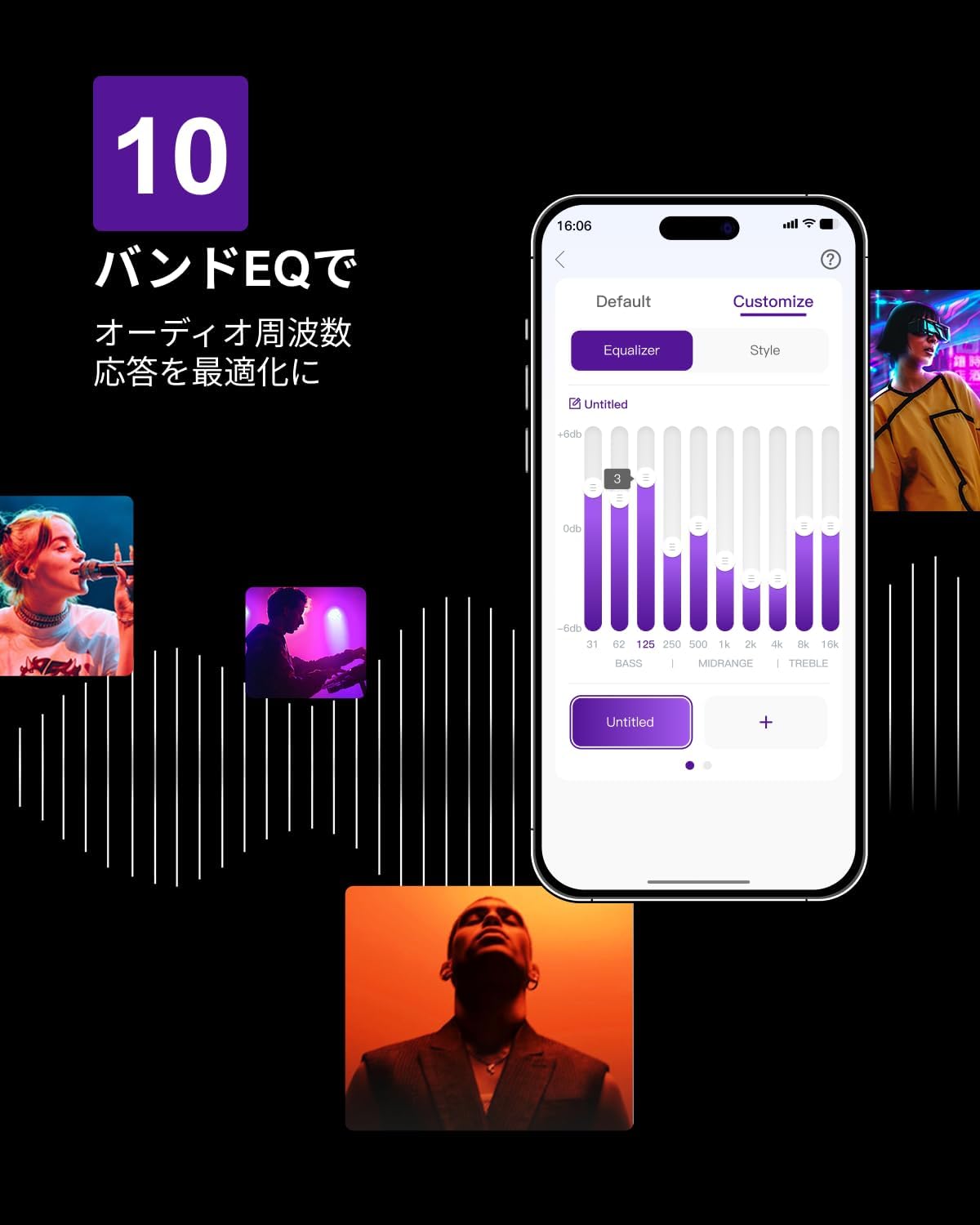
Figure 6.3: ULTIMEA mobile application interface.
7. Wartung
To ensure the longevity and optimal performance of your ULTIMEA Aura A60 soundbar system, follow these simple maintenance guidelines:
- Reinigung: Use a soft, dry cloth to wipe the surfaces of the soundbar, subwoofer, and speakers. Do not use liquid cleaners or abrasive materials, as they may damage the finish.
- Belüftung: Um eine Überhitzung zu vermeiden, muss sichergestellt werden, dass alle Lüftungsöffnungen frei und ungehindert sind.
- Lagerung: Wenn Sie das System über einen längeren Zeitraum lagern, trennen Sie es vom Stromnetz und lagern Sie es an einem kühlen, trockenen Ort, geschützt vor direkter Sonneneinstrahlung und extremen Temperaturen.
8. Fehlerbehebung
Sollten Sie Probleme mit Ihrem Soundbar-System haben, beachten Sie bitte die folgenden häufig auftretenden Probleme und Lösungen:
| Problem | Mögliche Ursache | Lösung |
|---|---|---|
| Kein Ton von der Soundbar. | Incorrect input selected, volume too low, cables not connected properly. | Verify the correct input source. Increase volume. Check all cable connections (HDMI, Optical, AUX). Ensure the soundbar is powered on. |
| Kein Ton aus den Subwoofer-/Surround-Lautsprechern. | Subwoofer/speakers not paired or powered on, volume too low. | Ensure subwoofer and surround speakers are powered on. They should automatically pair. If not, refer to the pairing instructions in the full manual (if available) or contact support. Increase their individual volume levels. |
| Verzerrte oder schlechte Klangqualität. | Incorrect audio settings, poor source quality, interference. | Adjust EQ settings or try different sound modes. Ensure the audio source is high quality. Check for nearby electronic devices causing interference. |
| Probleme mit der Bluetooth-Verbindung. | Device out of range, not in pairing mode, interference. | Stellen Sie sicher, dass sich die Soundbar im Bluetooth-Kopplungsmodus befindet. Bringen Sie Ihr Gerät näher an die Soundbar heran. Trennen Sie die Verbindung und koppeln Sie das Gerät erneut. |
Sollte das Problem nach dem Ausprobieren dieser Lösungen weiterhin bestehen, wenden Sie sich bitte an den ULTIMEA-Kundendienst.
9. Spezifikationen
| Besonderheit | Detail |
|---|---|
| Marke | LETZTE |
| Modellname | Aura A60 |
| Modellnummer | U2621 |
| Lautsprechertyp | Soundbar with 7.1ch Surround Sound |
| Audiotechnik | Dolby Atmos, BassMX Technology |
| Konnektivität | HDMI eARC, Bluetooth, Optical, AUX, USB |
| Subwoofer | 4-inch Wired Subwoofer (integrated BassMX) |
| Surround-Lautsprecher | 4 (2 wired front, 2 wireless rear) |
| Kontrolle | Remote Control, ULTIMEA App |
| Farbe | Schwarz |
| Abmessungen (T x B x H) | 9 cm x 40 cm x 7 cm (Soundbar, approximate) |
| Ursprungsland | China |
10. Garantie und Support
ULTIMEA is committed to providing high-quality products and customer satisfaction. Your Aura A60 U2621 soundbar system comes with comprehensive support.
10.1 Garantieinformationen
Specific warranty details may vary by region. Please refer to the warranty card included with your product or visit the official ULTIMEA webDie aktuellsten Garantiebedingungen finden Sie auf der Website.
10.2 Kundendienst
For any questions, technical assistance, or troubleshooting not covered in this manual, please contact our dedicated support team:
- 365-Tage-Support: Our expert staff is available year-round to assist you.
- Live Chat: Instant responses are available via live chat on our webWebsite.
- Widerrufsfolgen: We offer a 30-day return policy with free shipping for your peace of mind.

365-Day Expert Support

Instant Live Chat

30 Tage kostenlose Rückgabe
Weitere Hilfe finden Sie unter ULTIMEA Markenshop.