
1. Produktüberschreitungview
The HONOR Magic8 Lite 5G is a robust and feature-rich smartphone designed for durability and high performance. It boasts industry-leading resistance to drops, water, and dust, a long-lasting battery, a high-resolution camera, and an immersive display, all powered by an efficient processor with advanced AI capabilities.
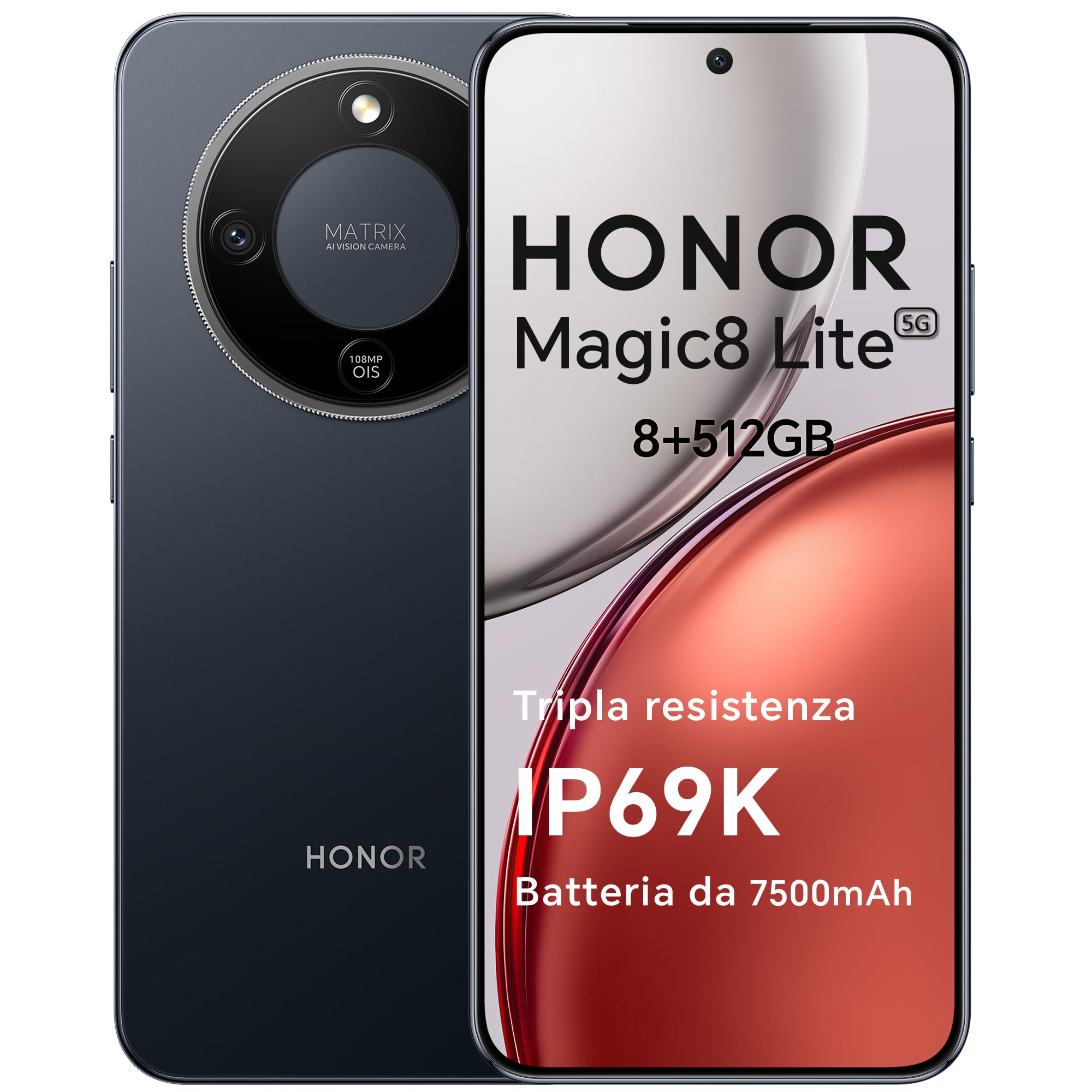
Figure 1: HONOR Magic8 Lite 5G Smartphone, Midnight Black variant.
Hauptmerkmale:
- Triple Resistance: SGS Five-Star Overall Drop Resistance (up to 2.5 meters), IP69K and IP68 water and dust resistance.
- Langlebige Batterie: 7500 mAh silicon-carbon battery with up to 3 days of autonomy and 66W SuperCharge. Functions as a portable power bank.
- Fortschrittliches Kamerasystem: 108 MP Ultra-Sensing Camera with Optical Image Stabilization (OIS) and Electronic Image Stabilization (EIS) for clear photos and stable 4K videos. Includes AI photography features.
- Immersive Anzeige: 6.79-inch 1.5K OLED display with 6000 nits peak brightness, 120 Hz refresh rate, and HONOR Eye Comfort Display technology.
- Starke Leistung: Snapdragon 6 Gen 4 (4nm) mobile platform for smooth multitasking and gaming, integrated with Google Gemini and other AI functionalities.
2. Geräteeinrichtung
2.1 Packungsinhalt
Überprüfen Sie, ob Ihr Paket die folgenden Artikel enthält:
- HONOR Magic8 Lite 5G Smartphone
- USB-C-Kabel
- Power Adapter (66W SuperCharge)
- SIM-Auswerferwerkzeug
- Kurzanleitung
- Garantiekarte
2.2 Einlegen von SIM-Karten
- Suchen Sie den SIM-Karten-Einschub an der Seite Ihres Geräts.
- Führen Sie das SIM-Auswurfwerkzeug in die kleine Öffnung neben dem Fach ein und drücken Sie fest, bis das Fach herausspringt.
- Place your Nano-SIM card(s) into the designated slots on the tray. Ensure the gold contacts face downwards. The device supports Dual SIM functionality.
- Setzen Sie den SIM-Kartenhalter vorsichtig wieder in das Telefon ein.
The device also supports eSIM functionality. Refer to your carrier for activation details.
2.3 Erstes Aufladen und Einschalten
- Connect the USB-C cable to the phone's charging port and the other end to the 66W power adapter. Plug the adapter into a power outlet.
- Allow the phone to charge for at least 15 minutes before initial use.
- To power on, press and hold the Power button (located on the side) until the HONOR logo appears on the screen.
- Folgen Sie den Anweisungen auf dem Bildschirm, um die Ersteinrichtung abzuschließen, einschließlich Sprachauswahl, WLAN-Verbindung und Einrichtung des Google-Kontos.

Figure 2: The 7500mAh silicon-carbon battery provides extended usage.
3. Bedienungsanleitung
3.1 Grundlegende Navigation
- Touch-Screen: Zum Auswählen tippen, zum Scrollen wischen, zum Zoomen zusammenziehen.
- Startbildschirm: Zugriff auf Apps, Widgets und Benachrichtigungen.
- Gesten: Customize navigation gestures in Settings for a fluid experience.
3.2 Kameranutzung
The HONOR Magic8 Lite 5G features a 108 MP Ultra-Sensing Camera with OIS and EIS for superior image and video capture.
- Öffnen Sie die Kamera-App von Ihrem Startbildschirm oder Sperrbildschirm aus.
- Select your desired mode (Photo, Video, Portrait, Night, Pro, etc.).
- Tippen Sie auf den Auslöser, um ein Foto aufzunehmen oder die Videoaufnahme zu starten/stoppen.
- Utilize AI features like AI Eraser, AI Cutout, and AI Outpainting for enhanced photo editing.
- For underwater photography, ensure the device is properly sealed and use the dedicated underwater mode.

Abbildung 3: Bspamples of high-quality images captured by the 108 MP camera.
3.3 Batteriemanagement
The 7500 mAh battery is designed for extended use. To optimize battery life:
- Energiesparmodi aktivieren, wenn der Akku schwach ist.
- Bildschirmhelligkeit und Bildschirm-Timeout-Einstellungen anpassen.
- Close background apps not in use.
- The device supports reverse charging, allowing it to act as a power bank for other devices. Connect the devices using a compatible USB-C cable.

Figure 4: The device can charge other accessories, acting as a power bank.
3.4 Anzeigefunktionen
The 6.79-inch 1.5K OLED display offers vibrant visuals and eye comfort features.
- Augenschonmodus: Reduces blue light to prevent eye strain. Activate it in Display Settings.
- Dynamische Aktualisierungsrate: The 120 Hz adaptive refresh rate adjusts automatically for smooth scrolling and power efficiency.
- Hohe Helligkeit: With 6000 nits peak brightness, the display remains clear even in direct sunlight.

Figure 5: The 1.5K OLED display offers exceptional clarity and color.
3.5 AI Features and Google Gemini
The device integrates advanced AI functionalities and Google Gemini for enhanced user experience.
- Google Gemini: Interact with Gemini for real-time translation, information retrieval, and more.
- AI Writing Tools: Utilize AI to assist with text composition and productivity tasks.
- Magisches Portal: A shortcut for AI-powered tasks.

Figure 6: Google Gemini integration for intelligent assistance.
3.6 NFC-Funktionalität
The HONOR Magic8 Lite 5G supports Near Field Communication (NFC) for quick and secure transactions and data exchange.
- Enable NFC in your phone's Settings.
- Tap your phone to compatible NFC readers for mobile payments or to share content with other NFC-enabled devices.
4. Wartung
4.1 Reinigung Ihres Geräts
Despite its IP69K and IP68 ratings for water and dust resistance, proper cleaning helps maintain your device's longevity.
- Wischen Sie Bildschirm und Gehäuse mit einem weichen, fusselfreien Tuch ab.
- Vermeiden Sie die Verwendung von aggressiven Chemikalien, abrasiven Materialien oder Druckluft.
- Sollte das Gerät nass werden, wischen Sie es vor dem Aufladen oder dem Öffnen von Anschlüssen mit einem sauberen Tuch trocken.
4.2 Softwareaktualisierungen
Regular software updates provide security patches, new features, and performance improvements. Ensure your device is connected to Wi-Fi and has sufficient battery before initiating an update.
- Navigieren Sie zu Einstellungen > System & Updates > Software-Update um nach verfügbaren Updates zu suchen.
4.3 Batteriepflege
The 7500 mAh battery is designed for a long lifespan. To maximize its performance:
- Avoid extreme temperatures (below -30°C or above 55°C) as they can degrade battery performance.
- Verwenden Sie ausschließlich von HONOR zugelassene Ladegeräte und Kabel.
- Vermeiden Sie es, den Akku häufig vollständig zu entladen.

Figure 7: The device is designed to operate in a wide range of temperatures.
5. Fehlerbehebung
This section addresses common issues you might encounter with your HONOR Magic8 Lite 5G.
5.1 Gerät schaltet sich nicht ein
- Stellen Sie sicher, dass der Akku geladen ist. Schließen Sie das Ladegerät an und warten Sie einige Minuten, bevor Sie versuchen, das Gerät erneut einzuschalten.
- Halten Sie den Netzschalter mindestens 10-15 Sekunden lang gedrückt, um einen Neustart zu erzwingen.
5.2 Ladeprobleme
- Prüfen Sie, ob das Ladekabel und der Adapter fest angeschlossen sind.
- Try using a different HONOR-approved charger and cable.
- Überprüfen Sie den Ladeanschluss auf Schmutz oder Beschädigungen.
5.3 Kamera funktioniert nicht
- Starten Sie das Gerät neu.
- Clear the cache and data of the Camera app in Einstellungen > Apps > Kamera > Speicher.
- Ensure no other apps are currently using the camera.
5.4 Water/Dust Exposure
While the device is highly resistant, prolonged exposure or exposure to high-pressure jets (beyond IP69K/IP68 limits) can cause damage.
- If the device gets wet, dry it thoroughly before charging.
- Do not intentionally submerge the device in water beyond specified depths or for extended periods.
- If you suspect water damage, contact customer support.

Figure 8: The device is designed with advanced water resistance.
For other issues, refer to the official HONOR support webWebsite oder wenden Sie sich an den Kundendienst.
6. Spezifikationen
| Besonderheit | Spezifikation |
|---|---|
| Marke | EHRE |
| Modell | Magic8 Lite |
| RAM | 8 GB |
| Interner Speicher | 512 GB |
| Farbe | Mitternachtsschwarz |
| Batteriekapazität | 7500 mAh |
| Anzeige | 6.79-inch 1.5K AMOLED, 120Hz, 6000 nits peak brightness |
| Rückfahrkamera | 108 MP mit OIS |
| Prozessor | Snapdragon 6 Gen 4 (4nm) |
| Wasser- und Staubbeständigkeit | IP69K, IP68 |
| Fallfestigkeit | SGS Five-Star Overall Drop Resistance (up to 2.5m) |
| Konnektivität | 5G, Dual SIM, NFC |
| Herkunft | China |
| ASIN | B0G43TWKGS |

Figure 9: Detailed product information sheet.
For more detailed energy efficiency information, please refer to the EPREL database: https://eprel.ec.europa.eu/qr/2515767
7. Garantie und Support
7.1 Garantieinformationen
Warranty terms and conditions are typically provided with your purchase documentation. Please retain your proof of purchase for warranty claims. For specific warranty details, refer to the warranty card included in your product package or visit the official HONOR webWebsite für Ihre Region.
7.2 Kundendienst
For technical assistance, service, or further inquiries, please contact HONOR customer support:
- Offiziell WebWebsite: https://www.honor.com/de/
- Self-Repair Support: https://www.honor.com/de/support/self-repair/
- E-Mail-Support: support@honor.com