
Einführung
This manual provides comprehensive instructions for the installation, operation, and maintenance of your Comfort Direct MENA Ceiling Fan Remote Control, Model CDTX028C-S-1. Please read this manual thoroughly before use to ensure proper functionality and safety. This remote control is designed as a direct replacement for specific Hampton Bay MENA ceiling fan models.
Wichtiger Kompatibilitätshinweis
This remote control is NOT universal. It is specifically designed for Hampton Bay MENA ceiling fans. Please confirm your fan model before attempting to use this remote.
Compatible Hampton Bay MENA Ceiling Fan Models include: 99919, 58913, 92216, 92217, 99918, 92211.
Im Leistungsumfang enthalten
- 1 x Fernbedienung
- 1 x Wandhalterung
- 1 x Programming Manual (this document)
- 2 x Screws for wall mount installation
Note: One 12V 23A battery is required for operation and is NOT included.
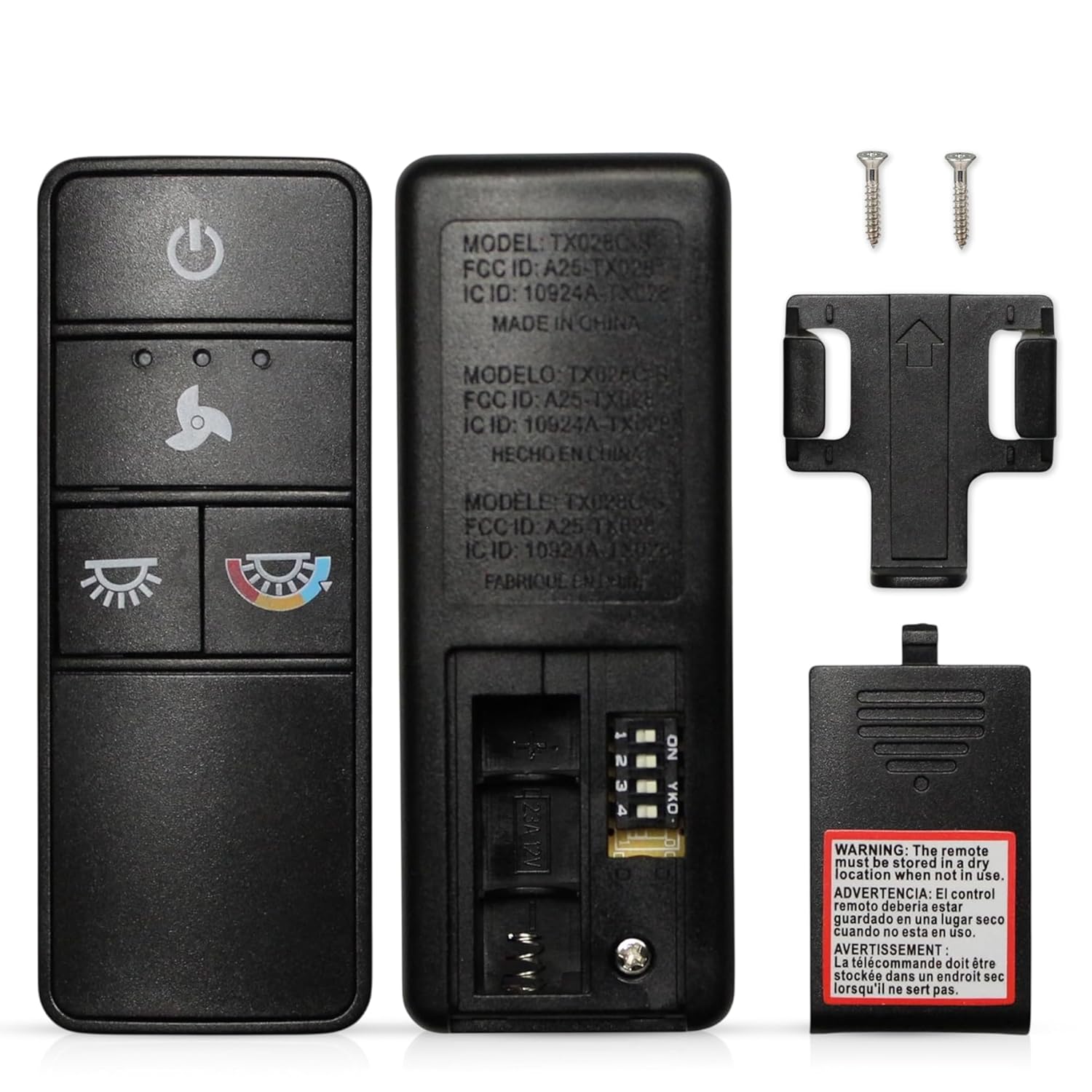
Image: The remote control, its back panel with DIP switches, the wall mount holder, and two mounting screws.
Einrichtung und Kopplung
1. Einlegen der Batterie
The remote control requires one 12V 23A battery (not included). To install:
- Öffnen Sie den Batteriefachdeckel auf der Rückseite der Fernbedienung.
- Insert one 12V 23A battery, ensuring the correct polarity (+/-).
- Schließen Sie den Batteriefachdeckel fest.
2. DIP Switch Pairing
The remote control uses a 4-position DIP switch system to communicate with your ceiling fan receiver. You must match the DIP switch settings on the new remote to those on your existing fan receiver (or old remote) for proper operation.
- Locate the DIP switches on your ceiling fan's receiver (usually found in the canopy above the fan motor) or on your old remote control.
- Open the battery compartment of your new Comfort Direct remote control to access its 4-position DIP switches.
- Carefully adjust the switches on the new remote to exactly match the ON/OFF positions of the switches on your fan's receiver or old remote. There are 16 possible combinations.
- Once the DIP switches are matched, close the battery compartment.
If your old remote is lost, you may need to try different DIP switch combinations until the remote successfully pairs with your fan. Ensure the power to the fan is cycled off and on after changing DIP switch settings for the fan receiver to recognize the new code.

Image: Illustration of the remote control's back panel with DIP switches, highlighting the 304 MHz RF system and DIP-pairing for compatibility with existing receivers.
3. Montage der Wandhalterung
The included wall mount holder allows for convenient storage and access to your remote control.
- Choose a suitable location on a wall, away from moisture and direct sunlight.
- Use the two provided screws to securely attach the wall mount holder to the wall.
- Place the remote control into the holder for easy access.

Image: The remote control securely placed in its wall-mounted holder, demonstrating convenient storage.
Bedienungsanleitung
The Comfort Direct remote control provides full control over your Hampton Bay MENA ceiling fan's fan speeds and lighting functions.

Image: The remote control highlighting its key functions: 3-speed fan control, independent light ON/OFF, dimmer, and color temperature adjustment.
Lüftersteuerung
- Power-Taste (⏻): Drücken Sie diese Taste, um den Ventilator EIN- oder AUSzuschalten.
- Tasten für die Lüftergeschwindigkeit:
- Drücken Sie die ⌂ button to cycle through High, Medium, and Low fan speeds.
- Drücken Sie die ⏻ Knopf zum Ausschalten des Ventilators.
Lichtsteuerung
- Light ON/OFF Button (💡): Press to independently turn the light ON or OFF.
- Dimmer Function (Hold to Dim): Wenn das Licht eingeschaltet ist, halten Sie die Taste gedrückt 💡 button to adjust the brightness. Release when the desired brightness is reached.
- Color Temperature (CCT) Adjustment Button (🌈): Press this button to cycle through different light color temperatures (e.g., warm white, cool white, daylight). The default setting is typically soft-white (3000K).
Wartung
Batteriewechsel
When the remote control's range decreases or it becomes unresponsive, it's time to replace the battery. Follow the battery installation steps in the "Setup and Pairing" section.
Reinigung
To clean the remote control, wipe it with a soft, dry cloth. Do not use abrasive cleaners, solvents, or expose it to excessive moisture.
Fehlerbehebung
- Fernbedienung reagiert nicht:
- Prüfen Sie, ob die Batterie korrekt eingesetzt ist und ausreichend geladen ist. Tauschen Sie sie gegebenenfalls aus.
- Verify that the DIP switch settings on the remote match those on the fan receiver.
- Ensure the fan's power supply is ON at the wall switch or circuit breaker.
- Fan operates but light does not:
- Check the light bulb in the fan for proper installation and functionality.
- Ensure the light ON/OFF button on the remote is pressed.
- Light does not dim or change color temperature:
- Confirm that your fan's light fixture supports dimming and color temperature adjustment (CCT).
- Ensure you are pressing and holding the light button for dimming, and pressing the CCT button for color changes.
- Begrenzte Reichweite:
- Ersetzen Sie die Batterie.
- Stellen Sie sicher, dass sich keine Hindernisse zwischen der Fernbedienung und dem Lüfterempfänger befinden.
Technische Daten
| Besonderheit | Detail |
|---|---|
| Modellname | CDTX028C-S-1 |
| Marke | Comfort Direkt |
| Konnektivitätstechnologie | Radiofrequenz (RF) |
| Betriebsfrequenz | 304 MHz |
| Controllertyp | Tastensteuerung |
| Maximale Anzahl unterstützter Geräte | 1 (one fan receiver) |
| Kompatible Geräte | Hampton Bay MENA Ceiling Fans (specific models) |
| Maximale Reichweite | 30 Feet (approx.) |
| Akku-Typ | 1 x 12V 23A Alkaline Battery (not included) |
| Abmessungen (L x B x H) | 4.57" x 1.8" x 2.76" (ca.) |
| Smart Home Kompatibilität | Not Smart Home Compatible |
Garantie
This Comfort Direct product is backed by a 1 Jahr Herstellergarantie from the date of purchase. This warranty covers defects in materials and workmanship under normal use. For warranty claims or further details, please refer to the manufacturer's official warranty policy or contact customer support.
Kundenservice
If you encounter any issues or have questions not addressed in this manual, please contact Comfort Direct customer support. Refer to your product packaging or the retailer's webWebsite für Kontaktinformationen.