
Garvee 2 Ton / 24000 BTU Mini Split Air Conditioner and Heat Pump User Manual
Model: BroHUZOQ2P66TYJ1M2_b2g1p
1. Einleitung
This manual provides essential information for the safe and efficient operation, installation, and maintenance of your Garvee 2 Ton / 24000 BTU Mini Split Air Conditioner and Heat Pump. This ductless inverter system offers both cooling and heating functions, smart WiFi connectivity, and compatibility with voice assistants like Alexa. Please read this manual thoroughly before using the unit and retain it for future reference.
The system is designed to provide climate control for areas up to 1500 sq. ft., operating on 208 / 230V with a 21 SEER2 efficiency rating.
2. Sicherheitshinweise
Wichtige Sicherheitshinweise:
- Stellen Sie stets sicher, dass das Gerät ordnungsgemäß geerdet ist.
- Bedienen Sie das Gerät nicht mit nassen Händen.
- Halten Sie Kinder und Haustiere vom Außengerät fern.
- Führen Sie keine Gegenstände in den Luftauslass oder -einlass ein.
- Vor der Reinigung oder Durchführung von Wartungsarbeiten muss die Stromversorgung ausgeschaltet werden.
- Professional installation is highly recommended to ensure safe and correct operation and to comply with local electrical codes.
- Wenn das Netzkabel beschädigt ist, muss es vom Hersteller, seinem Kundendienst oder einer ähnlich qualifizierten Person ersetzt werden, um Gefahren zu vermeiden.
3. Produktüberschreitungview und Komponenten
Your Garvee Mini Split system consists of an indoor wall-mount air handler, an outdoor condenser unit, and a remote control. A complete installation kit is included.

Abbildung 3.1: Dimensions of the indoor wall mount air handler (31.92" W x 8.07" H x 11.49" D), outdoor condenser (28.14" W x 19.61" H x 11.42" D), and the pre-flared and insulated copper line set (16.4 FT).
The system offers multiple operational modes for year-round comfort:
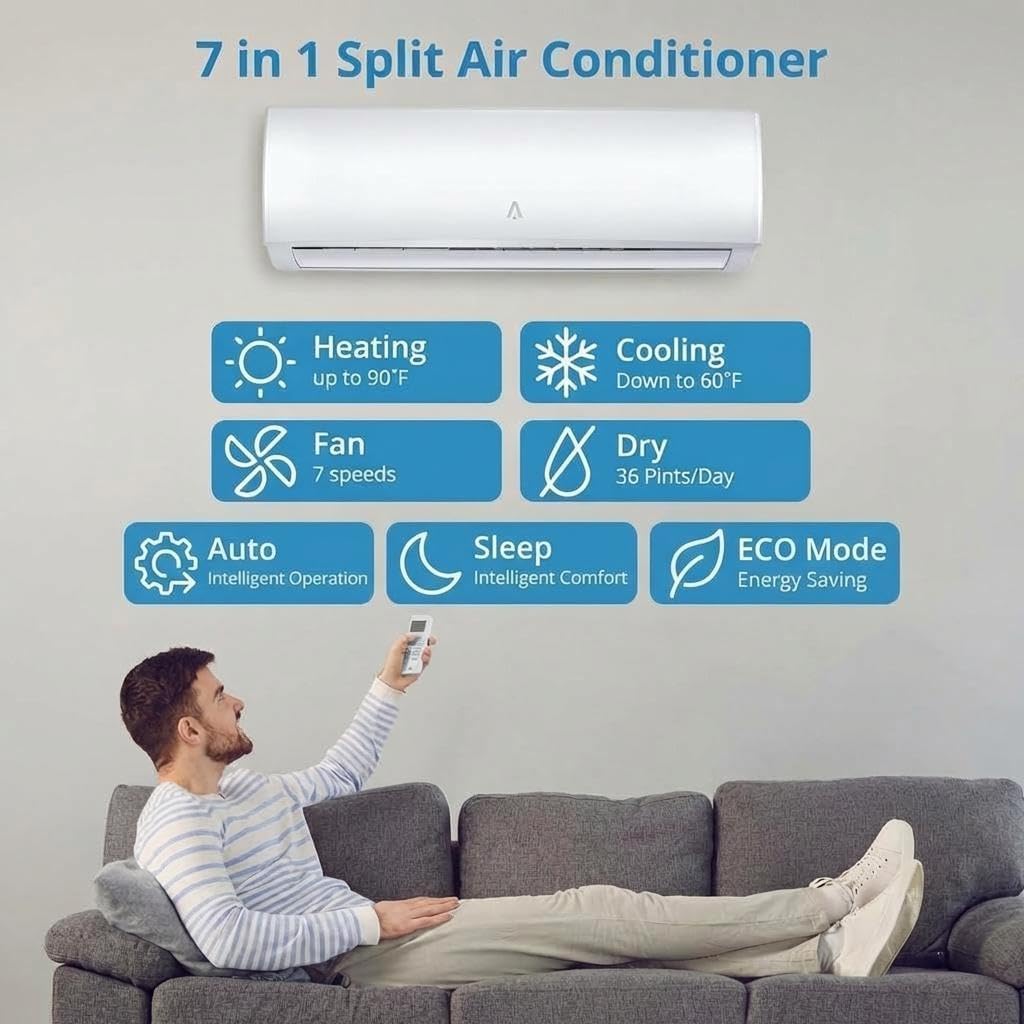
Abbildung 3.2: The 7-in-1 functionality of the Garvee Mini Split system, including Heating (up to 90°F), Cooling (down to 60°F), Fan (7 speeds), Dry (36 Pints/Day), Auto (Intelligent Operation), Sleep (Intelligent Comfort), and ECO Mode (Energy Saving).
4. Einrichtung und Installation
Your Garvee Mini Split system comes with a complete installation kit, including the indoor unit, outdoor unit, remote control, line set, and wiring. The system ships in two separate packages, which may arrive at different times.
Installationsschritte (Überview):
- Montage des Innengeräts: Select an appropriate wall location, ensuring sufficient space around the unit for airflow and maintenance. Secure the mounting plate and then the indoor unit.
- Installieren der Außeneinheit: Choose a stable, level location outdoors, away from direct sunlight and obstructions. Ensure proper clearance for airflow.
- Anschluss der Kältemittelleitungen: Connect the pre-flared copper line set between the indoor and outdoor units. Ensure all connections are tight to prevent leaks.
- Elektroverkabelung: Connect the power supply and communication wiring according to the wiring diagram provided in the detailed installation guide (not included in this manual). This step requires a qualified electrician.
- Staubsaugen und Kältemittelbefüllung: Evacuate the refrigerant lines to remove air and moisture. The system is pre-charged with refrigerant, but additional charging may be required depending on line length.
- Drainage Line Installation: Installieren Sie die Kondensatablaufleitung vom Innengerät, um eine ordnungsgemäße Wasserabfuhr zu gewährleisten.
Notiz: Professional installation by a certified HVAC technician is strongly recommended for optimal performance, safety, and warranty validity. Incorrect installation can lead to system malfunction, reduced efficiency, and safety hazards.
5. Bedienungsanleitung
Your Garvee Mini Split system offers various modes and smart features for customized comfort.
5.1 Grundlegende Betriebsarten
- Kühlmodus: Provides powerful cooling, ideal for hot weather. Can cool down to 60°F.
- Wärme-Modus: Delivers efficient heating, suitable for cold climates. Can heat up to 90°F.
- Trockenmodus: Reduces humidity in the room, removing up to 36 pints per day.
- Gebläsemodus: Circulates air without heating or cooling, with 7 adjustable fan speeds.
- Automatikmodus: Automatically selects the appropriate mode (cooling, heating, or fan) based on the set temperature and current room temperature.

Abbildung 5.1: The system's capability for fast cooling and heating, reaching desired temperatures efficiently.
5.2 Smart Features and Controls
- Fernbedienung: Use the included remote to adjust temperature, change modes, set fan speed, and access other functions.
- Intelligente WLAN-Konnektivität: Control your mini split AC from anywhere using a smartphone app. Follow the instructions in the app to connect your unit to your home WiFi network.
- Sprachsteuerung (Alexa-kompatibel): Integrate with Alexa for hands-free control. Adjust settings, switch modes, or set schedules using voice commands.
- 24-Stunden-Timer: Programmieren Sie das Gerät so, dass es sich zu bestimmten Zeiten automatisch ein- oder ausschaltet.
- Schlafmodus: Optimizes temperature and fan speed for quiet operation and comfortable sleep, gradually adjusting settings throughout the night.
- Energiesparmodus: Enhances energy efficiency by optimizing operation to reduce electricity consumption.
- Leise Leistung: Engineered for whisper-quiet operation, running as low as 25 dB.
- Backup-Funktion: Recalls your preferred settings after a power interruption.

Abbildung 5.2: Sleep Mode provides a quiet environment and gentle airflow, with noise levels as low as 27 dB.

Abbildung 5.3: Advanced features for enhanced comfort, including ultra-silent operation, a 24-hour timer, sleep mode, and the option to turn the display on or off.
6. Wartung
Regular maintenance ensures the longevity and efficient operation of your Garvee Mini Split system.
6.1 Wartung der Inneneinheit
- Selbstreinigungsfunktion: The indoor unit features a high-temperature (134.6°F) self-cleaning function. Activate this function periodically to reduce contaminants and maintain air quality. Refer to your remote control or app for instructions on activating this feature.
- Waschbarer Filter: The indoor unit is equipped with a washable air filter. Clean the filter regularly (e.g., every 2-4 weeks, depending on usage) to ensure optimal airflow and efficiency. To clean, open the front panel, remove the filter, wash it with lukewarm water and mild detergent, rinse thoroughly, and allow it to dry completely before reinserting.
- Außenreinigung: Wischen Sie die Außenseite des Innengeräts mit einem weichen, fusselfreien Tuch ab.amp Tuch. Verwenden Sie keine scharfen Chemikalien oder Scheuermittel.
6.2 Wartung der Außeneinheit
- Automatische Abtaufunktion: The outdoor unit includes an auto-defrost function to prevent ice buildup during winter heating operation, ensuring efficient performance in cold climates. This function operates automatically.
- Hindernisse beseitigen: Ensure the outdoor unit's coils and fan are free from leaves, dirt, and other debris. Periodically clear any obstructions around the unit to maintain proper airflow.
- Spulenreinigung: Annually, or as needed, have a professional clean the outdoor coil to remove accumulated dirt and grime, which can impede heat exchange.
7. Fehlerbehebung
Before contacting customer support, please refer to the following common troubleshooting tips:
| Problem | Mögliche Ursache | Lösung |
|---|---|---|
| Das Gerät lässt sich nicht einschalten | Keine Stromversorgung; Batterien der Fernbedienung leer; Schutzschalter ausgelöst. | Stromanschluss prüfen; Batterien der Fernbedienung austauschen; Sicherungsautomat zurücksetzen. |
| Unzureichende Kühlung/Heizung | Dirty air filter; Temperature setting incorrect; Obstructions around outdoor unit; Room size exceeds capacity. | Clean air filter; Adjust temperature; Clear obstructions; Ensure unit matches room size (up to 1500 sq. ft.). |
| Ungewöhnliche Geräusche | Lose Teile; Lüfter blockiert; Gerät nicht waagerecht. | Check for loose components; Remove obstructions; Ensure unit is level. If noise persists, contact service. |
| Wasserleckage am Innengerät | Verstopftes Abflussrohr; Unsachgemäße Installation. | Clear drain pipe; Contact a professional for inspection and repair. |
| Fernbedienung funktioniert nicht | Leere Batterien; Hindernis zwischen Fernbedienung und Gerät; Fernbedienung außerhalb der Reichweite. | Replace batteries; Remove obstructions; Operate within effective range. |
Sollte das Problem nach dem Ausprobieren dieser Lösungsansätze weiterhin bestehen, wenden Sie sich bitte an den Garvee-Kundendienst.
8. Spezifikationen
| Besonderheit | Spezifikation |
|---|---|
| Marke | Garvee |
| Modellnummer | BroHUZOQ2P66TYJ1M2_b2g1p |
| Kühlleistung | 24000 BTU |
| Heizleistung | 24000 BTU |
| SEER2-Bewertung | 21 |
| Bandtage | 208 / 230V |
| Abdeckungsbereich | Bis zu 1500 m². |
| Geräuschpegel (Innenbereich) | 25 dB |
| Produktabmessungen (Innenbereich) | Approx. 31.92" D x 8.07" W x 11.49" H (from image) |
| Produktabmessungen (Außenbereich) | Approx. 28.14" D x 19.61" W x 11.42" H (from image) |
| Gewicht | 67.9 kg (Gesamt) |
| Kontrollmethode | Remote Control, Smart WiFi App, Voice Control (Alexa) |
| Besondere Merkmale | Inverter Technology, Self-Cleaning, Auto-Defrost, 24-Hour Timer, Sleep Mode, ECO Mode |
| Im Lieferumfang enthaltene Komponenten | Indoor unit, Outdoor unit, Remote control, Installation kit (line set, wiring) |
9. Garantie und Support
Your Garvee Mini Split Air Conditioner and Heat Pump is backed by reliable performance. For specific warranty details, including coverage period and terms, please refer to the warranty card included with your product or contact Garvee customer support directly. Keep your proof of purchase for warranty claims.
For technical assistance, troubleshooting beyond this manual, or to inquire about service, please contact Garvee customer support through their official channels. Contact information can typically be found on the product packaging, the manufacturer's webWebsite oder Ihre Kaufdokumentation.