
1. Einleitung
This manual provides comprehensive instructions for the installation, operation, and maintenance of your aosu 4K T2 Ultra Wireless Outdoor Security Camera System with aosuBase 2.0. Please read this manual carefully before using the product to ensure proper functionality and safety. Keep this manual for future reference.
2. Produktüberschreitungview
2.1 Packungsinhalt
- 2 x aosu 4K T2 Ultra Wireless Outdoor Security Cameras with integrated solar panels
- 1 x aosuBase 2.0
- 1 x Power Adapter for aosuBase 2.0
- 1 x Ethernet-Kabel
- Befestigungsschrauben und Dübel
- USB-C Extension Cable (for solar panel detachment)
- Benutzerhandbuch (dieses Dokument)
2.2 Hauptmerkmale
- 4K Ultra HD 8MP Resolution: Bietet klare und detaillierte Video-Footage.
- TrueColor Night Vision: Delivers full-color video even in low-light conditions without additional spotlights.
- 360° Panoramic AI Tracking: Automatically tracks movement across a full 360-degree field of view, wodurch tote Winkel beseitigt werden.
- Triple Detection System: Utilizes radar, PIR sensor, and AI for precise motion detection and reduced false alerts.
- Lokaler Speicher: aosuBase 2.0 includes 32GB built-in storage, expandable up to 1TB (microSD card/HDD/SSD not included). No monthly fees required.
- Solarbetrieben: Integrated 3W solar panel for continuous power, with detachable option for flexible placement.
- Zweiwege-Audio: Kommunizieren Sie mit Besuchern oder schrecken Sie Eindringlinge mit dem eingebauten Mikrofon und Lautsprecher ab.
- Inter-Camera Tracking: Cameras work together to provide seamless surveillance coverage.
- Wi-Fi-Konnektivität: Supports 2.4GHz and 5GHz Wi-Fi for stable connection.
- Wetterfestes Design: Geeignet für den Außeneinsatz bei unterschiedlichen Wetterbedingungen.
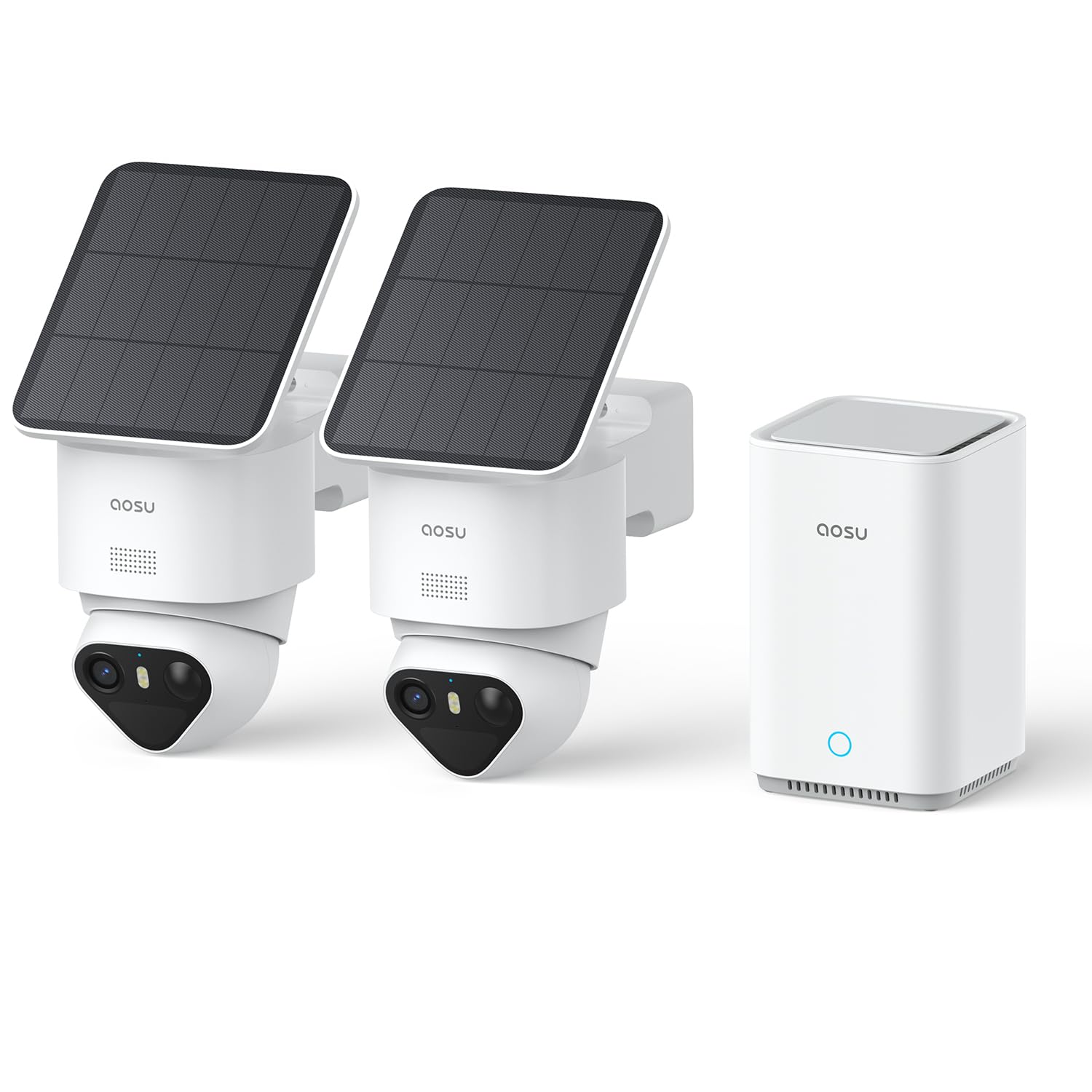
Image 1: aosu 4K T2 Ultra Camera and aosuBase 2.0 Kit components.

Image 2: Close-up of the aosu 4K T2 Ultra Camera with its integrated solar panel.

Image 3: The aosuBase 2.0 central hub for local storage and connectivity.
3. Einrichtungsanweisungen
3.1 Vor der Installation
- Stellen Sie sicher, dass der gesamte Paketinhalt vorhanden ist.
- Charge the cameras fully before installation for optimal initial performance.
- Laden Sie die 'aosu'-App aus dem App Store Ihres Smartphones (iOS oder Android) herunter.
- Ensure your Wi-Fi network is 2.4GHz or 5GHz compatible and has a strong signal at the intended camera locations.
3.2 aosuBase 2.0 Setup
- Place the aosuBase 2.0 near your Wi-Fi router.
- Connect the aosuBase 2.0 to power using the provided adapter.
- Connect the aosuBase 2.0 to your router using the provided Ethernet cable.
- Wait for the indicator light on the aosuBase 2.0 to show a stable status (refer to app for specific light indications).
3.3 Kamerainstallation
The cameras are designed for easy, wire-free installation. The solar panel can be attached directly to the camera or detached and mounted separately for optimal sun exposure.
- Wählen Sie einen Standort: Wählen Sie einen Standort, der die gewünschten Eigenschaften bietet. viewing angle and receives adequate sunlight for the solar panel. Consider areas with high traffic for surveillance.
- Montage der Kamera: Use the provided screws and wall plugs to securely mount the camera to a wall or other stable surface. Ensure the camera is within Wi-Fi range of the aosuBase 2.0.
- Positionierung des Solarmoduls: If detaching the solar panel, use the extension cable to connect it to the camera and mount the panel in a location that receives maximum direct sunlight throughout the day.
- Einschalten: Once mounted, ensure the camera is powered on. The solar panel will begin charging the internal battery.

Image 4: Illustration of quick and easy camera installation.

Image 5: Flexible mounting options for the solar panel to optimize sun exposure.
3.4 App-Pairing
- Open the 'aosu' app on your smartphone.
- Follow the in-app instructions to add your aosuBase 2.0 and then each camera. The app will guide you through the pairing process, often using Bluetooth for initial connection.
- Ensure a stable connection between the cameras and the aosuBase 2.0.

Image 6: Screenshot of the aosu app showing quick connectivity steps.
4. Bedienungsanleitung
4.1 Live View und Aufzeichnung
- Open the aosu app to view Live-Bilder Ihrer Kameras.
- The system automatically records events triggered by motion detection. You can also manually initiate recordings from the app.
- Auf aufgezeichnetes Foo zugreifentage via the app. Footage is stored locally on the aosuBase 2.0.

Bild 7: View multiple camera feeds simultaneously on your smartphone.
4.2 Bewegungserkennung und Benachrichtigungen
- The camera system uses a combination of radar, PIR, and AI to detect motion accurately.
- Configure detection zones and sensitivity settings within the app to minimize false alerts.
- Erhalten Sie sofortige Benachrichtigungen auf Ihr Smartphone, sobald eine Bewegung erkannt wird.
- The AI tracking feature allows the camera to follow detected subjects across its 360° field of view.

Image 8: Visual representation of the 3-in-1 precision detection system.

Image 9: The system identifies people by analyzing unique gait, posture, clothing, and behavioral habits.
4.3 Nachtsicht
- The cameras feature TrueColor 4K night vision, providing clear, vivid color images in low light.
- No additional spotlights are required for color night vision.

Abbildung 10: Beispielample of TrueColor night vision capturing details in the dark.
4.4 Zwei-Wege-Kommunikation
- Use the two-way audio feature in the app to speak through the camera and listen to audio from the camera's location.
- A voice change function is included for added security.

Image 11: Illustration of two-way communication via the camera.
5. Wartung
5.1 Reinigung
- Reinigen Sie das Kameraobjektiv und das Solarpanel regelmäßig mit einem weichen Tuch.amp Tuch, um optimale Leistung zu gewährleisten.
- Verwenden Sie keine aggressiven Chemikalien oder scheuernden Materialien.
5.2 Batterie und Solarpanel
- The integrated solar panel charges the camera's battery. Ensure the solar panel is free from obstructions and receives direct sunlight for several hours daily.
- If the camera's battery level is consistently low, consider repositioning the solar panel or camera for better sun exposure.

Image 12: The 3W solar panel provides efficient charging for continuous operation.
5.3 Speicherverwaltung
- The aosuBase 2.0 comes with 32GB of internal storage. This can be expanded up to 1TB using a compatible microSD card, HDD, or SSD (sold separately).
- Manage recorded videos through the aosu app. You can view, herunterladen und Foo löschentage.
- Note: Deleting recordings one by one is standard. Bulk deletion may require specific app features or a paid subscription if offered by aosu.

Image 13: aosuBase 2.0 offers 32GB integrated storage, expandable up to 1TB, with no subscription fees.
6. Fehlerbehebung
| Problem | Mögliche Ursache | Lösung |
|---|---|---|
| Camera not connecting to aosuBase 2.0 | Weak Wi-Fi signal; Camera too far from aosuBase; aosuBase not connected to network. | Ensure aosuBase is connected to your router via Ethernet. Move camera closer to aosuBase or install a Wi-Fi extender. Check app for connection status. |
| aosuBase 2.0 disconnects frequently | Unstable network connection; Router issues. | Ensure the Ethernet cable is securely connected. Restart your router and aosuBase. Check your internet service provider for network stability. |
| Schlechte Bildqualität | Verschmutzte Linse; Schwache Lichtverhältnisse; Probleme mit der Netzwerkbandbreite. | Clean the camera lens. Ensure adequate lighting (TrueColor night vision should handle low light). Check your network speed. |
| Solarpanel lädt Batterie nicht | Insufficient sunlight; Panel obstructed; Dirty panel. | Ensure the solar panel receives direct sunlight for several hours daily. Clear any obstructions. Clean the solar panel surface. |
| Falsche Bewegungsalarme | High sensitivity settings; Environmental factors (e.g., moving branches, shadows). | Passen Sie die Empfindlichkeit der Bewegungserkennung in der App an. Definieren Sie spezifische Aktivitätszonen, um irrelevante Bereiche auszuschließen. |
| Cannot install aosu app | Device incompatibility; App store issues. | Ensure your smartphone meets the app's minimum system requirements. Try restarting your phone or clearing the app store cache. |
7. Spezifikationen
| Besonderheit | Detail |
|---|---|
| Modellname | C9X11 |
| Marke | aosu |
| Konnektivitätstechnologie | Wireless (Wi-Fi 2.4G/5G) |
| Empfohlene Verwendung | Sicherheit im Außenbereich |
| Auflösung der Videoaufzeichnung | 4K (8 MP) |
| Nachtsicht | TrueColor Night Vision |
| Nachtsichtbereich | 10 Millimeters (effective range for color details) |
| Viewing-Winkel | 360° (Schwenk-/Neigefunktion) |
| Local Storage (aosuBase 2.0) | 32GB (installed), expandable up to 1TB (via microSD/HDD/SSD) |
| Stromquelle | Solar powered (with integrated 3W panel) / Battery |
| Wasserbeständigkeit | Wasserdicht |
| Kontrollmethode | Application (aosu App) |
| Montagetyp | Wandmontage (Schraubmontage) |
| Abmessungen (Artikel) | 27 x 16 x 30 Zentimeter |
| GTIN / UPC | 696168663180 |
8. Garantie und Support
Informationen zur Garantie und zum technischen Support finden Sie auf der offiziellen aosu-Website. website or contact aosu customer service directly. Details can typically be found in the 'About Us' or 'Support' section of the aosu app or webWebsite.
Manufacturer: aosu


