
Einführung
Thank you for choosing the Reshow Cassette Player 12. This portable device allows you to enjoy your favorite cassette tapes and convert them into digital files. This manual provides essential information for the safe and efficient use of your new cassette player.
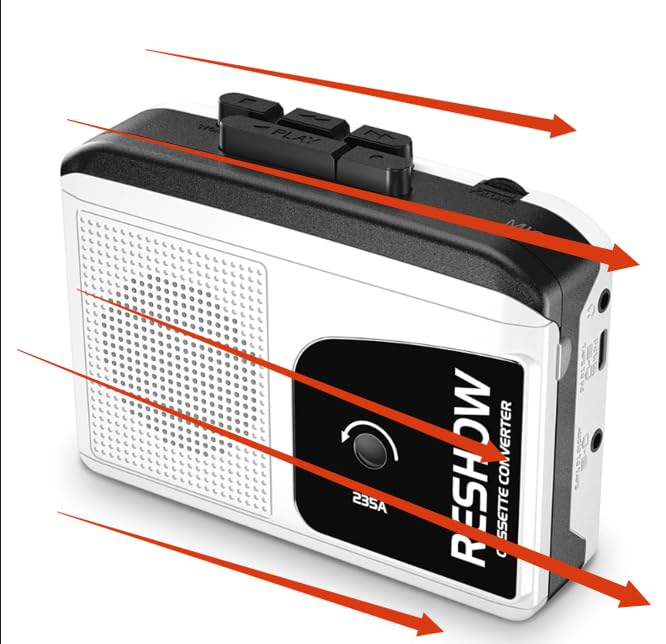
Image: Reshow Cassette Player 12
Packungsinhalt
- Reshow Cassette Player 12
- USB-C-Kabel
- Benutzerhandbuch (dieses Dokument)
Aufstellen
Einschalten des Geräts
The Reshow Cassette Player 12 can be powered via the included USB-C cable or by batteries (not included).
- USB-C-Stromversorgung: Connect the USB-C cable to the player's USB-C port and the other end to a compatible USB power adapter (not included) or a computer's USB port.
- Batterieleistung: Open the battery compartment (location not specified in data, typically on the back or side) and insert the required batteries, ensuring correct polarity.
Einlegen einer Musikkassette
- Locate the cassette compartment door.
- Gently open the compartment door.
- Insert your cassette tape with the open edge facing the player's head mechanism.
- Close the compartment door until it clicks securely.
Bedienungsanleitung
Abspielen einer Kassette
- Ensure the cassette player is powered on and a tape is inserted.
- Drücken Sie die SPIELEN , um die Wiedergabe zu starten.
- Adjust the volume using the volume control dial (location not specified, typically on the side).
- Um die Wiedergabe zu stoppen, drücken Sie die Taste STOPPEN Taste.
- Verwenden Sie die SCHNELLER VORLAUF Und ZURÜCKSPULEN Tasten zur Navigation durch das Band.
Using the Built-in Speaker and Headphone Jack
- Eingebauter Lautsprecher: Audio will play automatically through the integrated speaker when no headphones are connected.
- Kopfhöreranschluss: Connect standard 3.5mm headphones (not included) to the headphone jack for private listening. Connecting headphones will automatically mute the built-in speaker.
Converting Cassettes to Digital Files (MP3)
The Reshow Cassette Player 12 can convert your analog tapes to digital files using a computer and appropriate software (not included).
- Connect the cassette player to your computer using the supplied USB-C cable.
- Your computer should recognize the device as an audio input.
- Open your preferred audio recording software (e.g., Audacity, available separately).
- Configure the software to record from the USB audio input device.
- Start playback on the cassette player and begin recording in your software.
- Once recording is complete, stop playback and recording, then save your digital file (e.g., MP3 format).
Wartung
Reinigen des Geräts
- Wischen Sie die Außenseite des Players mit einem weichen, trockenen Tuch ab.
- Verwenden Sie keine flüssigen Reinigungsmittel oder Scheuermittel.
- Periodically clean the tape head and pinch roller with a cotton swab lightly dampened with isopropyl alcohol to ensure optimal sound quality and tape longevity.
Lagerung
Store the cassette player in a cool, dry place away from direct sunlight and extreme temperatures when not in use.
Fehlerbehebung
| Problem | Mögliche Ursache | Lösung |
|---|---|---|
| Der Player lässt sich nicht einschalten. | Kein Strom oder schwache Batterien. | Check USB-C connection or replace batteries. |
| Kein Ton während der Wiedergabe. | Volume too low, headphones connected, or tape issue. | Increase volume, disconnect headphones, or check tape for damage. |
| Schlechte Tonqualität. | Dirty tape head or worn tape. | Clean the tape head (see Maintenance). Try a different tape. |
| Tape gets stuck or chewed. | Damaged tape or dirty pinch roller. | Do not use damaged tapes. Clean the pinch roller (see Maintenance). |
| Cannot convert to digital. | Incorrect software settings or cable issue. | Ensure USB-C cable is properly connected. Verify audio input settings in your recording software. |
Technische Daten
- Modell: Cassette Player 12
- Hersteller: Wieder aufführen
- Energiequelle: USB-C or Batteries (type not specified, typically AA or AAA)
- Audioausgang: Eingebauter Lautsprecher, 3.5-mm-Kopfhöreranschluss
- Konnektivität: USB-C for power and digital conversion
- Paketabmessungen: 7.52 x 4.49 x 1.81 Zoll
- Artikelgewicht: 10.8 Unzen
- ASIN: B0GCF4WMZ6
- Als Erstes verfügbar: 24. Dezember 2025
Garantie und Support
Informationen zur Produktgarantie und zum Kundendienst waren in den verfügbaren Daten nicht enthalten. Bitte beachten Sie die Produktverpackung oder die offizielle Website des Herstellers. webWebsite für Details.