
1. Produktüberschreitungview
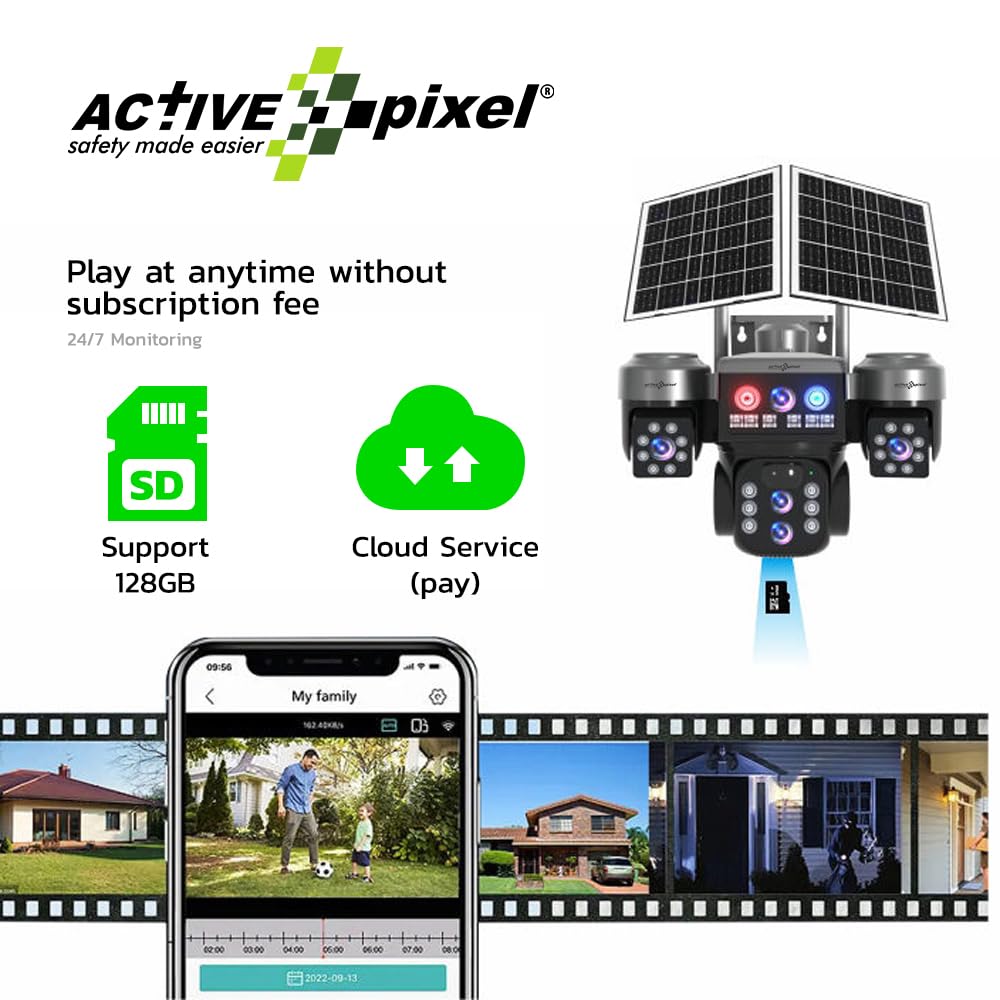
The Active Pixel G16 is a 4G solar-powered outdoor security camera system featuring a 4MP resolution and a triple-lens setup with 10X optical zoom. It operates via a 4G LTE SIM card, eliminating the need for Wi-Fi, making it suitable for remote locations. The system includes two fixed-angle lenses and one 360° pan-tilt-zoom (PTZ) lens for comprehensive coverage. Integrated solar panels and a built-in battery ensure continuous operation. Key features include motion detection, two-way audio, and IP66 weather resistance.
Packungsinhalt
- 1x Active Pixel G16 Camera Unit
- 1x Netzteil
- 1x Benutzerhandbuch
- 1x Screw Kit for Installation

2. Installationsanleitung
2.1 Installation der SIM-Karte
- Locate the SIM card slot on the camera unit. This is typically protected by a waterproof cover.
- Carefully open the cover using a small screwdriver if necessary.
- Insert a activated 4G LTE SIM card into the designated slot. Ensure the SIM card is correctly oriented according to the diagram near the slot.
- Schließen Sie die wasserdichte Abdeckung sorgfältig, um das Eindringen von Wasser zu verhindern.
2.2 Physische Installation
- Choose a mounting location that provides optimal sunlight exposure for the solar panels and a clear view des gewünschten Überwachungsbereichs.
- Use the provided screw kit to securely mount the camera bracket to a wall or pole. Ensure the mounting surface is stable.
- Attach the camera unit to the mounted bracket. Adjust the angle of the solar panels to maximize sun exposure throughout the day.
- Connect the solar panel cable to the camera unit's power input.

2.3 Erstes Einschalten und App-Verbindung
- Ensure the camera has sufficient battery charge or is receiving sunlight.
- Download the official Active Pixel mobile application from your device's app store (iOS or Android).
- Register an account and follow the in-app instructions to add your new camera. This typically involves scanning a QR code on the camera or manually entering its device ID.
- Sobald die Verbindung hergestellt ist, können Sie auf die Live-Übertragung zugreifen. view and configure camera settings.
3. Bedienungsanleitung
3.1 Live View und PTZ-Steuerung
From the mobile application, select your camera to access the live video feed. You can switch between the two fixed-angle lenses and the PTZ lens. For the PTZ lens, use the on-screen controls to pan (horizontal rotation), tilt (vertical movement), and zoom (10X optical zoom) the camera to adjust its viewing-Winkel.

3.2 Zwei-Wege-Audio
The camera supports two-way audio communication. In the live view, tap the microphone icon to speak through the camera's speaker, and tap the speaker icon to listen to audio from the camera's vicinity. This feature can be used for communication or as an alarm deterrence.

3.3 Bewegungserkennung und Benachrichtigungen
Configure motion detection settings within the app. You can set detection zones, sensitivity levels, and schedule times for alerts. When motion is detected, the camera will record footage und senden Sie Push-Benachrichtigungen an Ihr Mobilgerät.
3.4 Videoaufzeichnung und -speicherung
The camera supports local storage via a microSD card (up to 128GB) and cloud storage (subscription may be required). Recorded footage kann aufgerufen und erneut abgerufen werdenviewed through the mobile application.
4. Wartung
4.1 Reinigung
- Reinigen Sie die Kameralinsen und Solarzellen regelmäßig mit einem weichen, fusselfreien Tuch.amp cloth to ensure optimal performance and image clarity.
- Vermeiden Sie die Verwendung aggressiver Chemikalien oder abrasiver Materialien, die die Oberflächen zerkratzen könnten.
4.2 Batteriepflege
- Ensure the solar panels receive adequate direct sunlight daily to maintain battery charge.
- In prolonged periods of low sunlight, the camera may require charging via the included power adapter.
4.3 Firmware-Updates
- Check the mobile application periodically for available firmware updates.
- Install updates as recommended to ensure the camera operates with the latest features and security enhancements.
5. Fehlerbehebung
| Problem | Mögliche Ursache | Lösung |
|---|---|---|
| Die Kamera lässt sich nicht einschalten. | Low battery; solar panels not charging; power connection issue. | Ensure solar panels are in direct sunlight. Charge the camera using the power adapter. Check all power connections. |
| Keine 4G-Netzwerkverbindung. | SIM card not activated; incorrect SIM insertion; poor network coverage. | Verify SIM card activation with your provider. Reinsert SIM card correctly. Relocate camera to an area with better 4G signal. |
| Unable to connect to the camera via app. | Camera offline; incorrect device ID; app malfunction. | Check camera power and 4G status. Re-add the device in the app. Restart the app or your mobile device. |
| Schlechte Bildqualität. | Verschmutzte Linse; schlechte Lichtverhältnisse; Probleme mit der Netzwerkbandbreite. | Clean the camera lenses. Ensure adequate lighting. Check 4G signal strength. |
| Bewegungserkennung funktioniert nicht. | Incorrect settings; detection zone too small; environmental factors. | Review motion detection settings in the app. Adjust sensitivity and detection zones. |
6. Technische Daten
| Besonderheit | Spezifikation |
|---|---|
| Modellname | G16 |
| Auflösung der Videoaufnahme | 4 MP (2560 x 1440) |
| Zoom | 10-facher optischer Zoom |
| Konnektivitätstechnologie | 4G LTE Mobilfunk |
| Verwendung im Innen- und Außenbereich | Im Freien |
| Wetterbeständigkeit | IP66 Wasserdicht |
| Montagetyp | Wandhalterung |
| Speicheroptionen | MicroSD Card (up to 128GB), Cloud Storage (optional) |
| Audio | 2-Wege-Audio |
| Stromquelle | Solar Powered with Built-in Battery |
| Technische Daten | 20 x 20 x 15 cm |
| Artikelgewicht | 1.35 g |
| Hersteller | Active Pixel |
| Ursprungsland | China |
7. Garantie und Support
7.1 Garantieinformationen
This Active Pixel G16 camera system comes with a 1-year manufacturer's warranty from the date of purchase. The warranty covers defects in materials and workmanship under normal use. It does not cover damage caused by misuse, accidents, unauthorized modifications, or natural disasters. Please retain your proof of purchase for warranty claims.
7.2 Kundendienst
For technical assistance, troubleshooting, or warranty inquiries, please contact Active Pixel customer support:
- Kundenservice: 9321367328
- Importeur/Verpacker: Glorious Digital Solution Pvt Ltd, Mumbai, India