
Einführung
The Hunter ZenTech 44-inch smart ceiling fan combines modern design with advanced technology to provide efficient air circulation and adjustable lighting for indoor and covered outdoor spaces. This fan features a slim DC motor for quiet operation and energy efficiency, TrueLight LED technology for customizable lighting, and HunterSMART technology for seamless integration with smart home systems like Amazon Alexa, Google Assistant, and Apple HomeKit.
This manual provides detailed instructions for the safe installation, operation, and maintenance of your ZenTech ceiling fan. Please read all instructions carefully before beginning installation or use.
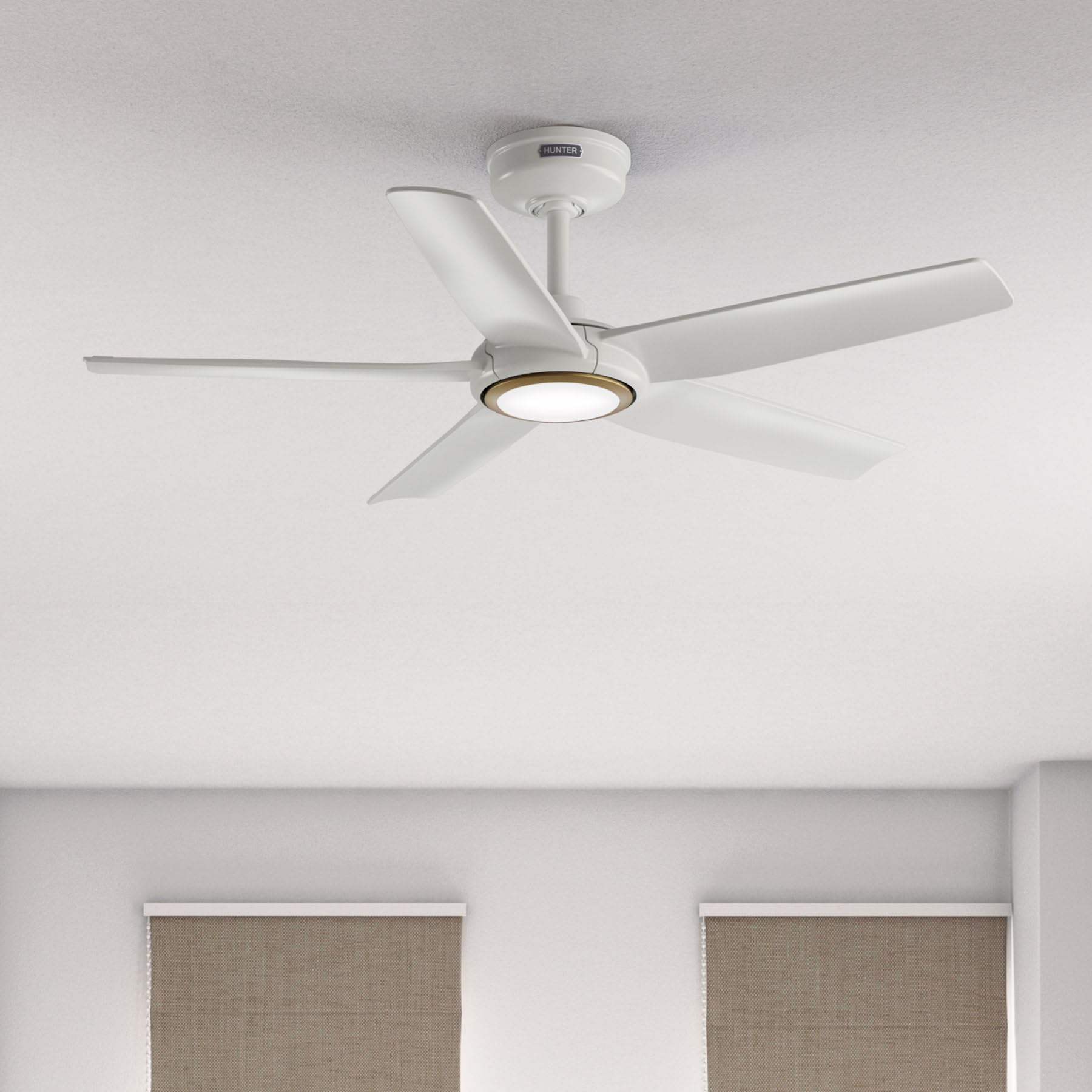
Image: Hunter ZenTech 44-inch ceiling fan in Fresh White, showcasing its sleek design and integrated LED light.
Sicherheitshinweise
To reduce the risk of electric shock, fire, or injury to persons, always follow these important safety precautions:
- Lesen Sie alle Anweisungen sorgfältig durch, bevor Sie diesen Ventilator installieren oder verwenden.
- Vor der Installation oder Wartung muss sichergestellt werden, dass die Stromzufuhr am Sicherungsautomaten unterbrochen ist.
- Alle Verkabelungen müssen den nationalen und lokalen Elektrovorschriften entsprechen. Wenn Sie mit Verkabelungen nicht vertraut sind, wenden Sie sich bitte an einen qualifizierten Elektriker.
- Der Ventilator muss so montiert werden, dass ein Mindestabstand von 2.1 Metern (7 Fuß) zwischen der Hinterkante der Rotorblätter und dem Boden eingehalten wird.
- Stellen Sie sicher, dass die Montagekonstruktion das Gewicht des Ventilators (ca. 13.45 Pfund) tragen kann.
- Betreiben Sie den Ventilator nicht, wenn die Flügel beschädigt sind oder andere Bauteile beschädigt sind.
- Dieser Lüfter ist damp-rated, suitable for indoor use and covered outdoor areas where exposure to moisture may occur. Do not expose to direct water spray.
Setup und Installation
Proper installation is crucial for the performance and safety of your ceiling fan. It is recommended to have a qualified electrician perform the installation.
Prüfungen vor der Installation
- Prüfen Sie, ob alle Komponenten gemäß Packliste vorhanden sind.
- Ensure the electrical box is securely mounted and capable of supporting a ceiling fan.
- Schalten Sie den Strom am Hauptschalter aus.
Montage des Lüfters
- Befestigen Sie die Montagehalterung mit den mitgelieferten Schrauben an der Deckenanschlussdose.
- Assemble the downrod (6 inches included) to the motor housing. Factory-installed wiring and connectors are designed for downrods up to 24 inches. Do not extend or modify.
- Heben Sie die Lüftereinheit vorsichtig an und hängen Sie sie an die Montagehalterung.
Elektrische Anschlüsse
- Schließen Sie die elektrischen Leitungen des Ventilators gemäß dem Schaltplan in der vollständigen Bedienungsanleitung an die Hausinstallation an. Stellen Sie sicher, dass alle Verbindungen fest sitzen.
- Verstauen Sie alle Kabel sorgfältig im Schaltkasten.
Anbringen von Klingen und Beleuchtungssatz
- Securely attach the five fan blades to the motor housing.
- Install the LED light kit module. The fan includes in-box accessories for a personalized finish, including an interchangeable LED module, a no-light cap, and two trim ring options (one matching the fan finish and one in Luxe Gold).

Image: Hunter ZenTech ceiling fan installed in a modern living room, demonstrating its aesthetic integration into a home environment.

Image: Hunter ZenTech ceiling fan installed on a covered outdoor patio, highlighting its damp-rated suitability for outdoor use.
Bedienungsanleitung
Your ZenTech fan offers multiple control options for convenience.
Fernbedienung
A handheld remote control is included for basic fan and light functions:
- Lüftergeschwindigkeit: Adjust between 6 speeds.
- Lüfterrichtung: Reverse the fan direction for summer (downward airflow) or winter (upward airflow) operation.
- Licht ein/aus: Schalten Sie das LED-Licht ein oder aus.
- Lichtdimmung: Passen Sie die Helligkeit des LED-Lichts an.
HunterSMART App Control
The HunterSMART app provides advanced control and customization options:
- Download the HunterSMART app from your device's app store.
- Follow the in-app instructions to connect your ZenTech fan to your home Wi-Fi network.
- Once connected, you can control fan speed, light brightness, and color temperature from your smartphone or tablet.
- Access additional features such as scheduling and custom settings.

Image: Diagram illustrating HunterSMART app interface and voice command examples for controlling the ceiling fan.
Sprachsteuerung
The ZenTech fan is compatible with leading smart home platforms:
- Amazon Alexa: Enable the Hunter skill in the Alexa app and link your HunterSMART account.
- Google Assistant: Link your HunterSMART account through the Google Home app.
- Apple HomeKit: Follow the pairing instructions in the Apple Home app.
Use voice commands such as "Alexa, turn on the living room fan" or "Hey Google, set the bedroom light to warm white."
TrueLight LED Lighting
The integrated TrueLight LED technology allows for fully adjustable lighting:
- Choose from 10 brightness levels to suit your needs.
- Adjust the color temperature between warm and cool tones to create the desired ambiance.

Image: Graphic illustrating the 'Clearly Brighter' TrueLight features, showing 10 levels of light and 10 color temperatures for adjustable LED lighting.
Wartung
Regular maintenance ensures the longevity and optimal performance of your ZenTech ceiling fan.
Reinigung
- Lüfterflügel: Wipe the blades with a soft, damp cloth. Do not use abrasive cleaners as they may damage the finish.
- Motorgehäuse: Dust the motor housing with a soft, dry cloth.
- Beleuchtungsset: Clean the light diffuser with a soft, lint-free cloth.
Always ensure the power is off at the circuit breaker before cleaning any part of the fan.
Allgemeine Instandhaltung
- Überprüfen Sie regelmäßig alle Schrauben und Verbindungen auf festen Sitz. Ziehen Sie sie gegebenenfalls nach.
- Der Gleichstrommotor des Lüfters ist für einen langfristigen, wartungsfreien Betrieb ausgelegt und benötigt keine Schmierung.
Fehlerbehebung
If you encounter issues with your ZenTech ceiling fan, refer to the following common problems and solutions:
| Problem | Mögliche Ursache | Lösung |
|---|---|---|
| Lüfter startet nicht | Kein Strom für den Ventilator; Lose Kabelverbindungen; Batterie der Fernbedienung schwach. | Prüfen Sie den Sicherungsautomaten; Vergewissern Sie sich, dass alle Drahtverbindungen fest sitzen; Ersetzen Sie die Batterie der Fernbedienung. |
| Licht funktioniert nicht | Loose wire connection to light kit; LED module faulty. | Check light kit wiring; Contact customer support for LED module replacement if necessary. |
| Lüfter wackelt | Lose Klingenschrauben; nicht richtig ausgewuchtete Klingen; lose Montagehalterung. | Tighten all blade screws; Use a blade balancing kit (not included); Ensure mounting bracket is secure. |
| Fernbedienung funktioniert nicht | Battery low or dead; Remote not paired with fan. | Replace battery; Refer to the full manual for remote pairing instructions. |
| Probleme mit der Wi-Fi-Konnektivität | Falsches WLAN-Passwort; Router zu weit entfernt; Netzwerkstörungen. | Verify Wi-Fi password; Move router closer or use a Wi-Fi extender; Reduce interference from other devices. |
For more complex issues or if troubleshooting steps do not resolve the problem, please contact Hunter customer support.
Technische Daten
| Besonderheit | Detail |
|---|---|
| Marke | Jäger |
| Modellname | ZenTech |
| Modellnummer | 53641 |
| Größe | 44 Zoll |
| Farbe | Frisches Weiß |
| Technische Daten | 44"T x 44"B x 11.78"H |
| Artikelgewicht | 13.45 Pfund |
| Anzahl der Klingen | 5 |
| Motortyp | DC Motor (43% slimmer) |
| Anzahl der Geschwindigkeiten | 6 |
| Lichtart | TrueLight LED (Adjustable Brightness & Color Temperature) |
| Kontrollmethode | App Control (HunterSMART), Remote Control, Voice Control |
| Smart Home Kompatibilität | Amazon Alexa, Google Assistant, Apple HomeKit |
| Verwendung im Innen- und Außenbereich | Indoor, Covered Outdoor (Damp (Bewertung) |
| Bandtage | 120 Volt |
| Wastage | 14 Watt |
| Luftstromkapazität | 4493.25 Kubikfuß pro Minute |
| Downrod-Länge | 6 Inches (included), compatible up to 24 inches |
| Zertifizierungen | ETL, Energy Star, FCC |
Garantie
The Hunter ZenTech ceiling fan is backed by a limited lifetime motor warranty, reflecting Hunter's commitment to engineering and quality. This warranty covers defects in materials and workmanship of the fan motor for the lifetime of the original purchaser. Specific terms and conditions apply. Please refer to the warranty card included with your product or visit the official Hunter webWebsite für alle Details.
Unterstützung
For technical assistance, warranty claims, or additional information regarding your Hunter ZenTech ceiling fan, please contact Hunter customer support:
- Online-Hilfe: Visit the Hunter Fan Company webWebsite mit häufig gestellten Fragen, Anleitungen zur Fehlerbehebung und Kontaktformularen.
- Telefonischer Support: Refer to your product packaging or the Hunter webHier finden Sie die aktuellste Kundendienst-Telefonnummer.
Bitte halten Sie bei Kontaktaufnahme mit dem Support Ihre Modellnummer (53641) und den Kaufbeleg bereit.