1. Einleitung
The MOZC YYK-Q17-AI Translation Earbuds are designed to facilitate global communication through advanced real-time translation technology. These earbuds offer a versatile solution for various scenarios, including travel, business meetings, and language learning. They combine translation capabilities with high-quality audio for calls and music, all within a comfortable and lightweight design.
Key features include support for 168 languages, Bluetooth 5.4 connectivity, multiple smart translation modes, and intuitive touch controls. The accompanying mobile application enhances functionality, providing a seamless user experience.

Image: MOZC AI Translation Earbuds showcasing global connectivity and language support.
2. Lieferumfang
Bitte überprüfen Sie nach dem Auspacken den Packungsinhalt, um sicherzustellen, dass alle Artikel vorhanden sind:
- 2 x Übersetzungs-Ohrhörer
- 1 x USB-C Ladekabel
- 1 x Kabelloser Ladekoffer
- 1 x Benutzerhandbuch
- 1 x Produktbox

Image: Package contents of the MOZC YYK-Q17-AI Translation Earbuds.
3. Installationsanleitung
3.1 Erstaufladung
Before first use, ensure the earbuds and charging case are fully charged. Remove any protective films from the earbud charging contacts if present.
3.2 Download und Installation der App
- Locate the QR code in this user manual.
- Scan the QR code with your smartphone to download the "BitDynamic" AI app from your device's app store (compatible with iOS and Android).
- Installieren Sie die App und erteilen Sie die erforderlichen Berechtigungen.
3.3 Bluetooth-Kopplung
- Stellen Sie sicher, dass Bluetooth auf Ihrem Smartphone aktiviert ist.
- Öffnen Sie das Ladeetui. Die Ohrhörer wechseln automatisch in den Kopplungsmodus.
- In your phone's Bluetooth settings, select "YYK-Q17" from the list of available devices to connect.
- Once connected, open the "BitDynamic" app. The app will automatically detect and connect to the earbuds.

Image: Earbuds in charging case, highlighting app compatibility and Bluetooth 5.4.

Image: Visual instructions for connecting the earbuds to the BitDynamic app.
4. Betriebsarten
The MOZC YYK-Q17-AI Translation Earbuds offer various smart modes to suit different communication needs:
- Übersetzung von Angesicht zu Angesicht: Ideal for direct conversations. Both parties can use the device simultaneously for real-time two-way translation.
- Kontinuierliche Übersetzung: Provides real-time translation and playback for foreign language conferences, courses, or general listening.
- Übersetzung von Audio-/Videoanrufen: Real-time translation during audio and video calls within the app.
- Fotoübersetzung: Translate text from menus, road signs, or documents by taking a photo through the app.
- KI-Meeting-Assistent: One-click recording, transcription, and summarization of meetings with AI.
- AI Smart Dialogue: Engage in real-time voice interaction with AI for various queries.

Image: Demonstrates global conversations with 168 languages supported by the earbuds.
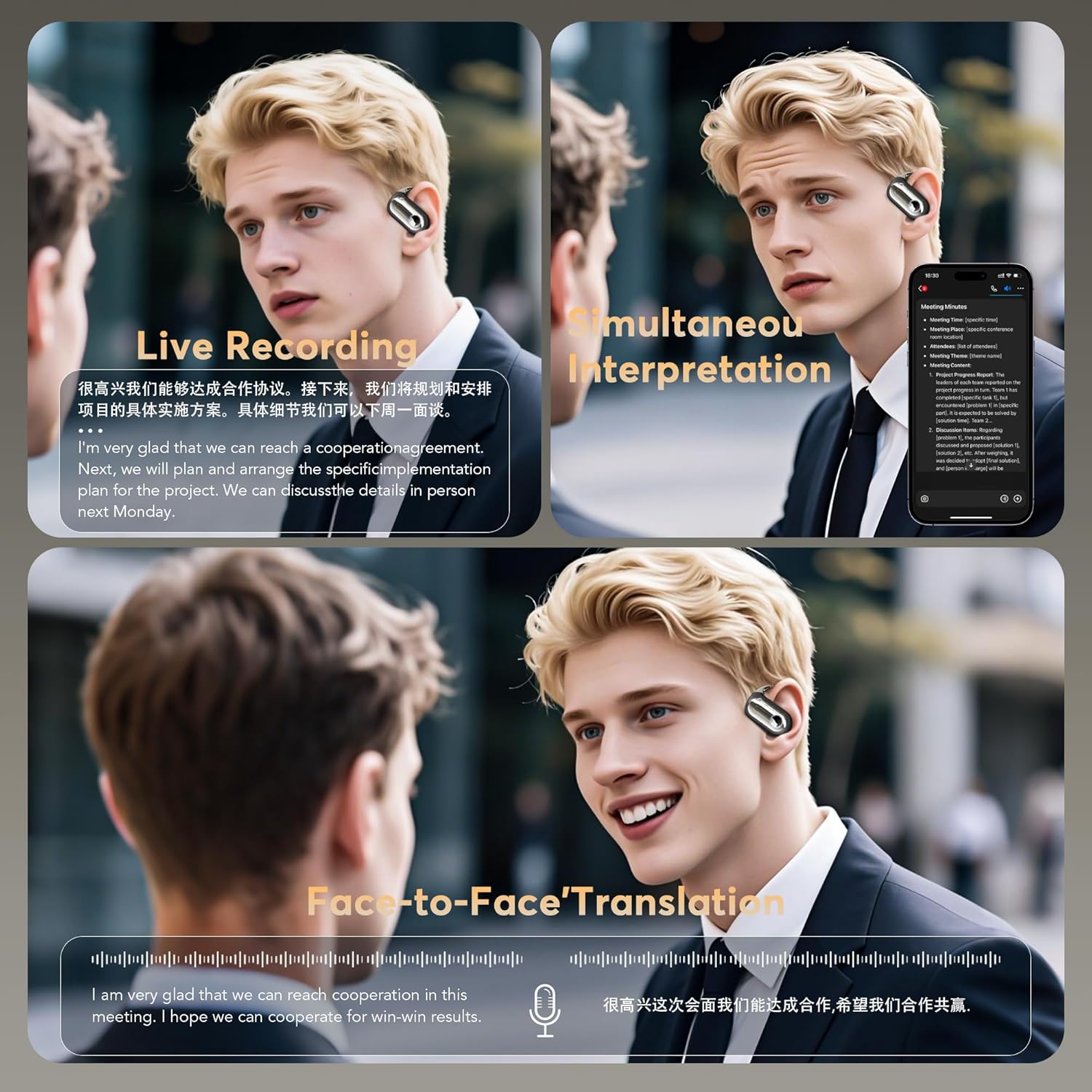
Image: Visual representation of various translation modes including live recording and simultaneous interpretation.
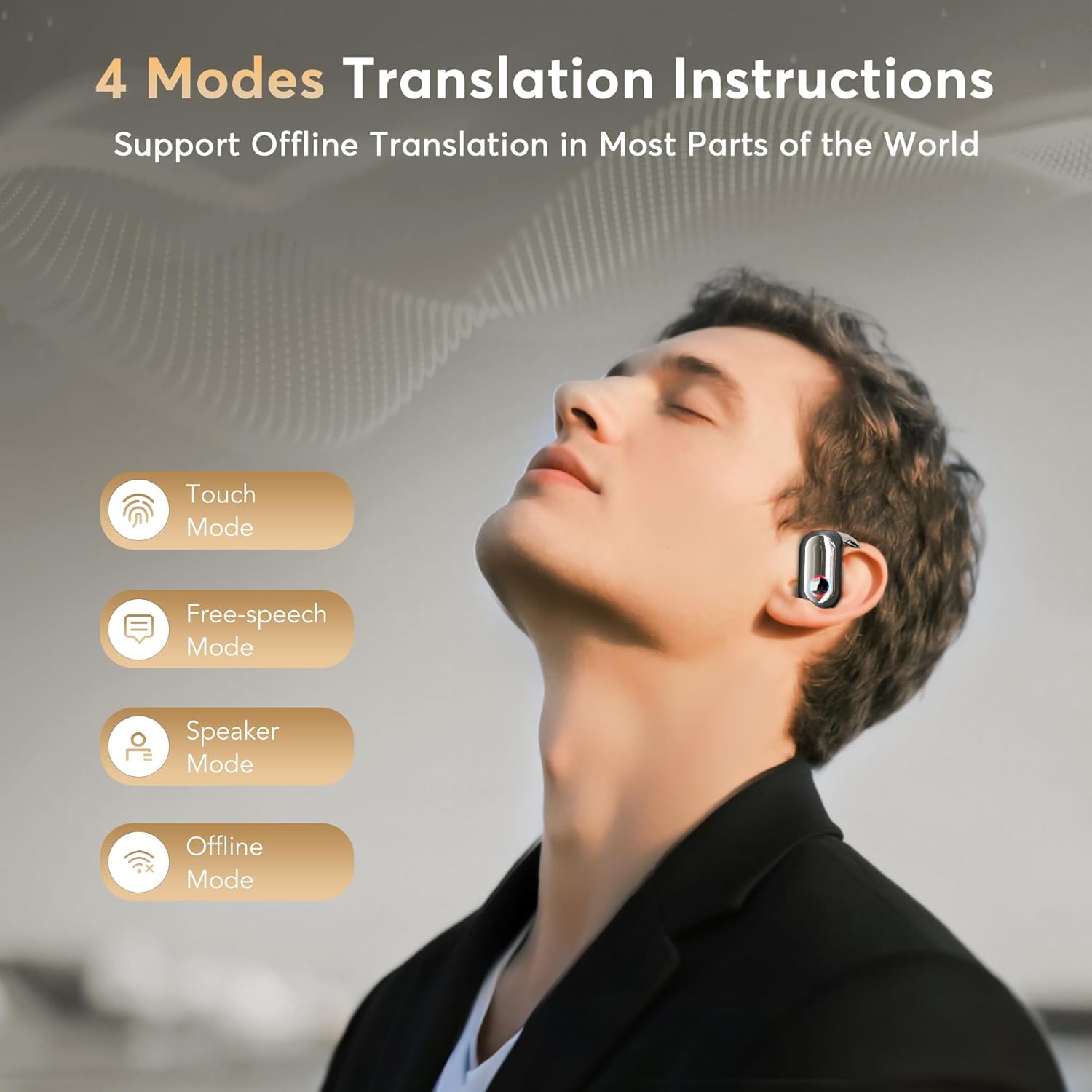
Bild: Überview of the 4 smart translation modes.
4.1 Video Demonstration of Translation Features
Video: A demonstration of the AI Translation Earbuds, showcasing their real-time translation capabilities and app interface.
Video: Ein überview of the 168 Languages Bluetooth 5.4 Headphones Translator, demonstrating its functionality.
5. Audiofunktionen
The earbuds feature 16.2mm bio-carbon fiber dynamic coils, delivering powerful low frequencies (as low as 50Hz) and unique mid-high frequencies (up to 5kHz) for a rich stereo sound experience. They also include five adjustable equalizer modes (Standard, Classic, Jazz, Rock, Pop) to customize your listening experience.

Image: App interface for customizing audio effects and equalizer settings.
6. Akku und Aufladen
The earbuds provide up to 8 hours of continuous use on a single charge. The ultra-fast magnetic charging case extends the total battery life to approximately 50 hours. The charging case features a digital display to show the battery percentage of both the case and individual earbuds.
- Ohrhörer-Spielzeit: Bis zu 8 Stunden pro Ladung
- Gesamtspielzeit mit Hülle: Bis zu 50 Stunden
- Ladeschnittstelle: USB-C

Image: Battery life and charging details for the earbuds and case.
7. Tippen Sie auf Steuerung
The earbuds feature smart touch controls that can be customized via the "BitDynamic" app. You can adjust gestures for various functions such as playing/pausing music, skipping tracks, adjusting volume, and activating voice assistant.

Image: Customization options for earbud touch controls within the app.
8. Find Earphones Feature
If your earbuds are misplaced, the "BitDynamic" app includes a "Find Earphones" feature. This function can help you locate your earbuds by displaying their last known location on a map, enabling tracking functionality.

Image: The 'Find Earphones' feature in the app, showing location tracking.
9. Spezifikationen
| Besonderheit | Detail |
|---|---|
| Marke | MOZC |
| Modellnummer | YYK-Q17-AI |
| Farbe | Pistole Schwarz |
| Platzierung des Ohrs | Im Ohr |
| Formfaktor | Im Ohr |
| Lärmschutz | Unterdrückung von Umgebungslärm |
| Konnektivitätstechnologie | Kabellos (Bluetooth 5.4) |
| Bluetooth-Reichweite | 15 Meter |
| Steuerungstyp | Touch-Steuerung |
| Größe des Audiotreibers | 16 Millimeter |
| Wasserbeständigkeit | Wasserdicht |
| Material | Acrylnitril-Butadien-Styrol (ABS) |
| Akkulaufzeit (Ohrhörer) | Bis zu 8 Stunden |
| Akkulaufzeit (mit Hülle) | Bis zu 50 Stunden |
10. Fehlerbehebung
- Ohrhörer lassen sich nicht koppeln: Ensure both earbuds are in the charging case, fully charged, and Bluetooth is enabled on your device. Try resetting the earbuds by placing them in the case and closing it for a few seconds, then reopening.
- Kein Ton aus den Ohrhörern: Check the volume levels on both your device and the earbuds. Ensure they are properly connected via Bluetooth and selected as the audio output.
- Übersetzung funktioniert nicht: Verify that the earbuds are connected to the "BitDynamic" app and the correct source and target languages are selected. Ensure a stable internet connection for online translation features.
- App not detecting earbuds: Close and reopen the "BitDynamic" app. Ensure Bluetooth is active and the earbuds are powered on and in range.
- Schlechte Audioqualität: Ensure earbuds are clean and properly seated in your ears. Check for any obstructions or interference.
11. Garantie und Support
The MOZC YYK-Q17-AI AI Translation Earbuds come with a 2 Jahr Herstellergarantie. For technical support, warranty claims, or any product-related inquiries, please refer to the contact information provided in your physical user manual or visit the official MOZC webWebsite.
For app-related support, please use the support features within the "BitDynamic" application.