
1. Einrichtung
1.1 Auspacken und erste Inspektion
Prüfen Sie nach dem Öffnen der Verpackung, ob alle Komponenten vorhanden und unbeschädigt sind. Die Box sollte Folgendes enthalten:
- XIAOMI Redmi Note 15 Pro 5G AI Smartphone
- SIM-Fach-Auswerfer
- USB-Kabel
- Handyhülle
1.2 Installation der SIM-Karte
The Redmi Note 15 Pro 5G AI supports Dual SIM functionality (nano SIM + nano SIM or nano SIM + eSIM). It does nicht have a Micro SD slot.
- Suchen Sie den SIM-Karten-Einschub an der Seite des Geräts.
- Führen Sie das mitgelieferte SIM-Karten-Auswurfwerkzeug in die kleine Öffnung neben dem Fach ein und drücken Sie vorsichtig, bis das Fach herausspringt.
- Place your nano SIM card(s) into the designated slots on the tray. Ensure the gold contacts face downwards and the card is correctly oriented.
- Schieben Sie den SIM-Kartenhalter vorsichtig wieder in das Telefon ein, bis er einrastet.
Notiz: For USA market, this phone is compatible with T-Mobile, Mint, Tello, or any network operating under the T-Mobile infrastructure. An already activated SIM card is required. Outside the USA, it works with any GSM carrier SIM.
1.3 Erstes Aufladen und Einschalten
Before first use, it is recommended to fully charge your device. The phone supports 45W turbo charging.
- Connect the USB cable to the phone's USB Type-C port and to a compatible power adapter.
- Stecken Sie den Netzadapter in eine Steckdose. Die Ladeanzeige erscheint auf dem Bildschirm.
- Once sufficiently charged, press and hold the power button on the side of the device until the XIAOMI logo appears.
- Folgen Sie den Anweisungen auf dem Bildschirm, um die Ersteinrichtung abzuschließen, einschließlich Sprachauswahl, WLAN-Verbindung und Einrichtung des Google-Kontos.
2. Bedienungsanleitung
2.1 Anzeigefunktionen
The device features a 6.83-inch AMOLED display with a 1.5K resolution (2772 x 1280) and a refresh rate of up to 120Hz. It offers a peak brightness of 3200 nits and is protected by Corning Gorilla Glass Victus 2.
Wet Touch Technology 2.0: This feature intelligently detects water, oil, foam, or sweat, providing a smoother and more responsive touch experience even in challenging conditions.
2.2 Kameranutzung
The Redmi Note 15 Pro 5G AI is equipped with an advanced camera system:
- Rückfahrkamera: 200MP main camera with Optical Image Stabilization (OIS) and an 8MP ultra-wide camera.
- Frontkamera: 20 MP.
To access the camera, tap the camera icon on your home screen or lock screen. Select modes such as Photo, Video, Portrait, or Pro mode. The 200MP AI Engine supports features like AI Film Camera for cinematic effects and various AI image editing tools.
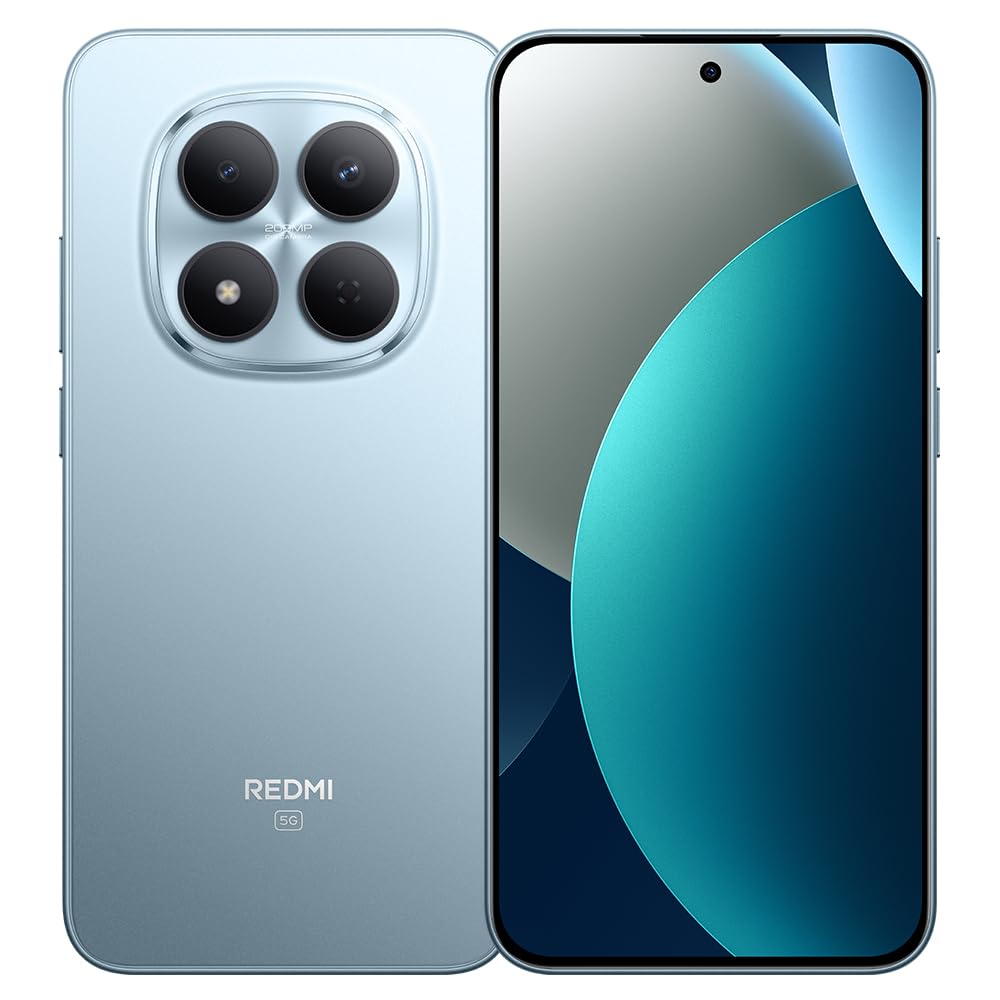
Image: XIAOMI Redmi Note 15 Pro 5G AI smartphone, black color, showing the front display and side profile.
2.3 Biometrische Sicherheit
The device offers two primary biometric security methods:
- Fingerabdrucksensor im Bildschirm: Registrieren Sie Ihre Fingerabdrücke in den Sicherheitseinstellungen für ein schnelles und sicheres Entsperren.
- KI-Gesichtsentsperrung: Set up face recognition in the Security settings to unlock your device by looking at the front camera.
2.4 Navigation and AI Features
The phone supports multiple global navigation satellite systems including GPS, GLONASS, BDS, Galileo, and QZSS for accurate positioning.
Integrated AI features enhance user experience:
- Kreis zum Suchen mit Google: Informationen lassen sich schnell finden, indem Sie Inhalte auf Ihrem Bildschirm einkreisen.
- Google Gemini: AI assistant for various tasks.
- KI-Bildbearbeitung: Includes AI Erase Pro, AI Remove Reflection, AI Image Expansion, AI Sky, AI Bokeh, AI Cutouts, AI Image Enhancement, and AI Beautify.
3. Wartung
3.1 Batteriepflege
The device is equipped with a 6580mAh silicon-carbon battery designed for longevity, boasting a 6-year battery life guarantee. To maximize battery life:
- Vermeiden Sie extreme Temperaturen.
- Use the provided 45W turbo charger for optimal charging speed.
- The phone also supports up to 22.5W reverse charging to power other compatible devices.
3.2 Langlebigkeit und Schutz
The Redmi Note 15 Pro 5G AI is built for durability:
- Sturzfestigkeit: Certified for 2.5-meter drop resistance.
- Bildschirmschutz: Features Corning Gorilla Glass Victus 2 for enhanced impact and scratch resistance.
- Wasser- und Staubbeständigkeit: Rated P66/IP68/IP69/IP69K for dust and water resistance, ensuring protection against various environmental challenges.
3.3 Reinigung Ihres Geräts
So reinigen Sie Ihr Smartphone:
- Wischen Sie Bildschirm und Gehäuse mit einem weichen, fusselfreien Tuch ab.
- Bei hartnäckigen Flecken leicht dampDas Tuch mit Wasser oder einer Bildschirmreinigungslösung befeuchten.
- Vermeiden Sie die Verwendung von aggressiven Chemikalien, scheuernden Materialien oder übermäßiger Feuchtigkeit.
4. Fehlerbehebung
4.1 Häufige Probleme und Lösungen
- Gerät lässt sich nicht einschalten: Ensure the battery is charged. Connect the phone to its charger for at least 15 minutes, then try powering it on again. If it still doesn't turn on, perform a forced restart by holding the power button for 10-15 seconds.
- Schlechter Netzempfang oder kein Service: Check if your SIM card is properly inserted. Verify that airplane mode is off. Go to Settings > SIM cards & mobile networks and ensure your SIM is enabled. If issues persist, contact your mobile carrier.
- Touchscreen reagiert nicht: Restart the device. If the issue continues, ensure the screen is clean and dry. If using a screen protector, ensure it is properly applied and not interfering with touch sensitivity.
- Batterie entlädt sich schnell: Reduce screen brightness, close unused apps running in the background, disable unnecessary notifications, and limit location services. Check battery usage in Settings to identify power-hungry apps.
- Apps stürzen ab oder frieren ein: Löschen Sie den Cache und die Daten der problematischen App unter Einstellungen > Apps. Besteht das Problem weiterhin, deinstallieren Sie die App und installieren Sie sie anschließend neu. Stellen Sie sicher, dass die Software Ihres Geräts auf dem neuesten Stand ist.
4.2 Werksreset
Sollten anhaltende Softwareprobleme auftreten, die sich durch andere Schritte zur Fehlerbehebung nicht beheben lassen, kann ein Zurücksetzen auf die Werkseinstellungen erforderlich sein. Warnung: Durch das Zurücksetzen auf Werkseinstellungen werden alle Daten auf Ihrem Telefon gelöscht. Sichern Sie daher wichtige Daten, bevor Sie fortfahren.
- Gehen Sie zu Einstellungen > Über das Telefon > Auf Werkseinstellungen zurücksetzen.
- Tap 'Erase all data' and follow the on-screen instructions.
5. Spezifikationen
| Marke | XIAOMI |
| Modellname | Note 15 Pro 5G |
| Modellnummer | 25080RABDG |
| Betriebssystem | HyperOS 2 |
| CPU Modell | Mediatek Dimensity 7400-Ultra (Octa-core, up to 2.6GHz) |
| RAM | 8 GB |
| Speicherkapazität | 256 GB |
| Bildschirmgröße | 6.83 Zoll AMOLED |
| Auflösung | 1.5K (2772 x 1280) |
| Bildwiederholrate | Bis zu 120Hz |
| Spitzenhelligkeit | 3200 Nits |
| Rückfahrkamera | 200 MP (Main, OIS) + 8 MP (Ultra-wide) |
| Frontkamera | 20 Megapixel |
| Batteriekapazität | 6580 mAh |
| Laden | 45W Turbo Charging, 22.5W Reverse Charging |
| SIM-Kartensteckplatz | Dual SIM (Nano SIM + Nano SIM or Nano SIM + eSIM) |
| Konnektivität | 5G, 4G LTE, Wi-Fi, Bluetooth, NFC, USB Type-C |
| Wasserbeständigkeit | IP66/IP68/IP69/IP69K |
| Biometrische Sicherheit | Fingerabdrucksensor im Display, KI-Gesichtserkennung |
| Maße | In den Daten nicht angegeben. |
6. Garantie und Support
6.1 Garantieinformationen
The XIAOMI Redmi Note 15 Pro 5G AI comes with a 30-day Xiaomi Europe WarrantyBitte bewahren Sie Ihren Kaufbeleg für Garantieansprüche auf.
Additionally, spare parts for this device are available for a duration of 6 Jahre within the EU.
6.2 Kundendienst
For technical assistance, warranty claims, or further inquiries, please contact XIAOMI customer support through their official website or authorized service centers. Refer to the official XIAOMI webWebsite mit den aktuellsten Kontaktinformationen und Support-Ressourcen.