
1. Einleitung
Thank you for choosing the BLUETTI Elite 300 Portable Power Station. This manual provides essential information for the safe and efficient use of your device. Please read it thoroughly before operation and retain it for future reference.
The BLUETTI Elite 300 is a compact 3 kWh portable power station designed for reliable energy supply in various scenarios, including home backup, camping, and RV travel. It features a LiFePO4 battery, high power output, and smart app control.

Image: The BLUETTI Elite 300, highlighted as the world's most compact 3 kWh portable power station, shown in an outdoor setting with a camper and tent at night.
2. Sicherheitshinweise
Your safety is our top priority. Please observe the following safety guidelines:
- Zerlegen, reparieren oder modifizieren Sie das Gerät nicht.
- Avoid exposure to rain, moisture, or direct sunlight for prolonged periods.
- Von Wärmequellen, offenen Flammen und brennbaren Materialien fernhalten.
- Use only BLUETTI-approved accessories and charging cables.
- Sorgen Sie während der Verwendung und des Ladevorgangs für ausreichende Belüftung.
- Außerhalb der Reichweite von Kindern und Haustieren aufbewahren.
- Bei Nichtgebrauch an einem kühlen, trockenen Ort aufbewahren.
- The BLUETTI Elite 300 utilizes ultra-safe LiFePO4 battery cells and premium BMS technology for enhanced reliability and durability.
3. Packungsinhalt
Bitte überprüfen Sie beim Auspacken, ob alle unten aufgeführten Artikel enthalten sind:
- BLUETTI Elite 300 Tragbare Powerstation
- AC-Ladekabel
- Erdungsschraube
- Benutzerhandbuch (dieses Dokument)
If any items are missing or damaged, please contact BLUETTI customer support.
4. Produktüberschreitungview
The BLUETTI Elite 300 is equipped with various ports and a clear display for intuitive operation. Familiarize yourself with the layout:
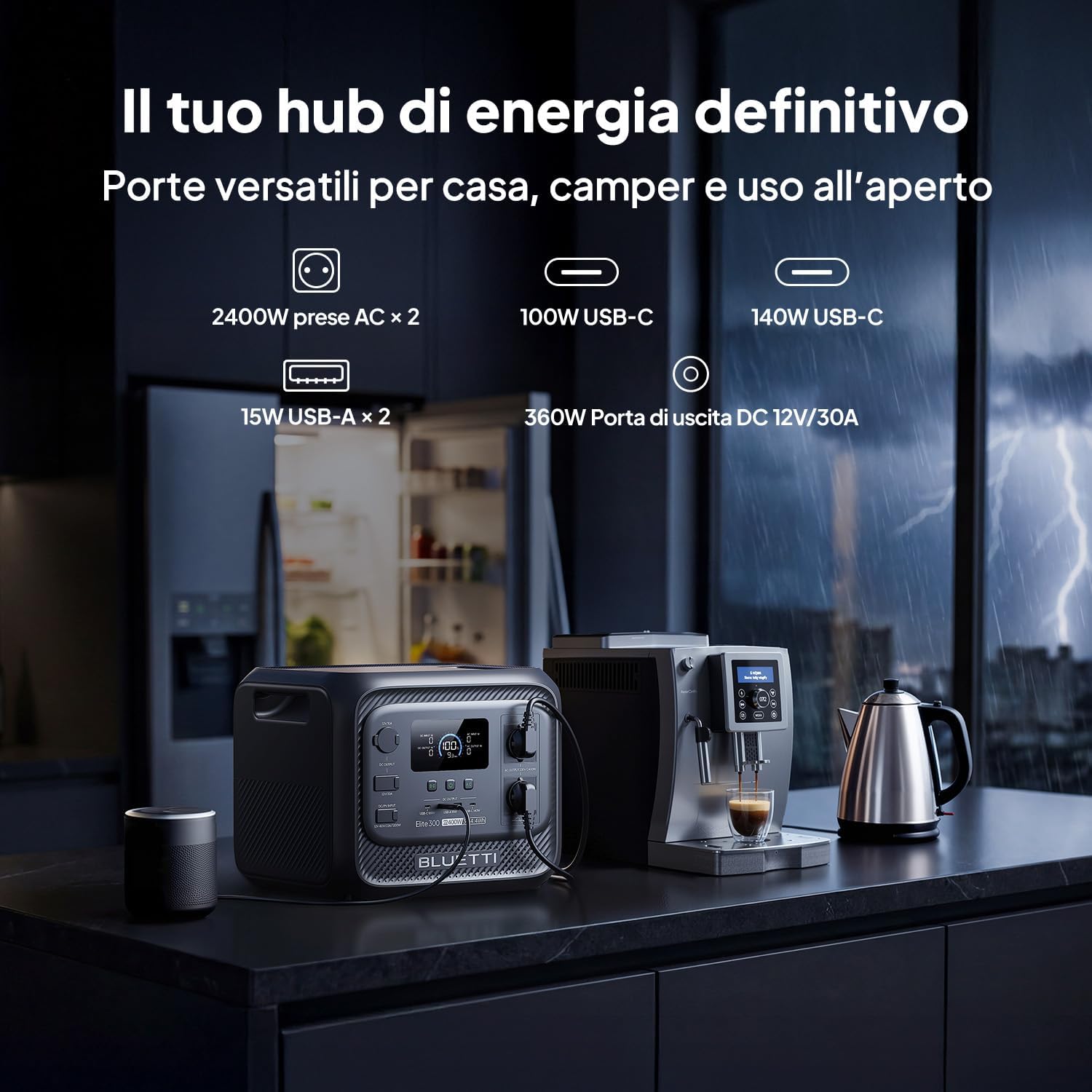
Bild: Vorderseite view of the BLUETTI Elite 300, illustrating its versatile ports including AC outlets, USB-C, USB-A, and a 12V/30A DC output, alongside its digital display.
Anschlüsse und Ausgänge:
- AC-Steckdosen (x2): 2400W continuous AC power, 4800W peak.
- USB-C-Anschlüsse: 100W and 140W for fast charging compatible devices.
- USB-A-Anschlüsse (x2): 15W total for standard USB devices.
- DC 12V/30A Output: 360W dedicated port for RV appliances and other essential outdoor gear.
The integrated display provides real-time information on battery level, input/output power, and operational status.
5. Einrichtung
Before first use, ensure the power station is fully charged. Follow these steps:
- Auspacken: Carefully remove the BLUETTI Elite 300 and all accessories from the packaging.
- Grundgebühr: Connect the AC charging cable to the power station and then to a wall outlet. The display will indicate charging status.
- Volle Ladung: Allow the unit to charge completely before its first use. This typically takes approximately 1.8 hours for 0-80% AC charging.
6. Bedienungsanleitung
6.1 Laden der Power Station
The Elite 300 supports multiple charging methods:
- AC-Steckdose: Connect the AC charging cable to a standard wall outlet. Max 2300W input.
- Solarplatten: Connect compatible solar panels (up to 1200W Max) to the solar input port.
- Aufladen im Auto: Charge the unit while driving using a compatible car charger (Max 1200W input, full charge in 3.2 hours).
- Doppeltes Laden (Netzstrom + Solar): Combine AC and solar charging for faster recharge times (up to 2400W Max, 80% in 78 minutes).

Image: Visual representation of the BLUETTI Elite 300 being charged via AC wall outlet, a car charger, and solar panels, highlighting rapid charging capabilities.

Image: An illustration showing the BLUETTI Elite 300 being charged inside an RV while the vehicle is in motion, demonstrating the 'Charge while driving' feature.
6.2 Discharging and Powering Devices
Um Ihre Geräte mit Strom zu versorgen:
- Einschalten: Press the main power button to turn on the unit.
- Ausgabe auswählen: Activate the desired output ports (AC, DC, USB) by pressing their respective buttons.
- Geräte verbinden: Plug your devices into the appropriate ports.
- Monitor: The display will show the current output wattage and estimated remaining runtime.
The Elite 300 delivers 2400W of continuous AC power with a 4800W peak, capable of running high-demand appliances like kettles, air conditioners, and power tools.

Image: The BLUETTI Elite 300 connected to and powering a refrigerator, oven, air conditioner, induction hob, chainsaw, and drill, indicating estimated runtimes for each.

Image: A person using a power saw outdoors, powered by the BLUETTI Elite 300, demonstrating its capability to run demanding tools with prolonged autonomy.

Image: The BLUETTI Elite 300 powering an air conditioner, microwave, refrigerator, and coffee machine in an RV kitchen, illustrating its use for off-grid comfort.
6.3 Unterbrechungsfreie Stromversorgung (USV)-Funktion
The Elite 300 features a reliable UPS function with a <10ms switchover time. In the event of a power outage, it instantly switches to battery power, ensuring critical devices like routers, computers, and refrigerators remain operational without interruption.

Image: A BLUETTI Elite 300 connected to a computer setup, illustrating its instant power switchover (<10ms) during a power outage to prevent data loss or work interruption.

Image: A person working on a computer during a simulated blackout, with the BLUETTI Elite 300 powering the computer, router, and refrigerator, emphasizing continuous power supply.
6.4 Intelligente App-Steuerung
Manage your power remotely with the BLUETTI app. The app allows you to:
- Monitor power usage and battery status.
- Control output ports.
- Set charging schedules.
- Benachrichtigungen erhalten.

Image: A hand holding a smartphone displaying the BLUETTI app interface, showing remote control and monitoring features for the power station in a kitchen setting.
7. Wartung
To ensure the longevity and optimal performance of your BLUETTI Elite 300, follow these maintenance guidelines:
- Regelmäßige Reinigung: Reinigen Sie die Außenseite mit einem trockenen, weichen Tuch. Verwenden Sie keine Scheuermittel oder Lösungsmittel.
- Lagerung: If storing for extended periods, charge the unit to 50-80% every 3-6 months to preserve battery health. Store in a cool, dry environment.
- Belüftung: Stellen Sie sicher, dass die Lüftungsöffnungen frei von Staub und Schmutz sind.
- Batteriezustand: Vermeiden Sie es, den Akku häufig vollständig zu entladen, da dies seine Lebensdauer verkürzen kann.
8. Fehlerbehebung
If you encounter issues with your BLUETTI Elite 300, refer to the following common problems and solutions:
| Problem | Mögliche Ursache | Lösung |
|---|---|---|
| Das Gerät lässt sich nicht einschalten | Der Akku ist vollständig entladen; der Ein-/Ausschalter wurde nicht richtig gedrückt. | Laden Sie das Gerät mit dem Netzteil auf; Halten Sie den Netzschalter 3 Sekunden lang gedrückt. |
| AC-Ausgang funktioniert nicht | AC output not enabled; Overload protection activated; Device power exceeds 2400W. | Press the AC output button; Reduce the load; Check device wattage. |
| Langsames Laden | Using a low-power charger; High ambient temperature; Solar input insufficient. | Use the provided AC charger or higher wattage solar panels; Ensure good ventilation; Check solar panel orientation. |
| App-Verbindungsprobleme | Bluetooth/Wi-Fi off; App not updated; Unit too far from phone. | Ensure Bluetooth/Wi-Fi is active on your phone; Update the BLUETTI app; Move closer to the unit. |
For further assistance, please contact BLUETTI customer support.
9. Spezifikationen
Detailed technical specifications for the BLUETTI Elite 300 Portable Power Station:
| Besonderheit | Spezifikation |
|---|---|
| Modellname | BLUETTI Elite 300 |
| Akku-Typ | LiFePO4 |
| Kapazität | 3014.4 Watt-hours (3 kWh) |
| AC-Ausgangsleistung | 2400 W (Dauerleistung), 4800 W (Spitzenleistung) |
| AC-Ausgangsvolumentage | 230 Volt (Wechselstrom) |
| USB-C-Ausgang | 100W, 140W |
| USB-A-Ausgang | 15 W (x2) |
| DC-Ausgang | 12 V/30 A (360 W) |
| Max. AC-Eingang | 2300 W |
| Max. Solareingang | 1200 W |
| Max Combined Input (AC+Solar) | 2400 W |
| USV-Funktion | <10ms Switchover Time |
| Abmessungen (L x B x H) | 36.5 L x 30.5 B x 29.5 H cm |
| Gewicht | 26.3 kg |
| Ursprungsland | China |
10. Garantie und Support
For warranty information, please refer to the warranty card included with your product or visit the official BLUETTI website. BLUETTI is committed to providing reliable power solutions and excellent customer service.
If you require technical support, have questions about your product, or need to claim warranty service, please contact BLUETTI customer support through their official channels. Contact details are typically found in the included user manual or on the BLUETTI webWebsite.