1. Einleitung
The XTOOL TP580 is a comprehensive diagnostic tool designed for automotive professionals and advanced DIY users. It integrates full system OBD2 diagnostic capabilities with complete TPMS (Tire Pressure Monitoring System) service functions. This device allows for reading and clearing fault codes, viewing live data, performing various service resets, and managing TPMS sensors including activation, programming, and relearn procedures.
2. Einrichtung
2.1 Auspacken und Packungsinhalt
Carefully unpack the XTOOL TP580 device and verify all components are present. The standard package includes:
- TP580 OBD2 Scanner Unit
- VCI (Vehicle Communication Interface) Dongle
- Ladegerät
- US-Adapter
- UK-Adapter
- EU-Adapter
- Typ-C-Kabel
- Schlüsselband
- Quick Start Guide & Certificate of Quality

2.2 Initial Power-On and Registration
Upon first use, connect the TP580 to the power adapter and charge it fully. Follow the on-screen prompts to complete the initial setup, which typically includes selecting your region and agreeing to terms. You will need to register the device with your email address.
2.3 Softwareaktualisierungen
It is crucial to update the software to the latest version to ensure optimal performance and compatibility with the widest range of vehicles. Connect the device to a Wi-Fi network and navigate to the 'Updates' section in the main menu. Download and install all available updates. The TP580 offers lifetime free software updates.

2.4 VCI-Anschluss
The TP580 utilizes a wireless VCI (Vehicle Communication Interface) dongle for vehicle communication. Plug the VCI into the vehicle's OBD2 port. The TP580 unit will automatically connect to the VCI via Bluetooth, providing a flexible diagnostic experience.
2.5 Spracheinstellungen
The device comes with English and Spanish pre-installed. After updating to the latest APP version, you can switch between supported languages directly in the device settings. If you require a language other than English or Spanish, contact XTOOL support with your device's serial number for authorization.

2.6 Video: XTOOL TP580 What's in the Box
This video provides a detailed unboxing experience for the XTOOL TP580, showcasing alle enthaltenen Komponenten und Zubehörteile.
3. Operating the XTOOL TP580
3.1 Allgemeine Navigation
The TP580 features an intuitive touchscreen interface. Navigate through menus by tapping icons and options. Use the back button to return to previous screens. The main menu provides access to various functions such as Diagnostics, TPMS, Special Functions, and Updates.
3.2 OBD2-Diagnose
The TP580 offers comprehensive OE-level full system diagnostics for over 10,000 vehicle models (12V OBD2 vehicles only, not for 24V trucks or Indian vehicles). Key diagnostic functions include:
- Read and Clear DTCs: Retrieve and erase Diagnostic Trouble Codes from all available systems (Engine, Transmission, ABS, SRS, BCM, TPMS, EPB, Chassis, Powertrain, etc.).
- Lebensdaten: View real-time data streams from various sensors and components. Graph up to 4 PIDs simultaneously for detailed analysis.
- Standbilddaten: Erfassen Sie eine Momentaufnahme der Fahrzeugbetriebsbedingungen zum Zeitpunkt des Auftretens eines Fehlercodes.
- I/M-Bereitschaft: Überprüfen Sie den Status der emissionsrelevanten Überwachungssysteme, um sicherzustellen, dass das Fahrzeug für eine Abgasuntersuchung bereit ist.
- AutoVIN: Automatically identify vehicle information for faster and more accurate diagnostics.
- Unterstützte Protokolle: Supports CAN FD protocol (for GM vehicles after 2020, CAN FD adapter not included) and DOIP protocol (for BMW E/F/G Chassis, Jaguar, Land Rover).


3.3 TPMS-Funktionen
The TP580 provides comprehensive TPMS services, including:
- TPMS-Diagnostik: Read and clear TPMS fault codes, display Sensor ID, Tire Pressure, Tire Temperature, Battery Status, Frequency, Position, and TPMS ECU information.
- Sensoraktivierung: Trigger most OE and aftermarket 315MHz/433MHz TPMS sensors to retrieve sensor data.
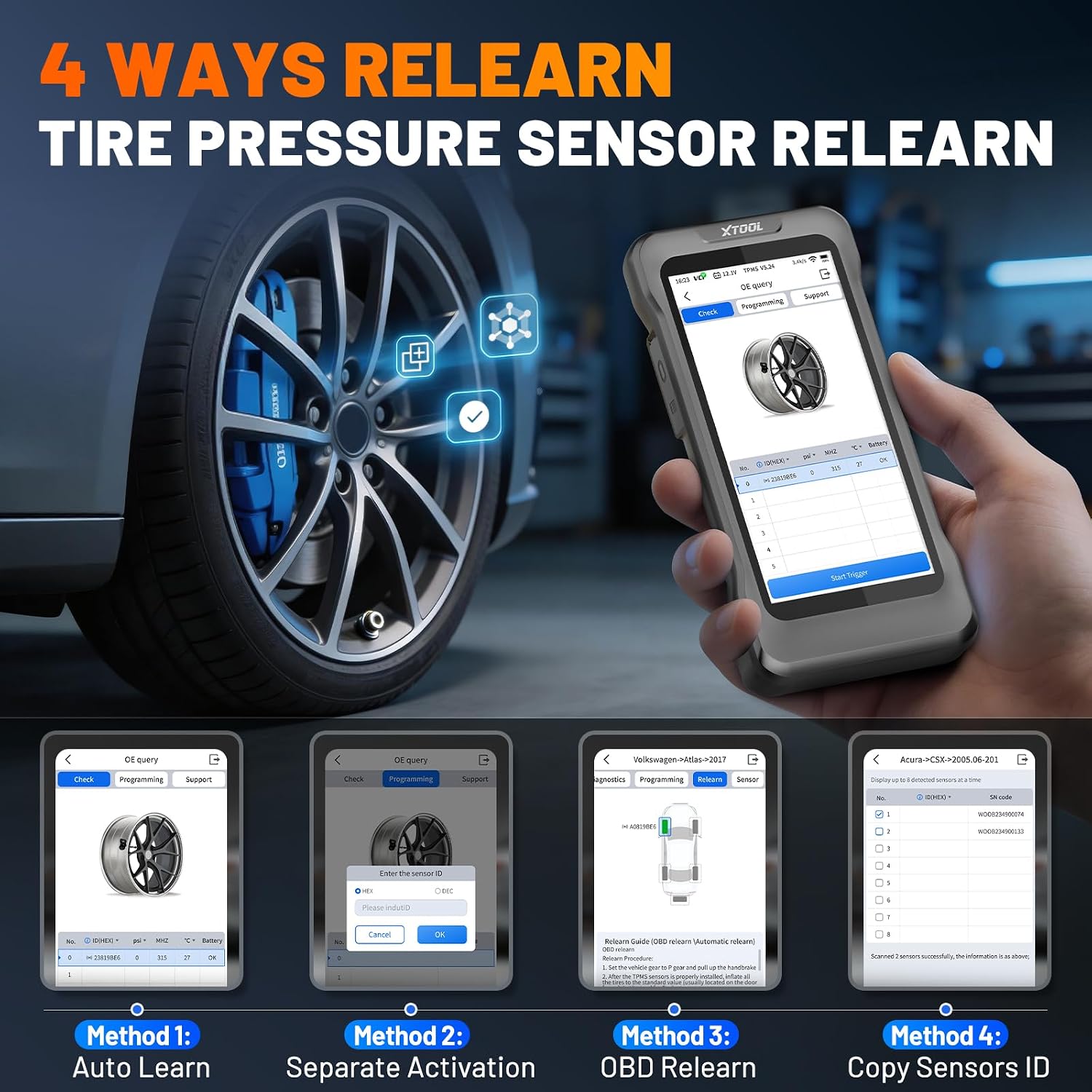
- Sensorprogrammierung: Program XTOOL TS100 Pro and compatible pre-programmed sensors using four methods: Auto Create, Manual Input, Copy by Activation, or Copy by OBD.
- Sensor-Neulernen: Perform OBD Relearn, Stationary Relearn, Automatic Relearn, and Manual Relearn procedures with guided on-screen instructions to synchronize sensor IDs with the vehicle ECU after tire rotation or sensor replacement.

3.4 Spezialfunktionen (22+ Rücksetzungen)
The TP580 includes over 22 commonly requested service functions for routine maintenance and repairs. Availability of these functions varies by vehicle year, make, and model. Some of the key special functions include:
- Öl zurücksetzen
- EPB (Electronic Parking Brake) Service
- ABS-Blutung
- Injektorkodierung
- Drosselklappen-Neuanlernen
- BMS (Batteriemanagementsystem) zurücksetzen
- SAS (Lenkwinkelsensor) Kalibrierung
- Übertragung neu lernen
- Kurbelwellensensor neu anlernen
- DPF (Dieselpartikelfilter) Regeneration
- EVAP-Test
- Fahrwerkskalibrierung
- Scheinwerfereinstellung
- Windows-Initialisierung
- Sitzkalibrierung
- Camshaft Sensor Relearn
- Coolant Replacement
- Tire Size Setting
- Initialisierung des Schiebedachs
- EGR (Exhaust Gas Recirculation) Relearn

3.5 Erstellung von Diagnoseberichten
The TP580 allows you to generate diagnostic reports, which can be saved to the device's 64GB onboard memory or your XTOOL account. These reports can be exported as PDF files, shared via email or mobile phone, and printed for record-keeping or client communication.

3.6 Video: XTOOL TPMS Programming & OBD2 Scanner Diagnostic Tool
This video demonstrates the XTOOL TP580's combined TPMS programming and OBD2 diagnostic functionalities in a practical setting.
3.7 Video: XTOOL TP580 OBD2 Scanner with TPMS Programming
Dieses Video bietet einen kurzen Überblick überview of the XTOOL TP580's capabilities as both an OBD2 scanner and a TPMS programming tool.
4. Wartung
4.1 Softwareaktualisierungen
Regularly check for and install software updates via Wi-Fi. XTOOL provides lifetime free updates, ensuring your device remains current with new vehicle models and diagnostic features. This is essential for maintaining optimal performance and compatibility.
4.2 Gerät reinigen
Keep the TP580 unit clean by wiping it with a soft, damp Verwenden Sie kein scheuerndes Reinigungs- oder Lösungsmittel, da diese den Bildschirm oder die Elektronik beschädigen könnten.asing. Ensure the OBD2 connector on the VCI is free from dirt and debris.
4.3 Batteriepflege
To prolong battery life, avoid fully discharging the device frequently. Charge the unit using the provided charger and adapters. Store the device in a cool, dry place when not in use for extended periods.
5. Fehlerbehebung
If you encounter issues with your XTOOL TP580, consider the following common troubleshooting steps:
- Gerät lässt sich nicht einschalten: Stellen Sie sicher, dass der Akku geladen ist. Schließen Sie das Gerät an das Ladegerät an und warten Sie einige Minuten, bevor Sie versuchen, es wieder einzuschalten.
- VCI-Verbindungsprobleme: Verify the VCI dongle is securely plugged into the vehicle's OBD2 port. Check that Bluetooth is enabled on the TP580 unit. Try restarting both the TP580 and the vehicle.
- Software friert ein/stürzt ab: Perform a software update to ensure you have the latest stable version. If the issue persists, try restarting the device.
- Funktion funktioniert bei bestimmtem Fahrzeug nicht: Service availability varies by vehicle. Ensure your vehicle is supported for the specific function. You can verify compatibility by sending your VIN to XTOOL support.
- TPMS Sensor Not Activating/Programming: Ensure the sensor is a 315MHz or 433MHz type. For programming, ensure it is an XTOOL TS100 Pro or compatible pre-programmed sensor. Position the TP580 correctly near the tire valve.
For persistent issues or advanced troubleshooting, please contact XTOOL technical support.
6. Spezifikationen
| Besonderheit | Detail |
|---|---|
| Marke | XTOOL |
| Modellnummer | TP580 |
| Stromquelle | Batteriebetrieben |
| Betriebssystem | Linux |
| Bildschirmgröße | 5.45 Zoll |
| Passform für Fahrzeuge | Universelle Passform |
| Artikelgewicht | 1.7 Pfund |
| Im Lieferumfang enthaltene Komponenten | TP580 OBD2 Scanner, VCI, Unit Charger, US Adapter, UK Adapter, EU Adapter, Type-C Cable, Lanyard |
| GTIN / UPC | 753758498345 |
7. Garantie und Support
7.1 Produktgarantie
Das XTOOL TP580 wird mit einem 2 Jahr HerstellergarantieDiese Garantie deckt Material- und Verarbeitungsfehler bei normalem Gebrauch ab. Bitte bewahren Sie Ihren Kaufbeleg für Garantieansprüche auf.
7.2 Kostenlose Software-Updates auf Lebenszeit
Enjoy lifetime free software updates for your TP580. There are no annual subscription fees or regular renewal costs for software updates. Connect your device to Wi-Fi to download the latest updates.
7.3 Technischer Support
XTOOL provides lifetime technical support for the TP580. If you have any questions, encounter issues, or require assistance, please contact XTOOL support. You can reach them at: xtoolofficial@hotmail.com.
7.4 VIN Compatibility Check
To ensure the TP580 supports the specific functions you need for your vehicle, it is recommended to send your Vehicle Identification Number (VIN) to XTOOL support before purchase for a free compatibility verification.