
1. Einleitung
The TOPDON TOPBT600PLUS is a professional-grade 2-in-1 Battery and Resistance Tester designed for comprehensive battery diagnostics in various automotive and industrial settings. This device accurately tests 6V, 12V, and 24V battery systems, providing reliable data for flooded, AGM, GEL, and EFB lead-acid batteries. Additionally, it supports internal resistance measurements for lithium, alkaline, and carbon-zinc batteries. Featuring a bright 3.5-inch display and an onboard power supply, the BT600PLUS offers fast, versatile, and dependable performance.
2. Sicherheitshinweise
Lesen Sie vor der Verwendung dieses Produkts alle Sicherheitshinweise und Anweisungen sorgfältig durch. Die Nichtbeachtung dieser Anweisungen kann zu Stromschlag, Brand oder schweren Verletzungen führen.
- Augenschutz: Tragen Sie beim Arbeiten in der Nähe von Batterien stets eine ANSI-geprüfte Schutzbrille.
- Belüftung: Beim Testen von Batterien muss für ausreichende Belüftung gesorgt werden, da diese explosive Gase freisetzen können.
- Batteriesäure: Vermeiden Sie den Kontakt mit Batteriesäure. Sollte es dennoch zu Kontakt kommen, spülen Sie die betroffenen Stellen sofort mit Wasser ab und suchen Sie einen Arzt auf.
- Funken und Flammen: Halten Sie Funken, Flammen und Rauchmaterialien von Batterien fern.
- Isolierte Werkzeuge: Verwenden Sie isolierte Werkzeuge, um versehentliche Kurzschlüsse zu vermeiden.
- Richtiger Anschluss: Connect the tester leads correctly to the battery terminals (red to positive, black to negative).
- Betriebsumgebung: Betreiben Sie das Gerät nicht in damp oder nassen Bedingungen.
3. Produktüberschreitungview
The TOPBT600PLUS features a robust design for professional use. Its main components include a 3.5-inch color display, control buttons, and two sets of test leads for versatile connection options.
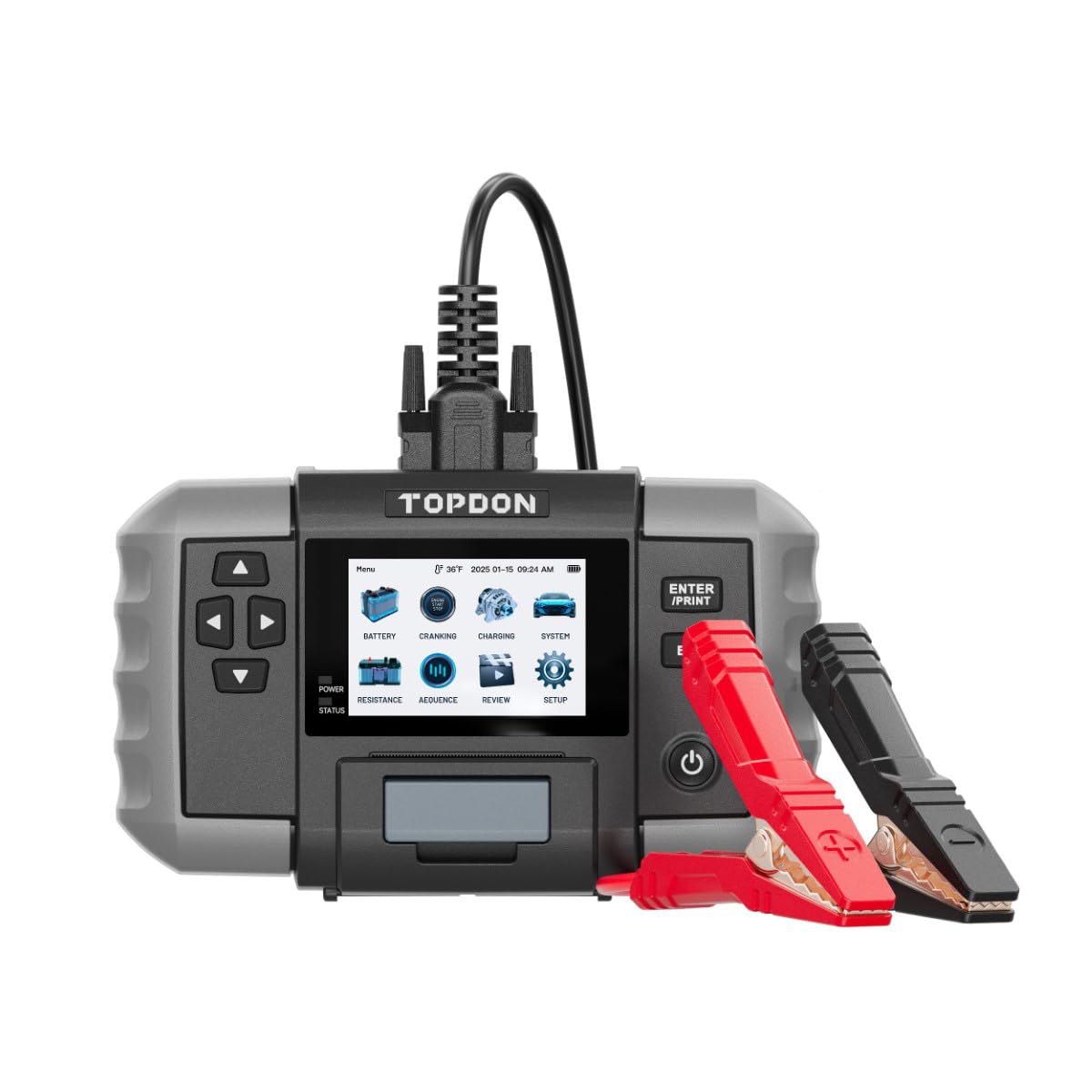
Abbildung 1: Front view of the TOPDON TOPBT600PLUS device. This image displays the main unit with its 3.5-inch screen and control buttons, along with the attached test leads.
The device's onboard power source allows for testing batteries down to 2V, enhancing its flexibility for various diagnostic scenarios.
4. Einrichtung
Follow these steps to prepare your TOPBT600PLUS for operation:
- Auspacken: Carefully remove the TOPBT600PLUS from its packaging and inspect for any damage.
- Erstes Einschalten: The device is equipped with an internal power source. Press the power button to turn it on.
- Testleitungen verbinden: Ensure the test leads are securely connected to the device. The red clamp is for the positive (+) terminal, and the black clamp is for the negative (-) terminal.
- Batterievorbereitung: Um genaue Messwerte zu erhalten, stellen Sie sicher, dass die Batteriepole sauber und frei von Korrosion sind.
5. Bedienungsanleitung
The TOPBT600PLUS offers various testing modes for comprehensive battery analysis.
5.1. Batterietest
This mode performs cranking, charging, and system tests for 6V, 12V, and 24V batteries.
- An die Batterie anschließen: Befestigen Sie die rote Klamp an den Pluspol (+) der Batterie und den schwarzenamp an den Minuspol (-) der Batterie.
- Batterietyp auswählen: On the device screen, select the appropriate battery type (e.g., Flooded, AGM, GEL, EFB).
- Input Battery Specifications: Geben Sie den Kaltstartmodus der Batterie ein. Amps (CCA) or other relevant ratings as prompted.
- Test starten: Follow the on-screen instructions to initiate the test. The device will guide you through cranking and charging system checks.
- View Ergebnisse: The 3.5-inch display will show detailed results, including battery voltage, CCA value, internal resistance, and overall battery health status.
5.2. Widerstandsprüfung
This mode measures the internal resistance of various battery chemistries.
- An die Batterie anschließen: Befestigen Sie die rote Klamp an den Pluspol (+) der Batterie und den schwarzenamp an den Minuspol (-) der Batterie.
- Select Resistance Test: Navigate to the Resistance Test option on the device menu.
- Select Battery Chemistry: Choose the correct battery chemistry (e.g., Lithium, Alkaline, Carbon-Zinc) if prompted.
- Test starten: Initiate the test. The device will measure and display the internal resistance.
- Ergebnisse interpretieren: Compare the measured resistance with the manufacturer's specifications for the battery to assess its condition.
5.3. Sequence Testing
The TOPBT600PLUS supports sequence testing for up to 500 batteries across 10 groups, ideal for batch testing.
- Setup Thresholds: Konfigurieren Sie voltage or resistance thresholds within the device settings to automatically identify underperforming units.
- Tests durchführen: Connect and test batteries sequentially. The device will alert you if a battery falls outside the set parameters.
6. Wartung
Proper maintenance ensures the longevity and accuracy of your TOPBT600PLUS.
- Reinigung: Reinigen Sie das Gerät mit einem weichen, trockenen Tuch. Verwenden Sie keine Scheuermittel oder Lösungsmittel.
- Lagerung: Store the tester in a dry, cool environment, away from direct sunlight and extreme temperatures.
- Bleipflege: Inspect test leads regularly for damage. Replace if insulation is cracked or wires are exposed.
- Software-Updates: Check the official TOPDON webDie Website wird regelmäßig auf Firmware-Updates aktualisiert, um optimale Leistung und Kompatibilität zu gewährleisten.
7. Fehlerbehebung
If you encounter issues with your TOPBT600PLUS, refer to the following common problems and solutions:
| Problem | Mögliche Ursache | Lösung |
|---|---|---|
| Gerät lässt sich nicht einschalten | Low internal battery; device malfunction | Ensure the internal battery is charged. If issue persists, contact support. |
| Ungenaue Messwerte | Poor connection; dirty battery terminals; incorrect battery type selected | Batteriepole reinigen. Sicherstellen, dass sie sauber sind.amps are securely attached. Verify correct battery type and specifications are entered. |
| Keine Displayausgabe | Screen damage; software error | Restart the device. If the screen remains blank, contact customer support. |
| Clamps get hot during testing | Loose connection; excessive current draw | Stellen Sie sicher, dass clamps are tightly secured. Discontinue test if excessive heat is observed and check battery condition. |
8. Spezifikationen
Key technical specifications for the TOPDON TOPBT600PLUS:
- Marke: TOPDON
- Modell: TOPBT600PLUS
- Energiequelle: Batteriebetrieben (intern)
- Minimales Betriebsvolumentage: 2 Volt
- Gewicht: 4.41 Pfund
- Anzeige: 3.5-Zoll-Farbbildschirm
- Supported Battery Types (Lead-Acid): Überflutet, AGM, GEL, EFB
- Supported Battery Chemistries (Resistance Test): Lithium, Alkaline, Carbon-Zinc
- Systemlautstärketage: 6V, 12V, 24V
9. Garantie und Support
For detailed warranty information, please refer to the warranty card included with your product or visit the official TOPDON webDie Garantiebedingungen decken in der Regel Herstellungsfehler für einen bestimmten Zeitraum ab Kaufdatum ab.
For technical support, troubleshooting assistance, or service inquiries, please contact TOPDON customer support through their official webWebsite oder die in Ihrer Produktdokumentation angegebenen Kontaktinformationen.