
1. Einleitung
Thank you for choosing the Sharp 40HF2265E Full HD Google TV. This manual provides essential information for setting up, operating, and maintaining your television. Featuring integrated Google TV, HDR10 support, Dolby Digital audio, and Bluetooth connectivity, your new TV offers a rich entertainment experience. Please read this manual thoroughly before use to ensure proper operation and to maximize your viewein großes Vergnügen.

Bild 1.1: Vorderseite view of the Sharp 40HF2265E Full HD Google TV.
2. Lieferumfang
Packen Sie Ihren Fernseher vorsichtig aus und überprüfen Sie, ob alle folgenden Teile enthalten sind:
- Sharp 40HF2265E Television
- Stromkabel
- Fernbedienung (benötigt 2 AAA-Batterien, nicht immer im Lieferumfang enthalten)
- Benutzerhandbuch (dieses Dokument)
- Garantiekarte
If any items are missing or damaged, please contact your retailer or Sharp customer support immediately.
3. Einrichtung
3.1 Standinstallation
To install the TV stand, place the TV screen-down on a soft, flat surface to prevent scratches. Align the stand feet with the corresponding slots on the bottom of the TV and secure them with the provided screws. Ensure the stand is firmly attached before placing the TV upright.

Bild 3.1: Vorderseite view of the TV with stand feet attached.
3.2 Wandmontage
If you prefer to wall-mount your TV, you will need a VESA-compatible wall mount (not included). The Sharp 40HF2265E supports a VESA mounting standard of 200 x 200 mm. Refer to the wall mount's instructions for installation. Always ensure the wall can support the weight of the TV and the mount.

Bild 3.2: Hinten view of the TV, highlighting VESA mounting points and ports.
3.3 Anschließen von Peripheriegeräten
Connect your external devices to the appropriate ports on the back and side of the TV. The TV features multiple HDMI, USB, and other connectivity options.
- HDMI-Anschlüsse: Zum Anschluss von Blu-ray-Playern, Spielkonsolen, Set-Top-Boxen usw.
- USB-Anschlüsse: Zum Anschließen von USB-Speichergeräten zur Medienwiedergabe oder für Software-Updates.
- Ethernet Anschluss: Für eine kabelgebundene Internetverbindung.
- Antennen-/Kabeleingang: Zum Anschluss eines Antennen- oder Kabelfernsehsignals.
- Audioausgang: Zum Anschluss externer Audiosysteme.
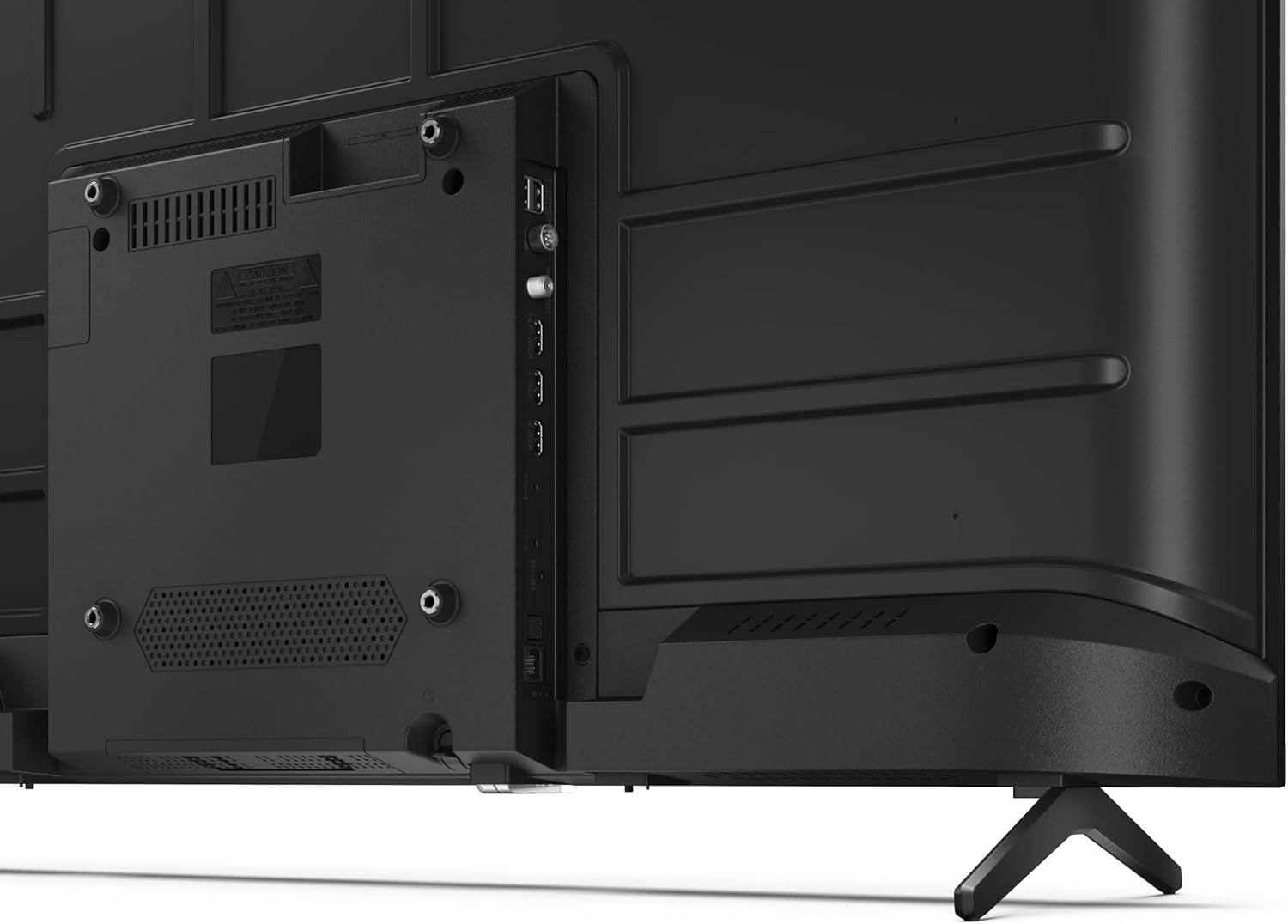
Abbildung 3.3: Detailansicht view der Anschlussbuchsen des Fernsehers.
3.4 Erstes Einschalten und Google TV-Einrichtung
After connecting all necessary cables, plug the power cable into an electrical outlet. Press the power button on the remote control or on the TV. Follow the on-screen instructions to complete the initial setup, including network connection, Google account login, and channel scanning.
4. Betrieb
4.1 Fernbedienungsfunktionen
The remote control allows you to navigate the TV's features. Common buttons include Power, Volume Up/Down, Channel Up/Down, Input Source, Home (Google TV), Navigation (directional arrows, OK), Back, and Google Assistant.
4.2 Google TV-Oberfläche
Your Sharp TV runs on Google TV, providing a personalized home screen with content recommendations from your subscriptions. Use the remote's navigation buttons to browse movies, shows, apps, and your library.

Image 4.1: The Google TV home screen on the Sharp 40HF2265E.
4.3 Eingangsauswahl
To switch between connected devices (e.g., HDMI 1, HDMI 2, TV tuner), press the 'Input' or 'Source' button on your remote control and select the desired input from the on-screen menu.
4.4 Bild- und Toneinstellungen
Access the TV's settings menu to adjust picture modes (Standard, Vivid, Cinema, Game), brightness, contrast, color, and sound modes (Standard, Music, Movie, Speech). The TV supports HDR10 for enhanced contrast and color, and Dolby Digital for rich audio.

Image 4.2: Visual representation of HDR (High Dynamic Range) technology.
4.5 Google Assistant und Chromecast
Use the built-in Google Assistant for voice control. Press the Google Assistant button on your remote and speak your commands, such as searching for content, controlling smart home devices, or getting information. Chromecast allows you to cast content directly from compatible devices like smartphones or tablets to your TV.

Image 4.3: Google Assistant integration for voice commands.
4.6 Bluetooth-Konnektivität
Pair Bluetooth-enabled devices such as headphones or soundbars with your TV for a wireless audio experience. Navigate to the TV's settings menu, select 'Remotes & Accessories', and then 'Pair new device' to connect.
5. Wartung
5.1 Reinigung des Fernsehers
Vor der Reinigung immer den Netzstecker des Fernsehers ziehen. Bildschirm und Gehäuse mit einem weichen, trockenen Tuch abwischen. Hartnäckige Flecken vorsichtig abtupfen.ampen the cloth with water or a specialized screen cleaner. Never use abrasive cleaners, waxes, or solvents.
5.2 Softwareaktualisierungen
Ihr Google TV erhält möglicherweise automatische Software-Updates. Stellen Sie sicher, dass Ihr Fernseher mit dem Internet verbunden ist, um diese Updates zu erhalten. Dadurch können die Leistung verbessert und neue Funktionen hinzugefügt werden. Sie können auch manuell im Einstellungsmenü nach Updates suchen.
6. Fehlerbehebung
Sollten Sie Probleme mit Ihrem Fernseher haben, beachten Sie bitte die folgenden gängigen Lösungsansätze:
- Kein Strom: Prüfen Sie, ob das Netzkabel fest im Fernseher und in der Steckdose steckt. Stellen Sie sicher, dass die Steckdose funktioniert.
- Kein Bild/Ton: Vergewissern Sie sich, dass die richtige Eingangsquelle ausgewählt ist. Prüfen Sie alle Kabelverbindungen (HDMI, Antenne). Versuchen Sie, den Fernseher neu zu starten.
- Fernbedienung funktioniert nicht: Tauschen Sie die Batterien (2 AAA) aus. Stellen Sie sicher, dass sich keine Hindernisse zwischen der Fernbedienung und dem Infrarotsensor des Fernsehers befinden.
- Netzwerkverbindungsprobleme: For Wi-Fi, check your router and ensure the TV is within range. For wired connections, check the Ethernet cable. Try restarting your router and the TV.
- Probleme mit der Bildqualität: Passen Sie die Bildeinstellungen (Helligkeit, Kontrast, Schärfe) an. Stellen Sie sicher, dass die Eingangsquelle ein qualitativ hochwertiges Signal liefert.
For more complex issues, consult the comprehensive troubleshooting section in the full digital manual or contact Sharp customer support.
7. Spezifikationen
Below are the technical specifications for the Sharp 40HF2265E Full HD Google TV:

Image 7.1: Dimensions of the Sharp 40HF2265E TV.
| Besonderheit | Spezifikation |
|---|---|
| Marke | Scharf |
| Modellnummer | 40HF2265E |
| Modellname | HF-Serie |
| Modelljahr | 2025 |
| Bildschirmgröße | 40 Zoll (81 Zentimeter) |
| Display-Technologie | LED |
| Auflösung | 1080p (Full HD) |
| Bildwiederholrate | 60 Hz |
| Seitenverhältnis | 16:9 |
| Kontrastverhältnis | 100000:1 |
| Bildschirmfinish | Matt |
| Ansprechzeit | 8 Millisekunden |
| Hintergrundbeleuchtungstechnologie | LED |
| Supported HDR Format | HDR10, HLG |
| Verbesserung der Bildqualität | Dynamic Contrast, HDR10, HLG |
| Motion Enhancement Technology | Motion Interpolation |
| Betriebssystem | Google TV |
| Internet Applications | Apple TV, Google TV, Hulu, Prime Video, YouTube |
| Besondere Merkmale | Bluetooth, Chromecast, Dolby Digital, HD Tuner |
| Konnektivitätstechnologie | Ethernet, USB, WLAN |
| Wireless-Technologie | Bluetooth |
| Bluetooth-Version | 5.0 |
| Screen Mirroring Technology | Chromecast, Google Cast |
| Gesamtzahl der HDMI-Anschlüsse | 3 |
| Total USB 2.0 Ports | 2 |
| Number of Composite Video Inputs | 1 |
| Audioeingang | Mini composite/CVBS + audio input |
| Total Audio Output Ports | 2 |
| Audioausgabemodus | Stereo |
| Audiokodierung | DD |
| Integrated Surround Sound Format | Dolby AC-4, Dolby Digital, Dolby Digital Plus |
| Maximale Lautsprecherausgangsleistung | 16 Watt (2x8W) |
| Anzahl der Audiokanäle | 2.0 |
| Broadcast-System | DVB-T2/C/S/S2 |
| Videokodierung | MKV |
| Produktabmessungen (TxBxH) | 8.4 cm (Breite) x 89.2 cm (Länge) x 50.9 cm (Höhe) |
| Artikelgewicht | 5.4 Kilogramm |
| Gewicht ohne Ständer | 5.4 Kilogramm |
| Basisbreite | 765 Millimeter |
| VESA-Montagestandard | 200 x 200 mm |
| Energieaufnahme | 37 Watt |
| Bandtage | 230 Volt |
| Remote Control Battery Size | AAA |
| Remote Control Battery Quantity | 2 |
| Parental Control Technology | Kindersicherung Über Google Tv |
| Verfügbarkeit von Ersatzteilen in der EU | 7 Jahre |
8. Garantie und Support
8.1 Produktgarantie
The Sharp 40HF2265E television comes with a 2-year manufacturer's warranty. Please refer to the included Warranty Card for detailed terms and conditions regarding coverage and service. Keep your proof of purchase for warranty claims.
8.2 Kundendienst
If you require further assistance, have questions not covered in this manual, or need technical support, please contact Sharp customer service. Contact information can typically be found on the Warranty Card or the official Sharp webWebsite.