PowerA Advantage Wireless Controller for Nintendo Switch 2 - Mario & Yoshi
Modell: NSGP0569-01V
Einführung
Dieses Handbuch enthält umfassende Anweisungen für den PowerA Advantage Wireless Controller, designed for use with the Nintendo Switch family of devices. It covers setup, operation, maintenance, and troubleshooting to ensure optimal performance and longevity of your controller.
Hauptmerkmale
Hall-Effekt-Module: Equipped with contact-free magnetic sensors in the thumbsticks to prevent stick drift, offering smoother control, enhanced precision, and increased longevity.
Erweiterte Gaming-Tasten: Two mappable buttons can be programmed on the fly during gameplay without needing to access system settings.
Intuitive Motion Controls: Experience fluid and responsive motion controls for aiming, steering, flying, and other in-game actions.
C-Taste: Provides quick access to GameChat features.
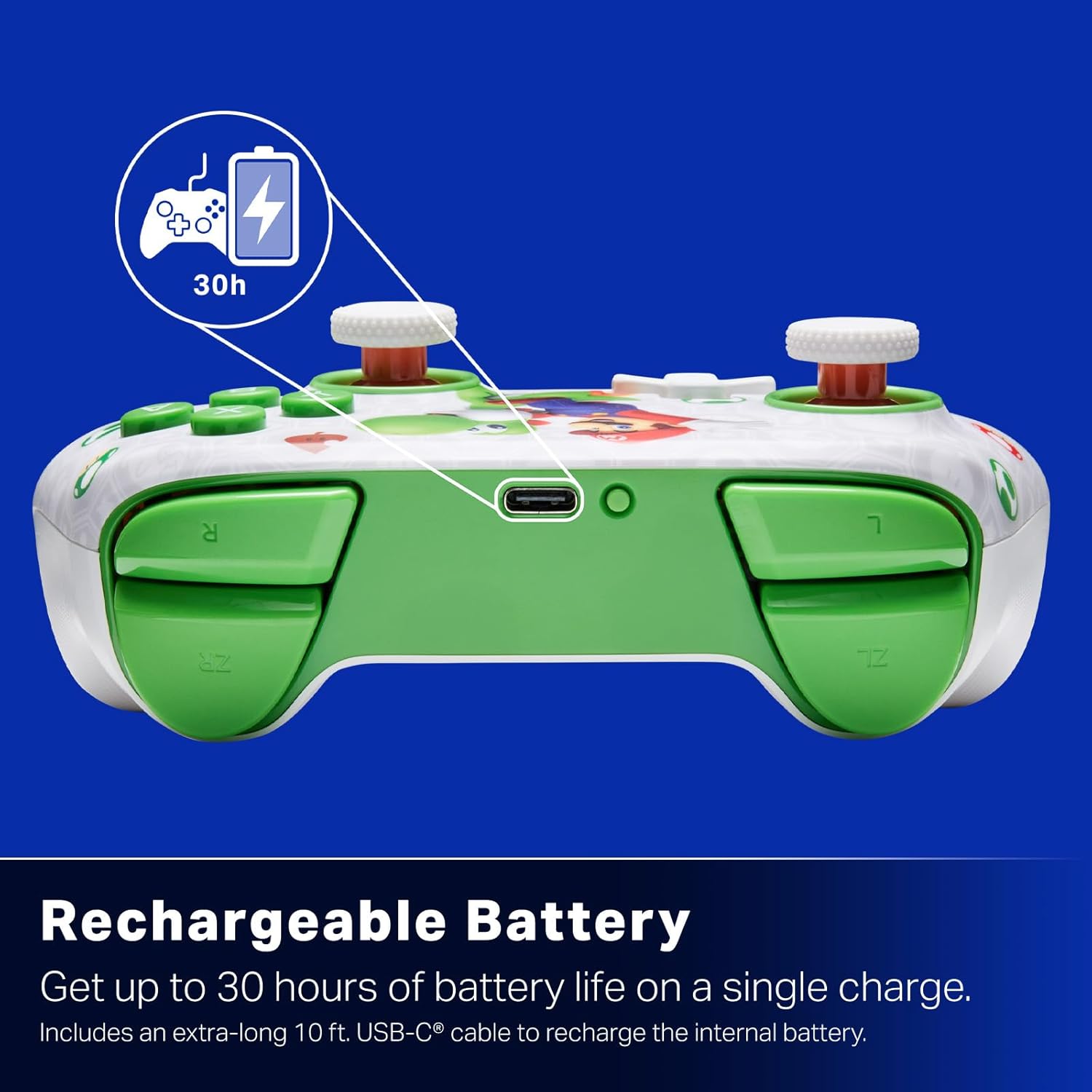
Wiederaufladbarer Akku: Offers up to 30 hours of gameplay on a single charge. Includes a 10 ft. (3m) USB-C cable for recharging.
Ergonomisches Design: Crafted for comfort during extended gaming sessions, utilizing cutting-edge ergonomics and high-quality materials.
Nintendo Family Compatibility: Compatible with Nintendo Switch 2, Nintendo Switch, Nintendo Switch – OLED Model, and Nintendo Switch Lite.
Offiziell lizensiert: PowerA products undergo rigorous testing by Nintendo to ensure compatibility and quality.
Installationsanweisungen
1. Erstes Aufladen
Before first use, fully charge your PowerA Advantage Wireless Controller. Connect the included 10 ft. (3m) USB-C cable to the controller's USB-C port and the other end to a powered USB port on your Nintendo Switch dock or a USB wall adapter.
Figure 1: Controller connected via USB-C for charging, highlighting the rechargeable battery feature.
2. Kopplung mit Nintendo Switch
Stellen Sie sicher, dass Ihre Nintendo Switch-Konsole eingeschaltet und auf die neueste Systemsoftware aktualisiert ist.
Wählen Sie im HOME-Menü die Option Controller, Dann Griff/Reihenfolge ändern.
On the PowerA Advantage Wireless Controller, press and hold the SYNC-Taste located on the top edge of the controller for at least three seconds. The player indicator LEDs on the bottom of the controller will begin to flash.
Once the controller successfully pairs, the player indicator LED(s) corresponding to the controller number will remain lit.
Drücken Sie die Ein Knopf to confirm and exit the pairing screen.
For subsequent uses, simply press the HOME button on the controller to wake it up and automatically reconnect to your Switch console.
Bedienungsanleitung
Grundlegende Bedienelemente
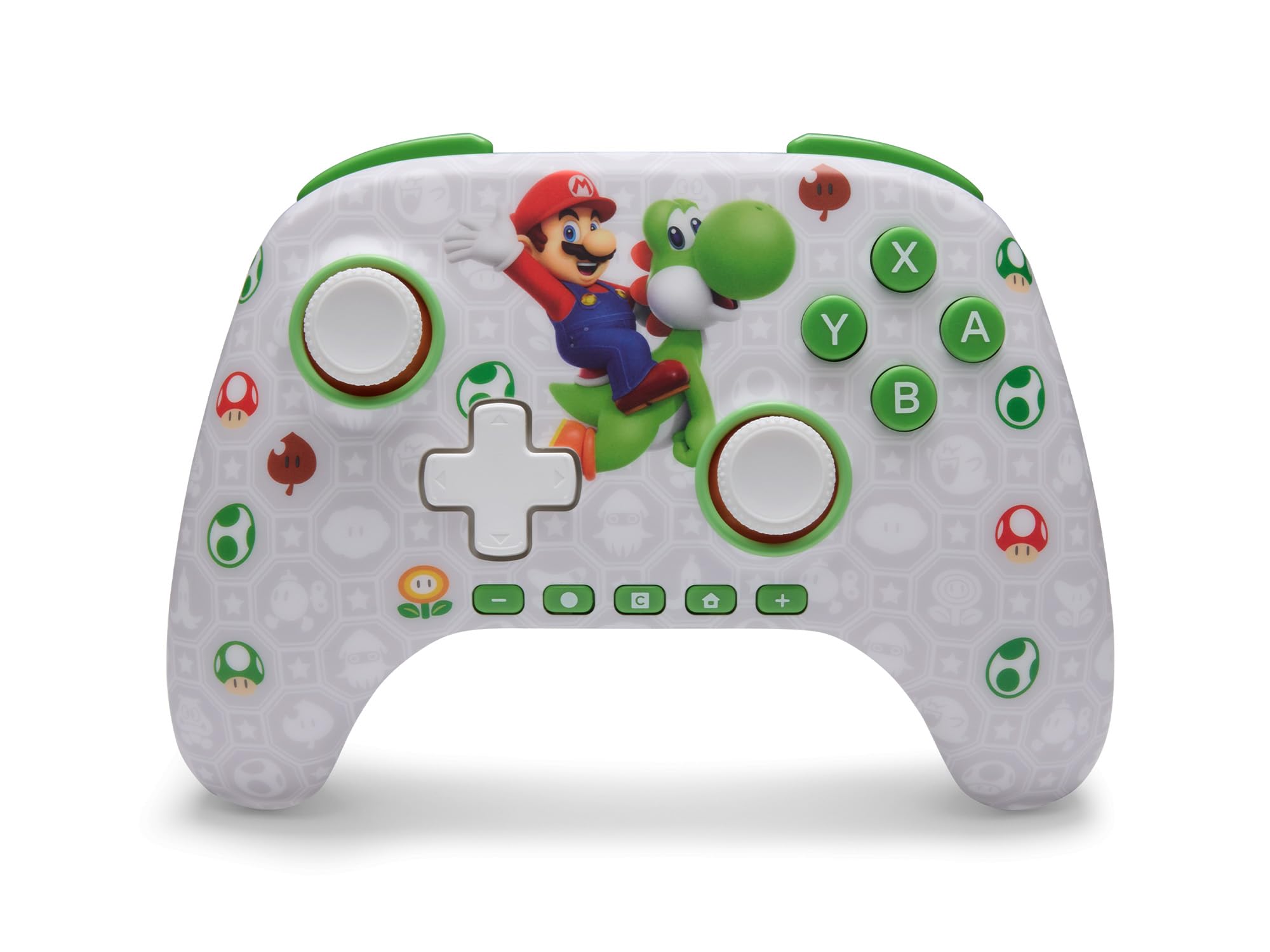
Der PowerA Advantage Wireless Controller features standard Nintendo Switch button layouts, including A, B, X, Y buttons, L/R and ZL/ZR shoulder buttons, a D-pad, and dual analog sticks. Familiarize yourself with these controls for general gameplay.
Abbildung 2: Vorderseite view of the PowerA Advantage Wireless Controller, highlighting the Mario and Yoshi design and button layout.
Erweiterte Gaming-Tasten (AGB)
The controller includes two mappable Advanced Gaming Buttons (AGR and AGL) on the back. These buttons can be assigned to replicate any other button on the controller for quick access during gameplay.
Drücken Sie die Program Button (PRGM) Auf der Rückseite des Controllers. Die Programm-LED blinkt.
Drücken Sie die Erweiterte Gaming-Taste (AGR or AGL) you wish to map. The Program LED will flash rapidly.
Drücken Sie die Taste you want to assign to the Advanced Gaming Button (e.g., A, B, X, Y, L, R, ZL, ZR, D-pad directions). The Program LED will stop flashing, indicating successful mapping.
To clear a mapped button, repeat steps 1-2, then press the Programmtaste wieder.
Figure 3: Advanced Gaming Buttons (AGB) on the back of the controller, with an illustration of mappable functions.
Bewegungssteuerung
The controller supports motion controls, allowing for intuitive interaction in compatible games. These controls are automatically enabled when supported by the game.
Figure 4: Controller demonstrating motion control capabilities through tilting.
C Button (GameChat)
The dedicated C Button provides quick access to GameChat features in supported titles, enhancing your multiplayer experience.
Figure 5: The 'C' button, used for GameChat features.
Wartung
Reinigung: Reinigen Sie den Controller mit einem weichen, trockenen Tuch. Vermeiden Sie die Verwendung von scharfen Chemikalien oder Scheuermitteln.
Lagerung: Bewahren Sie den Controller an einem kühlen, trockenen Ort fern von direkter Sonneneinstrahlung und extremen Temperaturen auf.
Batteriepflege: Um die Batterielebensdauer zu verlängern, vermeiden Sie häufiges vollständiges Entladen des Controllers. Laden Sie ihn regelmäßig auf, auch wenn er nicht ständig in Gebrauch ist.
Kabelpflege: Handle the USB-C charging cable with care. Avoid bending or twisting it excessively.
Fehlerbehebung
Controller verbindet/koppelt nicht
Stellen Sie sicher, dass der Controller vollständig aufgeladen ist.
Vergewissern Sie sich, dass Ihre Nintendo Switch-Konsole auf die neueste Systemsoftware aktualisiert ist.
Repeat the pairing process (see "Pairing with Nintendo Switch" in Setup Instructions).
Sollten die Probleme weiterhin bestehen, versuchen Sie, sowohl den Controller als auch die Nintendo Switch-Konsole neu zu starten.
Stick Drift
Der PowerA Advantage Controller features Hall Effect modules designed to prevent stick drift. If you experience any unintended input, ensure the controller's firmware is up to date (check PowerA's official webWebsite für Aktualisierungen).
Recalibrate the joysticks through the Nintendo Switch system settings if necessary (System Settings > Controllers and Sensors > Calibrate Control Sticks).
Kurze Akkulaufzeit
Ensure the controller is fully charged before each use.
Battery life can vary based on game usage and features enabled.
Verwenden Sie zum optimalen Laden das mitgelieferte USB-C-Kabel.
Technische Daten
Besonderheit
Detail
Modellnummer
NSGP0569-01V
Konnektivität
Wireless (Bluetooth), USB-C (for charging)
Kompatible Geräte
Nintendo Switch 2, Nintendo Switch, Nintendo Switch – OLED Model, Nintendo Switch Lite
Akkulaufzeit
Bis zu 30 Stunden (variiert je nach Nutzung)
Kabellänge
10 ft. (3m) USB-C
Maße
5.88 x 4.21 x 2.36 Zoll
Gewicht
0.66 Pfund
Besondere Merkmale
Hall Effect Thumbsticks, Mappable Advanced Gaming Buttons, Motion Controls, C Button
Garantie und Support
Der PowerA Advantage Wireless Controller comes with a Zwei Jahre beschränkte Garantie. For detailed warranty information, product support, or to register your product, please visit the official PowerA webSeite unter PowerA.com/Support.
Figure 6: Official Nintendo Licensed Product badge, ensuring quality and compatibility.
Ask a question about this manual
Ask about setup, troubleshooting, compatibility, parts, safety, or missing instructions. Manuals+ will review the question and use this page’s manual context to help answer it.