
1. Einleitung
Vielen Dank für Ihren Einkauf.asing the Daakro SR-3800 5.1 Channel Home Audio Amplifier. Dies amplifier is designed to provide a high-quality audio experience for your home theater, studio, or entertainment setup. It features a dynamic DSP display, multiple input options including Bluetooth 5.4, and robust power output for passive speakers. Please read this manual thoroughly before operating the device to ensure proper use and to maximize its performance and lifespan.

Image 1.1: Daakro SR-3800 5.1 Channel Home Audio Amplifier. This image shows the front view der amplifier with its illuminated DSP display and control knobs.
2. Wichtige Sicherheitshinweise
- Lesen Sie alle Anweisungen, bevor Sie das Gerät in Betrieb nehmen.
- Bewahren Sie dieses Handbuch zum späteren Nachschlagen auf.
- Setzen Sie dieses Gerät weder Regen noch Feuchtigkeit aus.
- Die Lüftungsöffnungen dürfen nicht blockiert werden. Die Installation muss gemäß den Anweisungen des Herstellers erfolgen.
- Installieren Sie das Gerät nicht in der Nähe von Wärmequellen wie Heizkörpern, Heizregistern, Öfen oder anderen Geräten (einschließlich ampKonverter (Lüfter), die Wärme erzeugen.
- Schützen Sie das Netzkabel vor dem Betreten oder Einklemmen, insbesondere an Steckern, Steckdosen und an der Stelle, an der sie aus dem Gerät austreten.
- Verwenden Sie nur vom Hersteller angegebene Zusatzgeräte/Zubehör.
- Ziehen Sie bei Gewitter oder längerer Nichtbenutzung den Stecker aus der Steckdose.
- Überlassen Sie alle Wartungsarbeiten qualifiziertem Servicepersonal. Eine Wartung ist erforderlich, wenn das Gerät auf irgendeine Weise beschädigt wurde, z. B. wenn das Netzkabel oder der Stecker beschädigt sind, Flüssigkeit in das Gerät verschüttet wurde oder Gegenstände hineingefallen sind, das Gerät Regen oder Feuchtigkeit ausgesetzt war, nicht normal funktioniert oder fallengelassen wurde.
- Warnung: Um das Risiko eines Brandes oder Stromschlags zu verringern, setzen Sie dieses Gerät nicht Regen oder Feuchtigkeit aus.
- Vorsicht: Stromschlaggefahr. Nicht öffnen.
3. Packungsinhalt
Stellen Sie sicher, dass alle Artikel in der Box vorhanden sind:
- Daakro SR-3800 5.1 Channel Home Audio Ampschwerer
- Fernbedienung
- Benutzerhandbuch (dieses Dokument)
- Stromkabel
4. Produktüberschreitungview
4.1 Bedienelemente auf der Vorderseite

Abbildung 4.1: Detailansicht view of the Daakro SR-3800 front panel with labels for each control and display element.
- MIKROFONLAUTSTÄRKE: Passt die Mikrofonlautstärke an.
- EINSCHALTEN / AUSSCHALTEN: Hauptschalter.
- LCD Bildschirm: Displays current mode, DSP spectrum, and other information.
- VERZÖGERUNG: Adjusts microphone echo delay.
- ECHO: Passt den Mikrofon-Echoeffekt an.
- M.BASS: Passt den Basspegel des Mikrofons an.
- M.TREBLE: Regelt den Höhenpegel des Mikrofons.
- MIC-EINGANG: Schließen Sie kabelgebundene Mikrofone an.
- VOLUMEN: Adjusts overall music volume.
- BASS: Adjusts music bass level.
- VERDREIFACHEN: Adjusts music treble level.
- SUB-VOL: Adjusts passive subwoofer volume.
- USB: USB input for media playback.
- Eingabemodus-Tasten: Select input source (DVD/CD/AUX, USB/BT/FM, OPT/COA).
- DSP Mode: Cycles through 13 DSP spectrum display effects.
- Wiedergabesteuerung: Play/Pause, Previous, Next, Single Song/Playlist Loop.
- MUSIKLAUTSTÄRKE: Main music volume control knob.
4.2 Anschlüsse auf der Rückseite
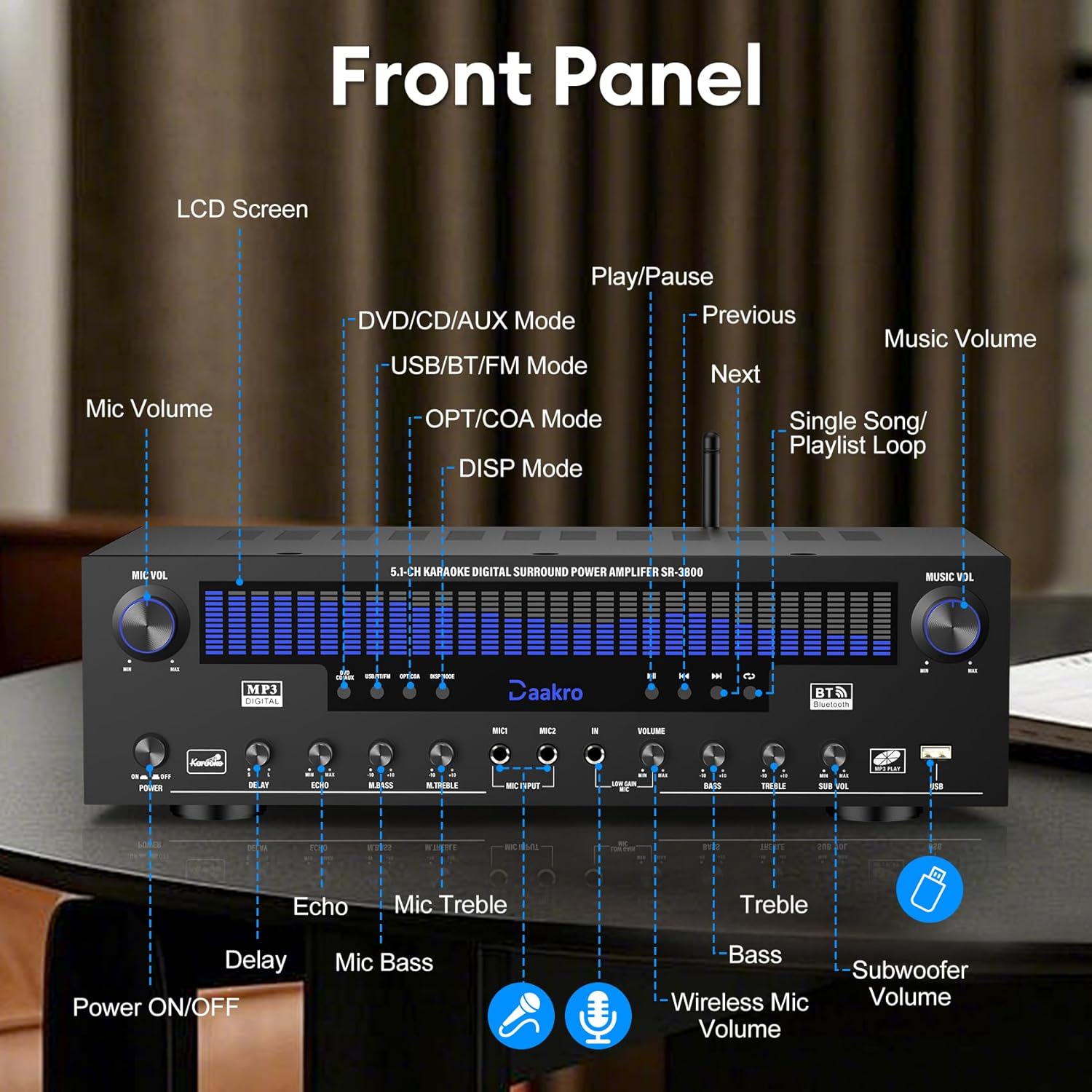
Abbildung 4.2: Detailansicht view of the Daakro SR-3800 rear panel, showing all input and output ports with labels.
- FM-ANTE: FM antenna input.
- AUX-IN: 3.5-mm-AUX-Eingang.
- OPTION: Optischer Audioeingang.
- KOAX: Koaxialer Audioeingang.
- BT ANT: Bluetooth-Antenne.
- AUDIO INPUT (DVD, CD, LINE): RCA stereo audio inputs for DVD, CD, and Line sources.
- AUDIO OUT (LINE): RCA stereo audio output for connecting to active speakers or other audio devices.
- SPEAKER OUTPUT (FR, FL, SR, SL, C, SUB): Spring clip terminals for connecting passive speakers (Front Right, Front Left, Surround Right, Surround Left, Center, Subwoofer). Compatible with 4-16 ohm passive speakers.
- LEISTUNGSEINGANG: AC power input (110V).
4.3 Hauptmerkmale
- Dynamic DSP Display: 19.8-inch LED screen with 13 spectrum effects, analyzing music rhythms in real-time (20 Hz to 20 kHz).
- True 300W Rated Power: Delivers 50W per channel across 5.1 channels, compatible with 4-16 ohm passive speakers.
- Mehrere Eingangsschnittstellen: Bluetooth, USB, wireless microphone, two wired microphones, FM, AUX, OPT, COAX, DVD, CD, and LINE inputs.
- Drahtloses Bluetooth-Streaming: Equipped with the latest Bluetooth 5.4 chip for stable connections up to 30 feet with smartphones, tablets, laptops, and computers.
- Intuitive Volume Equalizer Control: Independent rotary knobs for music volume, microphone volume, treble, bass, subwoofer, microphone delay, and reverb.
- Ultra-Quiet Cooling System: Built-in fans, heat sinks, and side ventilation ports improve cooling efficiency by 130% and reduce noise by 80%.
5. Einrichtung
5.1 Lautsprecheranschluss
The Daakro SR-3800 is compatible with 5-12 inch passive speakers and passive subwoofers. Ensure your speakers meet these requirements.
- Identify the speaker terminals on the rear panel: Front Right (FR), Front Left (FL), Surround Right (SR), Surround Left (SL), Center (C), and Subwoofer (SUB).
- Connect your passive speakers to the corresponding terminals. Ensure correct polarity (+ to + and - to -) for each speaker.
- If using a passive subwoofer, connect it to the SUB terminals.

Image 5.1: The Daakro SR-3800 amplifier positioned between two large passive speakers, illustrating a typical setup.
5.2 Audioquellenanschluss
Connect your desired audio sources using the appropriate input ports on the rear panel.
- DVD/CD/LINE: Use RCA cables to connect DVD players, CD players, or other line-level audio devices.
- OPT/KOAX: Use optical or coaxial cables for digital audio sources like TVs or game consoles.
- AUX-IN: Use a 3.5mm audio cable for portable devices.
- FM-ANTE: Connect the FM antenna for radio reception.
5.3 Stromanschluss
- Stellen Sie sicher, dass ampDer Netzschalter des Verstärkers befindet sich in der Position AUS.
- Connect the power cable to the POWER INPUT on the rear panel.
- Stecken Sie das andere Ende des Netzkabels in eine normale 110-V-Wechselstromsteckdose.
6. Bedienung
6.1 Ein-/Ausschalten
Press the POWER ON/OFF switch on the front panel to turn the amplifier ein oder aus.
6.2 Auswahl der Eingangsquelle
Use the input mode buttons on the front panel (DVD/CD/AUX, USB/BT/FM, OPT/COA) to select your desired audio source. The selected input will be displayed on the LCD screen.
6.3 Lautstärke und Ton einstellen
- MUSIKLAUTSTÄRKE: Rotate this knob to adjust the overall music volume.
- BASSSTIMME: Use these knobs to fine-tune the bass and treble levels of the music.
- SUB-VOL: Adjusts the output volume of the passive subwoofer.
6.4 Bluetooth-Streaming
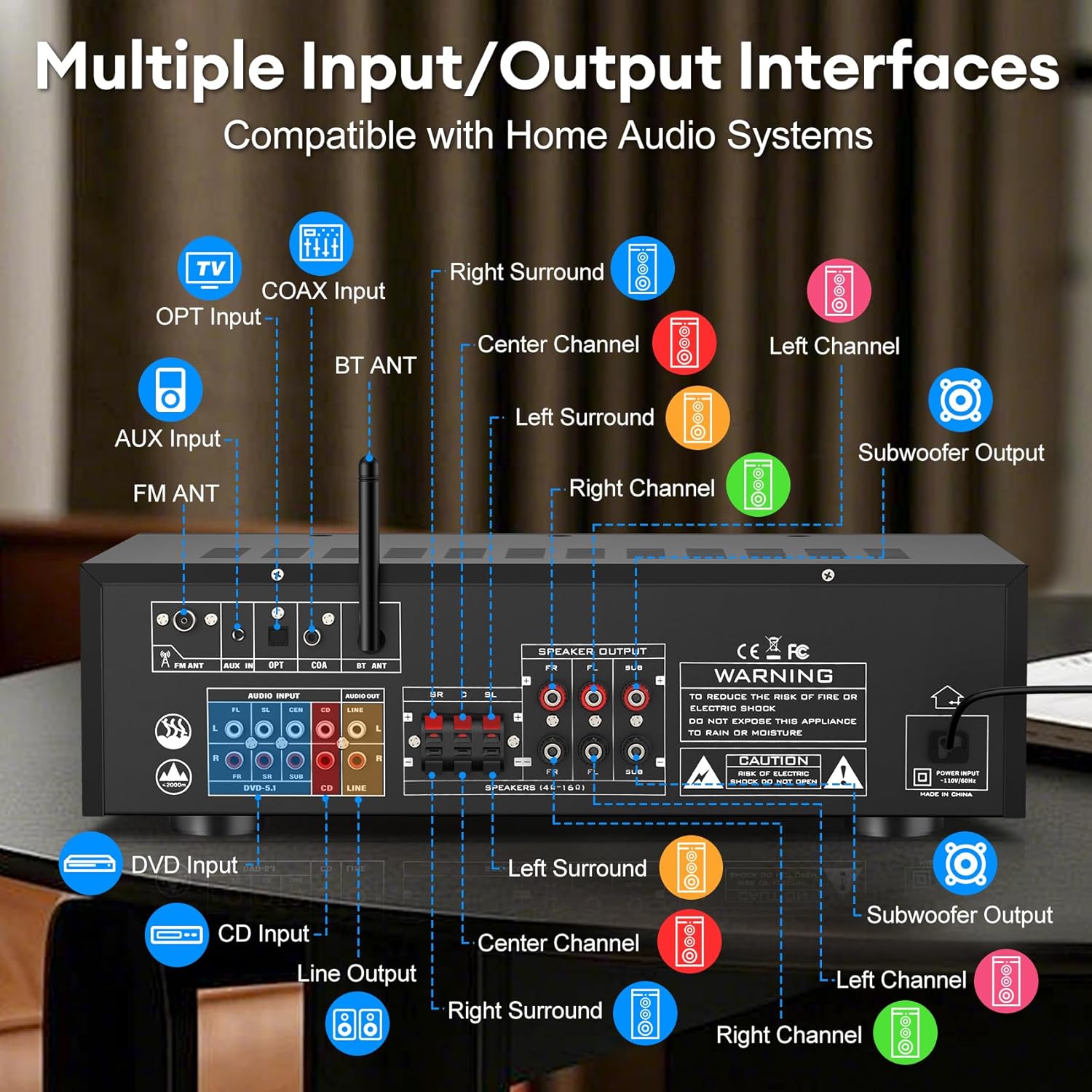
Image 6.1: The Daakro SR-3800 amplifier surrounded by various smart devices, illustrating its Bluetooth 5.4 connectivity and stable 30ft range.
- Select the 'USB/BT/FM' input mode.
- Suchen Sie auf Ihrem Bluetooth-fähigen Gerät (Smartphone, Tablet usw.) nach verfügbaren Bluetooth-Geräten.
- Select 'Daakro SR-3800' from the list to pair.
- Nach der Kopplung können Sie Audio drahtlos an das ampschwerer.
6.5 Mikrofon- und Karaoke-Funktionen

Image 6.2: Two individuals singing into microphones, demonstrating the karaoke feature of the Daakro SR-3800 ampschwerer.
- Connect wired microphones to the MIC INPUT jacks on the front panel.
- Adjust microphone volume using the MIC VOL knob.
- Use the DELAY, ECHO, M.BASS, and M.TREBLE knobs to customize microphone sound effects.
- Der amplifier also supports wireless microphones.
6.6 DSP Display Modes
Press the 'DISP Mode' button on the front panel to cycle through 13 different DSP spectrum display effects on the LCD screen.

Image 6.3: The Daakro SR-3800 ampVerstärker-Showasing its 19.8-inch dynamic DSP display with active spectrum effects.
7. Wartung
7.1 Reinigung
- Ziehen Sie den Stecker ampVerstärker vor der Reinigung vom Stromnetz trennen.
- Verwenden Sie ein weiches, trockenes Tuch, um die Außenflächen abzuwischen.
- Keine Flüssigreiniger oder Aerosolreiniger verwenden.
7.2-Kühlsystem
The SR-3800 features an ultra-quiet cooling fan. Ensure that the ventilation openings on the top and sides of the unit are not obstructed to allow for proper airflow.
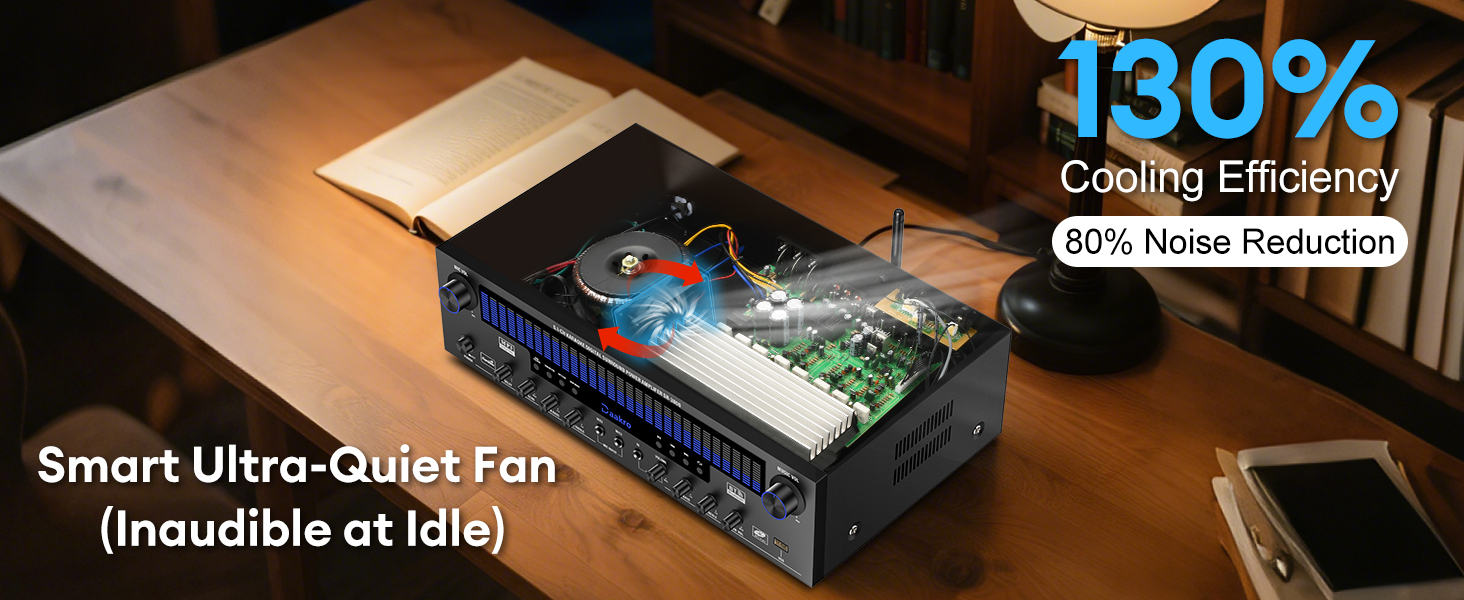
Abbildung 7.1: Ein interner view of the Daakro SR-3800 amplifier highlighting its smart ultra-quiet fan and heat sinks for efficient cooling.
8. Fehlerbehebung
| Problem | Mögliche Ursache | Lösung |
|---|---|---|
| Kein Strom | Netzkabel nicht angeschlossen; Netzschalter ausgeschaltet; Steckdose defekt. | Stellen Sie sicher, dass das Netzkabel fest angeschlossen ist. Schalten Sie den Netzschalter ein. Testen Sie die Steckdose mit einem anderen Gerät. |
| Kein Ton | Incorrect input selected; Volume too low; Speakers not connected or faulty; Source device not playing. | Select the correct input source. Increase the MUSIC VOL. Check speaker connections and ensure they are passive speakers. Verify the audio source is playing. |
| Bluetooth stellt keine Verbindung her | AmpVerstärker nicht im Bluetooth-Modus; Gerät zu weit entfernt; Gerät bereits mit einem anderen Gerät gekoppelt. | Select 'USB/BT/FM' input mode. Ensure your device is within 30 feet. Disconnect your device from other Bluetooth devices and try pairing again. |
| Microphone feedback/noise | Das Mikrofon ist zu nah an den Lautsprechern; die Mikrofonlautstärke ist zu hoch. | Move microphones away from speakers. Reduce MIC VOL. Adjust M.BASS and M.TREBLE. |
| Verzerrter Ton | Volume too high; Incorrect speaker impedance; Source audio quality is poor. | Reduce volume. Ensure speakers are 4-16 ohms. Check the quality of the audio source. |
9. Spezifikationen
| Besonderheit | Spezifikation |
|---|---|
| Modellnummer | SR-3800 |
| Nennleistung | 300 W (50 W pro Kanal) |
| Anzahl der Kanäle | 5.1 |
| Lautsprecherimpedanz | 4-16 Ohms (Passive Speakers) |
| Bluetooth-Version | 5.4 |
| Bluetooth-Reichweite | Bis zu 30 Fuß (10 Meter) |
| DSP-Anzeige | 19.8-inch LED with 13 spectrum effects |
| Frequenzgangbereich | 20 Hz bis 20 kHz |
| Eingabeschnittstellen | Bluetooth, USB, Wireless Mic, 2x Wired Mic, FM, AUX, OPT, COAX, DVD, CD, LINE |
| Ausgabeschnittstellen | 5.1 Channel Passive Speaker Output, Line Out (RCA) |
| Bandtage | 110 Volt (Wechselstrom) |
| Artikelgewicht | 13.87 Pfund |
| Verpackungsabmessungen | 19.75 x 14 x 8 Zoll |
| Zertifizierung | FCC |
10. Produktvideo beendetview
Video 10.1: An official product video from Daakro showcasing the features and connectivity of the SR-3800 5.1 Channel Home Audio Amplifier with DSP Display. This video provides a visual guide to the amplifier's design, input/output ports, and dynamic display in action.
11. Garantie und Support
11.1 Garantieinformationen
The Daakro SR-3800 amplifier comes with a 30-day warranty from the date of purchase. This warranty covers manufacturing defects and malfunctions under normal use. It does not cover damage caused by misuse, accidents, unauthorized modifications, or improper installation.
11.2 Kundendienst
For technical assistance, troubleshooting, or warranty claims, please contact Daakro customer service. Our team is available to provide support and ensure your satisfaction.
- Online-Kundenservice: Rund um die Uhr verfügbar.
- Kontaktinformationen: Refer to the product packaging or the official Daakro webDie aktuellsten Kontaktdaten finden Sie auf der Website.