
1. Produktüberschreitungview
The G-Shock Casio GD010 digital watch is engineered for durability and functionality, designed to withstand demanding conditions while providing essential timekeeping features. This timepiece incorporates bio-based resin components and a CORDURA re/cor band, reflecting a commitment to environmental considerations.
This manual provides detailed instructions for setting up, operating, maintaining, and troubleshooting your GD010 watch.
Hauptmerkmale
- Shock Resistant Construction: Designed to endure impacts and vibrations.
- Carbon Core Guard Struktur: Enhances durability and protection for the internal module.
- Wasserdicht bis 200 Meter: Suitable for swimming, snorkeling, and diving (non-SCUBA).
- Lange Akkulaufzeit: Mit einer CR2025-Batterie beträgt die Lebensdauer etwa 10 Jahre.
- Bio-based Resin Components: Case and bezel made with environmentally conscious materials.
- CORDURA re/cor Band: Durable strap made from recycled PET plastic fiber.
- Digitaler Bildschirm: Clear and easy-to-read time and function information.
- Mehrere Funktionen: Includes alarm, chronograph (stopwatch), and timer.

Image 1.1: The G-Shock GD010 watch, showcasing its core features including shock resistance, Carbon Core Guard structure, and a 10-year battery life.
2. Erste Schritte: Einrichtung
Tastenfunktionen
Your GD010 watch features several buttons for navigation and function control. Familiarize yourself with their locations and primary roles.

Abbildung 2.1: Seite view of the G-Shock GD010, illustrating the location of the control buttons.
- ANPASSEN (Oben links): Dient zum Aufrufen und Verlassen von Einstellungsmodi sowie zur Bestätigung von Einstellungen.
- MODUS (unten links): Cycles through the watch's various modes (Timekeeping, Stopwatch, Timer, Alarm).
- RÜCKSEITE (Oben rechts): Used to decrease values or move backward through options during setting.
- FORWARD / START (Bottom Right): Used to increase values or move forward through options during setting. Also used to start/stop stopwatch or timer.
- LIGHT (Center Bottom): Activates the backlight for illumination.
Erste Zeit- und Datumseinstellung
- Im Zeitmessmodus die Taste gedrückt halten ANPASSEN Drücken Sie die Taste so lange, bis der Stadtcode zu blinken beginnt und damit den Einstellmodus anzeigt.
- Verwenden Sie die UMKEHREN Und NACH VORNE buttons to select your desired Home City Code. This will automatically set the correct time zone.
- Drücken Sie die MODUS button to cycle through the settings: DST (Daylight Saving Time) → 12/24-hour format → Seconds → Hour → Minute → Year → Month → Day.
- Verwenden Sie für jede Einstellung die UMKEHREN Und NACH VORNE Tasten, um den Wert zu ändern.
- Sobald alle Einstellungen konfiguriert sind, drücken Sie die Taste ANPASSEN -Taste, um den Einstellmodus zu verlassen.
3. Bedienung Ihrer Uhr
The GD010 offers various modes for different functions. Press the MODUS Taste zum Durchschalten der Menüs.
Zeitnehmungsmodus
This is the default mode, displaying the current time, day of the week, and date.
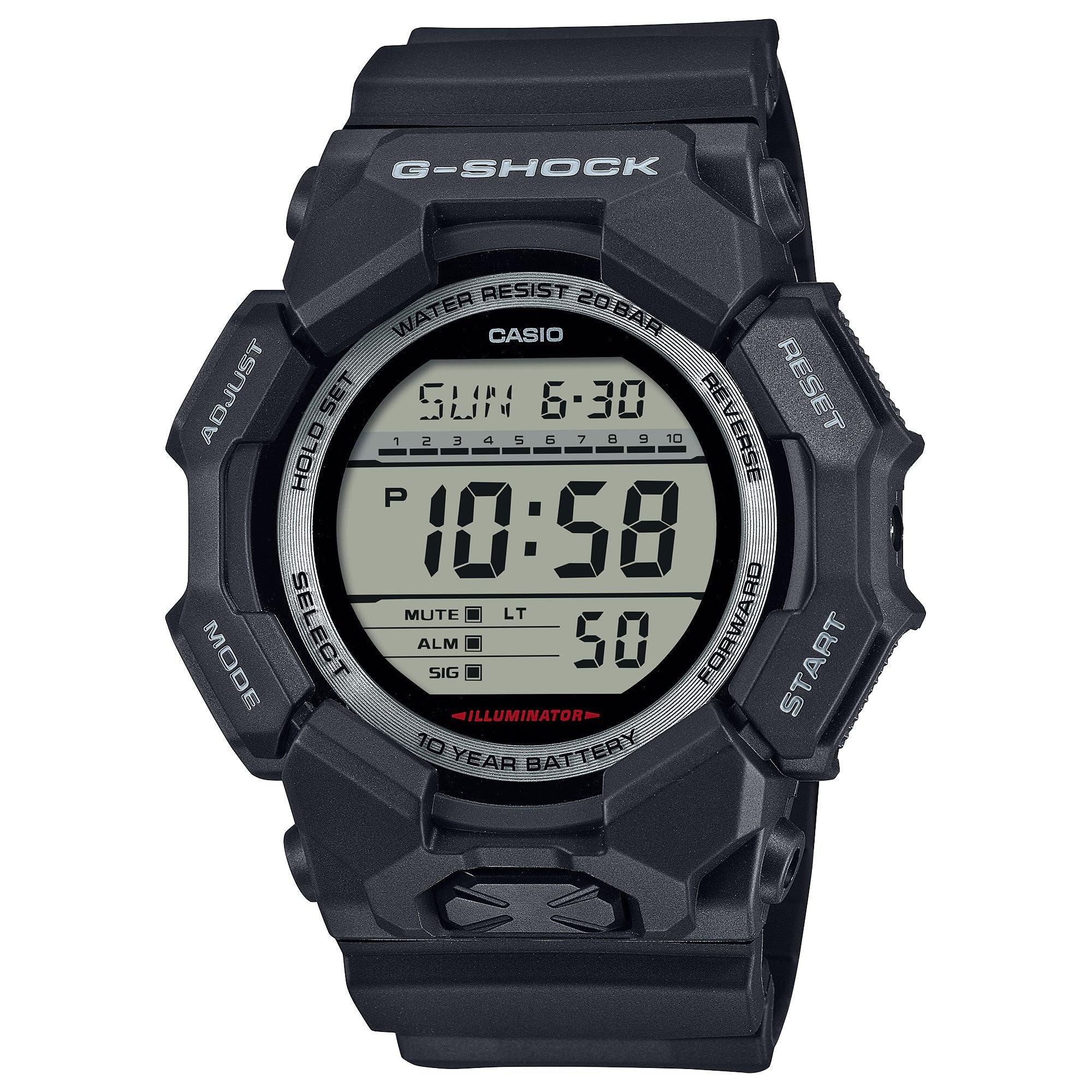
Image 3.1: The G-Shock GD010 watch face in Timekeeping Mode.
Verwendung der Stoppuhr (Chronograph)
- Drücken Sie im Zeitmessmodus die Taste MODUS Drücken Sie die Taste so lange, bis „STW“ oder „STOPWATCH“ auf dem Display erscheint.
- Drücken Sie die FORWARD / START Knopf zum Starten der Stoppuhr.
- Drücken Sie die FORWARD / START Drücken Sie erneut, um die Stoppuhr anzuhalten.
- Um die Stoppuhr auf Null zurückzusetzen, drücken Sie die Taste UMKEHREN Drücken Sie die Taste, während die Stoppuhr angehalten ist.
Einstellen des Countdown-Timers
- Drücken Sie im Zeitmessmodus die Taste MODUS Drücken Sie die Taste, bis „TMR“ oder „TIMER“ erscheint.
- Halten Sie die ANPASSEN button until the current timer setting starts to flash.
- Verwenden Sie die MODUS Taste zur Auswahl der Stunden- oder Minuteneinstellung.
- Verwenden Sie die UMKEHREN Und NACH VORNE Tasten zum Einstellen der gewünschten Countdown-Zeit.
- Drücken Sie die ANPASSEN -Taste, um den Einstellmodus zu verlassen.
- Drücken Sie die FORWARD / START button to start the countdown. An alarm will sound when the timer reaches zero.
Alarmfunktionen
- Drücken Sie im Zeitmessmodus die Taste MODUS Drücken Sie die Taste, bis „ALM“ oder „ALARM“ erscheint.
- Halten Sie die ANPASSEN Drücken Sie die Taste so lange, bis die Alarmzeitanzeige zu blinken beginnt.
- Verwenden Sie die MODUS Taste zur Auswahl der Stunden- oder Minuteneinstellung.
- Verwenden Sie die UMKEHREN Und NACH VORNE Tasten zum Einstellen der gewünschten Weckzeit.
- Drücken Sie die ANPASSEN -Taste, um den Einstellmodus zu verlassen.
- Zum Ein-/Ausschalten des Alarms drücken Sie die Taste FORWARD / START button while in Alarm Mode (without holding ADJUST).
Richtlinien zur Wasserbeständigkeit
Your GD010 watch is rated for 200-meter water resistance. This means it is suitable for recreational diving (excluding saturation diving), swimming, snorkeling, and water sports.
- Die Knöpfe dürfen nicht betätigt werden, solange die Uhr unter Wasser oder nass ist.
- Avoid exposing the watch to hot water, steam, or extreme temperature changes, as this can compromise water resistance.
- Nach Kontakt mit Salzwasser die Uhr gründlich mit Süßwasser abspülen und trocken wischen.
4. Pflege und Wartung
Allgemeine Pflege
- Wischen Sie die Uhr regelmäßig mit einem weichen, trockenen Tuch ab, um Schmutz und Feuchtigkeit zu entfernen.
- Avoid exposing the watch to strong chemicals, solvents, or detergents, as these can damage the resin materials.
- Bewahren Sie die Uhr bei Nichtgebrauch an einem kühlen, trockenen Ort fern von direkter Sonneneinstrahlung und extremen Temperaturen auf.
- The watch's resin components and band are designed for durability, but prolonged exposure to UV light may cause discoloration over time.
Batteriewechsel
The GD010 watch is equipped with a CR2025 battery, providing an approximate battery life of 10 years. When the display becomes dim or functions become erratic, it may be time for a battery replacement.
Battery replacement should ideally be performed by a qualified watch technician to ensure proper sealing and maintain water resistance. Attempting to replace the battery yourself may void the warranty and compromise the watch's water resistance.
Reinigung
To clean your watch, use a soft cloth dampened with mild soap and water. Gently wipe the case and band. For stubborn dirt, a soft brush can be used. Rinse thoroughly with fresh water and dry completely with a soft cloth.
5. Anleitung zur Fehlerbehebung
If you encounter issues with your GD010 watch, refer to the following common problems and their solutions.
| Problem | Mögliche Ursache | Lösung |
|---|---|---|
| Das Display ist leer oder dunkel. | Schwache Batterie. | Replace the battery (CR2025). Consult a professional watch technician. |
| Die Uhrzeit ist falsch. | Falsche Zeitzone oder manueller Einstellungsfehler. | Passen Sie die Zeit- und Datumseinstellungen wie in Abschnitt 2 beschrieben an. |
| Tasten reagieren nicht. | Watch is wet, or internal module error. | Ensure the watch is dry. If the problem persists, a reset may be required (consult support), or professional service. |
| Der Alarm ertönt nicht. | Alarm is turned off or volume is too low (if adjustable). | Verify the alarm is set to ON in Alarm Mode. Check watch settings for alarm volume if applicable. |
If the problem persists after attempting these solutions, please contact G-Shock customer support for further assistance.
6. Produktspezifikationen
| Modellname | GD010 |
| Modellnummer | GD010-1 |
| Gehäusegröße (L× B× H) | 54.9 × 51.9 × 16.1 mm |
| Gewicht | 73 g (ca. 2.57 oz) |
| Case and Bezel Material | Bio-based Carbon / Bio-based Resin |
| Armbandmaterialtyp | Resin (CORDURA re/cor) |
| Konstruktion | Shock Resistant, Carbon Core Guard structure |
| Wasserbeständigkeit | 200 Meter Wasserdichtigkeit |
| Stromversorgung | CR2025 (1 Lithium Metal battery, included) |
| Ungefähre Akkulaufzeit | 10 Jahre |
| Kristall | Mineralglas |
| Anzeigetyp | Digitales |
| Bewegungstyp | Japanischer Quarz |
| Zusätzliche Merkmale | Alarm, Chronograph, Timer |
| Verschlussart | Schnalle |
| Armbandfarbe | Schwarz |
| Zifferblattfarbe | Schwarz |
7. Garantie und Kundendienst
Garantieinformationen
Your G-Shock GD010 watch comes with a Eingeschränkte Garantie. The terms and conditions of this warranty cover manufacturing defects under normal use. Please refer to the warranty card included with your purchase for specific details regarding coverage duration, exclusions, and how to make a claim. Keep your proof of purchase for warranty validation.
Kontaktaufnahme mit dem Kundensupport
For technical assistance, warranty service, or any other inquiries regarding your G-Shock GD010 watch, please contact G-Shock customer support.
- Visit the official G-Shock website for support contact information, FAQs, and service center locations.
- Have your watch model number (GD010-1) and proof of purchase ready when contacting support.